TL;DR
- Countertop fabricators use a short list of dedicated tools for takeoffs: Moraware CounterGo, Slabsmith, Prodigi, Stone App, and Planit Speedy show up most.
- Some shops still run AutoCAD or plain spreadsheets.
- Each one handles measuring, material math, and pricing differently.
- The right pick depends on your job volume, your CAD skills, and how expensive your material is.
What exactly is a countertop takeoff?
A takeoff turns raw job measurements into square footage, material needs, edge linear footage, cutout counts, and a final price. In residential work, it bridges the gap between a salesperson's site visit and the shop's cut list. That's the whole job.
For kitchen countertops, takeoffs get complicated fast. You're juggling L-shapes, peninsula overhangs, under-mount sink cutouts, cooktop holes, mitered waterfall edges, and sometimes radius corners. Manual math on those jobs invites errors. One pricing mistake on a slab that costs $800 or more is a real loss, not a rounding issue.
A takeoff tool does three things. It draws or imports the layout, calculates square footage (applying the shop's price per square foot for that material), and produces a quote or cut sheet. Some tools stop at the quote. Others carry the job through scheduling and remnant tracking.
Which software do most countertop fabricators actually use?
There's no industry census, so nobody has clean market-share numbers. Based on trade coverage, forum discussions on sites like StoneProfessionals.com, and user counts vendors have disclosed, the North American market clusters around a short list [1].
| Tool | Primary use case | Pricing model |
|---|---|---|
| Moraware CounterGo | Quoting and job management | Monthly subscription (~$150-$350/mo, varies by tier) |
| Slabsmith | Slab layout, remnant tracking, nesting | Per-workstation license |
| Prodigi (formerly Align) | Templating with digital measuring arm | Hardware + software bundle |
| Stone App | Mobile quoting and CRM for fabricators | Monthly subscription |
| Planit Speedy | Full shop management, job costing | Per-seat subscription |
| AutoCAD / Vectorworks | General CAD, adapted for countertop drawing | Annual subscription |
| Excel / Google Sheets | Manual formula-based quoting | Free or low cost |
Moraware is the name that comes up most in online fabricator discussions. The company says it serves thousands of fabricators, though I can't verify an exact current user count from a primary source [2]. Slabsmith is a niche but genuinely respected tool for one specific problem: placing pieces on a slab to minimize waste. That's a different problem from quoting.
Smaller shops, particularly those doing laminate countertops or Formica countertops where material is cheaper and jobs are simpler, often stick with spreadsheets. That's not laziness. It's a rational cost decision when your margin risk per job is small.
How does Moraware CounterGo handle a takeoff?
CounterGo is built specifically for the countertop industry, which sets it apart from generic estimating software. You draw the shape with a built-in layout tool: click to add segments, type in dimensions, and it calculates square footage automatically. Backsplash square footage, edge linear feet, and cutouts each get their own pricing fields.
The quote output is clean enough to email straight to a homeowner. You can attach material images, show line-item pricing or a total-only view, and collect a digital signature. The job then flows into Moraware's scheduling calendar, so the takeoff doesn't sit in a silo away from the shop's workflow.
The main limit is that CounterGo isn't a CAD tool. The drawing is functional, not precise enough to hand a CNC machine. Most shops using CounterGo still template the job with a physical template or a digital arm, then draw the CNC file separately in a tool like Prodigi or their bridge saw software [2].
Pricing as of mid-2025 runs roughly $150 to $350 per month depending on user count and features. Moraware hasn't published a fixed price sheet, so you request a quote. Worth knowing before you budget.
What is Slabsmith and how is it different from quoting software?
Slabsmith solves a different problem. It's a slab inventory and layout tool. You photograph a real slab, import it into the software, and drag cut pieces onto the slab image to plan yield before you cut anything [3].
For natural stone, this matters enormously. A large veined marble slab is not interchangeable square footage. A customer paying for marble countertops often cares deeply about how the veins flow across the finished top. Slabsmith lets you show that customer a realistic preview of their actual stone before the saw touches it.
Slabsmith also tracks remnants. After a job, you photograph and catalog what's left, so future quotes can draw from existing inventory instead of always buying a new slab.
It is not a quoting tool in the usual sense. Most shops run Slabsmith alongside a separate quoting tool like CounterGo, not instead of it. The pairing is popular in high-end shops working with granite countertops or exotic marbles, where matching the material is a selling point rather than a commodity.
How does digital templating software like Prodigi fit into the takeoff process?
Prodigi (sold by Northwood Designs) is a digital templating system. Instead of building a cardboard or luan template at the job site, a technician uses a measuring arm (the LT-55 or similar hardware) to trace the countertop space directly. That digital file goes back to the shop and feeds into CNC bridge saw software.
The takeoff here is laser-accurate rather than hand-measured. The dimensional errors that creep in with tape measures and physical templates mostly disappear. For countertop installation on complex jobs with lots of walls, scribes, and appliance clearances, that accuracy cuts callbacks hard.
Prodigi also calculates square footage and can generate a quote from the template file. So for shops that buy the hardware, it collapses two steps (quote plus template) into one site visit. The measuring arm runs roughly $5,000 to $8,000 new, which is the main barrier for smaller shops [4].
Competitors include Laser Products Industries' Proliner (popular in Europe and common in bigger North American shops) and the iQuote system. Workflows differ a little, but the core idea is the same: digital measurement replaces physical templates.
Can you use AutoCAD or general CAD software for countertop takeoffs?
Yes, and plenty of shops do. AutoCAD, Vectorworks, and even free tools like LibreCAD can draw a countertop layout precisely. An experienced drafter can set up blocks for common edge profiles, cutout sizes, and material codes, building a custom quoting template inside a general CAD environment.
The downsides are real. There's no pricing engine in AutoCAD. Someone has to pull dimensions out of the drawing by hand and run them through a separate spreadsheet or formula. For a one-person shop where the owner draws and quotes, that's fine. For a shop with salespeople who aren't CAD-trained, it's a bottleneck.
AutoCAD's single-user subscription runs about $2,155 per year as of 2025 [5]. That's pricier than CounterGo for one user but cheaper if you're already paying for AutoCAD for other work (shop drawings, equipment layouts). For shops that also fabricate Corian countertops or solid surface, where seam drawings sometimes need more detail, the extra CAD precision can justify keeping both tools.
Then there's training time. CounterGo takes a few hours to learn. AutoCAD takes months to use productively. That's a real staffing cost.
What do small shops and solo fabricators typically use?
Honestly, a lot of them use Excel. A well-built spreadsheet with material prices, edge pricing per linear foot, cutout fees, and a markup formula can handle most residential jobs in ten minutes. The math isn't the hard part. The quote document just looks less polished than a CounterGo PDF, and many homeowners don't notice or care.
For a solo fabricator doing two to five jobs a week, a $200-a-month subscription is a real fixed cost. If the shop runs $30,000 in monthly revenue, that's manageable. If it runs $8,000 in monthly revenue, $200 is 2.5% of gross. That's actual money.
Stone App is a mobile-first option aimed at smaller shops. It handles quoting and has CRM features for tracking leads and follow-ups. It's lighter than Moraware's full suite and priced lower, though exact numbers require a vendor quote.
Some fabricators run general small-business tools like Jobber or ServiceTitan, adapted for countertops with custom line items. Those aren't built for the geometry problem, so someone still calculates square footage by hand, but they handle customer communication and invoicing well.
How does nesting software differ from takeoff software?
Nesting happens after the takeoff. Once you know how many pieces you need and what shapes they are, nesting software figures out the most efficient way to arrange them on a slab so you waste the least material.
For a shop cutting Cambria countertops or engineered quartz, where slabs are consistent and material is expensive (often $60 to $100 per square foot installed), even modest waste reduction hits the bottom line. Nesting software can sometimes save 10 to 15 percent of material on complex multi-piece jobs, though gains vary widely by job type.
Slabsmith has nesting features. Some CNC bridge saw control software (like Park Industries' products) includes basic nesting too [8]. There are standalone nesting tools like StoneApp's layout module and optimization engines built into Italian machinery control software.
SlabWise, for example, is a quoting and nesting tool built specifically for stone fabricators that handles both the front-end quote and the back-end slab layout in one place. Shops that want a single path from quote to cut list sometimes prefer tools that combine both functions instead of running separate systems.
Homeowners don't need to understand nesting. But it's fair to ask your fabricator whether they optimize slab yield. A shop that does is less likely to run out of material mid-job or charge you for a second slab to cut one small piece.
What should a fabricator look for when choosing takeoff software?
The decision comes down to five real questions.
First, does your team have CAD skills? If yes, you have more options. If no, you need something purpose-built and intuitive.
Second, what's your job volume? Low volume means a full shop management suite may not pencil out. High volume means the time savings per job compound into serious money.
Third, do you do digital templating? If yes, you need software that imports digital template files from your measuring system. If your bridge saw is CNC, the takeoff tool has to speak the same file format as your machine controller.
Fourth, do you need customer-facing quote documents? A fabricator who sells direct to homeowners needs a polished PDF. A fabricator who works purely through contractors may care less about presentation and more about internal accuracy.
Fifth, how important is remnant tracking? For a shop handling expensive natural stone, knowing your remnant inventory can be worth thousands a month in avoided material buys. For a shop doing mostly laminate or butcher block countertops, remnants are rarely worth tracking formally.
There is no single right answer. Shops that trial software on real jobs before buying make better decisions than shops that buy off a sales demo. Most major vendors offer a free trial. Use it on real jobs, not toy examples. The SBA's own guidance on managing finances is a good gut check here: treat software cost as a percentage of revenue and see if it holds up [10].
How much does countertop takeoff software cost?
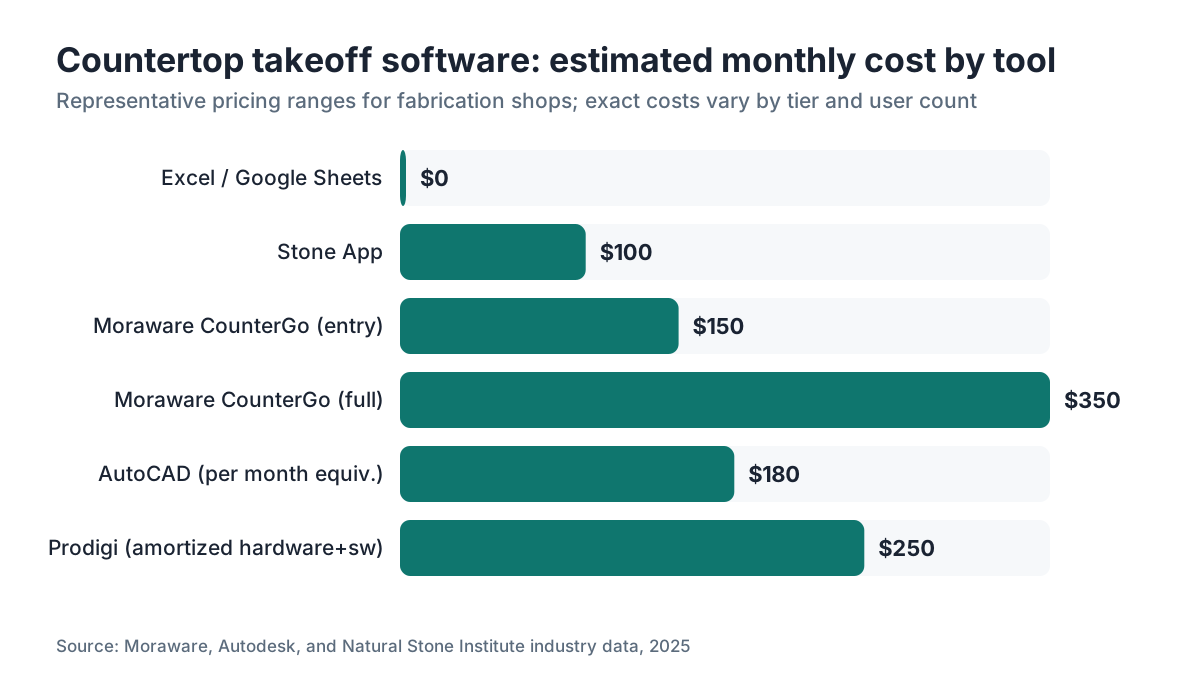
Costs vary enough that you should get quotes rather than trust any single source, but here are realistic ranges based on public pricing and industry reporting [2][4][5].
Moraware CounterGo: roughly $150 to $350 per month for a single shop, depending on user count and whether you add the full Moraware JobTracker module.
Slabsmith: licensed per workstation. The company doesn't publish pricing, but forum discussions suggest perpetual licenses around $1,500 to $3,500 per seat plus annual maintenance. That figure is unverified from a primary source.
Prodigi and other digital templating systems: hardware arm plus software, budget $5,000 to $10,000 upfront, sometimes with an ongoing software subscription.
AutoCAD: about $2,155 per year as of 2025 for a single-user subscription [5].
Excel or Google Sheets: effectively free, but someone has to build and maintain the pricing formulas.
For most mid-size shops (doing $500,000 or more in annual revenue), the time savings from dedicated software pay for the subscription in the first month. For very small shops the math is murkier, and spreadsheets are a defensible choice.
One thing to keep in mind. The cost of a software error on a single botched slab can easily beat a full year of subscription fees. That's not a sales pitch for any tool. It's just an honest way to frame the risk.
Are there free or low-cost options for countertop takeoffs?
A few exist. Google Sheets and Excel are the obvious ones. With a few hours of setup, a fabricator can build a workable square footage calculator, an edge pricing table, and a cutout fee schedule.
Some material suppliers hand their dealers basic quoting tools. Certain slab distributors offer online calculators that spit out rough material cost estimates, though those aren't shop management systems.
General contractor estimating tools like Stack (stackct.com) and PlanSwift handle plan takeoffs from PDFs. You can bend them toward countertop work if a homeowner or contractor uploads a floor plan, but they're not built for countertop pricing logic like edge profiles or sink cutouts.
For homeowners, online calculators (many from major retailers and material suppliers) give ballpark numbers. The National Kitchen and Bath Association (NKBA) publishes countertop planning guidance that covers measurement methodology, though it's a member resource rather than a free public tool [6].
The honest summary: free tools work until they don't. The failure mode is usually a salesperson making a measurement or pricing error on an expensive job. That's the moment shops upgrade to dedicated software.
How do homeowners use takeoff information when getting countertop quotes?
Most homeowners don't do their own takeoffs. They rely on the fabricator's measurements. But knowing what goes into a takeoff helps you judge whether a quote is accurate.
A well-done takeoff spells out: total square footage (confirm it against your own rough measurement), edge linear footage (ask how many linear feet of finished edge are included), the number and type of cutouts (sinks, cooktops, soap dispensers), material named by type and thickness, and any special work like mitered edges or radius corners.
If a quote just says "45 square feet, $3,200" with no breakdown of edge, cutouts, and material, you can't compare it against a quote that lists every line item. Asking for an itemized quote is reasonable, and any professional fabricator will provide one.
Waste is baked into most fabricator quotes. Fabricators typically add 10 to 20 percent to the measured square footage to cover cuts, waste, and the fact that slabs come in fixed sizes [7]. Ask what waste factor is applied and whether you're being charged for template-cut remnants.
For materials like quartzite (see our guide on how to clean quartzite countertops once installed) or natural stone with heavy veining, the waste factor can run higher because pattern matching eats more material.
Frequently asked questions
What is the most popular software for countertop fabricators?
Moraware CounterGo is the most frequently mentioned tool in fabricator forums and trade discussions for quoting and job management. Slabsmith is widely used specifically for slab layout and remnant tracking. Many shops run both. Smaller operations often rely on Excel-based spreadsheets, which stay common for lower-volume or lower-material-cost work like laminate or butcher block.
Can I do a countertop takeoff without special software?
Yes. A tape measure, sketch pad, and Excel spreadsheet handle the math for a standard kitchen takeoff. You calculate length times width for each section, subtract cutouts, add edge linear footage, and apply your price per square foot. The risk is calculation errors on complex shapes. Software reduces that risk but isn't strictly required, especially for simple rectangular layouts.
What is digital templating and how does it affect takeoffs?
Digital templating uses a physical measuring arm (like the Prodigi LT-55 or a Proliner) to trace a space precisely on-site. That file goes directly to the shop's CNC machine, skipping hand-cut cardboard templates. It improves accuracy, speeds up the shop workflow, and can reduce material waste. The upfront hardware cost runs $5,000 to $10,000, so it's mainly used by mid-size and larger fabrication shops.
Does Moraware CounterGo connect to CNC machines?
Not directly. CounterGo produces a quote and job record, but it's not a CAD or CNC programming tool. Shops using CounterGo typically draw their CNC files separately in bridge saw control software or in digital templating tools like Prodigi. Some shops export dimension data from CounterGo and re-enter it into their CNC workflow manually.
What is nesting software and do fabricators need it?
Nesting software arranges cut pieces on a slab to minimize wasted material. It matters most for expensive natural stone, where a 10 percent waste reduction on a $900 slab is real money. Low-volume shops or shops doing mostly commodity materials often skip dedicated nesting tools and rely on experienced fabricators to lay out cuts manually. High-volume or premium stone shops benefit most from automated nesting.
How does a fabricator calculate square footage for a countertop quote?
Each countertop section is measured as a rectangle (length times depth), including the overhang where relevant. Those rectangles are added together. Cutouts like sinks are sometimes deducted, sometimes not (ask your fabricator their policy). A waste factor of 10 to 20 percent is typically added. The total square footage is then multiplied by the material price per square foot plus edge and cutout fees.
Is there countertop takeoff software designed specifically for stone fabricators?
Yes. Moraware CounterGo, Slabsmith, Stone App, and Prodigi are all built specifically for stone and solid surface fabricators. They include stone-specific features like slab layout, remnant inventory, edge profile pricing, and integration with stone supplier catalogs. General construction estimating software like PlanSwift or Stack can be adapted but lacks those purpose-built countertop features.
What file formats do countertop takeoff tools typically produce?
Quoting tools like CounterGo output PDFs for customer quotes. Digital templating tools produce DXF files (a common CAD format) that CNC bridge saws can read. Slabsmith produces its own proprietary slab image files. If you're evaluating software, ask specifically whether its output is compatible with your bridge saw's control software, since format mismatches mean manual re-entry.
How do homeowners know if a fabricator's takeoff is accurate?
Do your own rough measurement first. Measure each countertop section and add them up. Your total won't match the fabricator's exactly (they add waste and may measure differently), but it should land in the same ballpark. A quote showing 65 square feet when your rough count is 38 square feet deserves a direct question. Ask to see the layout drawing that generated the square footage.
What's the difference between a countertop takeoff and a countertop template?
A takeoff produces the measurements and pricing for a quote, before fabrication. A template is the precise physical or digital pattern used to guide the actual cuts on the slab. A takeoff can use approximate measurements. A template must be exact. On many jobs, the takeoff happens during the sales process and the template is made later, after the customer signs the contract.
Do countertop software tools include material pricing databases?
Some do, some don't. CounterGo lets you set up your own material price list inside the software. It doesn't pull live pricing from distributors because stone pricing changes too often and varies by region and supplier relationship. A few platforms are building integrations with slab distributors, but as of 2025 most shops still maintain their own pricing manually inside the software.
Can a homeowner use countertop estimating software themselves?
A few consumer-facing online calculators exist on retailer and supplier websites, and they're good for ballpark estimates. The professional tools (CounterGo, Slabsmith, Prodigi) are built for fabricators, not homeowners, and they need shop-specific pricing inputs to produce useful numbers. For a homeowner, a retailer's online calculator plus three fabricator quotes beats licensing shop software.
How long does a countertop takeoff typically take?
With dedicated software, an experienced person completes a standard kitchen takeoff in 15 to 30 minutes, including drawing the layout, entering dimensions, and producing a quote. Complex jobs with custom shapes, multiple materials, or waterfall edges take longer. Manual spreadsheet takeoffs run about the same time for simple jobs but scale worse as complexity increases.
What happens if a countertop takeoff measurement is wrong?
The fabricator absorbs the cost if it's their measurement error. If a homeowner or contractor provided incorrect measurements for a non-templated job, responsibility depends on what the contract says. This is why professional fabricators almost always template before cutting rather than relying solely on customer-provided measurements. A cutting error on a $1,000 slab is a real financial exposure for a small shop.
Sources
- StoneProfessionals.com forum, software discussion threads: Industry forum discussions identifying Moraware, Slabsmith, and Prodigi as commonly used fabricator tools
- Moraware company website, CounterGo product page: Moraware CounterGo is a quoting and job management tool built for countertop fabricators; pricing and feature details
- Slabsmith by Northwood Designs, product overview: Slabsmith photographs real slabs and lets fabricators plan cut layouts and track remnant inventory
- Autodesk, AutoCAD subscription pricing page: AutoCAD single-user annual subscription pricing approximately $2,155 per year as of 2025
- National Kitchen and Bath Association (NKBA), planning guidelines: NKBA provides countertop measurement and planning methodology guidance for kitchen and bath professionals
- Natural Stone Institute (formerly Marble Institute of America), fabrication best practices: Industry guidance that fabricators typically add 10 to 20 percent waste factor to countertop square footage calculations
- Park Industries, CNC bridge saw product line overview: Park Industries CNC bridge saws accept digital template files and include nesting features in control software
- U.S. Census Bureau, Annual Survey of Manufactures data on stone product manufacturing: Federal survey data covering the cut stone and stone product manufacturing industry, providing context on the size and revenue distribution of fabrication businesses
- U.S. Small Business Administration, Manage your finances guide: SBA guidance on evaluating software and operating costs as a percentage of revenue for small businesses
Last updated 2026-07-11