TL;DR
- Slabsmith is slab-photography, layout, and nesting software built for stone countertop fabricators.
- Shops use it to photograph raw slabs at full resolution, map customer jobs onto those photos digitally, squeeze more usable stone out of every slab, and show homeowners exactly which piece of stone lands on their countertop before a single cut happens.
What does Slabsmith actually do?
Slabsmith is software built for one kind of business: natural and engineered stone shops. It does three things. It captures photorealistic images of full slabs with a special overhead camera rig, it lets fabricators digitally cut and arrange job templates (the real shapes of your countertop pieces) on top of those images, and it exports cut files, labels, and customer-facing layout previews from the same data.
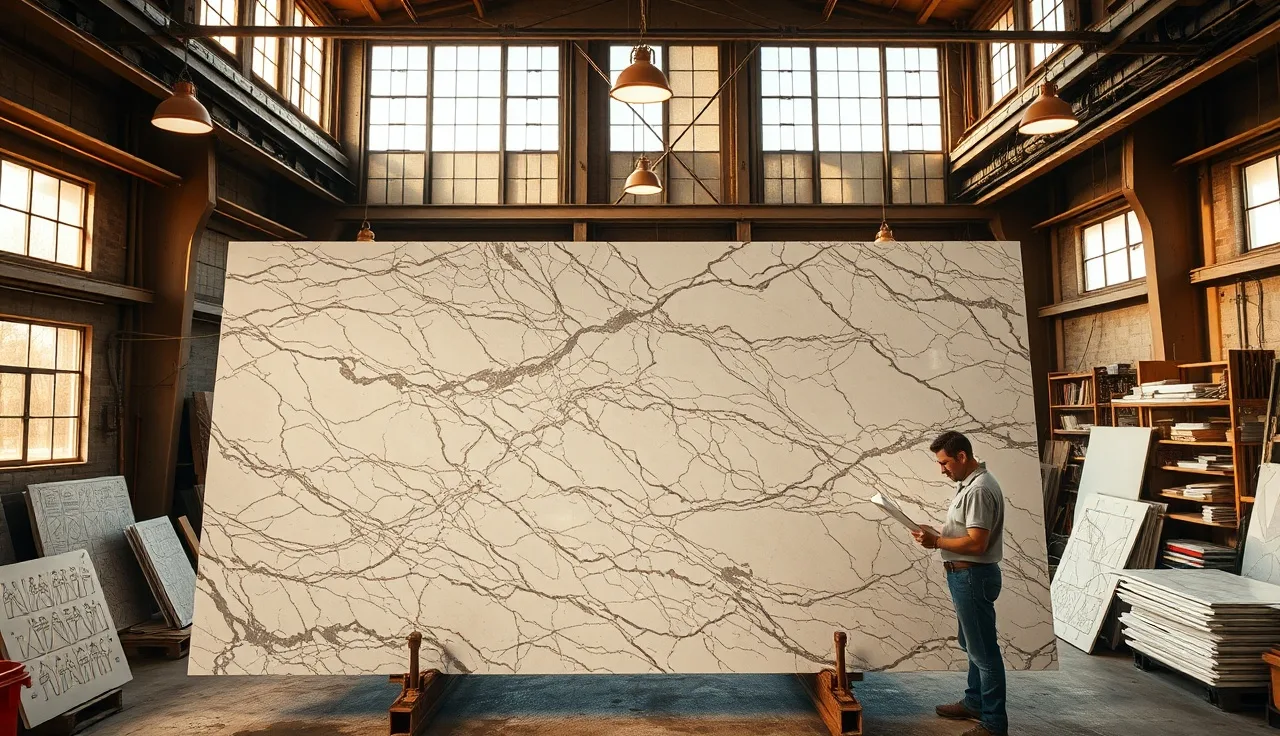
The photography part matters more than it sounds. A phone photo of a 9-foot granite slab is geometrically distorted and color-shifted under shop lighting. The Slabsmith rig (a long overhead rail that shoots overlapping frames and stitches them) produces a dimensionally accurate image where one pixel equals roughly one-tenth of an inch. That accuracy is what lets the software treat the photo as a real cutting guide instead of a reference snapshot [1].
Once the slab is in the system, a fabricator drags and rotates template shapes onto it. Those templates come from the templating step, done by hand, by laser templater, or by a digital tool. Slabsmith reads DXF files from all the major laser templaters. The operator can see exactly where a swirl of gold veining lands on a kitchen island, rotate a piece to chase a pattern, or line up two adjacent countertop sections so the vein flows across a seam. That last one is called seam matching. Designers and homeowners ask for it on marble and bookmatch jobs, and it is genuinely hard to pull off by hand.
The software also tracks which slabs are in inventory, how much usable square footage each remnant still has, and which jobs got assigned to which slabs. For a shop running 30 to 80 jobs a month, that inventory layer alone saves real hours. Without it, someone walks the yard with a tape measure before every job.
Who uses Slabsmith and why did shops start adopting it?
Slabsmith came from Northwood Designs, a Vermont company that started selling the system around 2007. It spread first through high-volume residential fabricators in the US and Canada, then reached commercial shops and distributors who needed a way to show architects and designers what a specific slab would look like installed [2].
The earliest adopters were running expensive exotic stone: quartzite, bookmatch marble, rare granites. On a $4,000 slab, one misplaced cut or a bad starting point can burn $500 to $1,500 in scrap. On those jobs the return was easy to calculate. Later, shops running mostly builder-grade granite picked it up too, because the customer-facing preview cut down on change-order fights and showroom complaints.
Today the user base runs from standalone fabrication shops to slab distributors who use it for marketing and customer viewing, to big production plants running CNC saws and waterjets that pull cut paths straight from the layout. There's also a standalone Slabsmith viewer app that lets customers and designers browse a distributor's inventory without anyone walking them through the building.
How does Slabsmith reduce material waste?
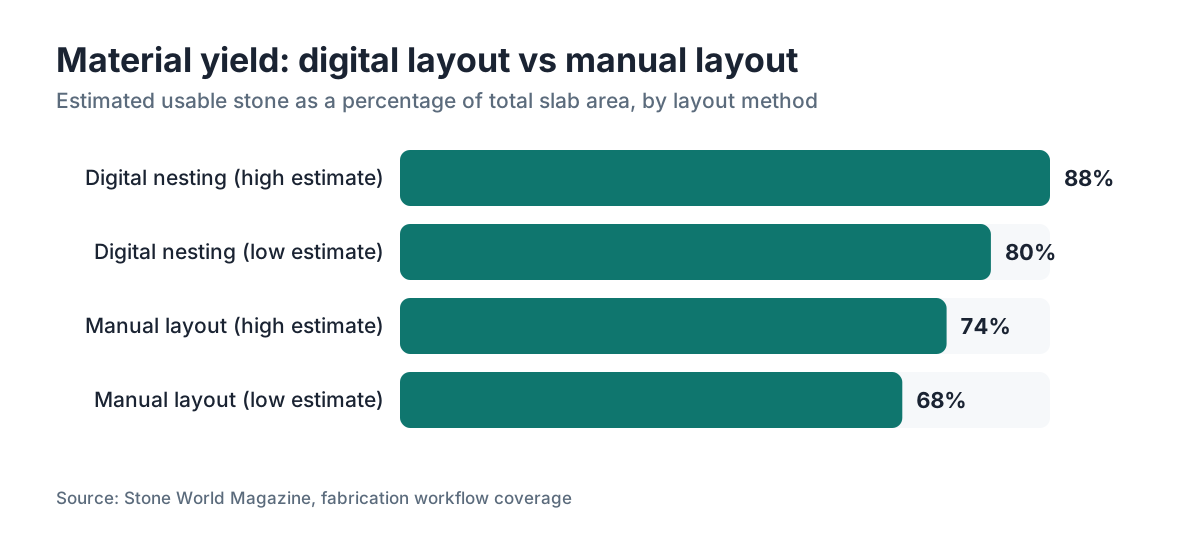
Stone waste costs you twice: the raw material you paid for, and the disposal or storage of remnants that never sell. A skilled estimator on graph paper or basic CAD might hit 68 to 74 percent yield on a typical kitchen. Shops using digital nesting report yields of 80 to 88 percent on similar jobs [3].
Slabsmith's nesting engine lets an operator pull several jobs and ask the software to find the tightest arrangement across one or more slabs. The engine tests rotations and positions fast, which a human doing it by eye will approximate but never fully optimize. Cut 50 kitchens a month and move yield from 70 to 82 percent, and you're buying roughly 6 percent less slab per job. At $400 to $700 for a standard 3 cm granite bundle, that adds up quick.
Remnant tracking is the other half. When a job uses 80 percent of a slab, the remaining 20 percent gets photographed, measured, and logged as an inventory remnant. Next small job that comes in, the software flags that a remnant in the yard already covers it, and nobody buys a fresh slab. Without a system, remnants stack up, get chipped, and end up in the dumpster. With one, a shop can sell remnant pieces to homeowners at a discount and still make margin, because the original job already ate the material cost.
For homeowners, this shows up indirectly. A fabricator who can quote off real slab photos and digital layouts is less likely to pad your estimate with a 15 to 20 percent material cushion just to cover uncertainty. That cushion tends to surface as a mystery line item or a vague overage charge on your final bill.
What is the Slabsmith camera rig and how does it work?
The rig is a long horizontal rail, usually mounted 10 to 12 feet up over a slab cradle or flat table, with a DSLR or mirrorless camera on a motorized carriage. The camera shoots overlapping frames as it travels down the rail. Slabsmith's stitching algorithm assembles those frames into one flat image that is color-correct under the shop's lighting and geometrically accurate to within about plus or minus one-eighth of an inch across a full slab [1].
Calibrate it at setup, and recalibrate if you move it much. Most shops run a calibration check monthly. The camera height and rail geometry are fixed so the software already knows the scale of each pixel without you telling it on every shot. Shooting a slab takes two to four minutes once the slab is positioned.
The files are big. A single slab image runs 80 to 200 megabytes depending on camera resolution and slab size. The software keeps a local database of these images and ties each one to its inventory record. Some shops back the database up to a NAS (network-attached storage) box or a local server instead of leaving it on individual workstations, because losing the image library means re-shooting every slab in inventory.
Smaller shops always ask whether a phone on a ladder can do the same thing. Honest answer: for pattern-matching preview, a phone photo beats nothing, but it isn't dimensionally reliable enough to cut from. The geometric correction the rig gives you is not something software can fully rebuild from a handheld or tripod shot taken at an angle.
How does Slabsmith handle seam placement and pattern matching?
Seam placement is one of the hardest things to explain to a customer and one of the easiest things to botch in a busy shop. A seam is wherever two pieces of stone meet, usually at a corner, at an inside or outside angle, or across a run longer than the slab is wide. The goal is to put seams where they hide best and, on patterned stone, to line them up so the veining reads as continuous.
In Slabsmith, the operator sees the actual slab image and drags template pieces onto it. When two pieces share a seam, the software overlays them at the seam edge so the fabricator sees exactly what the transition will look like. If it's off, they nudge one piece until the pattern matches, then lock the position. That locked position becomes part of the cut file.
Bookmatched slabs are the hard case. Two consecutively sliced slabs get mirrored and set face to face for a symmetric pattern. Slabsmith has a workflow that flips the second slab image and overlays it so the operator sees the matched result before cutting. Fabricators doing high-end marble waterfall islands or feature walls lean on this. Doing it without a tool means chalk lines on the slab and a lot of experienced guessing.
If you're ordering marble countertops or exotic quartzite with strong directional movement, ask your fabricator whether they do digital seam matching. One who does can show you a preview. One who doesn't can only promise their best effort.
Can Slabsmith integrate with CNC machines and other shop software?
Yes, and that's a big reason larger production shops buy it. Once templates are laid out on the slab image and positions are confirmed, Slabsmith exports cut paths in formats that feed digital saws, waterjets, and CNC routing tables directly. The common export formats are DXF and DXL, which most major machine controllers accept [2].
The workflow in a digitized shop goes like this. A laser templater scans the kitchen and spits out DXF template files. Those files import into Slabsmith. The fabricator lays the templates on the slab images. Once approved, the layout exports to the CNC or saw's control software. The machine cuts from the digital layout instead of hand-marked lines on the stone. That kills transcription errors, which in stone work mean a costly recut or a wrecked slab.
Slabsmith also has an open API that some shops use to connect it to their job-management or quoting software. How deep that goes varies a lot. Some shops run Slabsmith as a standalone island and retype dimensions between systems. Others wired it up so a job number in their ERP creates a Slabsmith record automatically.
If you're mapping your full digital workflow, the real question isn't only whether Slabsmith talks to your CNC. It's whether your templating tool, quoting tool, and scheduling system form a clean chain. Slabsmith handles the slab-layout step well. Tools like SlabWise handle quoting and job-level nesting from a different angle, estimating material quantities and pricing before the physical slab is even picked. The two types of tools live at different moments in the job and are not mutually exclusive.
What does Slabsmith cost and what hardware do you need?
Slabsmith pricing isn't published on their site in a tidy tier list. Based on industry reports and fabricator forum threads, the full system (camera rig, software license, and initial training) has historically run $20,000 to $35,000 for a new install [4]. The camera rig eats a big chunk of that. Annual support and maintenance contracts run roughly $2,000 to $4,000 a year by community-reported figures, though Northwood Designs negotiates pricing directly and terms move around.
Hardware beyond the rig is modest. The workstation needs to run Windows (Slabsmith is Windows-only as of 2024), have a reasonably fast processor, and hold the image database. Most shops dedicate a machine to it. The rig needs floor space, usually a dedicated photography area of at least 14 by 6 feet with room to mount the rail overhead.
For a shop doing under 15 kitchens a month in mostly commodity granite, the capital cost is hard to justify on waste savings alone. The customer-experience value (previews, seam approval, fewer disputes) may tip it, but it's a real check to write. For a shop doing 40-plus jobs a month with a decent slice in natural stone, the material-savings math usually pays it back inside two to three years.
Some distributors who carry Slabsmith give their retail fabricator customers access to the viewing tool and slab images without the fabricator buying the full system. That gets smaller shops some of the customer-facing benefit without the capital cost.
How do homeowners benefit from a fabricator who uses Slabsmith?
If your fabricator uses Slabsmith, you should be able to see a rendered preview of your actual layout before fabrication starts. Not a stock photo of the stone type, but a rendering of your specific slab with your specific template shapes on it, showing where seams fall and what the pattern looks like at each transition.
That preview matters most on veined stone. Granite with tight uniform speckling looks the same wherever you cut. But marble with bold diagonal veining, or quartzite with dramatic color movement, looks completely different depending on where the cut starts and how pieces get rotated. The same slab can give you a kitchen that reads cohesive or one that looks like three different stones. Seeing the layout before cuts happen is the only way to catch a bad arrangement.
For kitchen countertops specifically, the seam preview earns its keep even on plainer stone. Homeowners have opinions about where a seam lands on an island or peninsula, and having an actual image to point at kills the ambiguity that starts arguments after install.
You also benefit from less waste. A fabricator who can accurately place your templates on a slab image knows exactly how much material the job needs. That cuts the odds of a mid-job discovery that more slab is required, which can stall your countertop installation or trigger surprise costs if the original lot number is gone.
Ask your fabricator if they can show you the layout before they cut. If they can, look at seam placement first, then pattern alignment at the seams, then the overall flow across the surface. Those are the things you cannot change once the saw runs.
What are the limitations of Slabsmith?
Slabsmith does one thing extremely well: photographing slabs and laying out templates on those photos. It is not a general shop-management system. It doesn't do scheduling, customer relationship management, invoicing, or estimating in any serious way. Shops expecting it to replace their job-management software will be let down.
The camera rig is a physical install that needs space and calibration discipline. A shop that moves often or works from a satellite location can't easily take the rig along. Some shops have rigged portable versions on a movable frame within the yard, but it isn't built to travel.
The image database gets huge over time. Photograph 50 slabs a week and keep two years of images, and you're managing tens of thousands of large files. Without a solid backup and storage plan, that becomes a liability. A crashed workstation with no recent backup means re-shooting your entire current inventory.
Training is another real cost. The software isn't intuitive on day one. Northwood Designs includes onsite training with the purchase, and most users report a learning curve of several weeks before operators run the layout tools with confidence. Staff turnover stings if your trained operator walks.
One more gap. Slabsmith shows you what the stone looks like in your shop under your camera's color calibration. It does not show you what it looks like in the customer's kitchen under their light. That difference between shop preview and installed appearance is real, and no current tool fully closes it. Setting that expectation with customers is still the fabricator's job.
How does Slabsmith compare to other slab layout tools?
The direct competitors in slab photography and digital layout include Arch Software's Stone App (formerly tied to Stone Profit Systems with a layout module), Covaris, and homegrown workflows built on general photogrammetry tools or CAD software with manual photography. None of them match the depth of integration between photography, layout, and machine output that Slabsmith has built over 15-plus years.
Quoting and estimating tools like SlabWise come at the problem from the other end. They help fabricators price jobs and optimize material quantities from dimensions alone, no photographed slab required. That's useful at the quoting stage, before a slab is picked or bought. Slabsmith is useful after the slab is in the yard. Different steps, different tools.
Some CNC manufacturers bundle basic nesting software with their machines. That's usually fine for simple rectangular jobs but lacks the pattern-matching and photography that make Slabsmith useful on figured stone.
For shops deciding where to spend on technology, sequencing matters. A quoting and estimating tool pays back on every job you price. A photography and layout tool pays back on jobs where yield and pattern matching matter most, which skews toward natural stone and high-value work. Plenty of shops end up needing both, but they start with whichever category their current pain sits in.
| Feature | Slabsmith | Generic nesting software | CAD-based layout |
|---|---|---|---|
| Photorealistic slab image | Yes | No | No |
| Dimensionally accurate photo | Yes | No | No |
| Template nesting engine | Yes | Yes | Partial |
| CNC export (DXF/DXL) | Yes | Often | Yes |
| Seam pattern matching | Yes | No | Manual |
| Inventory tracking | Yes | Sometimes | No |
| Customer preview rendering | Yes | No | No |
| Cost of entry | $20K-$35K | $500-$5K | $1K-$10K |
What should fabricators evaluate before buying Slabsmith?
Before you commit, answer these questions honestly about your shop.
First, what share of your jobs use figured natural stone where pattern placement matters? If 80 percent of your volume is builder-grade granite in two or three generic colors, the customer-preview and seam-matching features do little for you. If a real chunk is marble, quartzite, or exotic granite, those features pay for themselves in customer satisfaction and disputes you never have.
Second, do you have a dedicated space for the rig and the discipline to photograph every slab that comes in? The system only works if it's populated. Photograph slabs inconsistently and you end up with a partial database and staff who don't trust it, which means they stop using it.
Third, what's your monthly slab throughput and average slab cost? The material-savings case gets easier at higher volume and higher material cost. A shop running 20 jobs a month at a $400 slab average is working different math than one running 60 jobs at $900.
Fourth, do you have someone who can own the software? This is not a set-and-forget tool. Someone owns the calibration schedule, the backup routine, the file-naming conventions, and training new operators. Without that person, even good technology rots.
Go visit another shop that runs it before you buy. Ask to watch a live layout session, not a polished demo. Ask the operator what breaks, what the calibration routine actually looks like, and how long it takes to move a typical job from photo to cut file.
Frequently asked questions
Is Slabsmith only for natural stone, or does it work for quartz and porcelain too?
Slabsmith works for any material sold in slab form, including engineered quartz and large-format porcelain. The photography and layout features apply to any slab. That said, the pattern-matching and seam-preview features earn their keep most on materials with directional veining or movement. Uniform engineered quartz benefits mainly from the nesting-efficiency side of the software.
Can homeowners view their layout through Slabsmith before fabrication starts?
Yes, if your fabricator uses Slabsmith you can get a rendered image showing your specific slab with your template pieces positioned on it. Some fabricators email it as a PDF approval document before cutting. Others walk you through it in the showroom. Ask for it specifically. Not every shop makes it a standard step in the customer approval process.
Does Slabsmith replace a laser templater?
No. Slabsmith is a slab-photography and layout tool. It handles what happens after you have your template shapes. Laser templaters like Proliner or LT2D3D capture the real dimensions of the kitchen and produce the DXF files Slabsmith then imports. The two tools work in sequence. One does not replace the other.
How long does it take to photograph a full slab with the Slabsmith rig?
Positioning the slab and shooting takes two to four minutes per slab once the rig is calibrated and the workflow is routine. Processing and stitching the image adds a few more minutes. A shop photographing 10 to 20 slabs on a delivery day can expect to spend roughly one to two hours on photography if the process is organized.
What file formats does Slabsmith export for CNC machines?
Slabsmith exports cut paths mainly in DXF and DXL, accepted by most major digital saws, waterjets, and CNC routing tables. Some machine controllers also take G-code or proprietary formats. The fabricator usually handles any final conversion between the Slabsmith export and the machine's native format.
Can Slabsmith help with kitchen countertop remnant sales?
Yes. Remnants from finished jobs get photographed, measured, and entered into the Slabsmith inventory with their remaining usable dimensions. A shop can then quote small jobs, bathroom vanities, or laundry countertops against those remnants. The customer sees the actual remnant they'd be getting, which makes remnant sales far easier to close than describing a piece over the phone.
What is the difference between Slabsmith and quoting software like SlabWise?
Slabsmith works after a slab is in the yard: it photographs it, lays templates on the image, and exports cut files. Quoting software like SlabWise works earlier, helping fabricators price a job from dimensions and material specs before a slab is picked. The tools cover different phases, and many shops use both, pairing a quoting tool with Slabsmith for physical layout.
Is Slabsmith software available on Mac or as a cloud-based tool?
As of 2024, Slabsmith is Windows-only desktop software. It is not a cloud-based SaaS product. The database and image library live on a local workstation or a network server the shop controls. That shapes your backup strategy and matters for shops wanting remote access. There is no native browser-based interface.
How much material waste can digital slab layout software actually save?
Industry-reported figures put digital nesting at 80 to 88 percent yield versus 68 to 74 percent for manual layout. The gap narrows on simple jobs with rectangular pieces and widens on complex kitchens with curved edges, sinks, and cooktop cutouts. Nobody has clean controlled-study data here. The numbers come from fabricator and software vendor reporting, not an independent study.
What is bookmatch layout and how does Slabsmith handle it?
Bookmatching means taking two consecutively sliced slabs, mirroring one, and setting them together so the veining is symmetric, like an open book. Slabsmith has a workflow that flips the second slab image digitally and overlays it against the first, so the fabricator can see and adjust the match before cutting. It's used on high-end marble islands, waterfall edges, and feature walls.
Does using Slabsmith guarantee a better countertop installation?
It lowers the risk of pattern misalignment, bad seam placement, and material shortfalls, but it guarantees nothing. Install quality still rides on templating accuracy, the saw operator's skill, and the installation crew. Slabsmith makes good information available. It can't fix poor execution downstream.
Can small fabrication shops with low volume justify the cost of Slabsmith?
For shops under 15 jobs a month in mostly commodity stone, the $20,000 to $35,000 capital cost is hard to recover on material savings alone. The customer-experience and dispute-reduction value can tip it, especially for a shop moving upmarket into natural stone. Smaller shops sometimes reach slab photography through a distributor who already owns the system instead of buying their own.
Sources
- Northwood Designs, Slabsmith product overview: Slabsmith camera rig produces dimensionally accurate slab images used as a cutting guide, accurate to approximately plus or minus one-eighth of an inch across a full slab
- Northwood Designs, Slabsmith system documentation and integration notes: Slabsmith exports cut paths in DXF and DXL formats accepted by digital saws, waterjets, and CNC controllers; system developed starting around 2007
- Stone World Magazine, digital fabrication workflow coverage: Shops using digital nesting and layout tools consistently report material yields in the 80 to 88 percent range versus 68 to 74 percent for manual layout methods
- Marble Institute of America (now Natural Stone Institute), Stone fabrication best practices: Seam placement and pattern matching are recognized best practices in natural stone countertop fabrication, particularly for figured marbles and exotic stones
- Natural Stone Institute, fabrication standards and certification resources: Digital layout and customer approval workflows are included in fabrication quality guidance for natural stone shops
- Stone World Magazine, slab inventory and remnant management best practices: Remnant tracking and digital inventory management reduce material waste and support remnant resale programs at fabrication shops
- Natural Stone Institute, countertop fabrication technical bulletins: Bookmatching workflow requires precise slab alignment before cutting; digital preview tools reduce error on high-value bookmatched installations
- US Census Bureau, NAICS 314 and 327 Stone Product Manufacturing industry data: Stone countertop fabrication shops classified under NAICS 327991 operate as a distinct manufacturing segment in US industry statistics
Last updated 2026-07-10