
TL;DR
- Get a signed cut sheet or shop drawing approved by the customer before any stone is cut.
- Pair it with a slab photo showing layout lines, a dated email or text confirmation, and a clear change-order policy.
- That paper trail is your only protection if a customer disputes a seam location, sink cutout, or edge profile after fabrication begins.
Why does customer approval before cutting matter so much?
Stone fabrication runs one way. The moment a blade or a CNC bit touches a slab, that material is committed, and there is no undo. A full kitchen island in Calacatta marble runs $3,000 to $8,000 in material alone, depending on slab size and grade [1]. If the customer wanted the seam two inches to the left, or wanted the sink cutout centered on the cabinet instead of the countertop, your options after the cut are all bad: remake the piece on your dime, patch a seam nobody asked for, or fight about who pays.
Most fabrication disputes are not about quality. They are about expectation gaps. The customer pictured one thing, you quoted something a little different, and nobody caught the mismatch before the saw ran. A signed approval document closes that gap every time.
A signed approval also shifts liability. Contract law in most U.S. states treats a signed written agreement as the authoritative record of what the parties agreed to, and courts routinely apply the parol evidence rule to exclude verbal discussions that contradict a written, signed contract [2]. That does not guarantee you never face a dispute. It means you have a document to hand a mediator or a small-claims judge.
Shops that skip formal approval are also sitting ducks for credit-card chargebacks. Visa and Mastercard let cardholders dispute charges for goods "not as described," and without documentation of what was approved, you have almost nothing to submit in a rebuttal [3].
What should a stone fabrication approval document include?
The document does not need to be fancy. It needs to be complete. Here is what every approval packet should cover.
Job identification. Customer name, address of the installation, your shop's job number, the date the document was created, and the date it was signed. Sounds obvious. Plenty of shops circulate unlabeled PDFs and then cannot match them to a job six weeks later.
Slab details. Material name (the exact name on the supplier invoice, more than "white marble"), supplier name, slab number, lot number, and thickness. With natural stone especially, two slabs sold under the same name can look nothing alike, so tying the approval to a specific slab matters [1].
Cut sheet or shop drawing. A dimensioned layout showing every piece, its position on the slab, seam locations, and grain or vein direction if the customer cares about bookmatching or veining continuity. This is the single most important element. Draw it by hand and scan it, or attach the PDF your software produces. Either works.
Edge profile. Name the profile explicitly (eased, full bullnose, ogee, and so on) and attach a photo or diagram. Customers misremember what they chose all the time.
Cutout specifications. Sink model, faucet hole count and location, cooktop model, outlet cutouts. Include rough dimensions. If you are using a manufacturer template, note the model number.
Finish. Polished, honed, leathered, or brushed, stated flat out.
Seam location and treatment. Mark seams on the drawing. Note whether seams get color-matched with epoxy or left as a hairline. For materials like marble countertops with strong veining, seam placement is often the thing customers care about most.
Change-order language. A short paragraph, or even two sentences, saying any change after signing requires a new written approval and may cost more. Print it right on the approval form so nobody can claim they never saw it.
Signature block. Customer printed name, signature, and date. If there are two homeowners, get both signatures on a large project. For contractor-managed jobs, get the GC's signature plus a note about whether the homeowner reviewed it separately.
Some shops add a checklist the customer initials line by line (seam location, sink cutout, edge profile). That granularity is extra work upfront. It also kills a lot of arguments later.
Should you use a digital signature or a wet signature?
Either holds up legally. The right choice depends on your workflow.
Wet signatures on a printed document are the easiest to defend. The customer physically held a pen and signed something they could see and touch. No question about whether the email went to spam or the PDF failed to load.
Electronic signatures are valid under the federal Electronic Signatures in Global and National Commerce Act (E-SIGN Act, 15 U.S.C. § 7001 et seq.), which says a signature "may not be denied legal effect, validity, or enforceability solely because it is in electronic form" [4]. Nearly every state has parallel law through the Uniform Electronic Transactions Act [7]. So DocuSign, Adobe Sign, a PDF signed on an iPad, or a clearly worded email reply ("I approve the attached cut sheet for Job #1042, dated June 3") can all stand up.
The practical risk with email is that details slip through. A customer clicking "reply" to approve a long thread may never scroll to the attachment. If you use email approval, put the list of specifics in the email body, not buried in a PDF, and ask the customer to confirm each item by name.
Higher-volume shops benefit from a purpose-built workflow (DocuSign, Jotform, or integrated job-management software) that creates a timestamped audit trail on its own. Timestamps matter if a dispute turns on whether the customer approved before or after fabrication started.
My honest recommendation: use digital signatures for the routine packet, and get a physical signature at the template appointment whenever the customer is on-site. The on-site signature is the cleanest of all, because the customer is standing in front of the actual slab layout and cannot later claim they could not picture it.
When in the fabrication process should approval happen?
Approval has to happen before the saw touches the slab. Obvious on paper. Harder in a busy shop, where it is tempting to start cutting while you wait on a customer to get back to you.
The ideal sequence looks like this:
- Template is taken (physical or digital).
- Shop drawing or cut sheet is produced from the template data.
- Cut sheet goes to the customer with a clear deadline (48 hours is common; shorter if your queue is tight).
- Customer signs and returns it.
- Material is pulled and programmed.
- Saw or CNC runs.
The most defensible moment for the signature is the template appointment itself. The templater walks the customer through the drawing on a tablet, shows where seams fall, confirms the sink model, and gets a signature before leaving the house. Shops that do this routinely report it nearly wipes out post-cut disputes, because the customer just watched the template get taken and has no doubt about what was measured.
If templating is digital and the customer is not present, send the cut sheet within 24 hours while the visit is still fresh. The longer you wait, the more the customer moves on, and the less carefully they read.
On countertop installation jobs where the GC manages the homeowner, spell out in your contract who obtains homeowner approval. Do not assume the GC will handle it. Do not assume the homeowner has ever seen your cut sheet.
How do you document slab selection and layout on the actual stone?
The cut sheet is a drawing. You also need proof that ties that drawing to the specific physical slab in your rack.
The most useful tool is a photograph. Before programming or cutting, photograph the slab with your layout lines drawn on it in chalk or soapstone marker. The photo should show:
- The full slab face
- The piece outlines labeled to match your cut sheet
- Seam marks
- Any known inclusions or fissures, and whether they fall inside or outside the cut pieces
- A handwritten job number and date visible in the frame (a card laid on the slab works fine)
Send this photo to the customer along with the cut sheet, or fold it into the approval packet. For granite countertops or any material with strong natural movement, customers who see the real layout on the real slab are far less likely to be surprised by the finished result. Industry fabrication standards recommend documenting slab selection with photo evidence and lot identification before cutting [8].
For bookmatched slabs or premium materials, some fabricators build a "virtual layout" in photo software and share it before pulling the slab from storage. More time, yes. Worth it on high-dollar jobs.
Keep the photo in your job file. If a customer later claims a fissure was never disclosed, or that a vein runs through the wrong area, the pre-cut photo is your evidence of what was present and visible before the blade ever moved.
What should a change-order process look like after approval?
Customers change their minds. Designers revise specs. GCs discover a cabinet dimension was wrong. Changes after approval are normal, and your process for handling them has to be as documented as the original approval.
The moment a customer requests a change, stop the relevant work if it has not started. If it has started and the change means a remake, say so in writing immediately. Price the cost impact before you agree to anything.
A change order should include the original approved specification, the requested new specification, the added cost (or credit, if it goes the other way), the timeline impact, and the customer's signature. Treat it exactly like the original approval document. The Federal Trade Commission points to written contracts with clear change-order clauses as the recommended way to protect both parties in custom transactions [9].
That change-order policy should already sit on your contract and your approval form. Something like: "Any change to approved specifications requires a written change order signed by the customer and may result in additional charges and schedule delays. Changes requested after material has been cut may require a full material remake at the customer's expense."
That language is not aggressive. It is honest. Customers who read it before signing are not surprised when a change costs money. Customers who never see it feel blindsided when you tell them a $200 sink cutout relocation now costs $600 because you already CNCed the opening.
For shop owners, the discipline here is cultural. Your sales staff and templaters have to know that no change is verbal-only. Every change gets a form. One missed verbal change that becomes a $4,000 remake eats a lot of margin.
How do you handle approval for contractor-managed jobs?
Contractor jobs add a layer. The GC is your customer on paper. The homeowner is the one who lives with the countertops and holds the strongest opinions about seam placement.
Write it into your contract with the GC: the GC is responsible for getting homeowner approval of your cut sheet before work begins. Put that in plain language. Some fabricators go further and require a homeowner signature directly on the cut sheet even on contractor jobs, as a backup. Others accept the GC's signature but make the GC countersign a line confirming the homeowner reviewed and approved it.
Either approach works. What never works is assuming the GC has shown the homeowner anything. The disputes on contractor jobs almost always trace back to the homeowner seeing the finished product for the first time at installation and saying "that's not what I wanted" about something the GC approved but never showed them.
On large commercial jobs, the approval chain gets longer: architect, GC, owner's representative, sometimes a facilities manager. Identify every required approver at the start and build them into your schedule. A tight timeline falls apart fast when you learn at the last minute that an architect's stamp is needed before you can cut.
What records should you keep and for how long?
Keep every signed approval, every change order, every pre-cut photo, and every email thread tied to approvals. Organize them by job number. That is the whole system.
How long? Written-contract disputes carry statutes of limitations that typically run four to six years, depending on the state [5]. Keeping records for five years covers you in most scenarios.
Digital storage is fine as long as it is backed up. A scanned PDF in a cloud folder indexed by job number beats a paper file in a drawer that floods. If you run job-management software, the approval documents should live inside the job record, not in a separate folder somebody can delete by accident.
For any job over a dollar threshold you set (many shops use $5,000 or $10,000), print a physical backup even if you work mostly digital.
Some states set specific record-retention rules for contractors. The IRS recommends businesses keep records supporting a transaction for a minimum of three to seven years [11]. Check your state contractor licensing board for anything specific to your license category.
What technology or software makes this process easier?
The workflow here is not complicated. Doing it consistently across 30 or 50 jobs a month takes either very disciplined staff or systems that make the right thing the easy thing.
At a minimum, use a template that auto-generates a cut sheet from your template data, attaches the slab photo, and emails it to the customer with a one-click approval link. The customer gets a clean document. You get a timestamped record. That removes most of the friction.
Software like SlabWise, built around quoting and nesting for stone fabricators, generates cut sheets straight from job data and ties approval status to the production queue, so a job cannot move to cutting until the approval is logged. That kind of integration is where higher-volume shops see the biggest gain, because it makes it physically hard for a job to slip into production unapproved.
Not ready for full software integration? A simple Google Form or Jotform that captures the customer's signature and auto-emails a copy to both the customer and the job file is a reasonable middle step. Free tools carry you a long way.
Whatever system you run, one metric matters: can you pull up the signed approval for any job currently in production in 30 seconds? If the answer is no, your system has a gap.
What are the most common mistakes shops make with approval documentation?
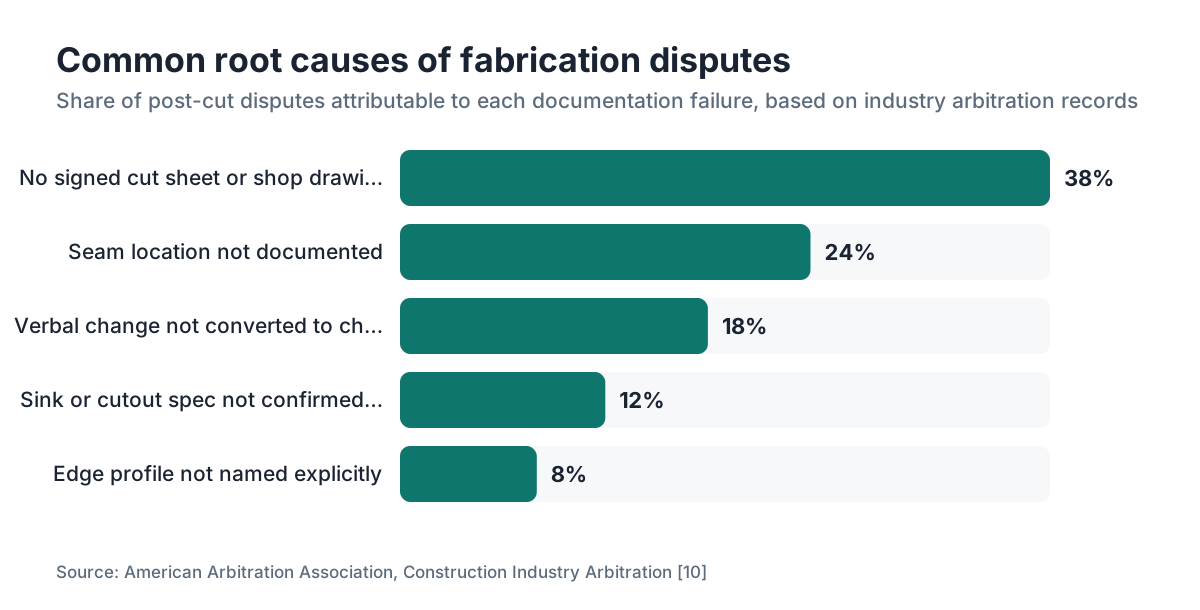
A few patterns come up over and over. Construction and fabrication disputes frequently trace back to specifications that were never documented in writing before work began [10].
Verbal approval treated as real approval. The customer says "looks good" on a phone call. No email, no signature. This is the most common root cause of disputes. Verbal approval means nothing you can prove.
Approval sent too late. The cut sheet goes out the afternoon before a morning cutting slot. The customer never checks email, the shop cuts anyway to stay on schedule, and now everyone is stressed. Build buffer time into your schedule for approval to come back.
Generic cut sheets. A drawing that shows piece shapes but not seam locations, not the sink model, not the edge profile. The customer signs something that never answers the questions they will have later. Make the document specific enough to answer every question a customer could reasonably ask about their finished countertop.
No photo of the slab layout. The cut sheet is approved, but nobody photographed the actual slab before cutting. When a customer claims a fissure was not in the area they wanted, you have no pre-cut evidence.
Approval filed separately from job records. The signed form lands in someone's inbox or a vague "approvals" folder. Six months later, when a dispute hits, nobody finds it in under five minutes. Centralize everything by job number.
Ignoring contractor-homeowner gaps. The GC signs, but the homeowner never saw the drawing. That is your risk, not the GC's, when the homeowner complains at installation.
Does this process look different for different countertop materials?
The core process stays the same. A few materials earn extra attention in the approval packet.
Natural stone (granite, marble, quartzite, soapstone). Each slab is unique. Veining, movement, color variation, and fissures all need documentation. The slab photo with layout lines is especially important here. For how to clean quartzite countertops and similar natural stones, customers sometimes discover after installation that the material needs more upkeep than they expected, so the approval packet is a good place to include a care acknowledgment. Same idea applies to how to clean soapstone countertops.
Engineered stone (quartz, like Cambria countertops). Less variation slab to slab, but lot numbers still matter for color consistency across a large job. Seam location and direction are still worth documenting explicitly, because engineered stone shows seams differently than granite, and customers are often more surprised by them.
Solid surface and acrylic (like Corian countertops). Seams can be made nearly invisible, but the customer still needs to approve where they land. Edge options need explicit approval too.
Laminate (laminate countertops, Formica countertops). Approval is simpler because the material is uniform, but edge treatment, color, and pattern direction (on large-format patterns) still belong in writing. Cutout specs for sinks and cooktops matter just as much as with stone.
Wood (butcher block countertops). Grain direction, finish type (oiled, sealed, lacquered), and sink cutout reinforcement method all belong in the approval document. Wood moves with humidity, and disclosing that in writing at approval time protects you from calls about gaps that show up later.
Frequently asked questions
Is a verbal agreement enough to start cutting stone?
No. Verbal agreements are nearly impossible to prove if a dispute arises. Most U.S. courts apply the parol evidence rule, which makes written contracts the authoritative record. A verbal "yes" gives you nothing to submit in a chargeback dispute or a small-claims hearing. Always follow up any verbal agreement with a signed document before you cut.
What happens if a customer refuses to sign the approval form?
Do not cut until they sign. Explain that the signature protects them too, because it locks in what they asked for. If a customer refuses after a reasonable explanation, that is a red flag about the whole relationship. Some shops include a contract clause stating that work cannot begin without signed approval, which sets the expectation from the start.
Can an email confirmation substitute for a signature?
Yes, in most cases. The federal E-SIGN Act (15 U.S.C. § 7001) recognizes electronic approvals as legally valid. A clear email from the customer's verified address saying "I approve the attached cut sheet for Job #1042" is defensible documentation. Make sure the email references the document version and date, and that your approval email lists every key specification in the body text.
How detailed does the cut sheet need to be?
Detailed enough that a stranger reading it could answer every question about the finished countertop without calling anyone. That means material and slab number, piece dimensions, seam locations, edge profile name, sink model, faucet hole count and location, finish type, and any special features like mitered edges or waterfall ends. Vague cut sheets produce vague approvals and clear disputes.
Who is responsible for homeowner approval on a GC-managed job?
Your contract should make the GC responsible, but you carry the practical risk if the homeowner complains at installation. The safest approach is requiring the homeowner's signature directly on the cut sheet, or requiring the GC to countersign a line confirming the homeowner reviewed it. Never assume the GC has shown the homeowner anything.
How long should fabricators keep signed approval documents?
Five years is a reasonable minimum for most shops. Written-contract disputes in most U.S. states carry statutes of limitations of four to six years. Store digital copies backed up to the cloud, organized by job number, so you can retrieve any approval in under a minute if a dispute surfaces months or years after installation.
What should a change-order form include after the original approval?
The change order should state the original approved specification, the new requested specification, the cost impact (additional charge or credit), the schedule impact, and the customer's signature. It should reference the original job number and approval date. Treat it as seriously as the original approval document. No change is binding without it in writing.
Should fabricators photograph the slab before cutting?
Yes, always. A photo of the slab with layout lines drawn on it, labeled with job number and date, is your pre-cut evidence. It shows what inclusions, fissures, and veining were visible before fabrication. Without it, a customer can claim a fissure appeared during cutting or that vein placement was not what they expected, and you have no rebuttal.
What is the best time during the fabrication process to get customer approval?
At the template appointment, while the customer or their representative is on-site. The templater can walk through the cut sheet on a tablet, confirm seam and cutout placement, and get a signature before leaving. If the customer is not present, send the cut sheet within 24 hours of templating and set a clear deadline before the cutting slot is scheduled.
How do you handle approval when a customer is unreachable before the cutting deadline?
Do not cut without approval. Push the job in your queue and notify the customer in writing (email or text) that their slot moves if approval does not arrive by a specific date and time. Document that notification. If they are a chronic non-responder, a well-worded contract clause can let you proceed after a defined waiting period with liability shifting to the customer, but get legal advice before relying on that.
Does the approval process differ for natural stone versus engineered quartz?
The form is the same, but natural stone needs a pre-cut slab photo far more urgently because every slab is unique. Veining, fissures, and color variation have to be visible in the documented layout. Engineered quartz is more uniform, so the photo is less critical, but seam location, edge profile, and lot number for color consistency still need to be documented and approved.
Can approval documentation help with credit card chargeback disputes?
Yes, a lot. Visa and Mastercard allow chargebacks for goods "not as described," but card networks also require customers to first attempt resolution with the merchant. A signed cut sheet showing the customer approved every specification is strong evidence in a chargeback rebuttal. Without it, you are arguing your version of events against the customer's, with no paper trail.
What software tools help automate the approval documentation process?
Job-management and fabrication software that generates cut sheets from template data and ties approval status to the production queue works best at scale. For smaller shops, DocuSign, Adobe Sign, or a well-structured Jotform can capture electronic signatures with timestamps. The key requirement is that approval status shows up in your job workflow before a cutting slot can be assigned.
Sources
- Natural Stone Institute, Stone Specifications and Standards: Natural stone slabs vary significantly by lot and slab number; slab identification is essential for traceability in fabrication documentation
- Cornell Law School Legal Information Institute, Parol Evidence Rule: Under the parol evidence rule, courts treat a signed written agreement as the authoritative record of what parties agreed to, excluding contradictory verbal discussions
- Consumer Financial Protection Bureau, Disputing Credit Card Charges: Card network dispute processes allow chargebacks for goods not as described; merchants must provide documentation of agreed specifications to rebut disputes
- U.S. House Office of the Law Revision Counsel, Electronic Signatures in Global and National Commerce Act (E-SIGN Act), 15 U.S.C. § 7001: The E-SIGN Act states that an electronic signature 'may not be denied legal effect, validity, or enforceability solely because it is in electronic form'
- National Conference of State Legislatures, Statutes of Limitations: Written contract disputes in most U.S. states have statutes of limitations ranging from four to six years depending on the state
- Uniform Law Commission, Uniform Electronic Transactions Act (UETA): UETA, adopted by nearly all U.S. states, validates electronic signatures for contract purposes parallel to the federal E-SIGN Act
- Natural Stone Institute (formerly Marble Institute of America), Dimension Stone Design Manual: Industry fabrication standards recommend documenting slab selection with photo evidence and lot identification prior to cutting
- Federal Trade Commission, Business Guidance: Written contracts with clear change-order clauses are the recommended method for protecting both parties in custom fabrication transactions
- American Arbitration Association, Construction Industry Arbitration: Construction and fabrication disputes frequently involve disagreements about specifications that were not documented in writing before work began
- IRS, How Long Should I Keep Records: IRS recommends businesses retain records supporting business transactions for a minimum of three to seven years
Last updated 2026-07-10