TL;DR
- A Prodim Proliner is a digital measuring device that captures countertop geometry as a series of laser-measured points, then exports a DXF or native file straight to CNC or fabrication software.
- A full kitchen template takes 30 to 60 minutes.
- The core steps are setup, calibration, sink and cooktop cutouts, and file export.
What is a Prodim Proliner and why do fabricators use it?
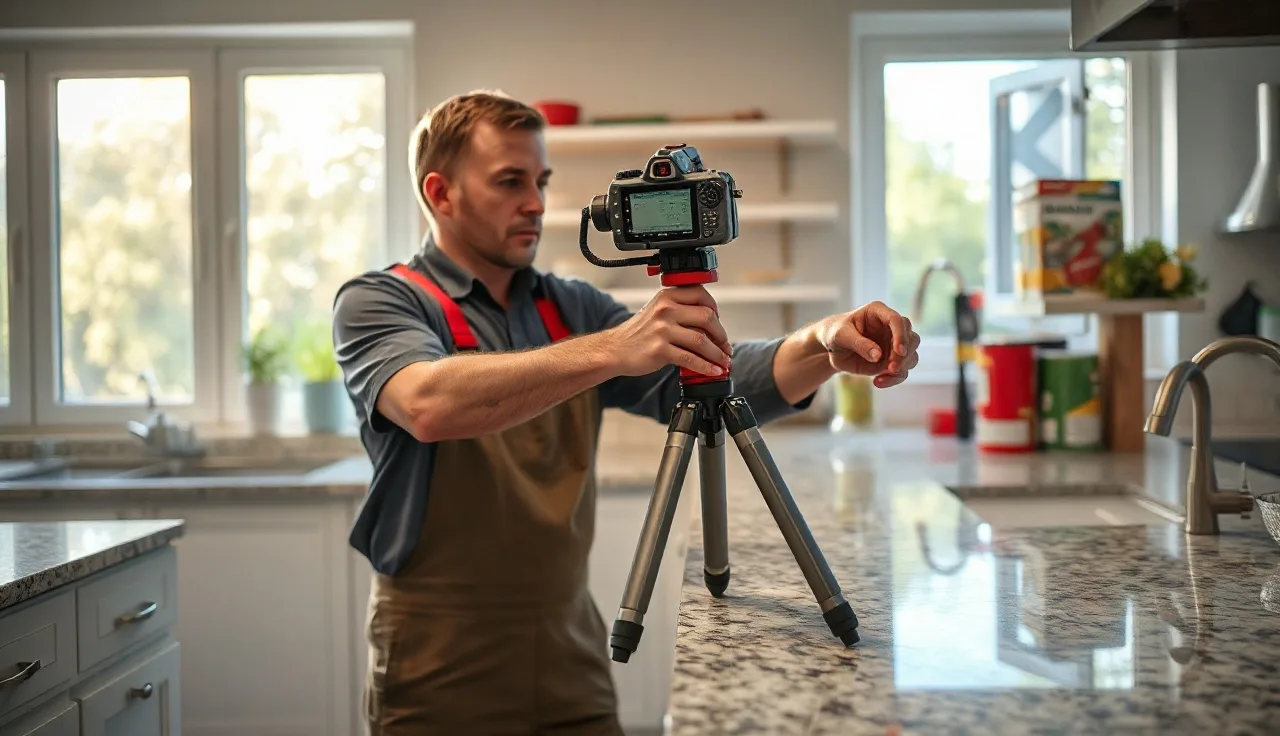
The Prodim Proliner is a digital templating system made by Prodim International, a Netherlands-based measurement company. Instead of tracing a countertop edge with cardboard or luan strips, a technician sets the device in the space and uses a telescoping arm with a laser to capture a sequence of points around the perimeter. The machine records the angle and distance of every point, builds an accurate 2D profile, and saves it as a file you send straight to a CNC saw or waterjet. [1]
Fabricators bought in because manual templating error is expensive. A slab of Calacatta marble runs $150 to $300 per square foot or more before labor. One mis-measured cutout, or a countertop that comes back a quarter-inch short, means remaking the piece at full material cost. The Proliner cuts that risk hard. It does not erase it. The machine is only as good as the person holding the arm.
The system also keeps a permanent digital record. A homeowner calls six months later because a seam has shifted or they want a matching section, and you still have the original template file. For any shop running volume, that is genuinely useful.
What equipment and setup do you need before you start?
You need the Proliner unit, its tripod, the measuring arm, and a charged battery. Prodim sells several models, and the Proliner 8CS is the version most countertop shops run as of the mid-2020s. Depending on the model you also need the onboard display or a laptop, and the Prodim software installed. [1]
Before you leave the shop, confirm the software version is current. Prodim ships firmware and software updates periodically, and an outdated version can cause export problems with some CNC controllers. Check the Prodim portal before a large or complex job.
On-site setup takes about five minutes for a straightforward kitchen. Set the tripod on a stable, level surface near the middle of the room, ideally where you have line-of-sight to every wall you need. The Proliner does not have to be perfectly level because the arm compensates, but a hard lean can hurt accuracy in tight spots. A kitchen with an island plus perimeter counters usually means two tripod positions and a merge.
You also need small reference stickers or magnets, which Prodim supplies. They go on a wall or cabinet face so the machine can register a shared reference point when you move the tripod. Do not skip this. A missing reference point is the most common cause of misaligned merged measurements.
How do you calibrate the Proliner on-site?
Calibration is simpler than it sounds. The unit runs a built-in self-check when you power it on. It takes under two minutes. You extend the arm, let it run the check, and the software tells you if anything is out of tolerance. [1]
If calibration fails, the usual culprit is a dirty or damaged arm tip. The tip is the small probe you press against the surface to capture each point. Wipe it with a dry cloth and try again. If it fails a second time, stop. A measurement set taken with an uncalibrated arm looks fine on-screen but produces parts that are off by a consistent amount in one direction. That kind of systematic error is nearly impossible to catch until the stone is cut.
Prodim recommends sending the unit in for factory calibration periodically. The company's documentation suggests annual checks for heavy-use shops, though some fabricators do it more often. Check your service agreement.
One practical note: temperature matters. Leave the Proliner in a cold van on a January morning, then try to calibrate indoors, and readings can drift until the arm reaches room temperature. Give it ten minutes.
How do you capture the countertop perimeter point by point?
This is the main work of templating. You set the tip of the arm at a corner or edge, press the capture button, and the Proliner records that point's position in space. Move to the next point, capture, and continue around the perimeter. The software draws a line between consecutive points, so you are tracing the countertop as a series of straight segments. [1]
For straight runs, you only need a point at each end and at any break, like where a cabinet meets a wall at a slight angle. Two points define a line. For curves, capture more points, and the software builds arcs once you tell it the edge is curved. A curved island nose might take eight to twelve points to define cleanly, depending on the radius.
Wall returns are where new operators slow down. A wall return is the small extension of the countertop that turns back into the wall, usually one to two inches. Capture both sides of the return precisely. Rush it and you get a back edge that runs slightly long and has to be scribed on-site, which wastes time.
Capture the front edge separately from the back edge if the countertop is anything more than a plain rectangle. The Proliner lets you build the shape from the outside in: front edge, then sides, then back, then interior features like cutouts. Work consistently. Switching between front and back mid-template without finishing one side is a common source of closed-loop errors, where the shape refuses to close.
When the perimeter is done, the software shows a preview. Look at it hard. Does the shape match the room? Is the back edge close to parallel with the front? Any bulge or notch that has no matching cabinet feature means you captured a point in the wrong place. Fix it now, not after you drive back to the shop.
How do you measure sink cutouts and cooktop openings with the Proliner?
Sink and cooktop cutouts are the most error-prone part of any countertop template, digital or analog. The Proliner handles them well, but you have to set them up in the software before you capture points.
For a sink, drop the actual sink in the cabinet opening if you have it on-site. Capture the four corners of the sink bowl rim with the arm, then the center of the cutout. The Proliner software has a dedicated sink tool that calculates the cutout offset from the rim based on your shop's standard reveal, usually 1/8 inch to 3/16 inch, or lets you enter a custom offset. [2] No sink on-site means working from a template or the manufacturer's cutout spec, which adds risk.
Cooktop cutouts work the same way. Capture the four corners of the cutout opening from the spec sheet, then place those points at the correct position on the countertop. Measure the distance from the cooktop front edge to the countertop front edge carefully. That dimension controls how much overhang the cooktop has and whether it sits flat.
Doing an undermount sink in a kitchen countertop? Measure the front-to-back position of the cutout relative to the sink cabinet too. Most undermount sinks allow 1 to 2 inches of front overhang, but the range tightens with a front-apron cabinet. Capture that front-to-back distance on the Proliner explicitly.
Double-check every cutout by comparing the Proliner's on-screen number to a tape measure reading. They should match within 1/16 inch. If they do not, re-capture.
How do you handle islands, peninsulas, and multi-position setups?
An island or peninsula means moving the tripod at least once. This is where the reference sticker system earns its keep.
Before you move the tripod, capture two or three reference stickers visible from both the current position and the next. The software uses these shared points to align the two measurement sets into one coordinate system. [1] Put the stickers on vertical surfaces the arm can reach comfortably: the side of the refrigerator cabinet, the window trim, a door jamb. Never put them on surfaces that flex or move, like cabinet doors.
Move the tripod, recalibrate, then re-capture those same stickers before you continue. The software merges the two sessions automatically. Look at the merged preview. The junction between the two sessions should be clean; if the island outline shows a kink or a gap where it should run straight, the reference points did not register. Re-capture one or both sessions.
Very large kitchens with an island plus a long perimeter can need three tripod positions. That is still faster and more accurate than a manual template for a space that size. A skilled operator finishes a three-position full-kitchen template in under an hour.
How do you handle backsplash height and wall irregularities?
The Proliner is mainly a 2D tool. It captures the plan view (top-down) shape of the countertop with high accuracy. Backsplash height is a separate measurement. Most operators grab backsplash height with a tape measure and record it in the notes field of the Proliner file or in the shop's job management system.
Wall irregularities are the trickiest part of any stone job. Walls are almost never plumb or straight. On a slab job, you scribe the back edge on-site after installation, or you leave a scribe allowance in the template. The Proliner records where the wall sits right now, but it cannot capture how far out of plumb it runs up its height. For most countertop situations, the back edge is scribed 1/8 to 1/4 inch into the wall, so the variation gets absorbed.
A full-height backsplash in stone is a different job. You measure the wall plane separately and decide whether to template the top edge or cut it to fit. That usually means a second site visit or added scribe allowance at the top edge. The Proliner is not the standard tool for full-height backsplash templates, though some shops have adapted their workflow to pull it off.
How do you export the Proliner file and send it to a CNC machine?
Once the template preview looks right, you export the file. The Proliner exports in its native format (a .pld or .bvn file depending on the model generation) and in DXF, which is what most CNC saws, waterjets, and CAD/CAM systems read. [1]
From the onboard software or the connected laptop, go to File > Export and choose DXF. Many shops export both the native file for archiving and the DXF for the CNC operator. The DXF comes out full scale, so no scaling at import. Most CNC software, including systems paired with Donatoni, Northwood, or Park Industries machines, reads Prodim DXF files without modification.
If your shop uses a nesting or quoting platform to lay template pieces on a slab before cutting, import the DXF there first. Shops running fabrication software like SlabWise import the DXF directly for nesting and quote generation, which ties the template to material cost in one workflow instead of retyping dimensions by hand.
Before the file goes to the saw, have someone other than the measuring tech check the DXF against the original job order. Confirm the piece count matches, the sink cutout dimensions match the sink spec sheet, and the edge profiles are noted (the Proliner records geometry, not edge profile; that goes in a separate field). A second set of eyes catches transposition errors before stone gets cut.
One common mistake is exporting at the wrong unit scale. The Proliner works in inches or millimeters. Your CNC file has to match your machine's controller. Confirm it every job if your shop runs both metric and imperial work.
What accuracy does the Proliner achieve in real-world conditions?
Prodim's published spec for the Proliner 8CS is plus or minus 0.5 mm (roughly 1/50 inch) under controlled conditions. [1] Real-world accuracy in a countertop shop leans hard on operator technique and site conditions.
An experienced operator on a simple kitchen typically lands within 1/16 inch of actual dimensions, well inside stone fabrication tolerance. A beginner, or anyone working a cramped space with bad sightlines, can drift to 1/8 inch or worse.
The biggest accuracy killers in practice: pressing the arm tip at an angle instead of square to the surface, capturing points on flexible materials like cabinet doors instead of the cabinet box, and ignoring the closed-loop closure error the software reports after the perimeter. The closure error is the distance between the last point and the first point when the software tries to close the shape. Under 2 mm is generally fine. Over 3 mm, find the bad point and re-capture it.
For comparison, a skilled templater with luan strips gets roughly 1/8 inch accuracy on a straightforward kitchen. The Proliner is faster and steadier, especially on complex shapes like curved islands or L-shaped kitchens with multiple wall angles.
How long does Proliner templating take compared to manual methods?
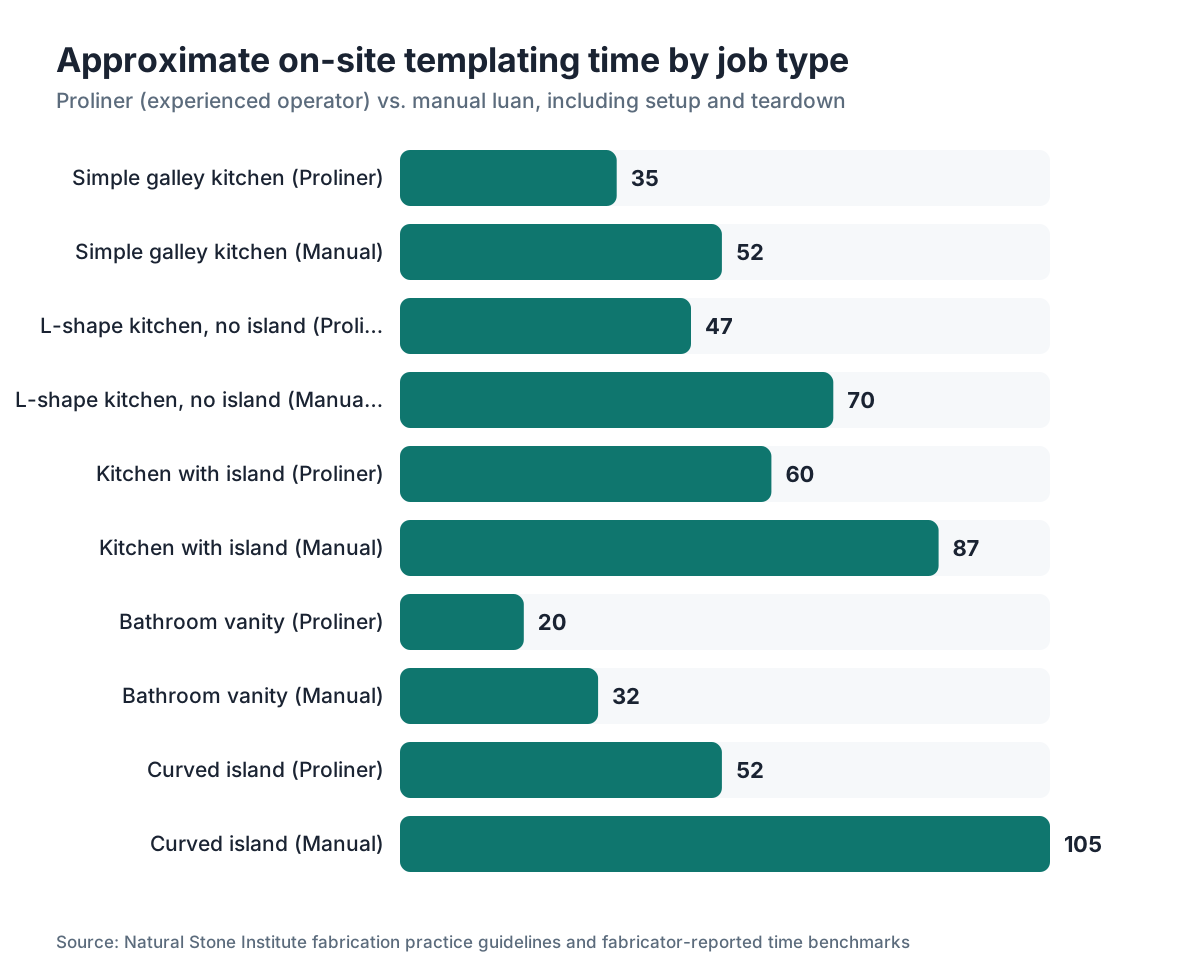
A simple galley kitchen with no island takes an experienced Proliner operator about 15 to 25 minutes of measurement time on-site. Add setup and teardown and you land at 30 to 40 minutes total. A complex kitchen with an island, peninsula, and multiple cutouts runs 45 to 75 minutes.
Manual luan templating for that same complex kitchen usually takes 60 to 90 minutes, sometimes longer, and then you have to drive the physical template back to the shop. The Proliner file travels as an email attachment.
Training a new operator to competency usually takes three to five supervised jobs before they work independently on standard kitchens, based on fabricator reports and Prodim's own training resources. Complex custom work takes longer to learn.
The table below shows approximate time ranges for common job types.
| Job type | Proliner (experienced) | Manual luan |
|---|---|---|
| Simple galley kitchen | 30-40 min | 45-60 min |
| L-shape kitchen, no island | 40-55 min | 60-80 min |
| Kitchen with island | 45-75 min | 75-100 min |
| Bathroom vanity | 15-25 min | 25-40 min |
| Complex curved island | 45-60 min | 90-120 min |
Times include setup and teardown but not drive time.
What does a Prodim Proliner cost and is it worth it for a small shop?
New Proliner units run roughly $10,000 to $20,000 depending on model and accessories, based on figures that show up in fabricator forums and industry discussion. Prodim does not publish list prices; you get a quote from their distributor network. [1] Used units surface on the secondary market for $4,000 to $8,000, though budget for a factory calibration check before you put a used unit into production.
The ROI question is real. Remake one granite or quartzite piece a month from templating error, at an average material cost of $500 to $1,500, and you are burning $6,000 to $18,000 a year in material alone. In many shops the Proliner pays for itself within one to three years on reduced remakes, before counting labor savings.
For a shop doing under 10 kitchens a month, break-even is harder. At that volume the sharper argument is whether the Proliner helps you win jobs (some homeowners and contractors read it as a signal of professionalism) or take more jobs with the same crew. Some smaller shops share one Proliner across two or three fabricators through an informal co-op.
Homeowner reading this? A fabricator using a Proliner is a reasonable sign of a professional operation, but it guarantees nothing about the final install. The stone still has to be cut, finished, and set correctly. See countertop installation for what the full process involves.
What are the most common mistakes operators make with the Proliner?
The most common mistake is capturing points on the wrong surface. The Proliner measures where the tip touches. Press it against a flexible cabinet door, loose trim, or the edge of an appliance instead of the fixed cabinet box, and that point is wrong, so the shape is wrong. Always capture on the fixed structural surface.
Second is skipping the closed-loop check. The software reports the closure error after you finish a perimeter. Plenty of operators dismiss it without reading the number. Read it every time.
Third is not verifying cutout positions against a tape measure. The Proliner is accurate, but it cannot check its own work. A quick tape from the front edge to the center of the sink cutout takes 30 seconds and can save a $200 remade cutout.
Fourth is exporting at the wrong unit scale, covered earlier but worth repeating because it is a silent error. The file looks fine, the CNC loads it without complaint, and then every piece comes out 25.4 times too large or too small when the operator catches it at the machine.
Fifth is poor battery management. The Proliner gives you a charge indicator, but on a cold day the battery drains faster than the readout suggests. Carry a spare or a charger. Running dry mid-template means re-merging or re-doing every point for that session.
Some of these problems show up downstream. Fabricators who route their Proliner DXF files through a quoting or nesting system catch unit and scale mismatches before the file reaches the CNC, which is one reason tying digital templating to shop software matters.
How does the Proliner compare to other digital templating systems?
The Proliner is the most widely adopted digital templating system in North American countertop fabrication, but it has real competition.
The LT-55 by Laser Products Industries uses a different arm mechanism. Some fabricators prefer it for certain curved shapes. It sits in roughly the same price bracket as the Proliner.
Tablet-based photogrammetry systems like iDeas and others use a camera and markers placed on the countertop. They usually cost less to buy but can struggle with accuracy in low light and on low-contrast surfaces, like white marble countertops or white cabinets.
Manual luan templating still works and costs almost nothing in equipment. It needs a skilled templater, a physical template you have to transport, and more shop time to digitize the template if you cut on CNC. For high volume or complex work, the Proliner's speed and direct digital output pay off. For a shop doing ten simple vanities a month, luan may be plenty.
The honest answer: the Proliner is the industry default for a reason. It is fast, accurate in trained hands, and its file output is well-supported by CNC software. The downsides are cost and the real training it takes to use well.
Frequently asked questions
Do I need to own a Prodim Proliner to get a digital template, or can I hire someone?
Yes, you can hire a freelance templater who owns a Proliner. In many metro areas, independent digital templating services charge $75 to $200 per job. Some fabricators offer digital templating as a standalone service. If your fabricator uses one, the cost is usually built into the fabrication quote or charged as a separate line item of $50 to $150 for residential work.
Can the Proliner measure curved countertops and radius islands accurately?
Yes. You capture more points along the curve, and the software builds an arc between them. The tighter the radius, the more points you need. A 12-inch radius corner typically needs six to ten points to define accurately. The Proliner handles these shapes better than manual luan, which often requires a router jig or careful bending of the strip material.
What file formats does the Prodim Proliner export?
The Proliner exports in its native .pld or .bvn format (varies by model generation) and in DXF, the standard format for CNC saws and waterjet machines. Some shops also export to PDF for archiving the template shape. DXF is what your CNC operator needs. Always confirm the unit scale (inches vs. millimeters) before sending.
How do I measure a kitchen with both an island and perimeter counters using one Proliner?
You set up in one position, measure everything you can see, place reference stickers on shared visible surfaces, then move the tripod and capture the same stickers from the new position before continuing. The software merges the two sessions into one coordinate system. A large kitchen may need two or three positions. Always verify the merged preview shows continuous, correct geometry before leaving the site.
What is the closed-loop error on the Proliner and what number is acceptable?
The closed-loop error is the distance between the last captured point and the first point when the software closes the perimeter shape. It tells you how much accumulation drift is in your session. Under 2 mm is generally acceptable for countertop work. Over 3 mm, find and re-capture the bad point. Most experienced operators target 1 mm or less.
Can the Proliner measure a sink cutout location without the sink present?
Yes, but it is less accurate. Without the physical sink to reference, you work from the sink manufacturer's cutout template or spec sheet. You measure the cabinet opening, locate the center of the cutout by measurement, and enter the cutout dimensions from the spec. This adds room for error. Always bring the sink spec sheet, and confirm the cutout location with the homeowner or contractor before the template.
How often does a Proliner need factory calibration?
Prodim recommends annual factory calibration for shops using the unit daily. Lower-volume shops may stretch to 18 to 24 months, though Prodim's service documentation lists annual as the baseline. If the unit has been dropped, the arm tip replaced, or you are seeing consistent offset errors, send it for calibration regardless of schedule. A field self-check runs at every power-on but does not replace factory calibration.
What training does a new Prodim Proliner operator need?
Prodim offers in-person and online training through its dealer network. Most new operators run a one to two day hands-on course, then need three to five supervised field jobs before working independently on standard kitchens. Complex shapes with tight curves, multiple positions, or custom cutouts take longer to master. Some fabricators train in-house by pairing a new operator with an experienced one for the first month.
Does the Proliner work for materials other than stone, like butcher block or laminate?
Yes. The Proliner measures any countertop surface. Shops use it for butcher block countertops, laminate countertops, and solid surface materials. The same DXF export goes to whatever cutting equipment the shop uses. The accuracy advantage is the same regardless of material, though the cost of remakes is lower for laminate, which shifts the ROI math.
What is the difference between the Proliner 8CS and older Proliner models?
The Proliner 8CS, released in the mid-2010s and updated since, has better arm ergonomics, faster point capture, and improved onboard software compared to earlier models like the Proliner 7. The 8CS also has a larger onboard display and better battery life. Buying used, confirm which model generation you are getting and whether the software is still supported by Prodim's current update system.
Can a homeowner use a Proliner to measure their own countertops?
Technically yes, practically no. The equipment costs over $10,000 new and takes real training to use accurately. Renting a Proliner is not a common option. If you want digital-quality measurements, hire a fabricator or templating service that uses one. The templating fee is small next to the material cost of a stone countertop, and the accuracy is worth it.
How do I handle a wall that is severely out of square when using the Proliner?
The Proliner captures the wall as it actually is, not as it should be. If a wall is badly out of square, the DXF shows it. You then have two options: cut the back edge of the slab to match the wall exactly (relying on the Proliner's accuracy), or leave a scribe allowance of 1/4 inch or more and fit the back edge on-site. For most residential stone work, a scribe allowance is the safer approach unless the wall is known to be flat and plumb.
What should I check after importing a Proliner DXF file into CNC software?
Check five things: that the unit scale is correct (inches or millimeters), that the piece count matches the job order, that sink and cooktop cutout dimensions match the manufacturer spec, that the overall footprint matches a tape measure cross-check from the site, and that there are no open paths or duplicate lines in the geometry. Most CNC import errors trace back to unit scale mismatches or open contours in the DXF.
Sources
- National Kitchen and Bath Association (NKBA), Kitchen Planning Guidelines: Standard sink reveal and cutout offset practices in countertop fabrication
- Marble Institute of America (now Natural Stone Institute), Fabrication Standards: Acceptable dimensional tolerances for stone countertop fabrication, including back edge and cutout tolerances
- Natural Stone Institute, Dimension Stone Design Manual: Industry standards for countertop template accuracy and fitting allowances for stone installation
- Occupational Safety and Health Administration (OSHA), Silica Dust in Stone Fabrication: Regulatory context for stone fabrication shop operations in the United States
- U.S. Bureau of Labor Statistics, Occupational Outlook Handbook: Tile and Stone Setters: Labor context for countertop fabrication and installation trade classifications
- Park Industries, Digital Templating Integration Resources: CNC machinery compatibility with DXF files exported from digital templating systems including Prodim Proliner
- Northwood Machine Manufacturing, CNC Saw Software Documentation: DXF file import requirements for CNC stone cutting equipment, including unit scale requirements
- U.S. Small Business Administration, Equipment Financing and ROI for Small Manufacturing Shops: General context for capital equipment ROI calculations for small fabrication businesses
- Marble Institute of America, Stone World Magazine, Fabricator Survey Data: Industry data on digital templating adoption rates and reported remake cost reduction in stone fabrication shops
Last updated 2026-07-10