TL;DR
- Efficient countertop fabrication scheduling means sequencing jobs so each station (templating, CNC, edging, polishing, installation) stays loaded without creating pile-ups.
- Most shops that move from paper-and-phone to a structured digital workflow cut their average lead time by 20 to 40 percent.
- The key levers are accurate time standards per operation, buffer management at the CNC, and hard rules about when a job enters the queue.
Why does countertop fabrication scheduling go wrong in the first place?
Most scheduling problems in stone shops have nothing to do with slow machines or lazy crews. They come from jobs entering the queue before they are actually ready. A job lands on the CNC schedule before the slab is confirmed. Templating happens Monday, the slab doesn't arrive until Thursday, and suddenly Friday's installation is dead. The shop scrambles, the customer is furious, and the install crew sits idle for half a day.
The second most common cause is treating every job as equal. A simple 25-square-foot kitchen island takes maybe 45 minutes of CNC time. A full kitchen with mitered waterfall edges, a farm sink cutout, and a cooktop cutout might take three and a half hours. Schedule by job count instead of machine-hours and you will overload some days while starving others.
The third cause is no real visibility into downstream constraints. The CNC operator finishes a slab and sets it aside, not knowing the edge polisher is already backed up six pieces. Material piles up. Pieces get shuffled, scratched, or lost in the stack. The fabrication manager burns two hours a day just figuring out where things are.
None of this is inevitable. Shops that solve it use a small set of disciplined rules rather than complex software, though software helps a lot once the rules are solid.
What are the main stages of a fabrication job and how long does each take?
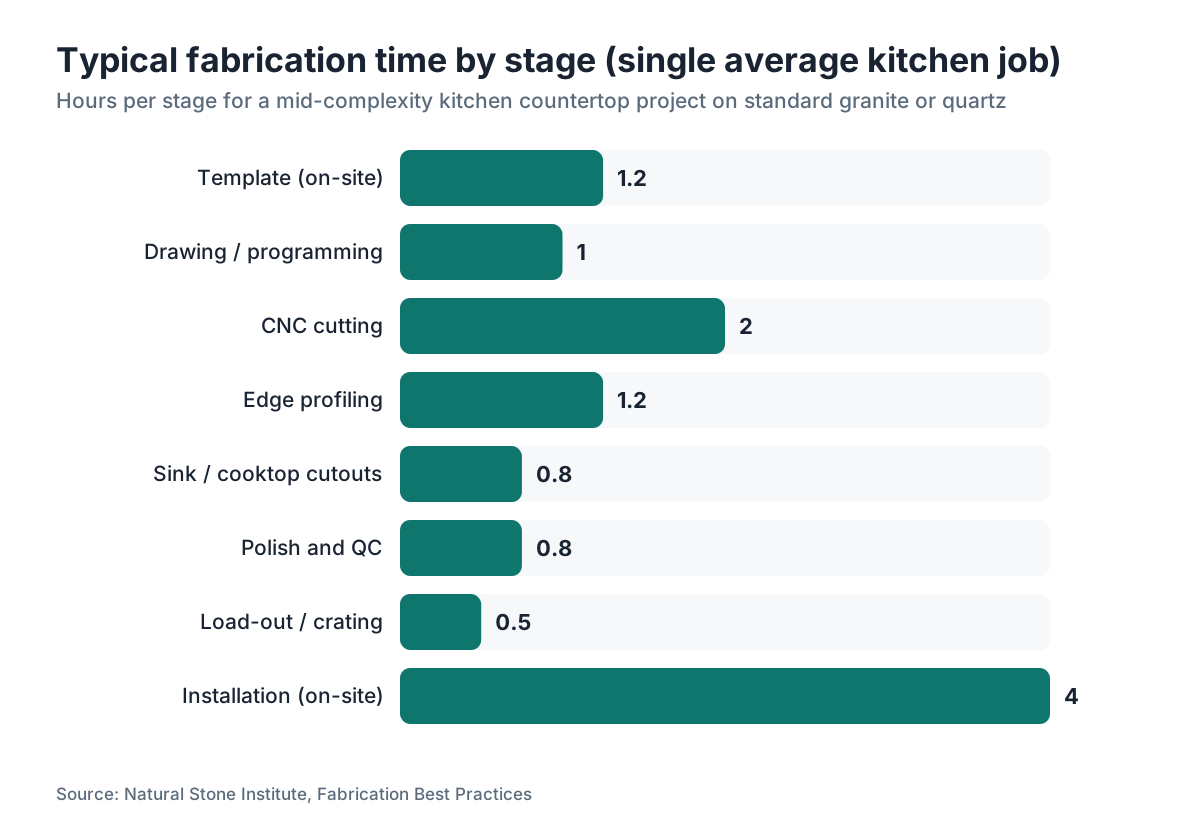
Before you can schedule intelligently, you need real time standards for your own shop. Industry averages exist, but your equipment, crew skill level, and material mix will shift those numbers. Here is a reasonable starting baseline for a mid-size shop running a single CNC bridge saw and a separate CNC waterjet or router:
| Stage | Typical time range | Notes |
|---|---|---|
| Template (laser or physical) | 45 min, 2 hr on-site | Travel time separate |
| Drawing / programming | 30 min, 2 hr | Depends on complexity, software |
| Slab selection and confirmation | 15 min, 1 hr | Add lead time if ordering |
| CNC cutting | 30 min, 4 hr | Highly variable by complexity |
| Edge profiling | 20 min, 2 hr | Per piece; mitered edges add time |
| Sink and cooktop cutouts | 15 to 45 min each | Hand-finished edges cost more time |
| Polish and final QC | 20 to 60 min | Material-dependent; quartzite takes longer |
| Crating / load-out | 20 to 40 min | |
| Installation | 2 to 8 hr on-site | Full kitchen vs. single piece |
Time your own jobs for four to six weeks before you build a scheduling model on these numbers. Track time by material type too. Granite and quartz cut fast. Quartzite and dolomite can eat twice the CNC time and a lot more hand-finishing. Porcelain slabs are their own challenge entirely.
The CNC is almost always the capacity constraint (the bottleneck) in a shop running one machine. Everything else should be scheduled around keeping that machine fed and running. Lean manufacturing calls this managing the constraint, and Eliyahu Goldratt's Theory of Constraints, developed in the 1980s, still describes it better than most production books written since [1].
What scheduling method works best for a small to mid-size fab shop?
For shops doing 20 to 80 jobs a month, a pull-based approach beats a push approach almost every time. In a push system, the schedule shoves jobs to each station the moment the upstream station finishes. In a pull system, a station takes the next job only when it has capacity. The difference sounds subtle. It eliminates the pile-up problem at your bottleneck.
Here is a simple pull-based system you can run on a whiteboard or a Kanban board:
- Define WIP (work-in-progress) limits for each station. For example: no more than 4 slabs waiting at the CNC at any time, no more than 3 pieces waiting at edge profiling.
- When a station drops below its WIP limit, it pulls the next job from the upstream queue.
- Jobs enter the queue only when every pre-condition is met: template complete, drawing approved, slab confirmed on-site or with a firm delivery date.
That third rule is the one most shops skip, and it causes the most pain. A job should not consume scheduling space until it can actually run.
Above 80 jobs a month, or with multiple CNCs, you probably want dedicated scheduling software. That is where tools like SlabWise come in, since the quoting and nesting data you already have feeds directly into load calculations without re-entering numbers.
One more thing. Build explicit buffer time into every week. Most high-performing fab shops reserve 15 to 20 percent of their CNC capacity as buffer for reruns, rush jobs, and maintenance. Schedule to 100 percent of theoretical capacity and you will miss deadlines the moment anything goes slightly wrong [2].
How far in advance should you schedule templating and installation?
The right lead time depends on your total throughput time, meaning the elapsed time from template to installation. For a shop running efficiently, that number is usually 7 to 14 calendar days for granite or quartz on a straightforward project. Complex natural stone projects with specialty edges or book-matched slabs should be quoted to customers at 3 to 4 weeks minimum.
Schedule templating only after three things are true: the cabinet installation is confirmed complete (or confirmed for a specific date), the customer has made final material and edge selections, and your shop has confirmed slab availability. Templating before cabinets are fully set is one of the single most expensive scheduling mistakes in the industry. Cabinets move. Dimensions change. You re-template, re-draw, sometimes re-program, and the original slot on your CNC calendar is now wasted.
Lock installation only after the slab has been cut and passed QC, never before. Promising an installation date at template time is fine as a target. Never schedule an installer and a delivery truck with zero buffer. One dropped piece, one edge chip that needs refinishing, and you have a crew standing in a customer's kitchen with nothing to install.
A good working rule: confirm the installation appointment when the job is loaded on the truck, not before.
How do you handle rush jobs without wrecking the rest of the schedule?
Every shop gets the call. A contractor's closing date moved up, a homeowner's rental is running out, something needs to happen in three days. Say yes to everything and you destroy the schedule for everyone else. Say no to everything and you lose business and referrals.
The answer is a formal rush policy. Define in writing what counts as a rush job (fewer than X business days from template to install, or fewer than X days from confirmed order), what the rush surcharge is, and what it displaces. Most shops charge a rush premium of 15 to 30 percent. That premium has to be high enough to actually pay the crew for overtime or weekend work, cover the administrative disruption, and discourage abuse.
When a rush job enters the queue, name the job that gets bumped or delayed and call that customer immediately. Transparency here protects your reputation more than the rush revenue ever will. A customer who finds out their job was quietly delayed is angrier than one who gets a proactive call.
Keep a short list of jobs that are actually flexible. Contractors who run loose schedules, customers who said 'whenever is fine.' These are your shock absorbers. When a rush comes in, slide a flexible job to a later slot and drop the rush into the opening.
What information does a job need before it enters the production schedule?
Shop managers call this the 'gate check' or job release criteria. A job should not appear on any production board until every item on this list is confirmed:
- Signed contract and deposit received
- Final material selected, slab confirmed on-site or delivery date locked
- Template completed and dimensions approved by customer
- Shop drawing approved (customer or contractor sign-off)
- Edge profile, finish, and all cutout specs confirmed in writing
- Sink or appliance model confirmed (not 'probably a 33-inch undermount')
- Installation address and site contact confirmed
- Installation window agreed with customer
Miss any one of these and you create a job that will stall in production, force a phone call at the worst possible moment, or generate a rework charge you probably won't collect. The gate check adds maybe 15 minutes of admin per job. It saves hours.
How should you sequence jobs across a week to maximize CNC utilization?
Grouping by material type is one of the most effective sequencing tactics available, and most shops underuse it. Switching between granite and porcelain on the same CNC often means changing tooling, adjusting feed rates, and running a test cut. That switch can cost 30 to 45 minutes. Batch two or three granite jobs together, then two porcelain jobs together, and you recover real machine time over a week.
Group by slab size as well. Large-format slabs (63x126 inches or bigger) need the overhead crane or full crew for loading and unloading. Batch those together and you set up the crane once instead of three times.
Sequence jobs that share an edge profile back to back where you can. If your shop has one profile wheel that's slow to mount, grouping all the ogee-edge jobs into one run cuts set-up time.
On the installation side, route by geography. Two jobs in the same zip code on the same day cost less truck time than two jobs across town. This sounds obvious, but shops that let customers pick any available install slot with no geographic logic routinely lose 30 to 60 minutes of crew time a day to bad routing. Over a month, that is real money [6].
For deeper reading on how nesting algorithms reduce material waste (which also shapes how you batch and sequence jobs), the NIST Manufacturing Extension Partnership has published guidance on lean manufacturing for small shops [3].
How do you track job status without spending all day updating spreadsheets?
The goal of any tracking system is simple. Anyone in the shop can answer 'where is this job right now?' in under 30 seconds without calling anyone. That's the bar.
For shops under 30 jobs a month, a physical Kanban board with job cards works. Columns represent stages: pre-production, queued for CNC, at CNC, at edge, at polish, QC, ready to ship, installed. Each card carries the job number, customer name, material, square footage, and due date. Cards move left to right. Stalled cards get flagged daily.
For larger shops, a digital system earns its cost. The features you actually need are job status visible to everyone (field installers included, via phone), automated date tracking (when did this job enter each stage), and a view of your CNC queue load by day without doing math.
Avoid over-engineered solutions. A shop that tries to run a full ERP system built for manufacturing plants often spends more time feeding the system than it saves. Start with what you will actually use. A well-maintained Google Sheet with clear stage columns beats a complicated system nobody updates.
SlabWise's production tracking module connects the quote and nest data directly to job status, which kills the double-entry problem that quietly wrecks most spreadsheet systems in busy shops.
For countertop installation coordination specifically, the status update that matters most to your installer is whether the slab passed QC and is on the truck. Build that notification into whatever system you use.
How do material lead times affect your scheduling and what can you do about them?
Slab availability is the variable most outside your control, and it deserves its own scheduling logic. Standard granite and quartz from a major distributor usually carry 1 to 5 business day lead times for in-stock material. Exotic natural stones, book-matched slabs, or materials ordered from an importer can run 4 to 12 weeks [4].
The scheduling implication is direct. For standard material, you can template first and confirm the slab within a day or two. For specialty material, reserve or receive the slab before you template. Otherwise you template, draw, program, then wait six weeks for stone that may have sold to someone else or shown up with a vein pattern different from the sample the customer approved.
Build a simple material status column into your job list: 'slab on-site', 'slab at distributor confirmed', 'slab ordered ETA [date]', 'slab not yet confirmed'. Jobs in that last category do not belong on any production countdown.
For shops doing serious volume in marble countertops, granite countertops, or other natural stone, keeping a small inventory of frequently-used materials (two or three slabs of your three best-selling colors) shortens your effective lead time on those jobs and lets you be more aggressive about scheduling. The SBA recommends safety stock for high-velocity items exactly for this reason [9].
The relationship with your distributor sales rep matters here. A rep who texts you about incoming shipments or holds a slab for 48 hours while you confirm with a customer is worth keeping close.
What scheduling metrics should a fabrication shop actually track?
You can track 40 things or you can track 5 and actually look at them every week. Here are the five that move the needle:
Average lead time: Days from completed template to installation. Track it per month. If it grows, something in the system is backing up.
CNC utilization rate: Actual cutting hours divided by available hours (typically 8 hours a day minus breaks and maintenance). A healthy shop runs 65 to 80 percent. Under 60 percent means you have capacity you are not selling. Over 85 percent consistently means you are one breakdown away from a crisis.
Rework rate: Jobs that needed re-cutting, re-edging, or re-polishing because of shop error. Even a 3 to 5 percent rework rate is expensive. Each rework job eats machine time you could have sold.
On-time installation rate: Percentage of installations completed on the originally confirmed date. This is the metric your customers feel directly. Under 90 percent signals structural scheduling problems.
Schedule attainment: Did you complete the jobs you said you would complete each week? Track it as jobs completed on schedule divided by jobs planned. World-class manufacturing operations target 95 percent or above [10]. Most small fab shops land in the 70 to 80 percent range when they first start measuring it.
Track these five weekly. Post them where your crew can see them. When any number moves the wrong way two weeks in a row, find out why before it becomes a month-long pattern.
How do software tools actually help with fabrication scheduling (and what they can't do)?
Software helps most with three things: visibility, load calculation, and killing re-entry. It does not replace good judgment about job priorities or your relationships with customers.
On visibility, a digital system lets your installation coordinator in the field see that a job passed QC at 2pm and is loaded for tomorrow, without calling the shop manager. That alone prevents a class of miscommunication that eats 20 minutes a day at many shops.
On load calculation, if your quoting software already knows a job is 48 square feet of quartzite with a mitered waterfall edge and a farm sink cutout, it can estimate CNC time with decent accuracy. Scheduling tools that pull from quote data show you your CNC queue in machine-hours instead of job counts. That is genuinely useful.
On re-entry, every time a job number, square footage, or edge spec gets typed into a second system, there's a chance of error. Shops running separate quoting, scheduling, and invoicing systems often have the same job carrying three slightly different square footages in three places. Integrated systems cut that down.
What software cannot do: it cannot make a customer confirm their sink model faster, it cannot fix a slab that arrived cracked, and it cannot schedule around human relationships (the contractor who always wants special treatment, the repeat customer who has earned flexibility). Those calls stay with you.
For shops quoting kitchen countertops, granite countertops, or engineered stone like Cambria countertops, the time saved on drawing and nesting in integrated software usually pays for the software within the first few months.
How do seasonal demand swings affect fabrication scheduling?
Countertop demand is not flat across the year. In most U.S. markets, the peak runs March through September, driven by spring home sales and summer remodel projects. The National Kitchen and Bath Association reported in its 2023 industry outlook that kitchen remodel activity peaks in Q2 and Q3 before declining in Q4 [5].
Here is what that means for scheduling.
In slow months (usually November through February in northern markets), build your process improvements, train new crew, and service equipment. Your CNC utilization will drop. Use that time productively rather than forcing volume you cannot sell.
In peak months, enforce your gate check rules harder, not softer. The temptation during a busy spring is to 'just get it in the queue' before everything is confirmed. That is exactly backwards. Unready jobs in a full queue create gridlock.
Pre-scheduling helps. During peak months, some shops offer a 'hold slot' deposit where customers pay a small fee (typically $150 to $300) to lock a production week two to three weeks out. This smooths demand and gives the shop better visibility. It also filters out tire-kickers who are not actually ready to commit.
If you work with a distributor that also swings seasonally, order slab inventory slightly ahead of your expected peak. Distributor stock of popular materials can thin out in April and May when every shop in the region is slammed.
What are the most common scheduling mistakes that cost fabricators real money?
A few patterns show up over and over in shops that struggle with scheduling, and the cost is not abstract.
Overbooking the CNC. If your machine runs 8 hours a day and you schedule 9 hours of jobs, you are not behind by one hour. You are behind by one hour on day one, which means the next day starts with that overflow, and by Thursday you are two days behind. Schedule to 75 to 80 percent of capacity to absorb normal variation.
Skipping the daily stand-up. A 10-minute morning check where the fabrication manager walks the queue with the CNC operator and the edge guy costs almost nothing and catches most problems before they cascade. Shops that skip it lose the same hours later in the day untangling confusion.
Not tracking reruns separately from new work. When a rework job jumps the queue (as it should, to make the customer whole fast), it comes from somewhere. If you are not tracking reruns separately, you cannot see your true capacity loss.
Promising installations before QC. Covered above, but it bears repeating because it is the single most common cause of installation-day chaos.
Underestimating install time. Installers who run late on job 1 are late for job 2, which ripples through the afternoon. If your average kitchen install takes 4 hours but you schedule three a day for one two-person crew, you have built a 4-hour overrun into the day before anyone leaves the shop. Track actual install times by job type for a month and reschedule to reality.
For context on how material complexity drives time, the gap between scheduling a laminate countertops job and a complex marble countertops job can be 4 to 6 hours of shop time [7]. Treat them as completely different job categories.
Frequently asked questions
How long should a countertop fabrication job take from template to installation?
For standard granite or quartz on a straightforward kitchen, 7 to 14 calendar days is achievable in a well-run shop. Complex natural stone projects with specialty edges, book-matched slabs, or custom sink cutouts typically run 3 to 4 weeks. If your shop regularly exceeds 14 days on simple jobs, look at your gate check process and CNC queue management first.
What is the best way to schedule a countertop installation appointment?
Lock the installation appointment only after the slab has passed final QC and is confirmed on the truck or ready to load. Scheduling installation at template time is a common mistake that causes same-day cancellations when shop issues arise. Give customers a target window at template time, then confirm the exact date within 24 hours of the job clearing QC.
How many jobs can a countertop fabrication shop realistically run per week?
It depends almost entirely on CNC capacity and crew size. A shop with one CNC bridge saw running 7 to 8 productive hours a day can typically handle 12 to 20 jobs a week for average-complexity kitchen projects. That drops fast with specialty materials or complex edge profiles. Track your CNC utilization rate and schedule to 75 to 80 percent of theoretical max to keep delivery reliable.
Should I schedule countertop templating before or after cabinet installation?
Always after cabinets are fully installed and leveled. Templating before cabinets are set leads to dimension errors, recuts, and missed installation appointments. Contractors sometimes push to template earlier to protect their timeline, but the cost of a recut and reshipped slab almost always beats the time saved. Build 'cabinets confirmed complete' into your template scheduling as a hard pre-condition.
How do you handle a countertop job that needs to be rushed?
Have a written rush policy before you need it. Define what 'rush' means (typically fewer than 5 business days from template to install), set a surcharge (15 to 30 percent is common), name which scheduled job gets bumped, and call that customer proactively. Keep a short list of flexible jobs that can shift without causing problems. Rush jobs without a policy create chaos and resentment.
What information must be confirmed before a countertop job enters the production queue?
At minimum: signed contract, deposit received, template complete, shop drawing approved, material confirmed on-site or with a firm delivery date, edge profile and finish selected in writing, sink or appliance model confirmed (with rough-in dimensions), and installation window agreed. Missing any one item is reason to hold the job out of the queue. Premature entry is the leading cause of scheduling jams.
Is scheduling software worth the cost for a small fabrication shop?
For shops under 20 jobs a month, a well-maintained physical Kanban board or a clear Google Sheet often costs less and gets used more consistently than a software subscription. Above 30 jobs a month, or any shop running multiple CNCs, scheduling software that connects to your quoting data pays for itself quickly by cutting double-entry errors and giving managers real-time queue visibility without daily phone calls.
How should a fabrication shop handle material delays from stone distributors?
Keep a material status column in your job list with four states: on-site, confirmed at distributor, ordered with a firm ETA, and not yet confirmed. Only jobs with material in the first two categories belong in the production countdown. For specialty stone that can take 4 to 12 weeks, confirm the slab before templating. A distributor relationship where your rep holds slabs for 48 hours is genuinely worth maintaining.
What metrics should a countertop fabrication shop track weekly?
Five matter most: average lead time from template to install, CNC utilization rate (target 65 to 80 percent), rework rate (jobs needing re-cutting or re-finishing due to shop error), on-time installation rate (target above 90 percent), and schedule attainment (jobs completed as planned divided by jobs planned). Post these where your crew can see them and investigate any metric that declines two weeks in a row.
How do you prevent pile-ups at the CNC or edge-profiling station?
Set explicit WIP (work-in-progress) limits for each station and enforce them. If more than 4 slabs are waiting at the CNC, upstream work stops until that number drops. This pull-based approach stops downstream stations from getting buried while upstream stations keep pushing work through. It also makes stalls visible immediately rather than hiding them inside a growing pile.
How does material type affect how long a countertop job takes to fabricate?
Significantly. Standard granite and engineered quartz cut fast and edge predictably. Quartzite can take twice the CNC time and more hand-finishing. Porcelain slabs need different tooling and careful handling to prevent chipping. Marble varies by hardness. Softer stones like soapstone finish quickly but scratch easily in handling. Track fabrication time by material type for at least a month to build accurate scheduling standards for your specific equipment.
What is schedule attainment and why does it matter in a fab shop?
Schedule attainment is the percentage of jobs you complete in the week you planned to complete them. It is calculated as jobs finished on schedule divided by jobs planned. Most small fab shops starting to measure this land in the 70 to 80 percent range. World-class lean manufacturing operations target 95 percent. Tracking it weekly tells you whether your planning is realistic and where delays actually happen.
How do seasonal demand peaks affect countertop shop scheduling?
In most U.S. markets, peak demand runs March through September, aligned with spring home sales and summer remodels. During peak months, enforce your gate check rules harder and resist loading unready jobs into a full queue. Some shops use a 'hold slot' deposit of $150 to $300 to let customers reserve a production week in advance, which smooths demand and improves visibility. Use slow winter months for maintenance and process improvements.
How do I route installation crews efficiently when scheduling countertop installs?
Group installs by geography whenever possible. Two jobs in the same zip code on the same day cost meaningfully less drive time than two cross-town jobs. Over a month, poor routing can cost a two-person crew 30 to 60 minutes a day. Give your installation coordinator visibility into all confirmed jobs for the week and let them build the route before locking customer appointments, rather than promising times first and routing second.
Sources
- Goldratt Institute, Theory of Constraints overview: Managing the constraint (bottleneck) is the central principle of throughput-based scheduling, as described by Eliyahu Goldratt's Theory of Constraints.
- NIST Manufacturing Extension Partnership, Lean Manufacturing: Scheduling to 100 percent of theoretical capacity guarantees missed deadlines under normal variation; lean operations target 15 to 20 percent buffer capacity.
- NIST Manufacturing Extension Partnership, Small Manufacturer Lean Resources: Lean manufacturing principles for small shops, including pull-based scheduling and WIP limits, are documented in NIST MEP guidance.
- Natural Stone Institute, Stone Industry Education: Exotic natural stone and imported specialty slabs can carry lead times of 4 to 12 weeks depending on origin and distributor inventory.
- National Kitchen and Bath Association, 2023 Design Trends and Market Outlook: Kitchen remodel activity peaks in Q2 and Q3, with Q4 seeing notable seasonal decline in most U.S. markets.
- U.S. Bureau of Labor Statistics, Construction and Extraction Occupations: Labor productivity data for construction trades supports the finding that routing inefficiency and idle crew time are measurable cost centers in installation-based businesses.
- Natural Stone Institute, Fabrication Best Practices: Material-specific fabrication time standards and tooling requirements differ significantly between granite, quartzite, porcelain, and marble.
- OSHA, Respirable Crystalline Silica Standard (29 CFR 1910.1053): Silica dust regulations affect wet-cutting schedules and station setup requirements, which must be factored into fabrication workflow planning.
- U.S. Small Business Administration, Manage Your Business: SBA guidance on inventory management for small manufacturers recommends maintaining safety stock for high-velocity materials to buffer against supply lead time variability.
- MIT Sloan Management Review: Research in operations management consistently finds that maintaining 15 to 20 percent capacity buffer reduces on-time delivery failures more than adding throughput capacity at the constraint.
Last updated 2026-07-10