TL;DR
- Digital nesting software arranges countertop pieces on a raw slab before cutting, and it typically lifts usable yield from 65-70% on hand-drawn layouts to 80-85% or higher.
- Better yield means less stone bought, fewer remnants stacked in the yard, and quotes that match what the shop actually cuts.
- The biggest wins come from accurate digital templates plus an engine that handles grain direction, veining, and remnant pooling.
What is slab yield and why does it matter so much?
Slab yield is the percentage of a raw stone slab that ends up as finished countertop delivered to a customer. Everything else becomes waste or remnant. The cutoff strips, the corners trimmed out for sinks, the thin edge runs that crack under the blade.
For a typical 3 cm granite slab priced at $300-$600 wholesale, a 10-point swing in yield is $30-$60 of stone per slab, before you count the labor to cut, move, and store the scraps [1]. Run 20 slabs a week and that gap turns into real money by Friday.
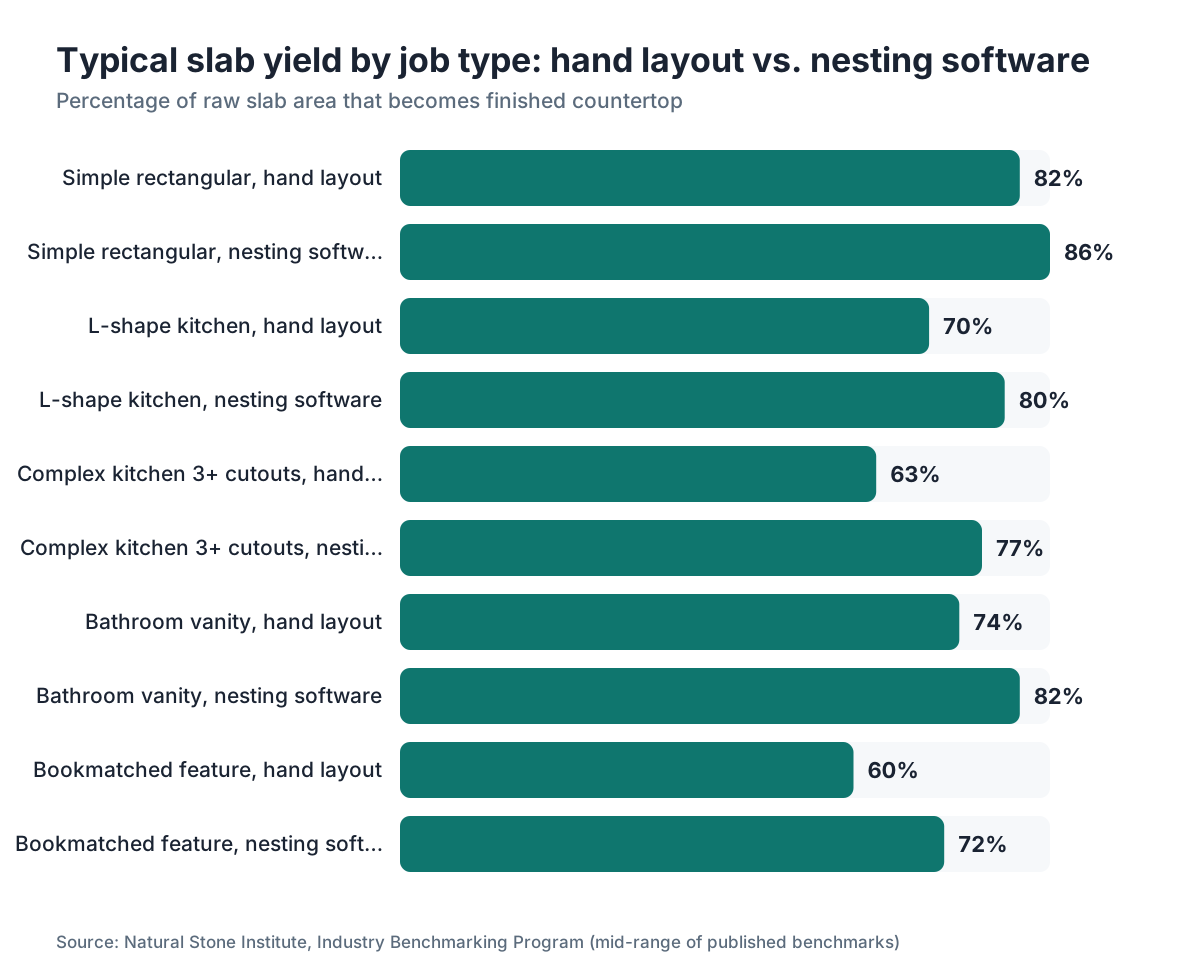
Most fabricators who still lay out cuts with a grease pencil and a tape measure land between 60% and 72% yield on complex jobs, based on benchmarks reported by stone trade groups [2]. Shops running dedicated nesting software report 78-85% on comparable work. The gap is measurable, and it's worth chasing.
Yield also feeds quoting accuracy. If your estimator assumes 75% and the shop cuts at 65%, every job with a tight slab leaves money on the table. That mismatch is one of the quietest ways a fabrication shop bleeds margin without anyone noticing.
How does digital nesting software actually work?
Nesting software takes the digital shapes of every countertop piece a job needs, usually imported from a templating file or drawn inside the software, and arranges them on a virtual slab to minimize waste. The engine tries hundreds or thousands of arrangements in seconds. No human matches that with a marker on a paper template.
The core algorithm is a variant of 2D bin-packing, a well-studied optimization problem [3]. Good stone software adds constraints on top of the math: grain direction locks so veining runs consistent across an island, blade-kerf clearance between cuts, no-fly zones for cracks or pits flagged during slab inspection, and pattern-matching rules for bookmatch slabs.
Templating data is the starting point. If your template is off by half an inch on a long run, the engine places pieces perfectly but the physical cut won't fit the actual countertop. That's why digital templating with laser or structured-light scanners feeds nesting software far cleaner than hand-measured paper templates [4].
After the engine proposes a layout, a person reviews it. This is not a press-and-walk-away box. An experienced layout tech overrides placements to keep bookmatched sections aligned, dodge a slab's known weak zones, or pull a remnant from an old job into the plan instead of cutting fresh stone.
What yield improvement can you realistically expect?
Honest answer: it depends on job complexity and where your baseline sits. Simple rectangular kitchens with no sinks or cooktops have little room to improve, because even a grease-pencil layout gets close to optimal on rectangles. The gains show up on L-shapes, radius corners, and full-slab feature pieces.
A 2019 study in Computers and Operations Research measured 2D irregular bin-packing algorithms against manual placement on furniture panel cutting plans and found algorithmic nesting cut material waste by an average of 12-18 percentage points [3]. Stone countertop cutting is a similar problem geometry, though veining constraints add complexity that can narrow the gap a little.
Benchmark data from the Natural Stone Institute, which tracks member fabricators, puts top-quartile shops above 82% yield and bottom-quartile shops below 68% [2]. The difference is more than software. It's templating accuracy, crew discipline on remnant tracking, and whether the shop actually pools remnants across jobs.
Here's a fair expectation for a shop moving from hand layout to nesting software. Figure 8-14 percentage points on jobs with irregular shapes, and 3-6 points on simple rectangular work. The software pays back fastest in shops doing a lot of complex residential remodels or commercial tops with many cutouts.
What features separate good nesting software from mediocre ones?
The single most important feature is grain and vein direction control. If the software can't lock piece orientation to a declared grain axis and hold it across every piece on the slab, you'll override the engine constantly on natural stone, which kills most of the time savings.
After that, the features that actually move the needle:
Remnant management. The software should keep a live inventory of remnant slabs, with their exact shapes digitized, and pull those shapes into the nesting pool automatically when one is big enough for a piece on an upcoming job. A lot of money hides here. Plenty of shops warehouse dozens of remnants and then buy fresh slabs anyway, because nobody can find a match fast enough to matter.
Multi-job nesting. Instead of nesting one job on one slab, the engine fills a slab with pieces from several jobs at once. That's powerful when you have small jobs in the same material. A 24-inch sink cutout from Job A might fill the exact gap Job B's L-corner leaves behind.
Cut path export. If the output connects straight to your CNC bridge saw's controller, you skip manual re-entry of cut coordinates. Re-entry breeds errors and eats 15-30 minutes per job that pile up into real labor cost.
Crack and flaw marking. The operator should be able to draw no-cut zones on the slab image, and the engine should treat them as hard constraints, not suggestions.
Features that sound good but rarely change yield: 3D slab visualization (nice for a sales pitch, irrelevant to yield), AR overlay tools (slow to set up, rarely touched on the floor), and AI-branded marketing that calls ordinary bin-packing "machine learning." Ask vendors flat out what algorithm they use and whether it handles irregular polygons, more than rectangles.
How does digital templating connect to nesting accuracy?
Nesting is only as good as the shapes it starts with. A piece that's 0.75 inches wider than reality, because the template got hand-measured on an unlevel floor, will nest beautifully in software and then leave a gap at install or force a field cut that wastes time and sometimes chips the slab edge.
Laser templating systems, and structured-light scanners including LiDAR units, capture countertop cavity dimensions to within ±1/16 inch or better [4]. That precision means the engine places accurate shapes and the cut pieces arrive fitting the first time.
The workflow that produces the highest yield in practice: laser template in the field, import the DXF or proprietary file straight into nesting software, nest and approve, export cut paths to CNC. No paper, no re-measurement, no re-entry. Every handoff that re-draws or re-measures a shape is another chance for error to stack up.
Shops still on paper templates should at least digitize the paper shapes with a digitizing tablet before nesting. Slower than laser, but more accurate than eyeballing a layout on a physical slab. The Marble Institute of America, now the Natural Stone Institute, has long recommended digitizing as a transitional step for shops not ready for full laser templating [2].
How should fabricators handle remnant inventory to boost yield across all jobs?
Remnant management is where most shops leave the most money. A remnant on an A-frame in the yard has real value, maybe $50-$200 in stone and sometimes much more for exotics, but only if someone can find it, identify it correctly, and fit a future piece onto it.
Digital remnant tracking means every remnant gets photographed, its shape digitized (or entered as a polygon), and logged with material type, thickness, finish, and location in the yard. When a new job comes in using that material, the engine tests whether a remnant covers any pieces before it opens a fresh slab.
The economics are clear. Say a remnant covers a 4-square-foot sink apron that would otherwise come off a $450 slab. If that remnant was already paid for on a previous job, the piece costs only labor, not stone. At typical shop rates, that's $40-$80 in labor versus $90-$120 in stone cost for the same piece off a new slab.
One discipline helps a lot: give remnants a shelf life. If a remnant hasn't matched a job in 90 days, it goes to the sale bin or gets offered to homeowners at a discount. Hoarding remnants forever just clutters the yard, makes it harder to move around, and makes digital tracking unreliable because things get shifted without anyone updating the system.
For homeowners looking at materials like granite countertops or marble countertops, asking a fabricator whether they have remnants in your material is a legitimate money-saving question. A shop with good remnant tracking can answer in under two minutes.
What does the nesting process look like step by step?
Here's how a job flows through a well-run nesting workflow:
-
Template. The installer or estimator templates the countertop cavities in the field, either with a laser system or a physical template that gets digitized back at the shop.
-
Import. The template file comes into the nesting software. Piece labels (island top, sink run, return wall) are confirmed and any special constraints (grain lock, bookmatching) are set.
-
Slab selection. The estimator or layout tech picks the slab or slabs for this job. Good shops tie slab selection to the quote so material cost is locked before fabrication starts.
-
Remnant check. The software scans remnant inventory for pieces that could cover any part of this job. If matches exist, the tech reviews and approves them.
-
Auto-nest. The engine runs the arrangement algorithm. On a modern workstation this takes seconds to a few minutes, depending on piece count and constraint complexity.
-
Manual review. The layout tech inspects the arrangement. They check grain direction, look for placements over slab defects, and may drag pieces to improve how veining reads across seams.
-
Approval and export. Once approved, the layout locks. The software exports cut paths to the CNC bridge saw controller and prints a cut sheet for the crew.
-
Remnant update. After cutting, the leftover slab shape gets measured and logged as a new remnant.
Shops that skip steps 4 and 8 report the worst remnant utilization, every time. The remnant loop only pays off if both ends of it, logging new ones and checking existing ones, happen on every job.
How much does nesting software cost, and what's the payback period?
Pricing varies widely. Standalone nesting modules aimed at stone fabricators run roughly $2,000-$6,000 per year on subscription, or $8,000-$20,000 for perpetual licenses, based on published vendor pricing as of 2024 [5]. Integrated quoting-and-nesting platforms, which bundle estimating, job management, and nesting, tend to run $5,000-$15,000 per year depending on seat count.
Payback depends on your volume and starting yield. Take a shop cutting 15 slabs per week at $400 average slab cost, moving from 68% to 80% yield. That saves about 12% of slab cost, or $48 per slab, which is $720 per week. Annualized, that's roughly $37,000 in material savings, before you count labor cut by CNC export and fewer callbacks from misfitting pieces. A $6,000-per-year subscription pays back in under 90 days at that volume.
Smaller shops doing 5-8 slabs per week still hit payback within 6-12 months in most cases, assuming they actually use the remnant management features. Software that sits half-adopted doesn't pay back at all, and that's a genuine risk. Training and workflow discipline matter as much as the tool. The SBA's small business finance guidance lays out the basic framework for calculating a payback period on equipment and software like this [8].
SlabWise includes nesting and remnant management inside its quoting platform, and you can see how the layout tools work through the demo if you're weighing options for a shop.
For context on the material costs that make yield worth chasing, see our coverage of kitchen countertops and countertop installation costs.
What are the biggest mistakes fabricators make when implementing nesting software?
The most expensive mistake is treating the engine as fully autonomous. The algorithm optimizes geometry. It doesn't know the left end of this slab has a hairline fissure, or that the client paid extra for a dramatic vein running diagonally across the island. Human review is not optional on natural stone.
Second mistake: importing shapes from bad templates and trusting the output anyway. If the input shapes are wrong, the nesting is geometrically efficient and practically useless. Shops that buy software without fixing their templating process get prettier layouts with the same fit problems at install.
Third: nesting each job in isolation while the shop runs multiple jobs in the same material. Leaving a 30% offcut on a slab, then opening a fresh slab for the next job in the same granite, wastes obvious money. Multi-job nesting needs a scheduler or coordinator who can batch jobs by material, and that takes some organizational discipline.
Fourth: not training the full crew. If the one tech who runs nesting is out sick and nobody else knows the system, the shop reverts to grease pencils for the day. Cross-train two or three people and that risk goes away.
Fifth, and this one is underappreciated: ignoring kerf width in the settings. A bridge saw blade removes roughly 1/8 inch of stone per cut [9]. If the software defaults to zero kerf or the wrong width, pieces nest tighter than they can actually be cut, and the last few pieces won't fit the slab as planned. Set kerf to match your real blade and verify it before you trust any layout.
Does nesting software work for quartz and engineered stone, or just natural stone?
It works well for both, and it produces more consistent results on quartz because there are fewer constraints. Engineered stone like Cambria or Silestone has no grain direction to worry about, no bookmatch requirements, and no fissures to avoid [6]. The pattern is uniform or random by design. The engine runs with fewer manual overrides, and the auto-layout is often good enough to approve as-is.
That said, large-format quartz slabs from some makers have subtle directional shading that shows when pieces rotate 90 degrees. Some fabricators treat these like natural stone and lock orientations. Others don't bother. The safe move is to check the manufacturer's technical data sheet for the specific product, since Cambria countertops and similar premium engineered stones sometimes specify directionality in their installation guidelines [12].
For laminate or solid-surface materials like Corian countertops, nesting software gets used less. These come in smaller sheets, not slabs, seams blend easily, and material cost is lower. The ROI on software is weaker on cheap material.
Natural stone with strong directional veining, especially quartzite and certain marbles, needs the most operator involvement in review. The geometry optimization still helps, but a skilled fabricator's eye on vein alignment is not something the algorithm replaces.
How do you evaluate whether your current yield is actually good?
Start by measuring it. Pull the last 20 completed jobs, record the square footage of finished pieces delivered against the total square footage of slabs consumed, and calculate the ratio. Most shops that have never run this exercise get surprised by how wide the range is across job types.
The Natural Stone Institute's benchmarking program gives member fabricators yield comparisons against anonymized peers [2]. If you're not an NSI member, regional stone associations sometimes publish similar data.
A simple benchmark table by job complexity:
| Job Type | Hand Layout Typical Yield | Nesting Software Typical Yield |
|---|---|---|
| Simple rectangular, no cutouts | 78-85% | 83-88% |
| L-shape kitchen, 1-2 cutouts | 65-74% | 76-84% |
| Complex kitchen, 3+ cutouts | 58-68% | 72-81% |
| Bathroom vanity tops | 70-78% | 78-85% |
| Full bookmatched feature wall | 55-65% | 68-76% |
These ranges come from published industry benchmarks and vendor case studies [2][5]. Your shop's results vary with crew experience, slab dimensions, and material type.
If your measured yield already sits at the top of the hand-layout range, software gains will be small. If you're in the bottom third, there's real money on the table, and it's worth the investment to go find it.
What should homeowners understand about slab yield when getting quotes?
You won't run the nesting software, but understanding yield helps you read quotes and ask sharper questions.
When a fabricator quotes "by the square foot," they're usually pricing finished countertop delivered. But they buy stone by the slab, and how efficiently they cut that slab affects their margin and sometimes your price. A fabricator with poor yield either charges more per square foot to cover waste or cuts corners somewhere else. A shop with tight nesting and good remnant tracking has more room to work with on price.
Ask two questions: "Do you use digital nesting software?" and "Can you show me the layout you're planning for my slab?" A fabricator who can hand you a digital cut sheet has done real planning before touching stone. One who says they'll figure it out when the slab hits the table is working with more waste.
If your job is small, a single vanity top for example, ask whether they have a remnant in your material. A well-run shop with active remnant tracking can often cut a small piece from a remnant and pass some savings to you.
For anyone comparing materials before committing, our guides on granite countertops, marble countertops, and kitchen countertops cover material costs and what drives price differences at the fabrication level.
Frequently asked questions
What is a good slab yield percentage for a stone fabrication shop?
Top-quartile shops consistently hit 80-85% yield or better on complex jobs. The industry average across all shop types runs closer to 70-75%. If your shop is below 68% on typical residential kitchen jobs, that's a signal that layout practices, templating accuracy, or remnant management (or all three) need attention. Nesting software alone won't fix inaccurate templates.
Can nesting software handle bookmatched slabs?
Yes, but it needs proper setup. You define paired slab images in the system and mark the bookmatching axis. The engine then mirrors piece placements across the pair. The key step is loading accurate slab images (photographed flat, undistorted) so the visual match the software predicts is what you actually see after cutting. Budget extra review time on bookmatched layouts. The algorithm optimizes geometry but doesn't judge aesthetic vein flow.
How long does it take to run a nesting layout on a typical kitchen job?
The auto-nest calculation itself takes seconds to a few minutes on modern hardware. The full process (importing shapes, setting constraints, running the engine, reviewing and adjusting, and exporting to CNC) typically runs 20-45 minutes per job once a shop is trained. That's comparable to or faster than a skilled tech doing it manually, with better yield and a digital record for every cut.
Does nesting software integrate with CNC bridge saws?
Most major nesting platforms export cut paths in formats (DXF, G-code, or proprietary) compatible with common CNC bridge saw controllers from Donatoni, Park Industries, Northwood, and others [7]. Integration quality varies by software and machine combination. Before buying any nesting software, ask the vendor for a specific list of CNC machines their export has been tested on, and verify it with your machine manufacturer.
What's the difference between nesting software and standard CAD software?
CAD lets you draw and arrange shapes, but you do the optimization by hand. Nesting software runs an algorithmic engine that tests thousands of arrangements to minimize waste, enforces material-specific constraints like grain direction and kerf width, and connects to remnant inventory. CAD is a drawing tool. Nesting is a production planning tool. Many shops use both: CAD for complex shape design, nesting for layout optimization.
How do fabricators track stone remnants digitally?
The common approach is photographing each remnant after cutting, tracing or importing its outline into nesting software, and tagging it with material type, thickness, and physical location in the yard. Some shops use QR code labels on each remnant that link to the digital record. The discipline that matters most is updating the record when remnants move, get sold, or get used. Software that ties remnant tracking to the nesting engine catches matches automatically when new jobs come in.
Is nesting software worth it for a small fabrication shop doing under 10 slabs per week?
Probably, especially if you cut a lot of natural stone with complex shapes. The payback period is longer at low volume, maybe 9-18 months versus 3-6 months for high-volume shops, but the margin improvement per job is the same. The bigger question for small shops is training. You need at least two people who can run the system confidently. If your team is two people and neither has time to learn new software, the implementation risk is real.
What input file formats do nesting software programs typically accept?
DXF is the most universal format and works with virtually every nesting platform. Some also accept DWG, SVG, and proprietary formats from specific templating systems like Laser Products Industries or Alpha Systems [10]. If you're buying a laser templating system and nesting software from different vendors, test the actual import workflow with your specific file outputs before committing to either purchase.
How does nesting software affect quoting accuracy?
A lot. When the engine runs a layout before the quote is finalized, you know exactly how many slabs the job needs and what yield to expect. That kills the common estimating error of assuming generic yield percentages that don't match a specific job's geometry. Shops that nest before quoting report fewer jobs where material overruns eat the margin, and fewer disputes with customers over material costs on complex work.
Can nesting software reduce seams in countertop installations?
Indirectly, yes. The engine can be set to minimize the number of pieces needed to cover a run, which may reduce seam count when the slab is large enough. It can also optimize seam placement for aesthetic consistency across joints. That said, seam count is driven mostly by slab size and countertop length, not by software. The software doesn't create more stone. It uses what's there more efficiently.
What happens to yield if template measurements are wrong?
The layout looks efficient on screen but the cut pieces don't fit the actual countertop. You either scrap the piece and recut (more slab cost and labor), do a field cut that risks edge chipping, or live with a gap that needs filling. Template accuracy is the foundation of yield optimization. Software can't fix bad input shapes, which is why digital templating with laser or LiDAR tools is worth so much.
Does nesting software help with material selection before a job is quoted?
Some platforms do. If the software has slab inventory linked to the engine, an estimator can run a quick layout on the actual slab sizes in stock for a given material, see what yield is achievable, and price accordingly. That beats applying a generic yield assumption during quoting. It also flags early when a job will need an extra slab, which changes the cost significantly.
Are there free or open-source nesting tools for stone fabricators?
General-purpose open-source bin-packing tools exist (SVGnest is one browser-based option), but none are built for stone fabrication with features like grain locking, kerf width settings for bridge saws, or remnant integration. Free tools give you a rough sense of algorithmic nesting, but running production on them introduces real operational risk. For a production shop, purpose-built commercial software is worth the cost.
How often should a shop review its nesting performance?
Monthly is a reasonable cadence. Pull actual yield from completed jobs, compare it against the projected yield the software showed at layout approval, and investigate large gaps. Common causes of yield falling short of the layout: kerf width misconfigured, operators overriding the nesting without logging why, or inaccurate template shapes. Reviewing this monthly catches systematic problems before they turn into expensive habits.
Sources
- Natural Stone Institute, Fabricator Benchmarking Data: Stone slab wholesale pricing and the financial impact of yield variation on fabrication margins
- Natural Stone Institute, Industry Benchmarking Program: Top-quartile fabricators achieve yield above 82%; bottom-quartile shops average below 68%; digitizing recommended as transitional practice
- Computers and Operations Research (Elsevier journal), research on irregular 2D bin-packing algorithms for panel cutting: Algorithmic nesting reduced material waste by an average of 12-18 percentage points versus manual placement on irregular 2D cutting plans
- Laser Products Industries, LT-2D3D Digital Templating System Documentation: Digital laser and structured-light templating captures countertop cavity dimensions to within plus or minus 1/16 inch
- Moraware, JobTracker and CounterGo Pricing Documentation (published pricing, 2024): Countertop fabrication software subscription pricing typically ranges $2,000-$15,000 per year depending on features and seat count
- Cambria Company, Product Technical Specifications: Engineered quartz surfaces have uniform or non-directional patterns that eliminate grain-direction constraints in nesting layouts
- Park Industries, CNC Stone Fabrication Systems Technical Documentation: CNC bridge saw integration with nesting software via DXF and proprietary cut-path export formats
- U.S. Small Business Administration, Manage Your Finances business guide: Framework for calculating material cost savings and payback periods for equipment and software investments in fabrication businesses
- Northwood Machine Manufacturing, Saber CNC System Technical Specifications: Bridge saw blade kerf width of approximately 1/8 inch per cut as standard for stone cutting operations
- Laser Products Industries, LPI Digital Templating System Documentation: Digital laser templating systems export DXF files compatible with stone fabrication nesting software
- Occupational Safety and Health Administration (OSHA), Crystalline Silica Standard 29 CFR 1910.1053: Regulatory context for stone fabrication shop operations and silica dust safety compliance relevant to workflow design
- Cosentino Group, Silestone Technical Data Sheets: Engineered quartz products specification confirming non-directional surface patterns applicable to nesting without grain constraints
Last updated 2026-07-10