
TL;DR
- Digital laser or structured-light templating runs 15 to 30 minutes on site per job.
- Traditional manual templating with cardboard or luan takes 45 to 90 minutes for the same kitchen.
- For a shop doing 10 or more jobs a week, switching to digital typically saves 5 to 15 field hours weekly and cuts remeasure callbacks by 80 to 90 percent.
What are the main templating methods shops actually use?
Three methods run the field today: manual (cardboard, luan, or stick templates), laser distance meters used freehand, and dedicated digital templating systems like LT-2D3D, Proliner, or Slabsmith. A fourth approach is creeping in: photogrammetry and LiDAR scanning off tablets or phones. Accuracy at countertop tolerances is still spotty enough that most production shops have not committed to it.
Manual templating is exactly what it sounds like. A tech cuts thin luan plywood or heavy cardboard to match the countertop footprint, labels every piece, rolls it up, drives it back to the shop, and the CNC or layout team traces or scans it in. The process is tactile and needs no capital equipment beyond a utility knife and tape.
Laser distance tools like the Leica DISTO series let a tech shoot point-to-point measurements and record them digitally. The catch: the tech still has to rebuild the layout in CAD back at the shop. That processing step is where time disappears.
Dedicated digital templating systems use a laser arm (the Prodim Proliner) or a structured-light and reference-point method (LT-2D3D) to capture the full countertop layout as a DXF file directly on site. That file goes straight to the CNC. No redrawing. No manual interpretation. [1][2]
How long does manual templating take compared to digital?
The numbers move with job complexity, but the ranges hold well enough to plan around. Manual templating a kitchen costs you two to three times the total labor of a digital capture, mostly in shop-side processing.
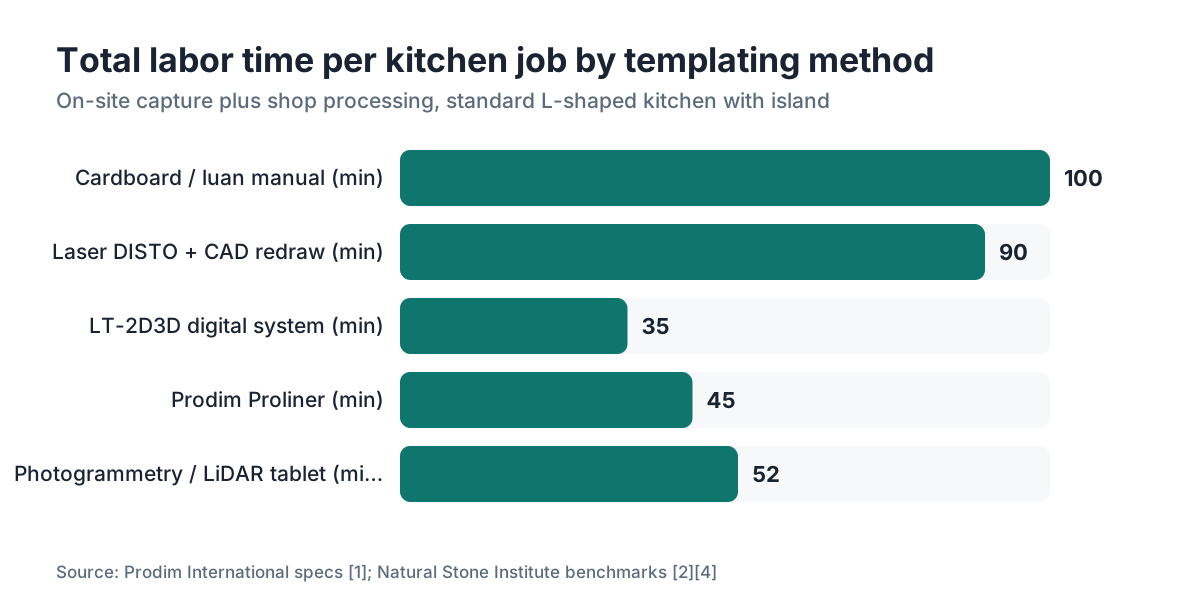
For a typical L-shaped kitchen with an island, an experienced manual templating tech takes 45 to 90 minutes on site. Add 20 to 45 minutes of shop-side layout processing (tracing the luan, digitizing edges, cleaning up the CAD file before it goes to the CNC). Total time per job: 65 to 135 minutes of labor, spread across at least two people.
Digital templating on the same job runs 15 to 35 minutes on site. The file transfers to the shop while the tech is still driving back, and it lands ready for nesting with minimal cleanup, usually 5 to 15 minutes of shop-side review. Total: 20 to 50 minutes of labor per job. [1]
That gap compounds fast. A shop running 12 kitchens a week that switches from manual to digital saves roughly 7 to 10 hours of combined field-plus-shop labor per week. At a fully-loaded labor cost of $35 to $55 per hour (wages, taxes, insurance), that is $245 to $550 in recovered labor weekly, or $12,000 to $28,000 annually. [3]
| Method | On-site time | Shop processing | Total labor per job |
|---|---|---|---|
| Cardboard / luan manual | 45-90 min | 20-45 min | 65-135 min |
| Laser distance device + CAD | 30-60 min | 30-60 min | 60-120 min |
| Dedicated digital system (Proliner, LT-2D3D) | 15-35 min | 5-15 min | 20-50 min |
| Photogrammetry / LiDAR (tablet) | 20-40 min | 15-30 min | 35-70 min |
The photogrammetry row comes with a caveat. Accuracy is close to plus or minus 1/16 inch on a good scan, but dedicated laser systems regularly hit plus or minus 1/32 inch or better, which matters for tight sink cutouts and appliance fits. [2]
Does digital templating actually reduce remeasure callbacks?
Yes, and this is where the ROI case beats the raw time savings. Digital systems drop the remeasure rate from roughly 3 to 8 percent of jobs down to under 1 percent in most shop reports.
Remeasure trips are expensive. A tech drives out, spends 30 to 60 minutes re-templating, drives back. That round trip can run 2 to 3 hours all-in, and the stone is sometimes already cut. One remeasure on a marble job can wipe out the margin on the whole project.
Fabrication industry surveys, including data collected by the Marble Institute of America (now part of the Natural Stone Institute), have put manual templating error rates at roughly 3 to 8 percent of jobs needing some form of remeasure or field correction. Digital systems pull that under 1 percent in most shop reports. Those are self-reported figures, so treat them as directional rather than exact. [4]
The mechanism is simple. Manual templates pick up error at every transfer: cutting the luan, loading it in the van without bending it, tracing it at the shop. Digital files have no physical transfer step. What the sensor captures is what the CNC cuts.
For a shop doing 50 jobs per month at a 5 percent remeasure rate, that is 2.5 callbacks a month. At $150 to $300 in labor and fuel per callback, plus the risk of a miscut slab, killing most of those callbacks pays for the digital system faster than most owners expect.
What does a digital templating system cost, and how long until it pays off?
Equipment cost swings hard by system and configuration. Plan on $8,000 to $28,000 for a field capture system, and expect payback in under a year at 12 jobs a week.
A Prodim Proliner (laser arm, cable-based) runs roughly $18,000 to $28,000 depending on model and accessories. The LT-2D3D system, which mounts a laser distance device to a reference frame, is generally in the $8,000 to $15,000 range. Slabsmith is mainly shop-side layout software, not a field capture tool, so it sits in a different category. Leica DISTO laser meters used as standalone tools run $300 to $1,500, but they still leave you with significant CAD work afterward. [1][5]
Training adds real cost. Most shops plan 2 to 4 days of onboarding before a tech is genuinely proficient, and another 4 to 6 weeks before they are fully fast. That onboarding period has a soft cost in reduced throughput.
Run the payback math at 12 jobs per week, recovering 8 labor hours weekly at $45 blended cost: $360 per week in recovered labor, plus roughly $200 per month in eliminated remeasures (conservative). That is about $540 per week in combined savings, or $28,000 per year. A $20,000 system pays back in under 9 months at that volume. At 6 jobs per week, payback stretches to 18 to 24 months, still reasonable but less urgent. [8]
Shops under 5 jobs per week are the honest exception. Capital and training overhead can genuinely outrun the savings at low volume, and a skilled manual templater is hard to beat on cost-per-job at that scale.
Which digital system is fastest: Proliner, LT-2D3D, or others?
For most standard straight-edge work, the LT-2D3D wins on speed-to-file. For accuracy and edge-case reliability on curves and irregular sinks, the Proliner wins. That is the whole decision in one sentence, but the details matter.
The Proliner is the established market standard and has the deepest user base in North American fab shops. Its cable arm is very accurate but makes the tech physically walk every edge. On a complex kitchen, setup and capture together run 20 to 35 minutes. File output is a clean DXF. It talks to most CNC controllers directly. [1]
The LT-2D3D system is generally faster on simpler jobs, closer to 15 to 25 minutes for a standard kitchen, because the tech shoots laser points instead of tracing edges by hand. It is lighter to carry and cheaper. The tradeoff: complex curved edges or heavily irregular sinks get slower to capture accurately. Some shops run LT-2D3D for bread-and-butter rectangular kitchens and keep a Proliner for architectural or curved work.
Rador and other European systems have good reputations but thinner North American service networks, which matters when something breaks on a Monday morning.
Photogrammetry tools like Matterport and iPhone LiDAR apps are genuinely interesting but still short of fabrication tolerance for most countertop work. They are better for whole-kitchen visualization and client communication than for CNC-ready files. The space is moving fast, and a handful of shops are using them for simple straight-edge jobs. [2]
How does templating speed affect overall shop throughput beyond field time?
Templating sits at the top of a pipeline. Slow it down and everything downstream waits. The bigger prize is not the field minutes, it is the day you shave off each job's cycle.
In a shop running a tight schedule, the template-to-cut window is typically 24 to 48 hours. If the digital file lands at the shop by 3 PM, the CNC team can nest and program that night, cut the next morning, and install the day after. Manual templates arriving crumpled and needing 45 minutes of shop processing push that window to 48 to 72 hours, adding a full day to each job's cycle. [6]
On a high-volume shop running 15 to 25 jobs per week, that extra day per job is not abstract. It is the difference between installing on Thursday or waiting until Monday. Delayed installs compress scheduling, spawn customer service calls, and sometimes force rush fees you either eat or awkwardly pass on.
The other downstream win is CNC efficiency. Digital files, especially from systems with direct CNC integration, arrive already nested or at least nest-ready. The programmer spends 10 to 20 minutes instead of 45. That frees the CNC for more cutting, which lifts slabs processed per week without adding a single machine. [6]
For fabricators running their own quoting and shop management software, template quality ties straight to material yield. A shop using SlabWise or similar nesting software gets the most out of that tool when incoming DXF files are clean and accurate, because the algorithm packs pieces tighter when edges are precisely defined rather than approximated from a hand-traced template.
Can a high-volume shop use manual templating and still stay competitive?
Some can. The shops that pull it off share a few traits: one or two veteran templaters who are genuinely fast and accurate, a simple job mix (mostly rectangular islands and straight runs), and a disciplined shop-side process for turning templates into cut files quickly.
The competitive pressure is real, though. Digital templating has gone common enough that it no longer reads as a premium differentiator. Customers usually do not care which system you use. They care about the install date and whether the stone fits. If your manual process reliably delivers clean files in under an hour of total labor per job, you are fine. If it is burning 2 hours per job with a 5 percent redo rate, you are leaving money on the table.
One honest middle-ground: use a DISTO laser and a field-measurement app like iMeasure or Magicplan to capture point-to-point dimensions accurately on site, then have a CNC programmer rebuild the file in CAD. This gets most of the accuracy benefit at a fraction of the equipment cost, though it still adds 30 to 60 minutes of CAD time per job. It is a reasonable step for a shop at 6 to 10 jobs per week that is not ready for the full capital commitment of a Proliner. [2][5]
How does templating method affect file quality for CNC cutting?
This matters as much as speed, maybe more. A digital file from a Proliner or LT-2D3D lands as a true-to-dimension DXF with real angles and radii, typically within plus or minus 1/32 inch. A hand-traced luan template stacks tolerance at every step and often reaches the CNC at plus or minus 1/8 inch. [1]
The CNC programmer imports the digital file, checks for anomalies, and sends it to cut. Clean input, clean output.
A manually traced luan template picks up error at the tracing stage (the digitizer has to interpret the edge of a physical cut), at the scan or photo stage if the shop photographs templates instead of tracing, and in any CAD cleanup. Each step adds tolerance stack. By the time the file hits the CNC, you might have plus or minus 1/8 inch on a corner angle, which shows up as a gap at the wall or a sink that will not drop in cleanly.
For countertop installation of stone like granite or quartzite, those tolerance gaps are a problem. For laminate or butcher block work where a small trim is acceptable, manual templating matters less. Stone is the discipline where file accuracy punishes you hardest, and it is also the highest-margin material, so accuracy errors cost the most there.
The material you fabricate should set how urgently you upgrade. A shop mostly doing laminate countertops or Formica countertops can live with wider tolerances. A shop cutting marble countertops or Cambria countertops needs tight files.
What training and staffing changes does digital templating require?
The good news: digital templating is learnable. Most techs are proficient with an LT-2D3D in about a week and fully fast in 4 to 6 weeks. The Proliner has a steeper curve, partly because its cable arm needs consistent technique to avoid measurement drift.
The less obvious shift is what happens to your existing templating staff. Manual templating is a skilled trade that takes years to build. A fast, accurate manual templater is valuable and knows it. When you switch systems, that person's value moves from hand skill to systematic process, a different competency. Most adapt fine. Some resist.
On hiring, digital templating opens the role to technicians who are detail-oriented and tech-comfortable but who lack years of countertop experience. That is a real staffing edge in a tight labor market. [3]
A practical note on coverage: if only one person in your shop can run the digital system, you have a fragile dependency. Cross-train at least two people before you retire the manual process entirely. The first two months after a rollout are when most shops learn this the hard way.
Is digital templating faster for small or irregular kitchens specifically?
Small rectangular kitchens, the kind with two straight runs meeting at a corner, are where manual and digital methods sit closest in total time. A skilled manual templater can knock out a simple galley in 30 minutes. The digital system still wins on shop processing, but the on-site savings are modest.
Where digital runs away is on complex layouts: angled walls (common in older homes), curved breakfast bars, vessel sink cutouts with odd geometry, or kitchens where nothing is actually square even though it looks like it should be. Capturing a wall that is 87.3 degrees instead of 90 is trivial for a Proliner. Catching that with manual templating takes careful measurement and interpretation that even good techs sometimes miss. [1][4]
Irregular shapes also hit material yield. A file that captures an odd angle accurately lets the nesting software pack the slab tight. A file that shows a rounded corner where the real corner has a 2-inch radius wastes material. For granite countertops at $60 to $100 per square foot installed, wasted material adds up fast. [7]
What do fabricators who have switched to digital templating actually report?
The trade press and industry forums (StoneFabricatorElite, Countertop Resource) show a consistent pattern from shops that posted their experience switching from manual to digital. The speed gains get confirmed almost every time, and most of the surprise is where the savings land.
The surprise for most shops is how much benefit shows up in shop processing rather than field time. Techs often report the on-site time savings are smaller than expected, but CAD cleanup and file-prep time drops sharply.
The most common complaint is the learning curve, specifically the first 3 to 6 weeks when the new system runs slower than the old manual process while techs build proficiency. Shops that do not plan for that dip get surprised by it.
Some shops report customers notice the professionalism of a tech showing up with a purpose-built digital tool, which helps close repeat business and referrals. Whether that is worth quantifying depends on your market.
The Natural Stone Institute's fabricator benchmarking surveys have noted digital adoption growing steadily, with a meaningful share of member shops reporting a shift to fully digital templating workflows by 2022. [4] Exact percentages vary by region and shop size, but the direction is clear: manual-only shops are increasingly the minority among mid-to-large volume fabricators.
For shops managing kitchen countertops across multiple material types, one consistent digital capture process simplifies training whether the job is stone, engineered quartz, or solid surface like Corian countertops.
How do you calculate the ROI of switching templating methods for your specific shop?
Start with four numbers: your jobs per week, your current average total labor time per template (field plus shop processing), your fully-loaded hourly labor cost, and your current remeasure rate. Everything else is arithmetic.
Estimate time savings by taking the difference between your current per-job labor and the target per-job labor with a digital system (use 25 minutes as a conservative estimate for a mid-complexity kitchen on an LT-2D3D). Multiply time saved by jobs per week by labor rate to get weekly labor savings.
Add remeasure savings: take your monthly remeasure count, multiply by the all-in cost of a remeasure trip (typically $150 to $350 including labor, fuel, and any material consequence), and use 80 percent of that as your savings estimate, since no system kills every error.
Set that total savings against equipment cost, amortized over 5 years, plus annual maintenance (typically 5 to 10 percent of equipment cost per year for laser systems). [8]
Here is a worked example. Ten jobs per week, saving 45 minutes per job, at $45/hr blended cost. That is 7.5 hours times $45, or $337.50 per week in labor savings, which is $17,550 per year. Add $150 per month in saved remeasures: $1,800 per year. Total: about $19,350 in annual savings. A $15,000 system amortized over 5 years costs $3,000 per year plus $1,000 maintenance. Net annual benefit: roughly $15,000. That is a strong return for a 10-job-per-week shop.
To run this model against your own numbers, job management and quoting tools that fold in templating workflow data, including options like SlabWise, can connect template-to-cut cycle time to real job profitability. Track the actual numbers rather than guessing at them after the fact.
Frequently asked questions
How accurate is digital templating compared to manual?
Dedicated laser systems like the Proliner or LT-2D3D consistently hit tolerances of plus or minus 1/32 inch. Manual luan or cardboard templating, after the transfer and tracing steps, typically delivers plus or minus 1/8 inch in real shop conditions. That difference is significant for stone, particularly at sink cutouts, appliance openings, and any wall with an angle that is not exactly 90 degrees.
Can a one-person shop justify buying a digital templating system?
At fewer than 5 jobs per week, the math is tight. Equipment cost runs $8,000 to $28,000, and payback at low volume can stretch to 3 to 4 years. The case is stronger if you are cutting high-margin stone where one remeasure and miscut destroys a job's profit, or if your market expects fast turnaround. A used or refurbished unit cuts the payback period substantially and is worth investigating before buying new.
What is the learning curve for digital templating tools?
Most techs reach basic proficiency in about a week and are genuinely fast in 4 to 6 weeks. The Proliner takes a bit longer than the LT-2D3D because its cable arm requires consistent technique. Plan for a 3 to 6 week period after rollout where throughput dips slightly before recovering. Cross-training two techs before retiring manual processes eliminates the risk of a single point of failure.
Does the templating method affect CNC programming time?
Significantly. A clean DXF from a digital system needs 10 to 20 minutes of CNC programming per job. A manually traced and digitized template typically needs 30 to 60 minutes of file cleanup before the programmer can nest and program it. For a shop running 15 jobs a week, that gap adds 5 to 10 hours of programmer time weekly, which is real overhead cost even if it feels invisible.
Which templating method works best for curved or irregular countertops?
Digital wins clearly on curved and irregular work. The Proliner traces any curve accurately because the tech physically follows the edge with the cable arm. Manual templating of curves requires cutting flexible luan or doing a series of straight-chord approximations, both of which introduce error. For radius breakfast bars, vessel sinks, or kitchens with bowed walls, digital templating is the practical choice.
How long does it take to template a full kitchen with a Proliner?
A standard L-shaped kitchen with an island runs 20 to 35 minutes with a Proliner, including setup and file export. A simple galley layout can be done in 15 to 20 minutes. Complex kitchens with multiple curved edges, undermount sinks, and cooktop cutouts can reach 40 to 50 minutes. Those times assume a trained tech working at full proficiency.
Can you use an iPhone or iPad LiDAR for countertop templating?
For visualization and rough planning, yes. For CNC-ready files at countertop tolerances, current consumer LiDAR apps are not reliable enough for most production shops. The point cloud resolution is typically plus or minus 1/4 to 1/2 inch on countertop surfaces, which is acceptable for furniture layout but not for stone cutting. This space is improving, and it is worth re-evaluating annually.
What file format do digital templating systems output?
Most output DXF, which is directly compatible with the major CNC controllers and CAD packages used in stone fabrication. The Prodim Proliner also has native integration with several shop management platforms. Some systems output DWG or SVG as alternatives. Whatever format your CNC programmer works in, confirm compatibility before committing to a system purchase.
How does templating speed connect to overall job turnaround time?
Templating is the first step in a 48 to 72 hour production window. A digital file that arrives at the shop by mid-afternoon can be nested and programmed that evening, cut the next morning, and installed the following day. Manual templates that need significant shop processing push the start of that window back by half a day to a full day, which compresses the whole schedule and often forces weekend installs or rushed CNC runs.
Is the Prodim Proliner worth the price over a cheaper alternative?
The Proliner is the most proven system with the largest North American support network, which matters when a sensor fails on a busy week. Its edge-following method is particularly accurate on curves. The LT-2D3D is a credible alternative at roughly half the cost and is genuinely faster on simple rectangular jobs. If your job mix is mostly straight-edge work, the LT-2D3D often makes more financial sense. Mixed or complex work favors the Proliner.
Do homeowners care which templating method a fabricator uses?
Most homeowners have no idea the distinction exists, and that is fine. What they notice is whether the stone fits perfectly and how long the process takes. Digital templating reduces callbacks and speeds installation, both of which show up as better customer experience. Some shops mention the digital tool during the consultation as a quality signal, and it can be a useful differentiator in a competitive market.
What happens if a digital templating system breaks down?
This is a real operational risk, which is why keeping manual templating as a backup process is worth maintaining even after you go fully digital. Most shops keep basic luan and a DISTO meter on the truck for exactly this scenario. Proliner and LT-2D3D both have service networks, but parts and repairs can take days. A 2 to 3 day manual backup capability prevents a breakdown from stopping production entirely.
Sources
- Prodim International, Proliner product documentation and specification sheets: Prodim Proliner accuracy specifications and field capture workflow, on-site time ranges for standard kitchen layouts
- Natural Stone Institute, digital templating technology overview and accuracy guidance for fabricators: Digital templating on-site time ranges and accuracy tolerances compared to manual methods, including laser and photogrammetry approaches
- U.S. Bureau of Labor Statistics, Occupational Employment and Wage Statistics, Stone Cutters and Carvers: Labor cost benchmarks for stone fabrication technicians, supporting fully-loaded hourly cost estimates of $35 to $55
- Natural Stone Institute, Fabricator Benchmarking and Industry Surveys: Digital templating adoption trends among member fabricators; remeasure and callback rate benchmarks for manual vs digital methods
- Leica Geosystems, DISTO laser distance meter product line specifications: DISTO laser meter price range ($300 to $1,500) and measurement capabilities for field use
- Fabricators and Manufacturers Association International, shop workflow and CNC integration guidance: Template-to-cut window timing and CNC programming time impact of file quality in fabrication workflows
- Natural Stone Institute, Stone Industry Education and Pricing Reference: Granite countertop installed cost ranges of $60 to $100 per square foot referenced for material yield impact calculations
- U.S. Small Business Administration, Equipment Financing and ROI Analysis Guidance: Framework for capital equipment payback period and amortization calculations used in ROI modeling section
- Occupational Safety and Health Administration (OSHA), Silica in Construction Standard 1926.1153: Regulatory context for stone fabrication shop operations; indirectly relevant to field templating workflow documentation requirements
- National Institute of Standards and Technology (NIST), dimensional measurement and calibration standards: Measurement accuracy standards and tolerance definitions supporting plus or minus 1/32 inch specification claims for laser systems
Last updated 2026-07-11