TL;DR
- Most shops lose 45 to 90 minutes per job to sloppy templating.
- The fix is three things stacked together: better pre-visit prep, digital measuring tools, and a tight shop-floor file workflow.
- Digital systems like the Proliner or LT-2D3D cut total template-to-CNC time by 50 to 75% compared to hardboard, according to fabricator case studies from the tool makers.
Why does templating take so long in the first place?
Templating is the one job step that happens at the customer's house. Every wasted minute there costs you travel plus labor, and the meter is running the whole time. A residential template visit for a moderately complex kitchen runs 60 to 120 minutes, based on fabricator forums and training material from Prodim, but shops at the slow end of that range are almost always losing time in predictable, fixable places [1].
The big time-wasters break into three buckets. First is jobsite prep, or the lack of it: templaters show up to find old countertops still bolted down, appliances unmoved, or a plumber mid-job. Second is the measuring method itself. Manual hardboard or cardboard templates need cutting, dry-fitting, labeling, and then hauling a fragile object back to the shop without cracking it. Third is file transfer and interpretation. Someone has to turn that physical template into a CNC-ready file, and if the drawing is ambiguous, you lose another 20 to 40 minutes in back-and-forth before the first cut.
None of this is new. What changed over the last ten years is that digital measuring tools got cheap enough that even a single-truck operation can justify them, and the ROI math now favors most shops.
What does a pre-visit checklist actually include, and why does it matter?
A solid pre-visit checklist is the cheapest way to cut template time. It costs you one phone call or a short emailed PDF, and it kills the two most common delays: countertops that aren't demo'd and sinks or appliances still boxed in a hallway.
Here is what the checklist should confirm before the templater leaves the shop:
- Existing countertops removed and cabinetry cleaned of old caulk and debris
- Sink cutout template (or the sink itself) on site
- Cooktop or range confirmed in place, or confirmed not needed for reveal measurement
- Walls painted, because paint thickness on fresh drywall can eat 1/8 inch of reveal
- Any window sills or door casings that affect slab runs noted in the work order
- A responsible adult present who can make decisions about edge details and seam placement
Shops that send this checklist as an automated text or email 48 hours before the visit, then again the morning of, report cutting arrival-to-measuring time by 15 to 25 minutes per job, according to workflow guides from the Marble Institute of America (now the Natural Stone Institute) [2]. That number sounds small until you multiply it by 400 jobs a year.
The checklist is also your best defense against a wasted trip. A 45-minute drive to a job where the old countertops are still installed costs more than the whole template file would have earned you.
How much faster is digital templating than hardboard templates?
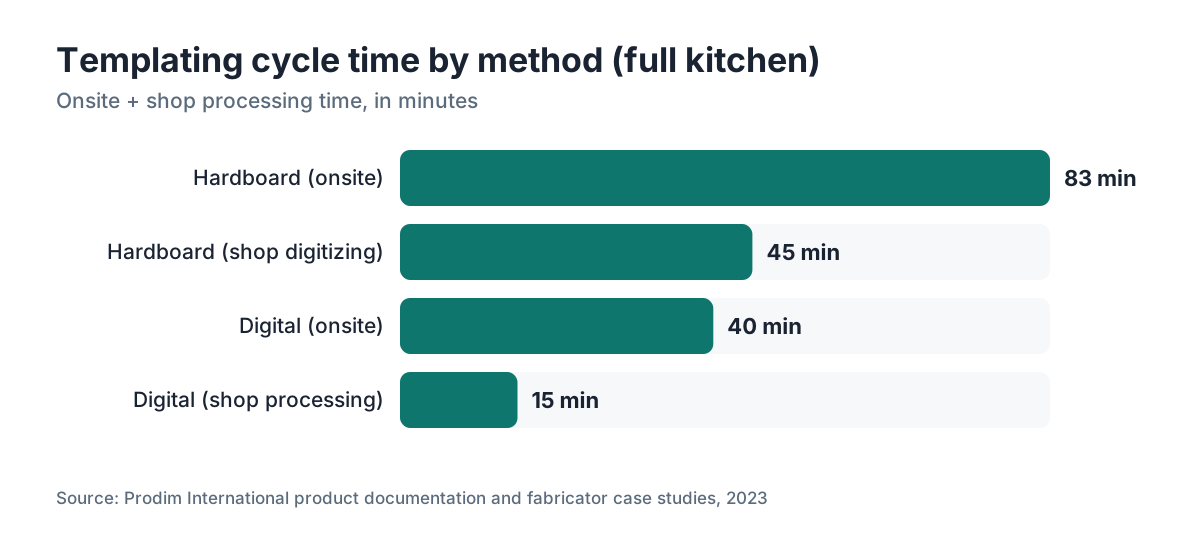
Here the numbers get concrete. A well-run hardboard template on a full kitchen takes roughly 75 to 90 minutes onsite, plus 30 to 60 minutes of shop digitizing if you're tracing that template into CAD by hand. A digital system, run by an experienced operator, covers the same kitchen in 30 to 50 minutes onsite, and the file is CNC-ready within minutes of returning to the shop because the device exports straight to common cutting formats [1].
The main digital systems in the North American market:
| System | Measurement method | Typical onsite time (full kitchen) | CNC file output |
|---|---|---|---|
| Prodim Proliner | Sonic/wheel arm | 30 to 50 min | DXF, SAM, others |
| LT-2D3D (Laser Products) | Laser triangulation | 25 to 45 min | DXF |
| Festool Conturo (measure only) | Manual + digital transfer | 45 to 65 min | Requires separate CAD |
| Slabsmith (photo-based) | Photogrammetry | 20 to 35 min (layout) | Proprietary + DXF |
| Manual hardboard | Physical cutting | 75 to 90 min | Requires digitizing |
Festool's approach is less about onsite speed and more about accuracy, so the table oversimplifies it a little. Slabsmith is really a slab layout tool that happens to export cut files, not a dedicated template system [8]. The honest speed comparison is Proliner vs. LT-2D3D vs. hardboard, and both digital options come out 35 to 50 percent faster onsite, with the real gain landing in shop processing time [1].
Run the math. A shop doing 300 jobs a year that shaves 40 minutes per job saves roughly 200 hours of labor. At a $35 fully-loaded labor rate, that's $7,000 a year [10]. Most digital templating systems cost $10,000 to $20,000, so the payback lands at 18 to 30 months before you count accuracy gains and fewer remakes [1].
What is the ROI on a digital templating system, and is it worth it for small shops?
The payback calculation is simple once you know your real numbers. You need four: jobs per year, current template time (onsite plus shop), labor rate, and the cost of remakes caused by template error.
For a shop doing fewer than 150 jobs a year, the case for a full $15,000-plus Proliner is weaker. The time savings are real, but payback stretches past three years. You may be better served by a lower-cost option like the LT-2D3D (roughly $4,000 to $8,000 depending on configuration) or a structured manual-to-digital workflow using a tablet and a measuring app like Canvas or Magicplan [4].
The remake cost angle gets underestimated constantly. A single countertop remake on a natural stone job runs $400 to $1,200 in material plus labor and delivery. If your current hardboard process throws even two or three remakes a year from template error, that alone justifies going digital. Prodim's published case studies show remake rates dropping 60 to 80 percent after the switch [1].
For large shops (500-plus jobs a year), the question isn't whether to go digital. It's whether to buy a second unit so templating never becomes a scheduling bottleneck. Two templaters with two devices run parallel routes, which matters a lot during the spring and summer rush.
How do you reduce wasted time during the onsite measuring visit itself?
Say you've done your pre-visit prep. The onsite visit still leaks time in a few spots. Here are the ones that show up most, and what to do about each.
Templater arrives missing info from the work order. Fix this with a work order that travels with the templater and lists the edge profile, sink model number, cooktop cutout specs, and any special detail like a waterfall edge or integrated drain board. A tablet with a job management app beats a paper folder here, because the templater can pull up the original quote and the customer's selections on the spot.
Repeat measuring because a dimension got transcribed wrong the first time. Digital systems nearly eliminate this. Manual methods don't. A second-person check (templater reads, helper confirms) on critical dimensions like corner-to-corner diagonals catches most errors before you pack up and leave.
Seam placement decided at the jobsite. Seam calls should happen before the visit whenever possible, based on the room sketch and the slabs sitting in your inventory. If the templater has to phone the shop to ask, that's a five to ten minute delay that belonged back in the quoting stage.
For shops running countertop installation crews that double as templaters, split the roles once volume justifies it. A dedicated templater who does nothing but template five to eight jobs a day gets dramatically faster than an installer who templates two jobs before a full install day. Specialization compounds.
What file and data workflows speed up the shop side of templating?
The template visit is only half the job. What happens to the file when the templater gets back decides how fast the job reaches the saw.
The fastest shops run a defined file-naming convention, one shared folder or cloud location, and a CNC programmer who picks up new files on a set schedule (every two hours, or on completion of each route). When a digital template file lands in the drop folder, the programmer opens it, assigns nesting, and queues the job with no verbal handoff needed. No file sits on someone's USB drive overnight.
Nesting software matters here. Nesting multiple jobs by hand burns 20 to 45 minutes that a computer does in under a minute with optimization algorithms. If your shop still nests by eye, moving to automated nesting is one of the highest-payoff shop-floor changes you can make. Tools like SlabWise handle quoting and nesting in one platform, so the template measurements feed straight into the cut layout without re-keying numbers [5]. Fewer re-entries, fewer errors.
A labeled DXF from a digital template also lets your stone supplier or a remote programmer review the layout before cutting. That's useful when a slab has vein or movement that needs a specific orientation. You have that conversation over a shared file instead of a phone call.
Label every piece in the file before the job goes to the saw. Piece labels (P1, P2, and so on) that match the installation drawing kill the most common install-floor mistake: pieces cut to the right dimensions but set in the wrong spot.
How do you handle complex or unusual kitchen layouts faster?
Islands with waterfall edges, curved breakfast bars, L-shapes with out-of-square walls, and commercial jobs with a pile of seams are where template time really balloons. A few targeted habits help.
Out-of-square rooms are where a digital system pays for itself on the first complex job. Capturing a 5-degree wall deviation with hardboard and transferring it accurately by hand is slow, fussy work. A Proliner or LT-2D3D grabs it in the same motion as any other wall. If you're still on hardboard, use a rafter square and mark every real angle explicitly instead of assuming 90 degrees.
Curved edges. Digital systems with a fine-pitch wheel arm (the Proliner at its finest setting captures curves in 5mm increments) record the curve as a polyline that translates straight to a CNC arc. Manual curved templates need a flexible ruler and tend to leave small flat spots that show up after install.
Very large commercial jobs. Do a measurement-planning site visit before the actual template visit. Walk the space, photograph every junction and obstacle, and bring the photos back to lay out with the shop team. The template visit then becomes execution of a plan, not improvisation. This adds one trip but cuts total template time by 30 to 40 percent on jobs over 200 square feet.
What training and staffing changes cut template time the most?
Equipment matters less than operator skill. A trained templater with hardboard beats an untrained templater with a $15,000 Proliner every time. The gap between a new templater and an experienced one usually runs 20 to 40 minutes per job for the first three to six months, then narrows as muscle memory builds. BLS classifies stone fabrication as a skilled trade, and it earns the label [6].
Structured training shortens that curve. Pair a new templater with your best operator for at least 20 jobs before sending them out solo. Have them explain their measurement sequence out loud before they start each room. Templaters who plan their path first save 5 to 10 minutes per job over those who measure reactively.
Build a standard measurement sequence: start at a fixed reference point (usually the refrigerator wall), measure perimeter walls in order, capture all cutouts last. Consistency means nothing gets forgotten, and the file always reaches the CNC programmer oriented the same way.
On pay, templating is a high-skill role that many shops underpay next to installation. Skilled templaters who understand kitchen countertops material behavior, especially how granite countertops or marble countertops act during cutting and installation, make smarter field calls about seams and movement. That knowledge cuts callbacks. It's time savings that never shows up on a template log but absolutely shows up on the P&L.
How do you track and measure your templating performance over time?
You can't improve what you don't measure. Most shops have no idea what their average template time is because nobody tracks it. Fixing that is simple and free.
Add two timestamps to every job ticket: template departure time (when the templater leaves the shop) and file-ready time (when the CNC-ready file hits the queue). The gap between those two numbers is your templating cycle time. Track it per templater, per job type (kitchen, bathroom, commercial), and per complexity rating (simple, standard, complex).
After 60 jobs you'll have enough data to see your slow spots. Maybe one templater runs 25 minutes slower than another. Maybe bathrooms take forever because your sequence isn't tuned for small rooms with lots of cutouts. Maybe the shop processing step is the bottleneck, not the field visit.
Set a target. Most well-run shops aim for 45 to 60 minutes of total cycle time (onsite plus shop) on a standard kitchen. If you're running 90 to 120, you have work to do. If you're already at 50, the next gain is probably in scheduling density, not technique.
Scheduling density means route optimization: how many templates can one person run in a day without rushing? For most digital operators the answer is four to six residential jobs per day in a compact service area. If you're running two or three, you're leaving capacity on the table.
What are the most common templating mistakes that cost time and money?
A handful of errors come up over and over in fabricator training material and shop forums.
Missed reveals on appliances. The gap between the countertop edge and the side of a refrigerator or range matters. A standard reveal is 1/8 to 1/4 inch, but some appliances need more. Capturing this right at the template stage costs 30 seconds. Fixing it after the cut costs an hour or more.
Ignoring wall movement. Walls in older homes shift seasonally. A template taken in January in a humid-summer climate can be slightly off by July. For stone jobs this usually doesn't matter because stone is rigid, but keep it in mind if you're seeing consistent fit problems in certain regions or seasons.
Not capturing backsplash height for slab-to-ceiling installs. If the customer wants a full-height slab backsplash (common on kitchen countertops in current design trends), you need the wall height measured at multiple points. Skip it and you're back for a second site visit.
Forgetting the electrical outlet boxes. Outlet placement affects where you can run a seam and whether you need a filler piece. Documenting it takes 60 seconds and prevents a costly late-stage change.
Not confirming the sink installation method (undermount, top mount, farmhouse). Each method has different overhang requirements, and getting it wrong at the template stage wastes material and time. Undermount sinks need precise cutout positioning that's far easier to nail with a digital template than with hardboard.
Is it faster to template or to measure from architectural drawings?
For new construction, some shops skip the template visit and work straight from architect or contractor drawings. That works if the drawings are accurate and the cabinets went in exactly to plan, which in practice happens maybe 60 to 70 percent of the time.
The risk with drawing-based measurement is expensive. If a cabinet run is even 1/2 inch off from the plan, the countertop may not fit. On a granite countertops job with no room to adjust, that's a remake.
A reasonable middle ground for new construction: use drawings for rough slab ordering and layout planning, then run a fast digital template visit once the cabinets are fully installed. You save the time you'd spend re-measuring from scratch while still catching the field deviations drawings miss.
For remodels and replacements, never skip the template visit. Old homes are full of surprises. Walls that aren't plumb, cabinets that have shifted, counter heights that vary by an inch across a single run. The template visit is your insurance against remakes on materials like marble countertops or other premium stones where a redo hurts.
Frequently asked questions
How long should a standard kitchen countertop template take?
With digital equipment, a standard kitchen (roughly 40 to 60 square feet of counter) should take 30 to 50 minutes onsite plus 10 to 20 minutes of shop file processing. With hardboard, budget 75 to 90 minutes onsite plus 30 to 60 minutes of digitizing. If your digital visits consistently run over 60 minutes for a simple kitchen, the bottleneck is usually prep or operator experience, not the equipment.
What is the cheapest way to speed up templating without buying new equipment?
Send a pre-visit checklist to every customer 48 hours before the appointment and again the morning of the visit. Confirm old countertops are removed, sinks are on site, and the space is ready. This alone cuts 15 to 25 minutes of wasted arrival time per job. Standardize your measurement sequence, add file-naming conventions, and track cycle time. None of it costs money, and the combined effect can rival a modest equipment upgrade.
How much does a digital templating system cost?
Entry-level laser setups like the LT-2D3D run roughly $4,000 to $8,000 depending on configuration. Mid-tier systems like the Prodim Proliner start around $12,000 to $15,000 for the base unit and climb with accessories and training. Tablet-based photogrammetry apps are much cheaper ($500 to $2,000 in hardware) but generally less accurate for stone fabrication. Prices move, so get current quotes directly from Prodim and Laser Products Industries.
What is the Prodim Proliner and is it the best option for most shops?
The Prodim Proliner is a sonic/mechanical arm measuring device made by Prodim International (Netherlands) that captures countertop profiles as digital polylines and exports them to DXF and other CNC-ready formats. It's the most widely adopted digital templating system in North America. For shops doing more than 150 jobs a year, it's the most validated choice. For smaller shops, the LT-2D3D is a credible, cheaper alternative worth a look.
Can I template countertops with just a smartphone app?
Apps like Magicplan and Canvas use LiDAR (on newer iPhones and iPads) to capture room dimensions. They work reasonably well for estimating and quoting, and some shops use them for simple bathroom vanity templates. For precision stone fabrication, the accuracy generally isn't reliable enough for CNC cutting without field verification. Treat them as quoting tools, not production templates, unless you've validated the accuracy on your own workflow.
How do digital templates reduce countertop remakes?
Digital templates capture wall angles and irregular shapes as actual coordinates, instead of relying on a fabricator to correctly read a physical hardboard piece. Prodim's published data shows remake rates dropping 60 to 80 percent after switching from hardboard to digital. The biggest single improvement is in out-of-square rooms, where even a 1-degree angular error in a hardboard template can leave a visible gap at the wall after install.
Should one person handle both templating and installation, or should these be separate roles?
Separating the roles improves speed on both ends once you're past roughly 200 jobs a year. A dedicated templater builds expertise and route efficiency that an installer who templates on the side can't match. Below 200 jobs, the overhead of two specialists may not pay off. Whoever templates should own measurement quality, with clear accountability for file accuracy and any resulting remakes.
How do you handle templating for unusual materials like butcher block or laminate?
Butcher block and laminate are more forgiving dimensionally than stone because they can be trimmed in the field. But the template visit still matters for establishing exact wall angles and cutout positions. For laminate and Formica-style surfaces, a precise template reduces wasted sheet material. Template time for these materials is usually shorter than stone because there's no seam placement complexity on most residential jobs.
What file format should digital templates be exported in for CNC cutting?
DXF (Drawing Exchange Format) is the most universal and is accepted by nearly all stone CNC saws and waterjet machines. Some systems export in SAM (a Prodim-specific format its own software reads natively) or DWG. If your CNC software accepts DXF, that's your safest default. Always confirm with your CNC operator or software vendor before committing, because version compatibility (DXF R12 vs. R14, and so on) occasionally causes import issues.
How many template visits can one person realistically complete in a day?
A digital templating operator in a compact service area can typically complete four to six residential kitchen jobs per day. Travel time is usually the binding constraint, not measuring time. In dense urban markets with short drives, six is achievable. In rural or sprawling suburban markets, four is more realistic. Route optimization (grouping jobs by geography rather than first-in-first-scheduled) is the easiest way to push toward the higher end.
What should be included in a countertop template work order?
Every template work order should include: customer name, address, and phone; edge profile selected; sink model and installation method (undermount, top mount, farmhouse); cooktop cutout dimensions if applicable; seam placement preferences or constraints; material and thickness confirmed; any special features like waterfall edges or integrated drain boards; and the name of the person on site authorized to approve the template. Missing any of these generates a call or callback that costs time.
How do you template accurately in a house where the walls are seriously out of square?
Out-of-square rooms are where digital templating earns its price. A digital system captures the actual wall angle as a coordinate, so the DXF reflects reality no matter how far the room deviates from 90 degrees. With hardboard, you physically fit the template into the corner and mark the true angle with a bevel gauge. Either way, verify by measuring corner-to-corner diagonals and comparing them to check for square before finalizing.
Does automating nesting really save meaningful time for a countertop shop?
Yes, and the savings scale with volume. Manual nesting for a typical multi-piece kitchen (six to ten pieces) takes an experienced programmer 15 to 30 minutes. Automated nesting software does the same job in under a minute and usually produces better yield (less waste) than a human eye. For a shop cutting five jobs a day, that's 75 to 150 minutes of programmer time recovered daily, plus measurable slab yield gains.
Sources
- Natural Stone Institute (formerly Marble Institute of America), Fabricator Resources: Pre-visit checklists and confirmed job-site readiness reduce arrival-to-measuring time by 15 to 25 minutes per job, as documented in NSI fabrication workflow guides.
- Magicplan, LiDAR Floor Plan and Measuring App: Magicplan uses LiDAR on compatible devices to capture room dimensions and is cited as a quoting and estimation tool, not a production template replacement, for stone fabrication.
- SlabWise, Countertop Fabrication Software for Quoting and Nesting: SlabWise connects template measurements to nesting and quoting in one platform, reducing manual data re-entry between field measurement and shop cutting.
- U.S. Bureau of Labor Statistics, Occupational Outlook Handbook: BLS classifies stone fabrication and installation as skilled trades with documented labor cost benchmarks used in shop ROI calculations.
- OSHA, Crystalline Silica Standard: OSHA silica regulations apply to stone fabrication workplaces and inform shop floor workflow planning, including time allocated for compliant cutting and measurement setups.
- Slabsmith by Northwood Design, Digital Slab Layout Software: Slabsmith is a photogrammetry-based slab layout tool that exports DXF cut files and reduces layout time to 20 to 35 minutes for experienced operators.
- Natural Stone Institute, ANSI/NSI 373 Sustainability Standard and Fabrication Guides: NSI publishes fabrication best practice guides covering template accuracy, seam placement, and installation tolerances for natural stone countertops.
- U.S. Small Business Administration, Business Guide: SBA guidance on fully-loaded labor cost calculations supports the $35/hour benchmark used in templating ROI estimates for small fabrication shops.
Last updated 2026-07-11