TL;DR
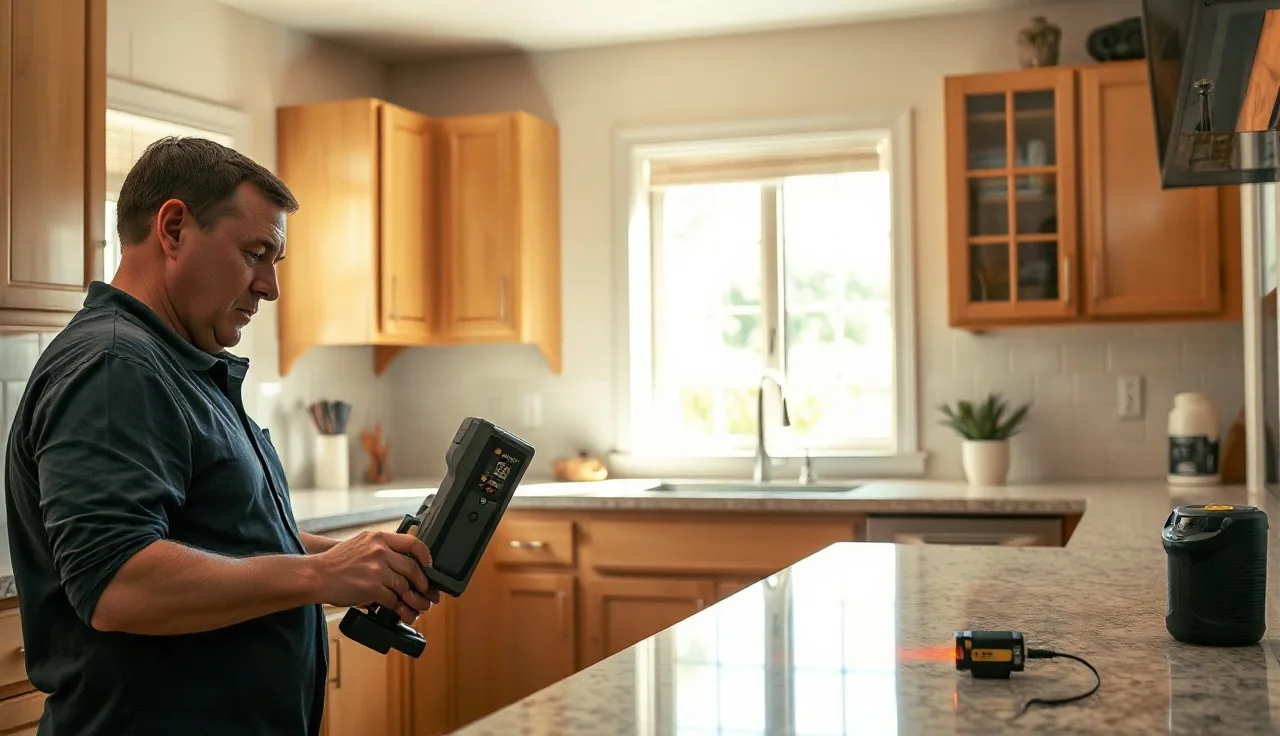
- A digital template is a precise digital file of your countertop layout, made on-site with a laser device or articulating arm instead of a cardboard cutout.
- The file feeds straight into CNC cutting software.
- No manual redrawing, less material waste, fewer fit errors.
- Most fabricators charge $75 to $200 for the templating visit, or fold it into the total job price.
What is a digital template and how is it different from a traditional template?
A digital template is a CAD file, usually DXF or a proprietary format, that holds the exact shape of your countertop space. A technician measures every wall angle, appliance cutout, and corner radius on-site with either a laser measuring system (like a Proliner) or a rigid articulating arm (a Faro arm or an LT-55), and the device writes those measurements into the file as it goes.
The old way used cardboard, luan plywood strips, or paper to trace the walls. A shop hand drove those physical templates back to the shop, retraced them onto a slab, and cut by hand or keyed the dimensions into a cutting program. Every transfer added error.
With a digital file, nothing gets redrawn. The shop imports the DXF straight into their CNC bridge saw or waterjet software, nests it against the real slab dimensions to trim waste, and cuts. The chain from measurement to cut is shorter, and the human redrawing step is gone.
This matters most on L-shapes, U-shapes, kitchens with out-of-square walls, curved islands, and any job stacked with sink or cooktop cutouts. On a straight galley counter, the payoff shrinks, though the file still earns its keep as documentation.
What equipment do fabricators use to take a digital template?
Two device categories run the shop industry right now: laser-based systems and arm-based systems.
The Prodim Proliner is the laser name you'll hear most. The technician sets reference points around the room, then touches a pointer to each corner, edge, and curve. The laser triangulates positions against those references and builds the shape on its own. Proliners move fast on open layouts. A typical kitchen takes 20 to 40 minutes [1].
Arm-based systems work differently. A rigid, jointed arm (picture a robotic skeleton) gets anchored to a fixed point. The tech traces every edge by dragging the arm's tip along the wall or sink opening. Faro and Romer are common in precision manufacturing, and some larger stone shops run them. Arms are slower, but they can beat a laser for accuracy in tight spaces where line-of-sight gets blocked.
A newer option is photogrammetry: the tech shoots dozens of overlapping photos and software stitches them into a 3D point cloud. This one is still finding its feet in countertop work. Accuracy leans hard on lighting and surface texture, and slabs with uniform color can confuse the algorithms. A few fabricators are testing it. It's not a mainstream production method yet.
Some shops run Leica Disto laser distance meters paired with tablet software. These cost less to buy than a Proliner, but they demand more manual input and more skill from the technician to nail the angles [7].
How accurate is a digital template compared to cardboard?
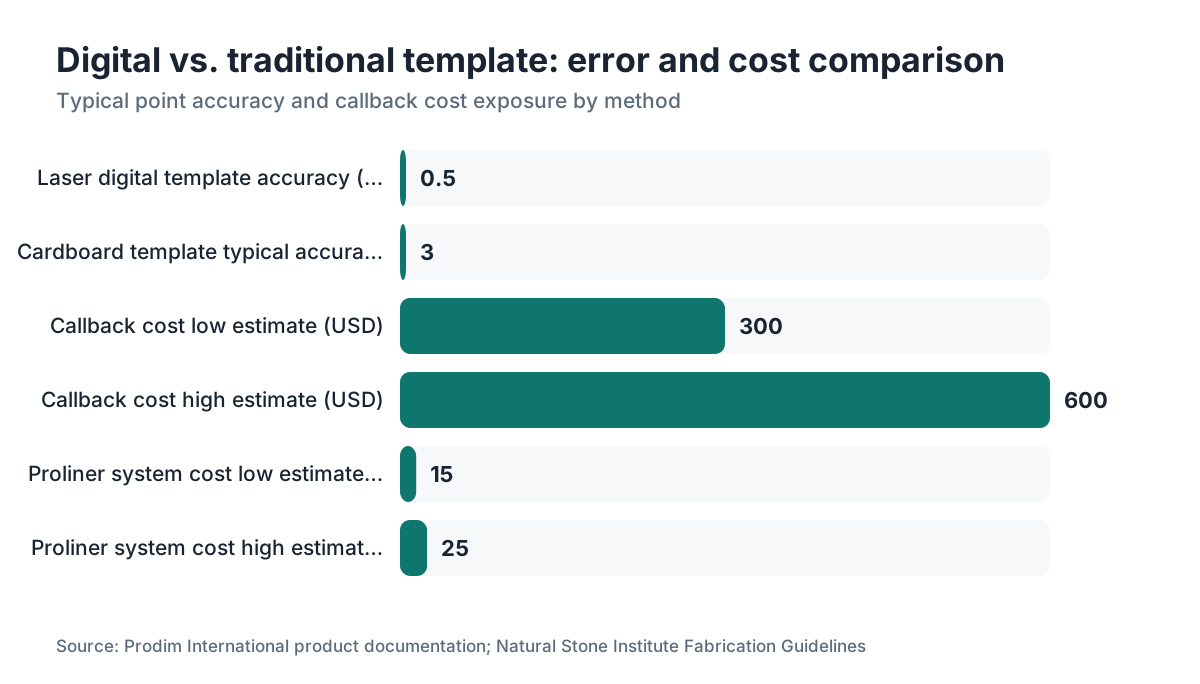
A laser system like the Proliner holds point accuracy of plus or minus 0.5 mm (about 1/50 of an inch) under good conditions, per Prodim's own documentation [1]. Cardboard accuracy depends entirely on the person cutting and transferring it, and errors of 1/8 inch or more are common in practice. So the gap between methods is real and large.
Here's the honest caveat. Published, independent research on this is thin, and most numbers come from device makers. Take the manufacturer figures as a ceiling, not a guarantee.
Think about what 1/8 inch means at a wall. For stone countertops, the installed gap gets caulked at roughly 1/8 inch. A cardboard template that's off by 1/8 inch has already eaten your entire caulk allowance on one edge. A digital file at 0.5 mm error leaves plenty of room to spare.
The bigger accuracy story is consistency. A laser device gives the same result no matter which technician runs it, as long as they follow the procedure. Cardboard varies by hand. For a high-volume shop, that repeatability is the real operational win, not the raw precision number.
Callbacks, where a fabricator drives back to trim or re-cut a piece that doesn't fit, hurt. Industry estimates put a callback at $300 to $600 in labor, truck time, and possible slab loss, though this swings with market and shop size [2]. Kill one callback a month and a Proliner lease starts to pay for itself.
What is the digital templating process, step by step?
Here's what happens from the moment the tech arrives to the moment the CNC machine starts cutting.
Step 1: Site prep. Cabinets must be fully installed, level, and secured. Undermount sinks and appliances should be in place, or their rough openings clearly marked. If cabinets aren't done, the visit gets rescheduled. This is the single most common source of delay.
Step 2: Reference setup. The tech places magnetic reference targets or reflectors around the space. For a Proliner, these anchor the laser coordinate system. For an arm, a fixed anchor point clamps to a stable surface.
Step 3: Point capture. The tech touches every corner, wall junction, and cutout opening. For curved edges or sink cutouts, extra points trace the arc. The software connects the dots into a continuous outline.
Step 4: On-device review. The tech checks the shape on the screen before leaving. If a wall looks oddly angled or a measurement seems off, they re-capture that section on the spot. Cardboard never offered this.
Step 5: File export. The shape exports as DXF (the most common CAD exchange format), sometimes also as a proprietary file if the shop's software prefers it [3].
Step 6: Shop import and nesting. The shop loads the DXF into their CNC software (Alphacam, EasyStone, Slabsmith, or similar). They enter the actual slab dimensions, then the nesting tool arranges every piece on the virtual slab to trim cutoff waste. This is where the real material savings live.
Step 7: CNC cutting. The machine cuts the shapes. Because the file came straight from measurement, nobody re-keys dimensions.
For a typical kitchen, template visit to slab cut often runs one to three days, against one to four days for traditional methods. The speed difference is modest. The bigger gains are quality and waste, not raw schedule.
How much does digital templating cost, and who pays for it?
Most residential fabricators price the templating visit at $75 to $200 as a line item, or they fold it into a project minimum. Some shops in high-cost metros charge up to $300 [2]. The line item covers real cost to the shop: a technician's time, the vehicle, and equipment depreciation.
For homeowners, the fee usually shows up on the quote as a fixed charge separate from material and fabrication rates. If a job doesn't proceed after templating, that fee is almost always non-refundable. Ask about it upfront.
For fabricators, the equipment is the bigger number. A Prodim Proliner system runs roughly $15,000 to $25,000 new [1]. Leasing is common. A simpler laser-plus-tablet setup can start around $3,000 to $5,000 [7]. Payback depends on volume: a shop doing 10 or more countertop jobs a week can usually justify a Proliner within 12 to 18 months on callback reduction and material savings alone, though every shop's math is its own.
Homeowners buy nothing. Your fee covers the shop's equipment and labor. A fabricator still using cardboard isn't automatically a red flag, but ask how they handle out-of-square walls and whether they've had fit trouble before.
What file formats does a digital template produce, and how do fabricators use them?
DXF (Drawing Exchange Format) is the dominant output for countertop digital templates [3]. Almost every CNC bridge saw and waterjet controller reads it. DWG (the native AutoCAD format) is a close relative, and some systems export both.
Some device makers use proprietary formats. Prodim's Proliner saves in its own format, and the Prodim software exports to DXF or pushes directly to supported CNC controllers.
Once the DXF lands in the shop's CNC software, a few things happen. The shape gets reviewed and sometimes edited: a drafter might clean up a slightly kinked wall line or confirm a sink template was captured right. Then the file gets nested. Nesting means arranging multiple job pieces, or several countertop sections, on the virtual version of the actual slab. Good nesting shrinks the leftover material (called offcuts or drops) and cuts material cost directly.
Shops running dedicated fabrication software can also attach the digital template to a customer's quote record, tying the measured shape to pricing, material selection, and scheduling in one place. The shop management module in SlabWise connects the DXF to the quote so the square footage on the template matches the square footage being billed, which heads off disputes over measurements.
You probably won't touch the DXF as a homeowner. But you can ask your fabricator to show you the digital layout on screen before cutting, so you see exactly where the seams fall on the slab and whether any pattern alignment matters to you. Most are glad to do it, and it takes about five minutes [10].
What are the real benefits of digital templating for a homeowner?
The main benefit is a better fit. Countertops cut from a digital template sit tighter against walls and around sink cutouts, which means less caulk gapping and a cleaner finished look. This matters most with undermount sinks, where the reveal around the rim needs to stay even all the way around.
The second is documentation. The digital file is a permanent record of your layout as-installed. If a piece breaks, needs extending, or your kitchen gets remodeled years down the road, that file tells the next fabricator the exact shape that was there. Cardboard templates rarely survive a few months in a shop.
Third is material efficiency. When the shop nests pieces accurately against the real slab, they may cut your job from a smaller piece of material. For expensive stones, quartz, or materials like Cambria, that can drop your quote because the shop isn't padding for measurement uncertainty.
Fourth is fewer surprises on install day. Callbacks and re-cuts are disruptive. Putting the kitchen back together after a botched install means extra days without a working counter. Digital templating doesn't kill every callback, but it kills most of the ones caused by measurement error.
For granite countertops and marble countertops, where every slab has its own veining, digital files also feed Slabsmith-style slab imaging. The shop photographs the actual slab and overlays the digital template to show you exactly how the finished counter will look before any stone gets cut [9].
Does digital templating work for all countertop materials?
Yes. The file format and measurement process don't care about material. The digital template is just a shape. Granite, quartz, laminate, porcelain, dekton, or solid surface, the same DXF file drives the CNC machine.
Here's the catch. Some materials rarely see a CNC bridge saw. Butcher block countertops get cut with woodworking tools, and Formica countertops or post-form laminate usually get cut by hand on-site. Digital templating is technically possible for those, but it's uncommon because the cutting equipment isn't CNC-driven in most shops.
For Corian countertops and other solid surface materials, some fabricators use digital templates, but the material trims and scribes easily on-site, so plenty of installers still prefer traditional methods.
The strongest case is any natural or engineered stone (quartz, porcelain slabs, sintered stone) that gets cut on a CNC machine. Material cost on those runs high enough that fit errors and waste sting, which is exactly where the digital workflow earns its money [5].
Can a homeowner request digital templating specifically?
You can, and you probably should. Ask this: do you use a laser or digital measuring system for templates? Most shops in competitive markets use digital templating now, because the gear got cheaper and customers started asking. A shop still using cardboard isn't automatically bad, but you deserve to know.
If you're getting countertop installation on a complex layout, an L-shape or U-shape, an island with curves, or walls that are notoriously out of square (common in older homes), ask for digital templating by name. Some shops charge a small premium. Most don't, because it's their standard process.
You can also ask to be there during the visit. That lets you confirm sink placement, flag any odd angles the tech might miss (a wall that's been patched thicker, say), and watch the measurement happen. Most technicians welcome it.
What can go wrong with digital templating?
The technology cuts errors. It doesn't erase them. Here are the real failure modes.
Cabinets not level or not final. If the boxes shift or get shimmed after the template is taken, the countertop won't fit. This is by far the most common problem, and it's entirely outside the fabricator's control.
Device calibration drift. Laser arms and Proliners need regular calibration. A device out of calibration gives systematically wrong measurements, and you won't know until the slab doesn't fit. Good shops calibrate on a known-good test fixture before each day of use.
Missed reference points. On large open kitchens, the tech repositions the laser targets to cover the whole space. If the targets don't register to each other correctly, the two halves of the template won't line up. That's a procedural error, not a device error.
Sink template errors. Undermount sink openings get traced with a manufacturer's template or the actual sink inverted on the cabinet. Wrong template, or a sink that shifts during tracing, and the cutout comes out wrong.
File import errors. DXF files from different devices sometimes hit scaling issues in older CNC software. A file that should read in millimeters gets read as inches, so everything comes out 25 times too big. Experienced shops catch this instantly, but it does happen.
None of these are unique to digital templating. The same error categories exist with cardboard. They're just harder to catch before the cut. The difference: a digital file can be inspected on screen before anyone touches stone, and that checkpoint is real.
How does digital templating affect the overall countertop installation timeline?
For most residential jobs, the sequence goes like this. The template visit happens after cabinets are fully installed and leveled. The file gets imported, reviewed, and nested the same day or the next morning. CNC cutting happens within one to three business days. Installation follows.
Total time from template to install runs three to seven business days for a standard kitchen, depending on shop backlog and material availability [2]. That's roughly the same calendar time as traditional templating. The difference is the shop catches problems earlier, at file review instead of at install, so the risk of a schedule blowout drops.
The bigger schedule variable is cabinet completion. Homeowners routinely underestimate how long cabinet installation takes, or get stuck waiting on backordered hardware. The fabricator can't template until cabinets are done. That dependency, not the templating tech, usually sets the pace of the whole kitchen renovation [8].
Frequently asked questions
Is digital templating included in the countertop price or is it a separate charge?
It depends on the shop. Some fabricators build the templating visit into their overall job price. Others list it separately at $75 to $200. Always ask when getting quotes so you're comparing like for like. Either way, the fee is almost always non-refundable once the visit is done, so confirm your cabinets are fully installed before scheduling.
How long does a digital templating visit take?
For a typical kitchen, a laser system like a Prodim Proliner takes 20 to 40 minutes of active measuring. Add travel, site setup, and on-device review, and most visits run 45 to 90 minutes total. Very large or complex spaces with multiple rooms or island curves can hit two hours. Cardboard templating on the same kitchen often takes longer because physical cutting and labeling eats time.
Do my cabinets really have to be fully installed before digital templating?
Yes, and this is a hard rule regardless of method. The countertop shape is defined by the cabinet tops. If any box isn't in its final position, level, and secured, the template will be wrong. Shimming a single cabinet by 1/4 inch after the template can cause a gap or a tight spot. Schedule the visit only after the cabinet installer confirms everything is final.
What is a DXF file and do I need to understand it as a homeowner?
DXF stands for Drawing Exchange Format. It's a standard CAD file type that CNC machines read directly. You don't need to open or understand it. What matters is that it carries the exact shape of your countertop space from the measuring device to the cutting machine without anyone redrawing it by hand. Ask your fabricator to show you the shape on screen before cutting if you want to confirm seam placement.
Can digital templates capture curves and radius edges?
Yes. Both laser systems and arm-based devices capture curves by tracing extra points along the arc. The software fits a smooth curve through those points. CNC machines then cut the curve in one continuous pass. This is one of the strongest cases for digital templating, because tracing a true curve on cardboard and re-creating it on stone by hand introduces far more error than a digitally measured arc.
What is the difference between a Proliner and other digital template devices?
The Prodim Proliner is a laser system that triangulates positions using reflective reference points placed around the room. It's the most widely used dedicated countertop templating device. Arm-based systems (Faro, Romer) use a physical jointed arm instead of a laser. Simpler setups pair Leica Disto distance meters with tablet software. The Proliner is generally faster on open layouts; arms can be more accurate in tight or cluttered spaces where laser line-of-sight is limited.
Will a digital template help get a better match on veined stone like marble or quartzite?
Yes, indirectly. Some shops run Slabsmith or similar slab imaging alongside the digital template. They photograph the actual slab, overlay the template shape on the photo, and show you exactly where the veins will fall before cutting. That lets you and the fabricator agree on seam placement and pattern continuity. It's a step separate from the templating itself, but the digital template is what makes it accurate.
Does digital templating reduce material waste?
It can, a lot. Accurate digital shapes let the nesting software fit pieces more tightly on the slab, trimming cutoff waste. For expensive natural stone where a full slab might cost $1,000 to $5,000, even a 10 to 15 percent cut in waste turns into real money. The savings show up more on large or complex jobs with multiple pieces than on a single straight counter.
Can a digital template be used for a countertop replacement without removing the old counter first?
Generally no. The template comes off the cabinet tops after the old countertop is removed, so the fabricator measures the actual substrate the new counter will sit on. Measuring over an existing counter adds error, because the old top may not be level or may have a backsplash return that's coming off. Schedule the template visit for after demolition of the old surface.
What software do fabricators use with digital templates?
Common CNC and nesting software in stone shops includes Alphacam, EasyStone, Slabsmith, and Saw Gear. The template's DXF file imports into any of these. Shops also use job management tools to tie the DXF to the customer's quote and production record. The specific software doesn't affect you as a homeowner, but shops with integrated workflows tend to have fewer billing disputes because the measured and invoiced square footage come from the same file.
Is digital templating available in smaller markets or rural areas?
Availability varies. In major metros, digital templating is close to standard now. In smaller markets, some shops still use traditional methods because a Proliner is harder to justify on lower job volume. If you're in a smaller market and this matters to you, ask several shops whether they offer it. A shop 30 to 60 miles away with digital equipment may be worth the extra travel, especially on a high-value material.
How is a digital template different from a 3D scan of the kitchen?
A digital template captures a 2D profile of the countertop footprint: the exact shape looking straight down. A 3D scan captures the full volume of the space, including wall heights, overhangs, and depth. Countertop fabrication only needs the 2D footprint, so most shops use 2D laser templating rather than full 3D scanning. Full 3D scanning shows up more in custom cabinetry and architectural millwork, where vertical dimensions matter.
What happens if the digital template is wrong and the countertop doesn't fit?
The fabricator is responsible for re-cutting the piece at no charge if the error came from their measuring process. Get this in writing before the project starts. If the cabinets moved or were shimmed after the template, that's usually a shared problem to negotiate. A reputable shop documents the cabinet condition at template time, sometimes with photos, so there's a clear record of who's responsible if a fit issue comes up.
Sources
- Natural Stone Institute (formerly Marble Institute of America), Fabrication and Installation Guidelines: Typical residential stone countertop lead time from template to installation is three to seven business days; callback cost and residential templating pricing context
- Autodesk, DXF Reference documentation: DXF (Drawing Exchange Format) is the standard CAD interchange format supported by CNC cutting controllers across the stone and solid surface fabrication industry
- OSHA, General Industry Standards 29 CFR 1910: Stone cutting and CNC operation falls under general industry fabrication standards; referenced for shop workflow context
- Natural Stone Institute, Stone Industry Education (SIE) program curriculum: Digital templating and CNC workflow are covered in professional stone fabricator training as standard practice for precision cutting
- Leica Geosystems, Disto Laser Distance Meter specifications: Leica Disto meters paired with tablet software provide an entry-level digital measuring option for countertop fabricators at lower equipment cost than full laser templating systems
- U.S. Bureau of Labor Statistics, Occupational Outlook Handbook: Stone cutting and fabrication workforce data; industry context for CNC adoption in stone shops
- Slabsmith by Northwood Design, product overview: Slabsmith slab imaging software integrates with digital template DXF files to allow visual layout of veined stone before cutting
- Alphacam (Hexagon), stone fabrication CNC software documentation: Alphacam is one of the primary CNC programming platforms used in stone fabrication shops for importing DXF templates and generating toolpaths
Last updated 2026-07-10