TL;DR
- A production board is a visual tracking system, physical or digital, that shows every active countertop job and which stage it's in: sold, templated, programmed, cut, polished, or scheduled for installation.
- It gives everyone in the shop one shared view of the work queue so nothing falls through the cracks.
- Most shops run 20 to 60 active jobs at once, and without a board, scheduling becomes guesswork.
What is a production board and what does it actually do?
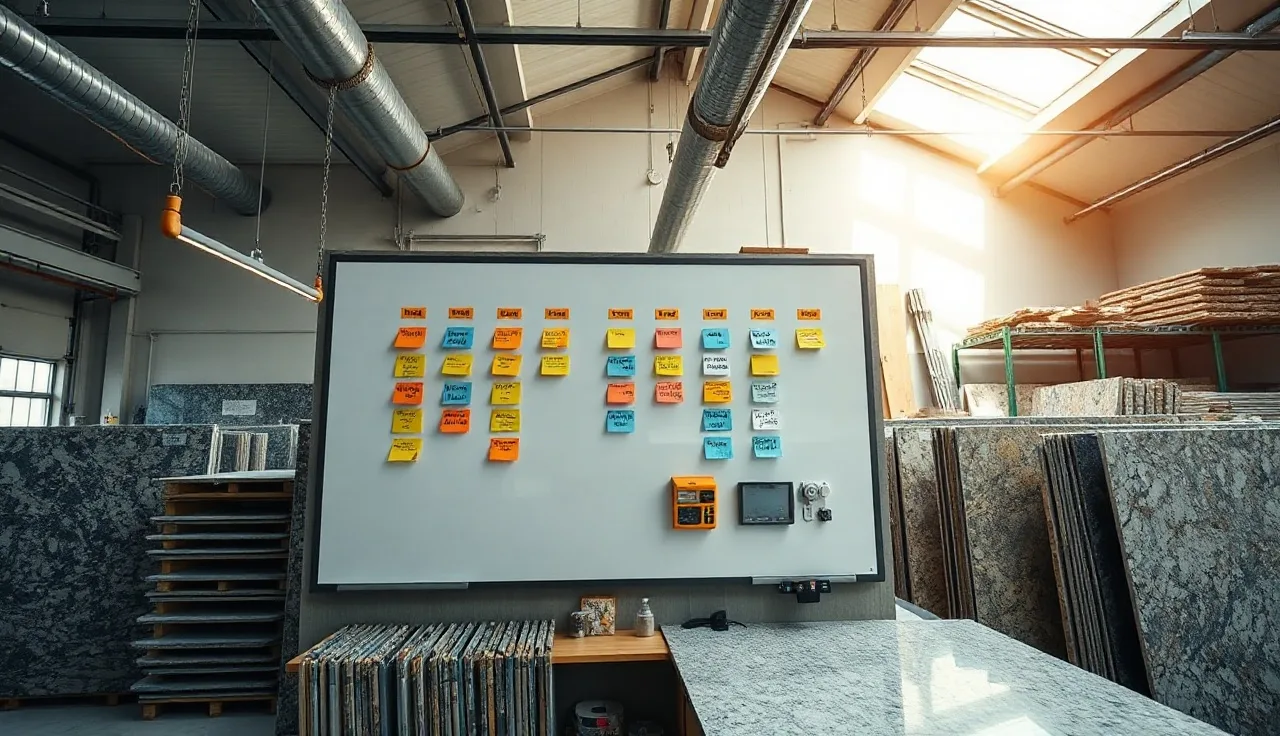
A production board is the master status display for a countertop fabrication shop. At its simplest it's a whiteboard on the shop wall with column headers for each stage of production and job cards, sticky notes, or magnets that move left to right as work progresses. At its most sophisticated it's a digital screen fed by shop management software that updates on its own when a fabricator logs a completed operation.
The point is always the same. One place, one truth. Everyone, from the owner to the CNC operator to the install crew, can look at the board and know exactly where every job stands without hunting down a manager or digging through a folder.
Countertop fabrication has an unusually large number of hand-off points compared to most trades. A single residential kitchen might pass through sales, design, templating, programming, slab selection, waterjet or CNC cutting, edge profiling, sink cutout, polishing, quality check, and then installation scheduling. That's ten or more distinct steps, often handled by different people or even different shifts [1]. Without a visible system tracking each step, jobs stall, customers get missed calls, and the install truck shows up without a confirmed time window.
The production board fixes that by making the workflow visible. Call the stages buckets, lanes, columns, or phases. Doesn't matter. What matters is that every job has a card, every card has a home, and the home changes as the work advances.
What are the typical stages on a countertop shop production board?
Every shop is different, but most fabrication boards share a core set of stages. The table below shows a common configuration alongside what each stage means on the floor.
| Stage | What it means | Who owns it |
|---|---|---|
| Sold / Contracted | Deposit collected, job in the system | Sales |
| Template Scheduled | Date set, homeowner confirmed | Coordinator |
| Templated | Field measurement complete | Templater |
| Programming / Nesting | DXF or template data turned into CNC toolpaths | Programmer |
| Slab Pulled | Material reserved and staged at saw | Yard / Warehouse |
| In Production | Cutting, edging, sink cutouts underway | Shop floor |
| QC / Inspection | Finished pieces checked against order | Lead fabricator |
| Install Scheduled | Date set, crew and truck assigned | Coordinator |
| Installed | Job complete, ready for final invoice | Install crew |
| Final Invoice Sent | Accounting step, job closed | Office |
Small shops often collapse several of these into fewer columns. A two-person operation might run just five: Templated, In Shop, Ready, Scheduled, and Done. High-volume shops sometimes break Production into sub-lanes by machine: saw, CNC, edge, polish [2]. The stage names matter less than the rule that a job can only sit in one column at a time.
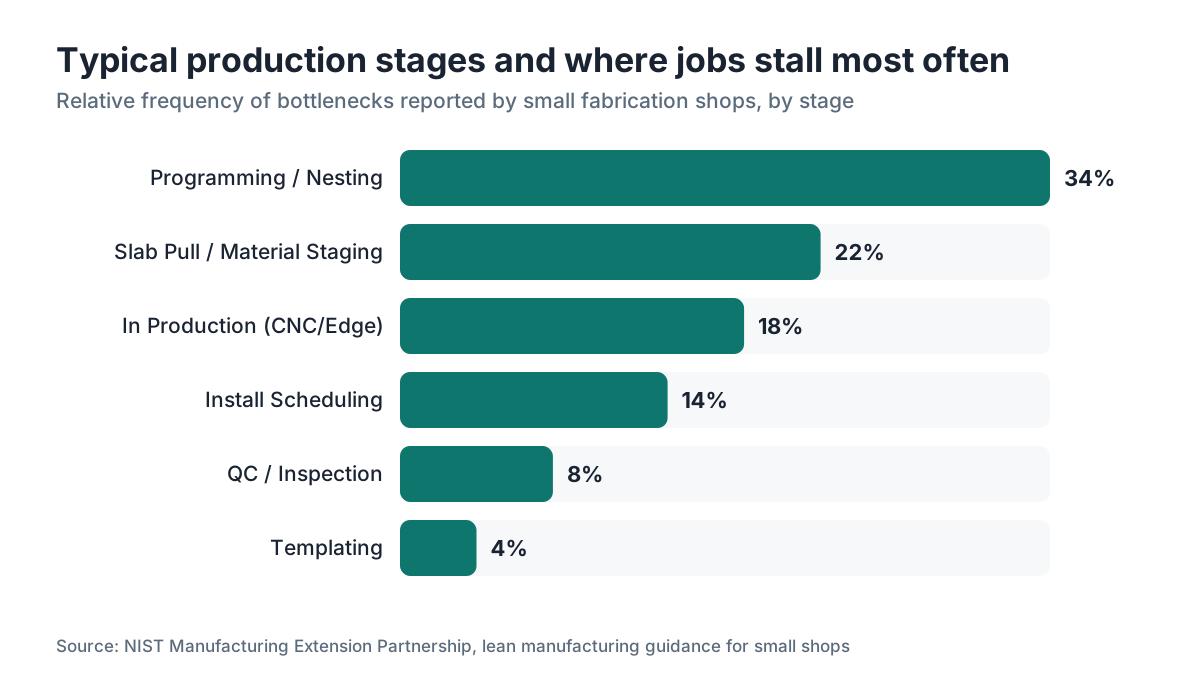
One stage gets overlooked more than any other. It's the gap between Templated and Programming. That hand-off is where jobs quietly age. The template comes back from the field, gets dropped on a desk, and waits for a programmer to open it. A board that shows this stage on its own makes the delay visible. Once it's visible, someone fixes it.
Physical whiteboard vs. digital production board: which is better?
The honest answer is that a good whiteboard beats a bad software system every time, and good software beats a good whiteboard once your shop grows past about five to eight people or 20 active jobs.
Physical boards are fast to set up, cost almost nothing, and need zero training. A shop owner can have a working system running this afternoon with a $30 whiteboard from an office supply store. The columns read clearly from across the shop floor, there's no login, and nothing gets out of sync with reality because the board is reality. Plenty of profitable mid-size shops still run on whiteboards in 2025 and have no reason to change.
The problems show up at scale. A physical board can't send a notification when a job moves. It doesn't timestamp anything, so you can't see how long jobs sit in a given stage. You can't check it from home, which means the owner who leaves early still fields calls about job status. It can't link to a customer record, a contract, or a nesting file. And if someone moves a card and doesn't tell anyone, the board lies.
Digital boards add those missing pieces. That could be a dedicated shop management platform, a countertop-specific tool, or a well-structured spreadsheet or project app like Trello. Jobs carry their paperwork with them as they move. Timestamps expose bottlenecks on their own. The coordinator can read the board from the front office without walking out to the shop. Some systems tie into CNC programming or quoting, so when a quote converts to a job, the production card is created for you with no manual entry.
The tradeoff is adoption friction. A digital system only works if every person on the floor actually uses it. That means training, habit change, and often a few weeks of running the old and new systems in parallel while trust builds [3].
How do fabricators use a production board during daily operations?
The production board anchors the daily shop meeting, sometimes called a huddle, that most well-run shops hold at the start of each shift. The manager walks the board column by column, spots anything that's stalled, and assigns the day's priorities. That meeting, if it stays tight, takes about ten minutes and replaces an hour of scattered interruptions across the day.
Beyond the huddle, the board answers the three questions shop staff ask most. What's next for me to work on? Is this job ready for the next step? When is such-and-such kitchen getting installed? When everyone can answer those questions without asking a manager, the manager gets time back.
The install coordinator uses the board to decide which jobs to schedule for delivery. Most shops keep one rule: a job doesn't get an install date until its card reaches the QC column. That single rule prevents the classic disaster of scheduling a homeowner, dispatching a truck, and then finding out the job is still on the CNC.
On the shop floor, fabricators use the board to pull their next job when they finish one. That pull system, borrowed from lean manufacturing, runs more efficiently than a push system where a manager hands out work. The fabricator looks at the In Production column, picks the job with the earliest install date, and starts. No waiting for instructions [4].
For homeowner communication, the board is indirect but real. When a customer calls and asks where their job stands, anyone who can see the board gives an accurate answer in 30 seconds. That alone cuts callback volume for shops that used to run on tribal knowledge.
What information should each job card contain?
A job card with too little on it is useless. One with too much gets ignored. Here's what actually gets used in a well-run shop.
At minimum, a job card should carry the customer name, the job number or contract number, the install date (even if tentative), the material type and color, and the square footage or slab count. Those five things answer 90 percent of the questions that come up on the floor.
Beyond the minimum, cards often include the edge profile, sink or cooktop cutout details, any special notes like a tight access or a specific adhesive requirement, and the name of the templater. That last one matters. If something doesn't fit at install, you know who to call.
Physical cards carry this with a printed label or a handwritten sticky note attached to a magnet. Digital cards carry it in fields you can search and filter. One advantage of digital systems is that you can attach the template drawing or CNC file straight to the card, so the fabricator on the floor never has to hunt for the file.
Color coding adds a fast visual layer. Many shops use color to signal material type: one color for granite, another for quartz, another for marble countertops. Others use color to flag priority: red for installs this week, yellow for next week, white for further out. Pick one meaning per color and stick to it. Shops that overload color coding end up with a board that needs a legend to read, which defeats the purpose.
How does a production board reduce mistakes and missed deadlines?
The most common shop failures share one root cause. Missed install dates, jobs cut with the wrong edge, incorrect material pulled, forgotten sink cutouts: in every case, someone didn't have the right information at the right time. The board is the fix because it forces information to travel with the job instead of sitting in someone's head or email inbox.
Bottleneck detection is a direct benefit. If ten job cards pile up in the Programming column while every other column is empty, the board makes that obvious right away. A manager without a board might not notice until customers start calling. With a board, the blockage is clear by lunchtime on the first slow day [5].
Deadline awareness changes behavior. When fabricators can see how many jobs have install dates three days out, they self-prioritize without being told. That's not management theory. It's what happens when people can see the consequence of their pace.
Quality checks get harder to skip. If the QC column exists on the board and a job moves to Install Scheduled without passing through it, someone has to physically move the card past QC. Skipping a visible stage is harder to do quietly than just telling someone the job is ready. The board creates light accountability even without strict enforcement.
Missed template appointments drop because the Templated stage only fills when the template actually comes back. Shops without boards sometimes have jobs sitting for days after a template appointment, and nobody notices the data never came home [1].
Can a production board integrate with quoting and CNC software?
Yes, and this is where going digital pays off most. The friction points in a fabrication shop sit at the transitions between software systems. A quote lives in one tool, the template dimensions arrive in another format, the CNC program saves in a third location, and the production schedule hangs on a whiteboard that doesn't talk to any of them.
Some shops build loose integrations by hand. The quoting tool exports a PDF, the coordinator prints a job card from that PDF and pins it to the board, the CNC programmer saves the file in a shared folder named by job number. That works, but it's fragile. Any step can break quietly.
Dedicated shop management platforms and countertop-specific software close those gaps. When a signed contract triggers a new production card automatically, one manual step disappears. When the CNC file attaches to the job record, the fabricator stops hunting through a file server. When board status updates trigger customer notifications, the coordinator stops making confirmation calls.
SlabWise, for example, ties quoting and nesting to production tracking, so the programmed layout and the cut list stay attached to the job as it moves through the board. The fabricator pulling the slab knows exactly what the CNC needs without a separate printout.
The honest caveat: full integration only works if every person at every step actually enters data. A half-used digital system is often worse than a well-maintained whiteboard, because the digital board lies with confidence. If you go digital, the first 60 days are about building the habit, not the features [3].
How should a shop set up a production board for the first time?
Start physical. Spend one afternoon with the owner, the shop lead, and the coordinator listing every step a job takes from signed contract to final invoice. Write each step on a whiteboard column. Then walk through your five most recent completed jobs and place them on the board as if they were still in progress. You'll find stages you forgot and stages you duplicated. Fix it.
Then put every active job on the board. Write each on a card, drop each card in the right column. This is the hardest hour of setup, because it forces you to face jobs you lost track of. Do it anyway.
Run the board for two weeks before you change anything. You'll notice certain columns fill up fast and others sit empty. That's your bottleneck data. Use it.
Once the physical board feels stable, meaning people actually use it and it matches reality, decide whether digital makes sense. Ask one question: are the problems you still have the kind software solves? If your main issue is remote visibility or automated customer notifications, software helps. If your main issue is that people don't update the board, software won't fix it, because that's a culture problem [2].
For the physical board, standard whiteboard markers fade fast in a dusty shop. Dry-erase paint on a section of wall lasts longer and gives you more horizontal space than a standard board. Magnetic cards with printed labels beat rewriting card content every time.
For a digital setup, start with fewer columns than you think you need. You can always add a stage. Starting with 12 columns and watching no one update half of them kills morale and leads to abandonment.
What does a production board reveal about shop capacity and scheduling?
Once a board has run for four to six weeks, it turns into a capacity tool. Look at the In Production column and count the jobs. Look at the Install Scheduled column and count how many installs are loading into a given week. That count tells you whether you can take another fast-turnaround job or whether you need to push a customer's timeline out.
Without that visibility, shop owners routinely over-promise. The pull to say yes to every sale is strong, especially when you're staring at a signed contract and a deposit check. But when the board shows 14 jobs moving through production for a week when your crews comfortably handle 10, saying yes to number 15 means something else slips [5].
Capacity math in countertops is rough. A commonly cited benchmark is that a well-organized three-person shop produces and installs 600 to 1,200 square feet per week depending on material mix, job complexity, and equipment. But nobody has clean published data on this. The closest hard figures come from individual shop benchmarking tools and association surveys, not peer-reviewed studies. Track your own shop's output over 90 days and the board hands you that number.
The other scheduling insight is lead time prediction. When you can see how long jobs typically sit in each stage, you can quote customers an accurate lead time instead of guessing. If Programming consistently takes three days and Production takes four, a new job needs at least 10 to 14 days from template to install. That kind of expectation-setting reduces customer complaints more than almost any other single practice.
How do high-volume shops use production boards differently than small shops?
Small shops, say one to four employees, often run a single board that covers everything and fits on an 8-foot whiteboard. The owner is usually also the estimator, sometimes the installer, and knows every job personally. The board backs up memory.
At 10 to 15 employees, the board becomes the primary communication system, because the owner no longer touches every job. The board has to be accurate, since there's no fallback. These shops often split the In Production column into sub-lanes by machine or operation: saw, CNC, edge, polish. They also start tracking who's assigned to each job, so accountability is explicit [2].
High-volume commercial shops handle hotels, apartment complexes, or builder contracts with hundreds of near-identical units, and they use the board differently again. Jobs get grouped by project rather than tracked one at a time. A 200-unit apartment complex might show up as a single entry with sub-tasks instead of 200 separate kitchen cards. The board tracks project phases: submittals, shop drawings, production runs, staged delivery, and punch list.
The software choice matters more at higher volume. A shop doing 50 residential kitchens a week needs digital, full stop. A whiteboard can't hold that many cards legibly, and the remote visibility alone justifies the software cost. The National Kitchen and Bath Association reports that top-performing shops consistently invest in systems that reduce re-work and scheduling errors, and production tracking is named as a specific area [6].
One thing doesn't change with size: the daily huddle. Even at a 20-person shop, a 10-minute morning review of the board prevents more problems than any amount of software sophistication.
Where do most shops go wrong with their production board?
The most common failure is a board that's accurate for the first week and then drifts. Cards stop moving because updating the board feels like extra work on top of the real work. Within a month, the board shows a fictional version of the shop's state and everyone stops trusting it. Then it becomes wall decoration.
The fix is making board updates part of the definition of finishing a task. The CNC program isn't done until the card moves to the next column. The install isn't done until the card moves to Installed. The update isn't optional paperwork. It's the final step of the operation. That framing change matters.
A second failure is too many stages. When you have 15 columns and half sit empty, people question whether the board is real and stop using it. Start with six to eight stages. Add more only when a gap causes a real problem.
A third failure is ownership. If nobody is responsible for board accuracy, the board drifts. Assign one person, usually the production coordinator or shop manager, as the keeper of the board. Their job includes auditing the board daily, moving any cards that should have moved but didn't, and flagging jobs that haven't advanced in more than two days.
A fourth failure, specific to digital boards, is picking a system that's too generic. A tool built for software development sprints uses different vocabulary than a countertop shop. When fabricators have to mentally translate between their work and the tool's language, they quit using it. The best adoption comes from systems built for, or easily bent to, fabrication workflows [3].
If your shop does countertop installation as part of the service, remember the install crew's feedback belongs on the board too. If a job goes back for a re-cut or a homeowner rejects a piece, that status needs to be visible so it gets prioritized on the floor.
Frequently asked questions
Do small countertop shops really need a production board?
Yes, even a one-person shop benefits from a visible list of jobs and their stages. At small scale you can keep it on a single whiteboard section or a notepad. The board earns its keep the moment you have more than three active jobs, because that's when you start forgetting details or misjudging which job is most urgent. Setup takes less than an hour.
What is the difference between a production board and a job scheduler?
A production board shows stage status: where every job is in the workflow right now. A job scheduler shows time: which jobs are assigned to which day or which crew. Most shops need both. The board tells you what's ready; the scheduler tells you when it gets installed. Some software tools combine them, but in a physical setup they're usually separate boards or separate sections of the same board.
How many stages should a countertop production board have?
Six to eight stages is the right range for most residential shops. More than ten stages and people lose track of where cards belong. Fewer than five and you lose visibility at the hand-off points where jobs actually stall. Start with six, run it for a month, and add a stage only when you can point to a specific problem it would solve.
What software do countertop fabricators use for digital production boards?
Options range from generic project tools like Trello or Monday.com, adapted with custom columns for fabrication stages, to dedicated shop management platforms built specifically for stone and solid surface shops. The dedicated tools usually include quoting, job costing, and sometimes CNC integration. Generic tools cost less and are faster to set up but require more customization work to match how a fab shop actually runs.
How does a production board help with customer communication?
When anyone in the office can check the board and see a job's current stage, they can answer a homeowner's status call in under a minute without tracking down the shop lead. Some digital systems send automated status notifications when a card moves, cutting inbound calls further. Accurate status updates are one of the biggest drivers of customer satisfaction in residential fabrication.
Can a production board help with estimating turnaround time for new customers?
Yes. After a few months of board data, you can see how long jobs typically spend in each stage. If Programming averages three days and Production averages four, you have a real baseline for quoting lead times. That's more accurate than gut estimates and prevents over-promising, which is one of the most common sources of customer complaints in the trade.
What should happen to a job card when an install gets rescheduled?
The card should move back from Install Scheduled to QC or a Pending Reschedule column, with a note about why the install was delayed. If the reschedule was customer-driven, that's worth flagging differently than a reschedule caused by an unfinished piece. Keeping a clear record of reschedules helps shops see whether they're rescheduling because of internal problems or external ones.
How do you handle rush jobs on a production board?
The most common method is a visual flag on the card: a red sticker, a colored magnet, or a digital priority tag. Rush jobs move to the top of their column and get pulled first. The key is an explicit rule about what qualifies as rush and who has the authority to declare a job rush, otherwise every salesperson calls their jobs rush and the system breaks down.
What is a bottleneck on a production board and how do you spot one?
A bottleneck is any stage where cards accumulate faster than they move out. If your Programming column consistently holds eight cards while your saw crew waits for work, programming is your bottleneck. On a physical board, a pile-up is visually obvious. On a digital board, most systems let you filter by stage and count cards. Fix the bottleneck before adding capacity anywhere else.
Should the production board track material orders and slab inventory?
Tracking slab availability on the production board makes sense at the stage level. A Slab Pulled or Material Confirmed stage tells the shop floor that material is physically ready before they start programming or cutting. Detailed inventory counts belong in a separate slab inventory system. Mixing full inventory management into the production board usually clutters it and leads to both systems being under-maintained.
How do commercial countertop projects get tracked differently on a production board?
Commercial projects, like multi-unit residential buildings or hotel renovations, are usually tracked as a single project entry with phases rather than as individual room-by-room cards. Phases might include submittals, mock-up approval, production runs by batch, staged delivery, and site punch list. The board shows which phase each project is in rather than tracking every individual piece separately.
How long does it take for a shop to see results after implementing a production board?
Most shops notice fewer missed status calls and better morning meetings within two weeks of a consistent board. Measurable reductions in re-cuts, missed installs, or overtime usually show up in the first 60 to 90 days, once the board is accurate enough that people trust it for decisions instead of treating it as optional. The first 30 days are mostly about building the update habit.
Sources
- National Institute of Standards and Technology, Manufacturing Extension Partnership: Small manufacturers benefit from visual management systems that make workflow status visible to all workers, reducing communication overhead and rework.
- Manufacturing Extension Partnership, Lean Manufacturing for Small Shops: Digital workflow tools require a parallel adoption period of 30 to 60 days during which old and new systems run simultaneously to build staff trust in the new system.
- NIST Manufacturing Extension Partnership, Pull Systems and Lean Principles: Pull-based work assignment, where workers draw the next available task from a visible queue, is more efficient than push-based assignment by managers in manufacturing environments.
- Small Business Administration, Manage Your Business: Visible workflow tracking helps small manufacturers identify over-scheduling before it results in missed customer commitments.
- National Kitchen and Bath Association, NKBA Industry Research: Top-performing fabrication and installation businesses invest in systems that reduce rework and scheduling errors as a key operational differentiator.
- U.S. Bureau of Labor Statistics, Occupational Outlook Handbook: The stone and marble fabrication and installation trade employs tens of thousands of workers in the U.S., with production organized across multiple specialized tasks.
- OSHA, Crystalline Silica: Countertop fabrication shops are regulated workplaces with multiple production operations including cutting, grinding, and polishing of stone materials.
- Lean Enterprise Institute: Visual kanban boards that move work items through defined workflow stages reduce work-in-process and improve throughput in manufacturing settings.
- National Institute of Standards and Technology, Baldrige Performance Excellence Program: Operational performance in small manufacturing is linked to process visibility and defined hand-off procedures between production stages.
Last updated 2026-07-10