
TL;DR
- Job cost tracking in countertop fabrication means recording every dollar spent on a specific job (slab material, saw time, labor hours, edge work, install) then comparing that total to what you quoted.
- Shops that do this consistently often find their real costs run 15 to 30 percent higher than their estimates.
- The fix starts with a simple job cost sheet and honest labor costing.
What is job costing and why do countertop shops get it wrong?
Job costing means you assign every cost that belongs to a specific job to that job, so at the end you know whether you made money on it. The alternative is averaging: total revenue minus total expenses at month end, fingers crossed. Averaging feels easier. It also hides the fact that some jobs are quietly killing your margins while others carry the shop.
Countertop fabrication has a job costing problem for a few specific reasons. Most shops started as trade contractors, not manufacturers, so they never built a cost accounting habit. The material is priced by the slab, but waste swings wildly by layout, which makes per-job material cost genuinely hard to pin down. And labor gets tracked by payroll period, not by job. None of that is fatal. It just means you have to build the tracking system on purpose.
Shops that do this well usually find two things. They have a handful of job types that are reliably profitable. And they have a handful they've been running at a loss for years without knowing. Neither discovery feels good. Both are worth the discomfort.
What are the main cost categories for a countertop fabrication job?
Every job has five buckets. Miss one and your job cost number is fiction.
Material cost. The slab itself, plus any remnants you consumed, plus consumables tied to the job: diamond blades, polishing pads, adhesive, sealer, sink clips. Blade and pad costs are easy to ignore because they're tiny per job. Across a thousand jobs they add up fast. A realistic consumable burden for a typical granite or quartz job runs $8 to $20 per square foot depending on complexity, edge profile, and cutout count [1].
Direct labor. Every hour a person touches the job: template, fabrication, install, rework. The common mistake is using the employee's hourly wage as the labor cost. That's wrong. The real cost of an employee is their wage plus payroll taxes (the employer share of FICA is 7.65 percent [2]), workers' comp, health benefits if you pay them, and paid leave. A $22/hour fabricator realistically costs the shop $28 to $34 per hour all-in. Use the all-in number.
Subcontract costs. Outsourced templating, waterjet cutting, or install belongs to the job, not to overhead.
Job-specific overhead. Delivery mileage, permit fees, dumpster fees, and any material ordered for one job live here.
Allocated overhead. The factory burden: rent, utilities, equipment depreciation, insurance, and the slice of your salary that is production management. You spread this across jobs using a rate, not a direct dollar amount. More on that below.
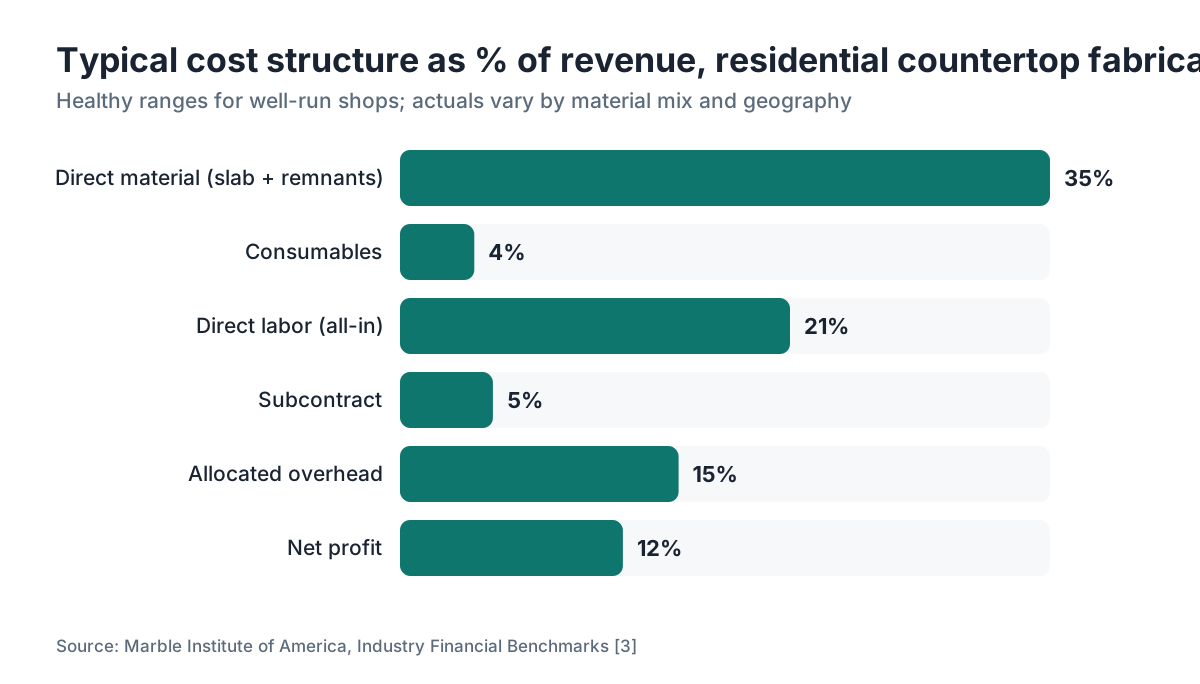
Here's a rough breakdown of what these buckets look like as a percentage of revenue for a typical residential granite or quartz shop, based on industry financial benchmarks [3]:
| Cost Category | % of Revenue (typical range) |
|---|---|
| Direct material (slab + remnants) | 30 to 40% |
| Consumables | 3 to 6% |
| Direct labor (all-in) | 18 to 25% |
| Subcontract | 2 to 8% |
| Allocated overhead | 12 to 18% |
| Total job cost | 65 to 87% |
Coming in below 65 percent means either you're genuinely exceptional at efficiency or your costing is incomplete. Above 87 percent, you're not making money.
How do you calculate material cost per job accurately?
Start with what you paid for the slab, not its list price or what you quoted the customer. Your actual landed cost, freight included, is the number.
Then you hit the yield problem. A 60-square-foot slab does not produce 60 square feet of finished countertop. A clean nesting layout on a straightforward kitchen might use 75 to 80 percent of a slab. A complex island with an ogee edge and two undermount cutouts might use 55 percent. The waste doesn't vanish. It becomes a remnant you either sell or eventually throw away, and how you account for that remnant changes your material cost a lot.
There are two defensible approaches. The simpler one: charge each job for the full slab it required, then credit the job for any remnant you're confident you'll sell, at your remnant sale price. Pay $280 for a slab, expect to sell the remnant for $60, and your net material cost is $220 plus consumables. The rigorous approach carries a blanket remnant inventory value on your books and does a periodic write-down when inventory doesn't move. Most shops aren't running formal inventory accounting at that level, and honestly they probably should be, but the simple method is fine to start.
Remnant resale for quartz and engineered stone is less predictable, because colorways change constantly. A good granite remnant in a popular color actually moves. For marble, it depends on the vein pattern [4]. Factor that into your expected remnant credit honestly.
Consumables get easier if you track them by job. The practical way is a job folder (physical or digital) where someone records how many blades were changed, which pads were used, and what adhesive and sealer went out with the install crew. Most shops skip this and use a consumable burden rate per square foot instead, which is a fine proxy. Just calibrate it once a year against actual consumable spend divided by actual square footage produced.
How do you track labor hours per job without it becoming a burden?
This is where most shops fail. The answer is not a time-and-motion study. The answer is a time ticket: a simple record of which employee worked on which job, for how many hours, at which stage.
You need four stages at minimum: template, fabrication (saw time plus edging plus polishing), cutouts, and install. Track delivery separately if you run it separately. Stages beat a single total because your labor cost per hour varies by stage. A bridge saw operator is not the same cost as an install helper, and the mix of stages shifts by job type.
The time ticket doesn't have to be digital. A paper sheet on a clipboard works. What matters is that someone fills it out, every job, before they move on. The moment it becomes retroactive, you get guesses. Guesses compound. Within six months you're back to knowing nothing.
For shops running ten or more jobs a week, a spreadsheet or a dedicated field in your shop management software handles this without much friction. Built into the workflow, entry takes two minutes per job per stage. As an afterthought, it takes twenty minutes of hunting and still comes out wrong.
One number to know. The Bureau of Labor Statistics Occupational Employment and Wage Statistics program puts the median hourly wage for stone cutters and sawyers around $20 to $23 [5]. Your real cost per hour, with burden, is $26 to $35 depending on your benefit package and comp rate. Workers' comp for stone fabrication in most states runs 6 to 12 percent of payroll [6], a chunk most shops forget to fold into labor cost.
What is an overhead rate and how do you set one for a fabrication shop?
Your overhead rate is how you spread fixed costs across individual jobs so each one carries its fair share of the shop's cost to exist.
Here's the method. Add up your monthly overhead: rent or mortgage on the building, equipment payments or depreciation, utilities, insurance (general liability, property, auto), shop supplies, software subscriptions, and any salaries that aren't direct production labor (office staff, plus your own management time if you work the office rather than the floor). Say that total is $18,000 a month.
Now estimate your productive capacity. If your shop produces about 1,800 square feet of finished countertop per month at normal volume, your overhead rate is $18,000 / 1,800 = $10 per square foot. Every job gets $10 per square foot added to its cost sheet as an overhead allocation.
The rate breaks down when volume swings, because fixed costs don't scale with volume. A slow month doesn't make your rent cheaper. Which is exactly why you need to know your break-even volume: the minimum square footage you must run each month just to cover overhead before any profit.
Break-even math is simple. Divide total fixed monthly overhead by your contribution margin per square foot (price minus variable cost per square foot). Contribution margin of $40/sq ft against $18,000 overhead means you need 450 square feet just to break even. Below that, you lose money every day you're open [7].
Revisit your overhead rate at least once a year. Equipment purchases, rent increases, and insurance renewals all move the number.
What does a job cost sheet actually look like?
A job cost sheet is one document that accumulates all cost data for a single job, from quote to close. It doesn't need to be fancy. Here's a working template you can build in a spreadsheet today:
| Line Item | Estimated | Actual |
|---|---|---|
| Slab cost (landed) | ||
| Remnant credit | ||
| Net material | ||
| Consumables (blades, pads, adhesive) | ||
| Template labor (hours × rate) | ||
| Fabrication labor (hours × rate) | ||
| Install labor (hours × rate) | ||
| Subcontract (waterjet, install sub) | ||
| Delivery/mileage | ||
| Overhead allocation (sq ft × rate) | ||
| Total job cost | ||
| Revenue (invoiced) | ||
| Gross profit | ||
| Gross margin % |
The two-column format, estimated versus actual, is the whole point. Track only actuals and you know what happened. Compare actuals to estimates and you know where your quoting is off, which is the information that fixes your pricing.
Run this for every job for ninety days and patterns surface fast. You'll likely find that decorative edges take longer than you quoted, that undermount cutouts are under-billed, and that your remnant credit assumptions were optimistic. Fixing those three findings alone usually adds 8 to 15 percent to your realized margin.
Software like SlabWise connects the original quote directly to job cost tracking, so you're not re-entering data from the estimate side. That connection is where most of the administrative friction lives. Kill it, and shops actually keep doing job costing past the first month.
How do you track job costs for different countertop materials?
Material type changes the cost structure of a job more than most people expect.
Natural stone (granite, marble, quartzite) has high material cost variability, heavy blade wear, and unpredictable yield from veining and fissures. A $180/slab granite and a $900/slab marble require the same labor in theory, but the marble job carries far more risk: a crack during fabrication or a stain at install is catastrophic on a $900 slab and merely annoying on a $180 one. That risk should show up somewhere in your pricing, either as a higher margin or as a damage reserve line.
Engineered quartz (Silestone, Cambria, and similar brands) has more consistent yield and faster fabrication because the material is uniform. The per-slab cost is often higher, and manufacturer warranty requirements add overhead if you want to keep installer certification [8]. Cambria countertops, for one, come with a lifetime warranty that transfers to homeowners, which changes how you handle callbacks.
Laminate and solid surface like Formica or Corian have low material cost and very different fabrication: you route and glue rather than grind and polish, blade wear is minimal, and your labor cost structure shifts [see /guides/laminate-countertops and /guides/corian-countertops]. Track them with separate burden rates if you do both stone and laminate, because mixing them into one rate distorts both.
Butcher block is another animal entirely: wood movement, oil finishing, and joinery mean the consumable and labor profiles are different again [see /guides/butcher-block-countertops]. If you run meaningful volume of any single material type, build material-specific overhead and consumable rates rather than one shop-wide number.
On your job cost sheet, the material line is always the slab invoice. Not your price list. Not your quote price. What you paid.
How often should you close out and review job costs?
Close out each job within 48 hours of the final invoice going out. That's the rule. The longer you wait, the fuzzier your labor entries get, and the harder it is to assign that last hour of rework to the right job.
At the job level, review every completed job with two questions: did we make money, and where did we bleed? This is a weekly conversation in your shop, not an annual exercise.
At the shop level, roll job costs up monthly. Look at average gross margin by job type (kitchen, bathroom vanity, commercial, outdoor), by material, and by sales channel (retail, contractor, designer). You'll find one or two channels are reliably less profitable because of extra handling, more design changes, or slower payment. That knowledge lets you price those channels differently or walk away from them.
Quarterly, recalibrate your overhead rate against actual overhead spend and actual volume. Add a second CNC and your overhead jumps 10 percent, so your rate has to jump too, or every job you run is now under-costed.
The IRS requires businesses to keep records that substantiate income and deductions. Publication 583 states you must keep records that "support an item of income, a deduction, or a credit appearing on a return." That's more than a tax argument [9]. It's a useful forcing function. Build job cost records that would satisfy an audit, and you've built records that actually help you run the business.
What software or tools work best for job costing in a fabrication shop?
There's a spectrum. At the low end, a well-designed spreadsheet is genuinely enough for a shop doing fewer than thirty jobs a month. SCORE, the SBA resource partner, publishes free financial and job costing templates you can adapt [10]. Build one with the categories above, print a copy for every job, and file it with the job folder. That's a real system.
The middle tier is QuickBooks or a similar accounting platform with a job costing module. QuickBooks Online Plus and Advanced both include project profitability tracking [11]. You assign bills, invoices, and time entries to specific projects and run a profit and loss by project. The limitation: QuickBooks knows nothing about slab yield or nesting, so you still calculate material cost outside the software and enter it by hand.
The top tier is fabrication-specific software that connects quoting, shop routing, and job costing in one system. Your quoted material and labor estimates carry through to the job cost sheet automatically, so the estimated column comes from the quote rather than a second entry. SlabWise is built for exactly this connection between quote and actual cost, which is where fabricators burn the most manual effort. A demo will show you whether the integration fits your workflow.
Whatever you use, discipline beats the tool. Perfect software with sloppy data entry is worse than a spreadsheet used religiously.
What benchmarks should a countertop fabricator aim for on job margins?
Gross margin (revenue minus direct job costs, before overhead) in residential countertop fabrication typically runs 40 to 55 percent for well-run shops, based on financial benchmarks published by the Marble Institute of America and similar trade bodies [3]. Net profit margin, after all overhead, typically runs 8 to 15 percent.
Below 35 percent gross, one of three things is true: your material cost is too high, your labor is untracked and therefore undercosted, or your pricing is too low. Investigate all three before you assume the market won't bear higher prices.
Some specific benchmarks worth knowing:
| Metric | Healthy Range |
|---|---|
| Material cost as % of revenue | 30 to 40% |
| All-in labor cost as % of revenue | 18 to 25% |
| Gross margin | 40 to 55% |
| Overhead as % of revenue | 20 to 30% |
| Net margin | 8 to 15% |
| Revenue per employee per year | $120,000 to $180,000 |
Revenue per employee is a fast sanity check. Six people and $400,000 in annual revenue means something is wrong with pricing, throughput, or both. Shops hitting $150,000 or more per employee are generally pricing right and running tight.
These numbers move by geography and material mix. A high cost-of-living metro shop running exotic marble looks nothing like a Midwest shop running quartz and granite. Treat the benchmarks as a starting point, not a verdict.
What mistakes cause job cost tracking to break down in practice?
The first is tracking at the wrong level. Record costs by week or by customer rather than by job, and you can't diagnose which job types are problems.
The second is using budgeted costs instead of actual costs. If your sheet says "material: $350" because that's what you quoted, but you actually bought a $420 slab, your record is wrong. Use what you paid.
The third is forgetting rework. A fabricator spends two hours re-polishing an edge because the customer wasn't happy. That time is real cost. Leave it off the sheet and your gross margin is overstated. Track rework hours separately within the job so you can see which jobs and which types of work generate the most.
The fourth is not separating overhead from direct cost. Drop rent or a truck payment straight onto one job and you distort that job's cost while leaving others under-costed. Use the allocation method.
The fifth, and the most common, is inconsistent execution. You track the first twenty jobs perfectly, then you get busy, then you stop. Three months later you try to reconstruct costs from memory and give up. The fix: make the time ticket and cost sheet part of job closeout, not an optional chore. Close the job in the system before you invoice. That sequence builds the discipline for you.
How does job cost data improve your quoting accuracy over time?
This is the real payoff. Quoting in this trade is mostly pattern recognition: this kitchen looks like that kitchen we did last quarter. Know what that kitchen actually cost and you can quote this one accurately. Guess, and you're just hoping.
After six months of honest job costing, your data should answer a few questions cold. What does a standard 30-sq-ft granite kitchen with an ogee edge and one undermount sink actually cost to produce? What does the same job cost in quartzite? What's the average overage versus estimate on jobs with more than two miters?
Those answers let you build a quoting model from real data rather than industry averages or gut feel. For countertop installation, you'll find install time varies more than fabrication time, because field conditions are unpredictable. Budget more install buffer than you think you need.
Most shops that go through this raise prices on specific job types and lower friction on others, because they discover they've been charging one rate for jobs with wildly different cost profiles. A bathroom vanity top with a vessel sink cutout and a 4-inch backsplash is not the same job as a plain 20-square-foot vanity slab, even if both read as "vanity tops" on the quote.
For homeowners wondering why quotes vary so much between shops, that's the answer. Shops with good job cost data know what work actually costs and price accordingly. Shops without it guess, and guesses cluster around industry averages that may have nothing to do with a specific shop's real efficiency. If you're shopping for countertops, the quote from a well-run shop is more likely to be accurate and less likely to blow up mid-project.
Frequently asked questions
Do small countertop shops really need formal job costing, or is it just for big operations?
Small shops need it more than large ones, because they have less margin for error. A ten-job-a-month shop that spots one unprofitable job type can fix it fast. A shop that tracks nothing usually underprices its most time-intensive work. You can run a workable system with a spreadsheet and a paper time ticket. It does not require expensive software.
What's the easiest way to start tracking job costs if I've never done it before?
Print a one-page job cost sheet for the next job you take. Track material cost from the invoice, total labor hours by stage, and any subcontract or direct expenses. Compare that total to what you quoted. Do it for ten jobs before changing anything else. The data from those ten jobs tells you more about your business than any benchmark.
How do I calculate my all-in labor cost per hour for fabricators?
Take the employee's hourly wage, add the employer share of FICA (7.65 percent), add workers' comp premium (typically 6 to 12 percent of payroll for stone fabrication), and add any benefits you pay. A $22/hour wage commonly lands at $28 to $34 all-in. Use the all-in number for every job cost calculation, or you're systematically undercosting labor.
Should I include my own time in job costs as a shop owner?
Yes, if you touch the work. Assign yourself an hourly rate that matches what you'd pay someone else for the same task. Do all the templates yourself, and your template time goes on the sheet at your market rate. Owners who skip their own time understate job costs and quietly overprice their own labor contribution without knowing it.
How do I handle job costs when a slab is split across two jobs?
Split the material cost by the square footage each job consumed. The remnant, if any, goes into remnant inventory at a carrying value, not onto either job. When you sell the remnant, book it as remnant revenue. That keeps both jobs accurately costed instead of stuffing an arbitrary share onto each.
How do I track costs for warranty callbacks and rework?
Create a rework job cost record tied to the original job number. Log the labor hours on the callback and any replacement material. Each quarter, total your rework cost and divide by total revenue for a rework rate. Healthy shops run below 2 percent. Above 4 percent signals a quality or install process problem worth chasing down.
What's a reasonable gross margin for a countertop fabrication job?
Industry benchmarks for residential countertop fabrication put healthy gross margin (revenue minus direct job costs, before overhead) at 40 to 55 percent. Net margin after overhead typically runs 8 to 15 percent. Below 35 percent gross, you likely have underpriced labor, untracked consumables, or a material cost problem.
How do slab yield and waste affect my material cost per job?
A lot. A complex layout or difficult vein match might yield 55 percent usable material; a clean rectangle layout might yield 80 percent. Price material off finished square footage without accounting for yield and you absorb all the waste in margin. Track actual slab use per job and build your yield assumptions into your per-square-foot material cost.
Can I use QuickBooks for job costing in a countertop shop?
QuickBooks Online Plus and Advanced include project profitability tracking that works for basic job costing. You assign bills and time entries to projects and run a profit and loss by project. The limitation is it doesn't understand slab yield or nesting, so you calculate material cost outside and enter it manually. It's a workable middle-tier option for shops doing under 50 jobs a month.
How does tracking job costs help with pricing different countertop materials?
Different materials have different yield, blade wear, and labor profiles. Quartzite is harder to cut than standard granite, marble carries higher breakage risk, laminate has almost no blade wear. Cost every material the same and you overpay on some jobs and underprice others. Six months of tracked data lets you build material-specific cost rates that make quotes far more accurate.
How do I set an overhead allocation rate for my shop?
Add up all monthly fixed overhead: rent, utilities, equipment payments, insurance, and indirect salaries. Divide by your average monthly productive output in square feet. Overhead of $18,000 against 1,800 square feet per month gives a rate of $10 per square foot. Apply that rate to every job. Recalibrate at least once a year as costs or volume change.
What records do I need to keep for tax purposes on job costs?
The IRS requires contemporaneous records that substantiate deductions: invoices, time records, and cost allocations tied to specific jobs or periods. Keep supplier invoices, payroll records, and your job cost sheets for at least three years, longer if you have capital equipment with multi-year depreciation schedules. Good job cost records double as your audit documentation.
How do commercial countertop jobs differ in cost structure from residential?
Commercial jobs often have tighter tolerances, longer runs, and more travel or coordination time. Material cost per square foot may be lower because of volume pricing, but project management overhead is usually higher. Callbacks on commercial jobs can be contractually more expensive. Track commercial jobs separately from residential so you can benchmark margins by channel.
How much higher than my estimates do real job costs usually run?
Shops starting honest job costing commonly find real costs run 15 to 30 percent above their estimates. The gap comes from untracked consumables, labor costed at wage instead of all-in rate, forgotten rework, and optimistic remnant credits. Ninety days of tracking usually surfaces the pattern, and fixing the quotes typically recovers 8 to 15 percent of realized margin.
Sources
- Stone World Magazine, fabrication cost survey: Consumable burden rate for typical granite or quartz fabrication runs $8 to $20 per square foot depending on complexity and edge profile
- IRS Publication 15 (Circular E), Employer's Tax Guide: Employer share of FICA (Social Security and Medicare) is 7.65 percent of employee wages
- Marble Institute of America, Industry Financial Benchmarks: Gross margin in residential countertop fabrication typically runs 40 to 55 percent for well-run shops; net profit 8 to 15 percent
- Natural Stone Institute, Stone Fabrication Technical Manual: Remnant resale value for natural stone varies significantly by material and vein pattern; marble remnant resale is less predictable than granite
- U.S. Bureau of Labor Statistics, Occupational Employment and Wage Statistics, Stone Cutters and Sawyers: Median hourly wage for stone cutters and sawyers runs approximately $20 to $23
- National Council on Compensation Insurance (NCCI), workers compensation class codes: Workers compensation rates for stone fabrication in most states run between 6 and 12 percent of payroll
- U.S. Small Business Administration, Business Guide: Break-even volume equals total fixed costs divided by contribution margin per unit; below break-even the business loses money regardless of revenue
- Cambria, Warranty and Installer Requirements: Cambria provides a lifetime warranty transferable to homeowners, with installer certification requirements affecting shop overhead
- IRS Publication 583, Starting a Business and Keeping Records: IRS requires records that support an item of income, a deduction, or a credit appearing on a return
- SCORE, Small Business Templates and Tools: SCORE provides free job costing and financial statement templates adaptable for small service businesses
Last updated 2026-07-09