TL;DR
- A working remnant inventory system needs four things: a consistent way to measure and tag every piece, a searchable record (spreadsheet or software), photos tied to each entry, and a pricing method based on square footage and material cost.
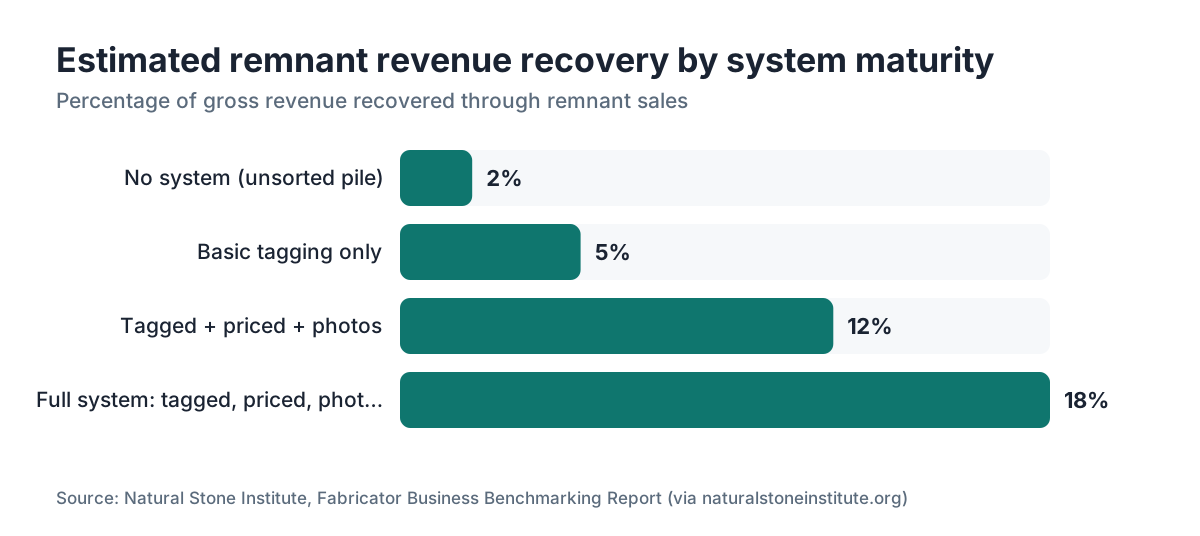
- Shops that run one recover 10 to 20% more revenue from offcuts that would otherwise sit and depreciate.
Why do stone shops lose money on remnants?
Most fabricators lose money on remnants the same way. Pieces get tossed in a pile, nobody writes down what they are, and six months later a 14-square-foot slab of Calacatta Gold sits under three other slabs with no tag, no price, and no memory of where it came from. That is not a storage problem. It is an information problem.
The economics are real. A full 2 cm granite slab might cost a shop $300 to $600 wholesale depending on material and region [1]. A remnant from that slab, if it represents 30% of the original material, carries roughly $90 to $180 in raw material cost. Sell it for scrap or throw it away and you burned that money. Price it and merchandise it right and you can often recover 60 to 80% of material cost on popular materials, sometimes more.
The other leak is labor. Shops that skip tagging at the saw pay for it later: re-measuring pieces, second-guessing the material, and sometimes discovering that a slab pulled for a job is too small to work. That wasted motion adds up fast in a busy shop. Build the system once and most of it disappears.
What information does every remnant record need?
Decide what fields you need before you pick software or build a spreadsheet. Every record should capture these at minimum:
- Unique ID (a physical tag number that matches the digital record)
- Material name and supplier (e.g., "Taj Mahal quartzite, Stone World Inc.")
- Color group (white, gray, beige, black, blue, green, etc.) for quick filtering
- Thickness (2 cm, 3 cm, or uncommon thicknesses)
- Finish (polished, honed, leathered, brushed)
- Measured dimensions (length x width in inches, not square feet; derive square footage from this)
- Square footage (calculated, not eyeballed)
- Condition (A-grade: no chips or cracks; B-grade: minor edge chip; C-grade: crack or significant flaw)
- Location in shop (rack number, bay, or zone)
- Date received (when it was cut or added)
- Original job number (ties back to your job records)
- Asking price
- Photo filename or URL
That is 13 fields. Sounds like a lot. Most of them take five seconds to fill in right after a cut.
The two fields shops skip and later regret are the original job number and the photo. The job number lets you trace material back to its purchase order and figure out true cost. The photo is what sells remnants to walk-ins and online shoppers without them digging through a pile.
A few optional fields earn their place if you have the time: edge profile status (does this piece already have a finished edge?), approximate weight (useful for delivery logistics), and a "holds" field to flag pieces promised to a customer.
How should you physically tag remnants in the shop?
Digital records are useless if you cannot match the physical piece to them. The tag is the bridge.
The most durable approach is a laminated paper tag or a small aluminum write-on tag, zip-tied through a hole drilled in a corner of the slab. Laminated paper costs almost nothing and survives the shop environment. Write the ID number large enough to read across a rack. Some shops color-code tags by material family (white tags for whites and creams, gray for grays, black for dark materials), which speeds up visual scanning.
QR codes printed on weatherproof vinyl labels work well if your staff carries phones or tablets on the floor. Scan the code and the record opens. The catch is setup time: you have to generate and print a code for each piece, and tying each one to a live database URL takes configuration. Batch generators exist, but budget an afternoon to wire it up.
Whatever format you choose, tag the piece the same day it is cut. This is the single biggest discipline point. A two-day lag becomes a week, and by then four more remnants are in the pile and nobody is sure which tag goes with which piece.
Mark the stone itself too, with a paint pen or chalk marker: just the ID number. Tags fall off. Paint pens do not.
Should you use a spreadsheet or dedicated software?
For a shop cutting fewer than 50 jobs a month, a well-built Google Sheet is honestly fine. It is free, opens on any device, holds photo links through Google Drive, and filters and sorts fast enough for a small inventory [2]. The trick is building it right from day one: one row per remnant, consistent column names, and dropdown validation on fields like material type and condition so your data stays clean.
Here is a column layout that works:
| Column | Type | Notes |
|---|---|---|
| ID | Text | e.g., REM-2024-0047 |
| Material | Dropdown | Granite, Quartzite, Marble, etc. |
| Color Group | Dropdown | White, Gray, Beige, Black, Blue, Green |
| Thickness (cm) | Number | 2, 3, or other |
| Finish | Dropdown | Polished, Honed, Leathered |
| Length (in) | Number | Longer dimension |
| Width (in) | Number | Shorter dimension |
| Sq Ft | Formula | =(Length*Width)/144 |
| Condition | Dropdown | A, B, C |
| Location | Text | e.g., Rack 3, Bay 2 |
| Date Added | Date | |
| Job Number | Text | |
| Ask Price | Currency | |
| Photo URL | URL | Google Drive share link |
| Status | Dropdown | Available, Hold, Sold |
A spreadsheet starts to break down once you run more than 50 jobs a month, or once your remnant count passes 100 to 150 pieces. Searching across filters gets clunky, linking photos stays manual, and there is no workflow for holds or customer inquiries. That is when purpose-built fabrication software pays off. Some platforms, including SlabWise, track remnants alongside job quoting so offcuts tie back to the job they came from automatically, which turns cost recovery from a manual calculation into a lookup.
Want to see software-based tracking before you commit? Most platforms offer a demo. The math is usually simple: if the software recovers one extra slab worth of remnant revenue a month, it covers most subscription costs at typical pricing.
How do you price remnants correctly?
Pricing remnants wrong is the second most common mistake, right behind not tagging them at all. Shops either price too low (selling $200 of material for $40 because it "feels like scrap") or too high (pricing remnants like full slabs and wondering why nothing moves).
A practical pricing formula:
Ask Price = (Material Cost per Sq Ft x Remnant Sq Ft x Recovery Rate) + Overhead Contribution
Breaking that down:
- Material cost per sq ft: your actual cost from the supplier invoice, divided by the slab's square footage. A $450 slab that was 55 sq ft cost you $8.18/sq ft.
- Recovery rate: the fraction of material cost you expect to get back. For popular materials (white marbles, gray quartzites), 70 to 90% is reasonable. For slow-moving colors, 50 to 60%.
- Overhead contribution: a flat add-on covering handling, storage, and the time to cut it down if needed. Many shops use $50 to $100 per remnant regardless of size.
Example: a 12-square-foot Carrara marble remnant, material cost $9/sq ft, 80% recovery rate, $75 overhead. Ask price = ($9 x 12 x 0.80) + $75 = $86.40 + $75 = $161.40. Round to $160 or $165.
B-grade pieces with edge chips get a 20 to 30% discount off A-grade pricing. C-grade with cracks gets 40 to 50% off, or price it for outdoor and landscape use.
One more rule: price by the piece for retail customers, not by the square foot. Homeowners do not think in square feet. They think about whether the piece fits their bathroom vanity. Show the dimensions clearly and give one price. Fabricators buying for their own shop can handle sq ft pricing.
How do you photograph remnants for online and showroom sales?
A good photo doubles the odds a remnant sells without the customer ever visiting. A bad photo, or no photo, means the piece sits.
You do not need professional gear. A modern smartphone in good daylight is enough. What matters is consistency and lighting.
Set up a simple station: a neutral gray or white backdrop (foam board or a painted section of shop wall works), positioned near a large door or window for natural light. Shoot straight down for a flat lay, which shows the true pattern. Take a second shot of the full piece leaning against a wall so the viewer can judge scale.
Lay a tape measure or a standard 12-inch ruler next to the piece in the frame. That reads faster than dimensions in a caption because it is immediately visual.
Take at least two photos per piece: the flat overhead and the leaning full view. If there is a strong vein pattern or a crack, shoot it separately and note it in the condition field.
File naming matters more than most shops realize. Put the ID number in the file name (REM-2024-0047-01.jpg, REM-2024-0047-02.jpg). Random names like IMG_3847.jpg get lost, and the whole system falls apart within a few months.
Store photos in a shared folder (Google Drive, Dropbox, or a server) organized by year and month. Link to them from your inventory record. If you post remnants publicly, upload from this same folder.
Where can stone shops sell remnants?
Once you have photos and prices, your options run well past walk-ins.
Your own website. A simple remnant page with photos, dimensions, material name, and price is your highest-margin channel because there is no middleman. Update it weekly. Even a basic WordPress or Squarespace page with a table of available pieces converts well, especially for homeowners searching for marble countertops or small granite countertops for a vanity or laundry room.
Facebook Marketplace and local groups. Free to post, reaches local buyers fast. Good for moving B and C grade pieces and for reaching DIYers who want to handle their own countertop installation. The downside is fielding a lot of messages from people who never show up.
Craigslist. Still active for stone in many markets. Post in both the "materials" and "for sale" sections.
Stone remnant marketplaces. Sites that aggregate remnant listings from multiple shops (regional availability varies) take a cut or charge a listing fee, but they bring buyers who came looking for remnants specifically.
Interior designers and contractors. Build relationships with designers who spec kitchen countertops for small projects and rental units. A recurring buyer who takes 5 to 10 remnants a month at a modest discount beats a string of retail one-offs.
Habitat for Humanity ReStores. For pieces you cannot sell, donating to a ReStore may qualify as a charitable deduction under IRC Section 170 [3]. Keep records of the fair market value you assign. The IRS requires documentation for non-cash donations above $500 [4].
In a slow market, selling remnants for outdoor use (fire pit surrounds, garden stepping stones, outdoor kitchen counters) opens a buyer pool that has nothing to do with your usual customers.
How do you audit and age your remnant inventory?
Inventory that never gets audited fills up with junk. Once a quarter, walk every piece and update its status. A piece sitting more than 90 days with no interest needs one of three things: a price cut, a different sales channel, or a decision to let it go. Auditing and turnover tracking are standard cost-recovery practice for any small business [9].
Add a "days in inventory" field to your spreadsheet: =TODAY()-[Date Added]. Sort by it quarterly. Anything over 120 days gets flagged. Anything over 180 days gets a decision.
Carrying cost is real and worth tracking on purpose. Stone does not spoil the way perishable goods do, but rack space is not free. A 10-square-foot remnant taking up space for 8 months costs you the space it occupies, even if the stone is perfect. Factor that into how far you are willing to discount.
Flag pieces on hold more than two weeks with no confirmed purchase. Holds are not sales. A 14-day hold limit with a small deposit ($25 to $50) separates serious buyers from browsers and keeps inventory moving.
At each quarter's close, count: pieces in, pieces sold, pieces written off, total revenue recovered. That number tells you whether the system works. Shops with a good one typically recover 10 to 20% of gross revenue in remnant sales; shops without one recover 2 to 5%, or nothing [5].
What are the best practices for remnant rack organization?
How you lay out remnant storage decides how fast you find pieces and how many you can hold without damage.
Vertical A-frame or L-frame racks are standard in stone shops and work for remnants too. Keep remnants on a separate section from full slabs, or on a dedicated smaller rack. Mix them and you end up pulling full slabs to reach remnants, or the reverse, which is how chips and breakage happen.
Match the physical rack to your digital location codes. If the record says "Rack 3, Bay 2," that should be a real, labeled spot. Use a label maker or a paint marker on the frame. An hour of setup saves hours of searching.
Group by material family first (quartzites together, granites together, marbles together), then by thickness within each family. That mirrors how customers and estimators browse: they know they want a 3 cm quartzite and want to see the whole category at once.
Store thin or fragile pieces flat, not vertical. Anything under 6 to 8 square feet, or any piece with a partial crack, goes on a flat rack or a padded shelf. The Natural Stone Institute's technical guidance notes that small or thin remnants stored upright without adequate support can crack under their own weight [10].
Leave walking space between rack sections. A cramped rack causes damage and makes staff avoid the system. The best remnant rack is one people are comfortable browsing.
How do you integrate remnant tracking with job quoting and nesting?
The most efficient shops do not treat remnants as an afterthought. They work them into the job flow from the start.
When you quote a job, note which slab you plan to use and the expected remnant dimensions based on your nesting layout. This is where nesting software pays off: a good tool shows exactly how much slab is left after the job is placed, so you know the remnant size before the first cut [6].
After the job is cut, the crew gets a checklist item: measure the remnant, tag it, photograph it, and log it before the scrap moves. That takes 5 to 8 minutes per job and is the single most effective process change most shops can make. Tie it to close-out. The job is not marked complete until the remnant is logged.
Some fabrication software, including SlabWise, lets you define the remnant right in the nesting view and push it to inventory automatically, which closes the loop with no re-entry. If your software cannot do that, a paper checklist at the saw gets you most of the way there.
Integration pays both directions. You can also check existing remnant stock before buying a new full slab. A 14-square-foot vanity job might be covered by a remnant already on the rack, saving a full slab purchase. Shops that make this check a habit report fewer new slab buys for small jobs, though the exact savings depend on shop size and job mix.
What does a minimal viable remnant system look like for a small shop?
Two-person shop cutting 15 to 20 jobs a month, and this all sounds like a lot? Here is the simplest version that actually works:
- Buy a pack of aluminum write-on tags and a paint pen. $20 total.
- Create a Google Sheet with these columns: ID, Material, Length (in), Width (in), Sq Ft (formula), Thickness, Price, Location, Photo Link, Status.
- When a remnant is cut, one person tags it with a sequential number (REM-001, REM-002...) on both the tag and the stone. Same day, one person fills in a row and takes two phone photos, uploaded to a shared Google Drive folder.
- Price it with the formula above. Write the price on the tag.
- Post a photo and price to Facebook Marketplace weekly.
- Once a month, mark anything sold as "Sold" and give anything unsold 60+ days a red fill.
That is the whole thing. Maybe 10 minutes per remnant to set up and 30 minutes a month to keep running. It is not fancy. It recovers money that is currently sitting in a pile.
Frequently asked questions
How do I calculate the square footage of an irregular-shaped remnant?
Measure the longest length and widest width, then calculate as if it were a rectangle: (length x width) / 144 = square feet. This overstates the usable area on L-shapes or triangular cuts, so note any cutouts or angles in the record. For pricing, use the bounding rectangle square footage and adjust your ask price down if a large portion is unusable.
How long should I keep a remnant before writing it off?
Most shops find pieces unsold after 6 months rarely sell without a real price cut or a new channel. At 90 days, cut the price 20%. At 180 days, decide: deep discount, donate, or repurpose for shop samples. Holding indefinitely costs rack space and management time. Stone does not spoil, but your rack space is not free.
Can I take a tax deduction for remnants I donate?
Yes. Under IRC Section 170, donated property can generate a charitable deduction if it goes to a qualifying organization like a Habitat for Humanity ReStore. For non-cash donations over $500, the IRS requires Form 8283. Over $5,000, you need a qualified appraisal. Document the fair market value at the time of donation with a comparable retail reference.
What is the best way to price a remnant that already has a finished edge?
Add $30 to $75 to your base remnant price for the finished edge. A piece with a polished or eased edge already applied is worth more to a homeowner doing a DIY vanity or small bar top because it cuts their finishing cost. Note the edge profile in the record and any listing. This detail is often the tiebreaker between two similarly sized pieces.
Should I post remnants on my website or on third-party marketplaces?
Both, if you can keep up with the maintenance. Your own website gives you the highest margin and builds your shop's brand. Marketplaces like Facebook Marketplace and Craigslist reach buyers who would never find your website. The danger with multiple channels is selling the same piece twice, so update status daily or mark pieces "pending" the moment a deposit is taken. Overselling a remnant burns trust fast.
How do I handle remnant inventory when I buy a slab and have leftovers from a previous owner?
Trace what you can: ask the previous owner for purchase invoices or supplier names. If you cannot get cost data, estimate using current wholesale prices for the material type and thickness from your suppliers. The goal is a reasonable cost basis for pricing, not a perfect accounting entry. Document your estimation method so you can explain it if a business advisor or tax preparer asks.
What thickness remnants are worth keeping versus scrapping?
Keep 3 cm pieces almost always. Keep 2 cm pieces if they are at least 6 square feet and in decent shape. Pieces under 4 square feet in 2 cm are borderline: they may sell as craft material or backsplash accents but eat space. Under 2 square feet is usually scrap unless it is a premium material like book-matched exotic quartzite. 1.2 cm and thinner rarely justifies the storage space.
How do I train shop staff to maintain the remnant system consistently?
Make tagging and logging a step in the job close-out checklist, not a suggestion. If close-out must be signed off before a job reads complete in your system, the behavior follows. Post the checklist at the saw. Review remnant inventory at your weekly shop meeting for the first month so staff sees management cares. Consistency in the first 60 days usually sets a lasting habit.
Can I use my remnant inventory to supply small DIY customer jobs?
Yes, and it is one of the higher-margin uses of remnant stock. A homeowner buying a 10-square-foot bathroom vanity top from a remnant pays near-retail per square foot with zero material waste on your end. The margin on remnant retail to homeowners often beats full-slab jobs once you account for the material cost already being sunk. Build a simple remnant browser on your website or a showroom screen.
What software do small stone shops use for remnant tracking?
Options run from a Google Sheet (free, fine under 100 pieces) to purpose-built fabrication platforms. Mid-market shops often use Moraware, Stone Profit Systems, or Slabsmith alongside manual spreadsheets for remnants. Newer platforms like SlabWise tie remnant tracking to job quoting so offcuts link to jobs automatically. The right choice depends on job volume and how much manual overhead your team can sustain.
How do I keep remnant photos organized as inventory grows?
Name every photo file with the remnant ID (REM-2024-0047-01.jpg). Store photos in a cloud folder organized by year and month. Link the photo URL right in the inventory record. That one-to-one link means you never hunt for a photo manually. Delete photos when a piece is sold or scrapped to keep the folder usable. A folder with 2,000 unnamed photos is functionally useless.
Is there a standard industry remnant pricing guide?
No universal standard exists. The Marble Institute of America (now merged into the Natural Stone Institute) has published cost benchmarking data for fabricators but not a remnant-specific pricing guide. Most shops build their own formula from material cost recovery plus overhead. The approach in this article (material cost x sq ft x recovery rate + overhead) is a practical starting point you can tune to your market over time.
How do I handle remnants from jobs that were returned or cancelled?
Treat them like any other remnant: measure, tag, photograph, price, and enter into inventory. If the customer paid for the material and the job was cancelled, your contract terms decide whether the material reverts to you or the customer. Keep a clear cancellation clause in your contracts. If material reverts to you, document the transfer in writing. These pieces often carry no prior job cost to recover, so any sale is pure margin.
Sources
- Natural Stone Institute, Stone Industry Statistics: Wholesale granite slab prices typically range from $300, $600 depending on material grade, origin, and regional market conditions.
- Google, Google Sheets product overview: Google Sheets is free, cloud-based, and accessible from any device with internet access.
- IRS, Publication 526 (Charitable Contributions): Under IRC Section 170, non-cash donations of property to qualifying organizations are deductible at fair market value.
- IRS, About Form 8283 (Noncash Charitable Contributions): The IRS requires Form 8283 for non-cash charitable donations exceeding $500 in value.
- Marble Institute of America (now Natural Stone Institute), Fabricator Business Benchmarking Report: Shops with active remnant programs recover 10 to 20% of gross revenue from remnant sales; shops without recover significantly less.
- Slabsmith by Northwood Design, nesting software: Nesting software calculates remaining slab area after job cuts are placed, enabling shops to predict remnant dimensions before cutting begins.
- IRS, Publication 561 (Determining the Value of Donated Property): For non-cash donations over $5,000, a qualified appraisal is required by the IRS to support the claimed fair market value deduction.
- IRS, Individuals and Families tax guidance: The IRS provides recordkeeping and documentation guidance for taxpayers claiming deductions, including non-cash charitable contributions.
- U.S. Small Business Administration, Manage Your Finances: Consistent inventory auditing and turnover tracking are standard recommended practices for small business cost recovery and waste reduction.
- Natural Stone Institute, Dimension Stone Design Manual: Stone remnants stored vertically without adequate support risk cracking under their own weight, particularly for smaller or thinner pieces.
Last updated 2026-07-09