
TL;DR
- Fabrication shops track slabs with three things working together: a physical tag on every slab, a location map of the yard, and a running log (spreadsheet or software) tying each slab to a job.
- The shops that get it right update inventory at three moments: receiving, cutting, and job close.
- The shops that struggle skip one of those three.
Why does slab inventory tracking matter so much in a stone shop?
Stone isn't lumber or tile. You can't reorder a matching slab next week. Every full slab is a one-of-a-kind sheet with its own veining, background color, and lot number. Lose track of one and you might quote a job against a slab that's already been cut, then get to explain to a homeowner why their countertop won't match the sample they picked.
The money side is just as sharp. A single 3cm quartzite slab from a distributor runs $400 to over $1,200 wholesale depending on material, and exotic marbles go higher [1]. A shop carrying 50 to 200 slabs is sitting on tens of thousands of dollars in raw material. Without accurate counts, overbooking and phantom inventory eat straight into margin.
There's a safety angle on the shop floor too. Slabs weigh 400 to 700 pounds and stand vertically in A-frames or saddles. Knowing exactly where a slab is, and that it's been tagged and checked in, means nobody is shuffling slabs in a dark corner of the yard guessing at what they've got.
Good tracking feeds your quoting. A salesperson who can look up available 3cm Calacatta Gold in real time, instead of walking the yard, writes faster and more accurate quotes. Shops that formalize their inventory process report fewer material shortages and less remnant waste, though I haven't seen a published study with clean numbers on this. The anecdotal read across shop forums and trade groups is consistent.
What information should you record for each slab?
Every slab entry needs these fields at minimum. Skip any of them and you'll feel it later.
- Unique slab ID (a number you assign, often printed on a tag or barcode label)
- Material type and name (granite, quartzite, engineered quartz)
- Color or pattern name as the supplier labels it
- Lot or bundle number from the distributor
- Finish (polished, honed, leathered, brushed)
- Thickness (2cm or 3cm; occasionally 1.2cm for specialty work)
- Slab dimensions in inches or cm, measured after receiving
- Supplier name and purchase order number
- Date received
- Cost per slab (or per square foot if you want unit cost analysis)
- Location in the yard or warehouse (A-frame number, row, slot)
- Status (available, reserved, in cutting, cut, remnant, sold/used)
- Job number if reserved or cut
- Remnant dimensions if partially cut
That last field is the one shops skip and later regret. A remnant sitting in the yard without dimensions logged against its slab ID is just a mystery rock. You can't quote it to a client without walking out to measure it again.
Some shops record slab weight, which matters for delivery scheduling and crane logistics. Others photograph every slab face-on against a color-calibrated backdrop so reps can show accurate images to clients remotely. That photo, tied to the slab ID, has turned into a real edge as more homeowners buy without setting foot in the yard [3].
What are the main methods shops use to track slabs?
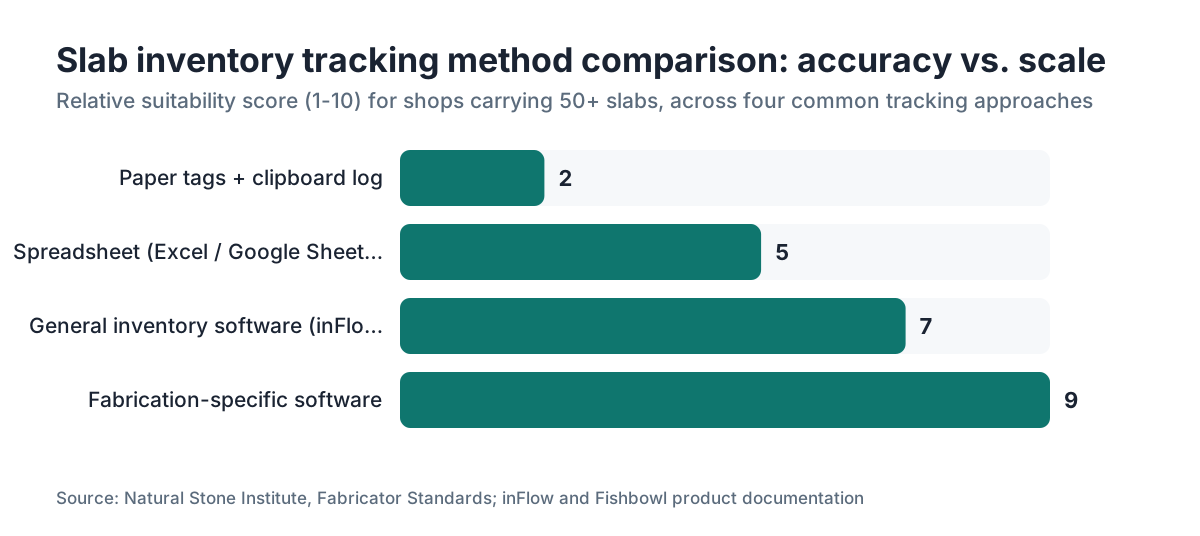
There's no single right method. The answer depends on shop size, budget, and how your team actually behaves under pressure. Here's an honest breakdown of the four approaches in common use.
| Method | Setup cost | Accuracy | Scales to 100+ slabs? | Real-time? |
|---|---|---|---|---|
| Paper tags + clipboard log | Near zero | Low to medium | No | No |
| Spreadsheet (Excel/Sheets) | Near zero | Medium | Struggling | No |
| General inventory software (Fishbowl, inFlow) | $1,000-$5,000/yr | Medium-high | Yes | Partial |
| Fabrication-specific software | $2,000-$10,000+/yr | High | Yes | Yes |
Paper tags work fine in a shop with fewer than 30 slabs and one person who's always in the yard. The trouble is coverage gaps. Somebody moves a slab, forgets the clipboard, and you've got drift inside a week.
Spreadsheets are the most common method in small and mid-size shops. A shared Google Sheet with columns matching the field list above gets you most of the way for free. The failure mode is discipline. When the shop is slammed, data entry is the first thing to slip. Shops running more than 80 active slabs usually find the spreadsheet turning into a liability instead of an asset.
General inventory platforms like Fishbowl handle the data structure well but aren't built around stone concepts like remnant tracking, bundle lot matching, or job-level material allocation. You can customize them into shape, but that takes time nobody in a shop has.
Fabrication-specific software connects slab inventory directly to quoting, job scheduling, and cutting layout, which is where the real efficiency lives. A platform like SlabWise links available inventory to the quoting workflow so a salesperson sees live material availability while building a quote. That closed loop between inventory and quote kills the most common error: promising a slab that isn't there. The SlabWise software demo walks through the full flow if you want to see it in practice.
Whichever method you pick, the system only works if every person in the shop uses it every time. The technology is secondary to the process.
How should you physically tag and organize slabs in the yard?
Physical organization is the foundation. The best software on earth falls apart if slabs are stacked in random order or mislabeled in the yard.
Start with a location schema. Divide your storage area into named zones (A, B, C or Row 1, Row 2), then into individual A-frame positions inside each zone. A slab's location then reads like B-3-4 (Zone B, A-frame 3, slot 4). Write that location into the inventory record when the slab arrives and update it any time the slab moves. That last part is where shops fail. Move a slab without updating its location record and the record is useless.
For the tag itself, a few options hold up. Laminated paper tags tied through a hole drilled in the slab corner are cheap and durable. Adhesive vinyl labels with a printed barcode or QR code scan faster but peel off in wet or cold conditions. Some shops stamp numbers into aluminum or plastic tags for slabs that live outside. Whatever the material, the tag needs the slab ID at minimum, and the job number once the slab is reserved.
Barcode and QR scanning, with a handheld scanner or a phone app, speeds up receiving and audits by a lot. A warehouse barcode scanner costs $100 to $300, and smartphone scanning apps are often free [4]. The scan logs to your system automatically and cuts transcription errors. Worth setting up once you're moving more than 15 slabs a week.
Do a physical count at least monthly. Walk the yard with a printed or on-screen list and verify every slab ID against its location. That takes 30 to 90 minutes depending on volume and finds drift before it costs you. Quarterly, re-verify dimensions on any remnants to keep that data fresh.
How do you handle remnant tracking specifically?
Remnants are where most tracking systems fall apart, and where a lot of money gets left on the floor. A remnant is any cut piece left after a job. It might be a 24x36 inch piece worth $80 to a homeowner doing a bathroom vanity, or a 48x60 inch chunk worth $400 or more in a premium material.
Every remnant needs its own record, separate from the parent slab. When a slab gets cut, close out or update the parent record and create a new remnant record with the cut date, actual measured dimensions, and a note linking back to the original slab ID and the job it came from. Photograph it. Slabs photographed individually sell faster because you can show the exact piece to a buyer without them driving over.
Store remnants in a dedicated section of the yard, away from full slabs. Give each one a physical tag with its remnant ID and dimensions. Some shops keep a printed remnant board or a public gallery on their website so homeowners can browse. Remnants that sit untagged and unphotographed for more than a few months almost never sell, because nobody can find them or describe them.
For costing, a remnant's book value is the proportional cost of the parent slab. Use 60% of a $600 slab on a job and the remnant carries $240 in cost. That matters for true job cost accounting. Sell a remnant and that revenue should offset material cost, not land as pure revenue with no cost attached.
The Natural Stone Institute publishes handling and business-practice guidance that covers material tracking and remnant management as part of its fabricator certification program [5].
How should slab inventory connect to job quoting and scheduling?
Inventory tracking that sits in a silo away from quoting gives you half the benefit. The full payoff comes when a salesperson building a quote can see which slabs are available right now, reserve a slab against the quote, and have that reservation automatically drop available stock so nobody else quotes the same material.
Here's the workflow most well-run shops use.
- Customer picks a material. Salesperson pulls up available slabs in that material and checks dimensions against the job's rough layout.
- Salesperson reserves one or two candidate slabs. The record reads "reserved for Quote #1042" and the status changes so other quotes can't double-book it.
- Quote is approved. The reservation converts to a job allocation. The slab is now "allocated to Job #1042."
- Cutting day. The cutter confirms the slab, cutting starts, status changes to "in cutting." Remnants get logged after.
- Job completes and ships. The slab record closes. Any remaining remnants get their own records.
That five-step flow sounds obvious, but plenty of shops run Steps 1 and 2 entirely in someone's head. The system breaks the moment that person is out sick.
Scheduling ties in too. If you know a slab is allocated to a job scheduled for Thursday, your project manager can confirm it's physically in the right yard slot Wednesday morning. A five-minute check that heads off a two-hour scramble on install day.
For homeowners, the practical upshot is that a shop with tight inventory discipline can give you a much more accurate lead time. If you're pricing out granite countertops or marble countertops, ask your fabricator whether they can show you the specific slab you'll get before you sign. Shops with good tracking say yes right away. Shops without it hedge.
What should the receiving process look like for new slabs?
Receiving is the moment that matters most in the inventory lifecycle. Whatever enters the system wrong at receiving spreads errors into every step downstream.
When a delivery arrives, the receiver does all of this before the truck leaves:
- Count the slabs against the purchase order.
- Check each slab for visible damage, chips, cracks, or transport damage. Note any issue on the delivery receipt before signing. Signing without noting damage makes freight claims nearly impossible to win [6].
- Measure each slab. Supplier-stated dimensions are often approximate. A slab listed as 120x68 might really be 118x66. Quote using the supplier's number and cut to the actual number and your yield math is off.
- Photograph each slab, ideally against a neutral background in good light.
- Assign and attach a physical tag with the new slab ID.
- Enter all data into your inventory system immediately, or within the same business day at worst.
The measuring step is where shops cut corners, especially when a delivery lands at 5pm and everyone wants to go home. Measured dimensions take maybe two minutes per slab with a tape. Skip them and it costs you when a job comes in needing a 115-inch run you thought you had covered.
Engineered quartz and porcelain hold consistent dimensions within a brand's tolerances. Natural stone varies enough that measuring always earns its keep.
How do you run a slab inventory audit and catch errors?
Even good systems drift. People move fast, slabs get shifted, tags fall off, a remnant gets tucked behind a full slab and drops off the mental map. Regular audits are how you catch and fix this before it hits a job.
Run a rolling cycle count. Divide the yard into sections and audit one section per week instead of the whole yard at once. Each week's count takes 15 to 30 minutes and keeps records current without a full shutdown. After four weeks, the whole yard has been audited.
For each slab you verify, check three things. The slab ID tag is present and readable. The location in the system matches where you actually found it. The status matches reality (a slab marked "available" should not have a saw cut in it).
Discrepancies fall into a couple of buckets. A slab in the system but not in the yard means it was used and not closed out, moved without a location update, or misidentified at receiving. A slab in the yard but not in the system means something came in without being entered. Both need investigation and correction, not a note on a sticky pad.
When you find a phantom slab (in the yard, not in the system), photograph it, measure it, create a record, and tag it. Don't leave it floating because "we'll figure it out later." Later never comes.
Quarterly, reconcile your inventory system's valuation against your accounting books. Total cost of slabs on hand should match the raw materials figure on your balance sheet within a reasonable tolerance. Big divergence means a process problem worth hunting down.
What are the most common mistakes shops make with slab tracking?
Shops repeat the same mistakes, and they're almost never about which software got picked. They're about process discipline.
The biggest one: updating inventory in a batch at the end of the week instead of in real time at each trigger point. By Friday, nobody remembers exactly when a slab was cut or which remnant came from which job. Updating at the three trigger points (receiving, cutting, job close) is non-negotiable if you want accurate data.
Close second: not giving remnants their own records. A remnant that inherits its parent slab's record instead of getting its own is invisible to quoting. You can't book it on a new job without confusion.
Third: one person owns the system and nobody else knows how it works. That person leaves or takes a week off and the inventory data freezes or rots. The process should be documented well enough that any employee can receive a slab or log a cut without the owner standing there.
Fourth: ignoring the location field when slabs move. This one hides because the count looks right while the location is wrong. You have the slab, you just can't find it in under ten minutes, and that time bleeds out of every job.
Fifth: carrying slabs on the books at retail price instead of actual cost. That inflates your apparent inventory value and wrecks job costing. Use your real landed cost per slab, freight included.
For shops running multiple material types including laminate countertops or Corian countertops, keep material categories cleanly separated in the system. Mixing natural stone with sheet goods in one undifferentiated pile makes analysis harder than it needs to be.
How does inventory tracking tie into job costing and profitability?
Inventory tracking and job costing are the same system viewed from two angles. Know the cost of every slab you received and the exact slabs consumed on every job, and you can calculate true material cost per job down to the square foot.
True cost per square foot matters because markup on stone changes by material. A 3cm quartzite at $18/sq ft wholesale needs a different markup than an engineered quartz at $9/sq ft to hit the same margin percentage, once cutting yield, waste, and remnant recovery factor in. Shops that average these costs across all materials give up accuracy they don't have to.
Remnant recovery is part of the profit picture. Sell a remnant for $150 when the allocated material cost was $200 and you recover 75 cents on the dollar, which is fine. Let it sit two years and scrap it and you've lost the $200. Tracking remnant age and flagging slow movers lets you make a real decision about discounting or donating instead of watching material age invisibly.
The link to accounts payable matters too. A supplier invoices you for 12 slabs and you received 11. You need receiving records to dispute that invoice. A good receiving log is evidence. The Natural Stone Institute (which absorbed the former Marble Institute of America) recommends shops keep material records for at least five years for warranty and dispute purposes [5].
To tighten this loop, fabrication management software like SlabWise folds slab inventory directly into job-level material costs, so you're not hand-reconciling two separate systems at month end.
What tools and software actually work for stone slab inventory?
The honest answer: almost any structured system works if the team uses it every time. The gap between a disciplined spreadsheet and mid-tier software is smaller than vendors want you to believe. The gap between a disciplined spreadsheet and no system is enormous.
For shops under 40 slabs on hand, a well-built Google Sheet with the field list from Section 2, shared with everyone, is a legitimate long-term answer. Use data validation to lock status values so nobody types "avail" in one row and "available" in the next. Use conditional formatting to flag slabs in cutting or overdue for audit. Costs nothing. Takes an afternoon.
For shops carrying 50 to 150 slabs, the spreadsheet strains. Version conflicts, slow loads with photos embedded, no real-time visibility across multiple users. That's where purpose-built or general inventory software starts to pay off.
General inventory platforms: Fishbowl Inventory and inFlow Inventory both do barcode scanning, purchase orders, and location tracking. Neither is built for stone, so you'll customize fields. Fishbowl's pricing starts around $4,395 for a perpetual license; inFlow runs roughly $89 to $249/month depending on tier [7][8]. Both offer free trials.
Fabrication-specific platforms add job integration, nesting support, and often a customer portal. They cost more but cut the manual work of shuffling data between systems.
For physical tools, a Honeywell or Zebra handheld barcode scanner ($150 to $300) plus a thermal label printer ($200 to $400 for a decent Zebra model) is a one-time buy that pays for itself in receiving accuracy within months [4].
Whatever you choose, run it in parallel for 30 days before you commit. Keep the old system live while you populate the new one. Finding a platform's gaps mid-job is far worse than finding them in a controlled test.
How do you get a whole shop team to actually use the inventory system?
This is the real problem. Technology is solved. Human behavior is not.
The single most effective move is tying inventory updates to physical checkpoints that already exist. Receiving a delivery is a physical event. Cutting a slab is a physical event. Shipping a job is a physical event. Bolt the update to the checkpoint. The delivery isn't signed for until the slab is entered. The saw doesn't start until the status is updated. The truck doesn't leave until remnants are logged. Make the update the last step of the physical action, not a separate desk chore.
Second: make the system reachable on the floor. If it only lives on the office computer and the yard is 200 feet away, the cutter won't update it in real time. A tablet mounted near the saw, or a phone-accessible web form, kills that friction.
Third: make errors visible and blame-free. A weekly five-minute review of discrepancies from the audit, shared with the team, builds accuracy without a blame culture. "We had three slabs with wrong locations this week, here's what happened, here's how we catch it faster" beats yelling.
Fourth: the owner models it. If the owner bypasses the system, cuts a slab without logging it, or lets receiving pile up for three days, the team reads that as permission.
Most stone fabrication shops employ fewer than 10 people [9]. With a team that small, one person going off-system is a big chunk of your data quality. Everyone has to be in.
Frequently asked questions
How much does stone slab inventory software cost for a small fabrication shop?
General inventory software like inFlow starts around $89/month, and Fishbowl runs roughly $4,395 for a perpetual license. Fabrication-specific platforms vary widely, typically $2,000 to $10,000+ per year depending on features and seat count. A well-structured Google Sheet costs nothing and legitimately works for shops carrying fewer than 40 slabs on hand.
How often should a stone shop do a full slab inventory count?
At least monthly. Many shops find a rolling cycle count easier: audit one section of the yard each week so the whole inventory gets touched every four weeks. That keeps records current without a full shutdown. Verify remnant dimensions quarterly, since they shift as pieces get moved or cut further.
What is the best way to tag stone slabs in a yard?
Laminated paper tags tied through a drilled corner hole work well for indoor or covered storage. Aluminum or engraved plastic tags hold up better outdoors. Adhesive barcode or QR labels on the slab face scan fast but peel in wet or cold conditions. Whatever the material, the tag needs at minimum the slab ID and the job number once the slab is reserved.
How do you track stone slab remnants after a job is cut?
Every remnant needs its own inventory record, separate from the parent slab. Create it at cutting time with actual measured dimensions, a photograph, the cut date, and the original slab ID it came from. Store remnants in a dedicated yard section with their own physical tags. A remnant without its own record is functionally invisible to quoting and scheduling.
Can I track slab inventory in a spreadsheet or do I need software?
A spreadsheet works well for shops carrying fewer than 40 to 50 slabs. Use Google Sheets with shared access so multiple people can update in real time. Add data validation to enforce consistent status values. It breaks down when you're moving more than 15 slabs a week, managing many remnants, or needing inventory tied to quoting and job scheduling.
What should I check when receiving a stone slab delivery?
Count slabs against the purchase order, inspect for damage before signing the delivery receipt, measure actual dimensions (they often differ from supplier specs), photograph each slab face, assign a physical tag with a unique slab ID, and enter all data into your system the same day. Signing a delivery receipt without noting damage makes freight claims very hard to pursue.
How do you allocate slab costs to individual jobs?
Use your actual landed cost per slab (purchase price plus freight), not retail or estimate. When a slab is allocated to a job, assign the full slab cost or a proportional share if only part is used. Remnants carry the proportional cost of their parent slab. Selling a remnant recovers part of that cost; scrapping an old remnant writes it off. That gives you true material cost per job.
How do you prevent double-booking the same slab on two different customer quotes?
Use a reservation status. When a slab goes onto a quote, mark it reserved and link it to that quote number. Other quotes should not be able to select a reserved slab. When a quote is declined, release the reservation. This only works reliably with software or a very strictly managed shared spreadsheet where everyone checks before reserving.
What inventory data do you need to run accurate countertop quotes?
At minimum: available slab dimensions, material type and finish, your cost per slab, and current status. Better systems also carry lot or bundle numbers for color-match jobs, plus photos so salespeople can show clients the actual slab remotely. Without current dimensions, you may quote a job that won't fit the available slab, which means extra material cost or a delay.
How do stone shops handle inventory for multiple materials like granite, quartz, and quartzite?
Use material category as a top-level field so you can filter by type. Each category has different typical dimensions, cost ranges, and yield rates. Granite and natural quartzite slabs vary a lot in actual dimensions, so measuring at receiving is essential. Engineered quartz is more consistent but still worth measuring. Keep natural stone and sheet goods in physically separate yard sections if space allows.
Should I photograph every slab in my inventory?
Yes, for any shop doing more than a few jobs per month. A face-on photograph of each slab, tied to its ID in your system, lets salespeople show clients their exact material remotely. It also settles disputes about what was on a slab before cutting. The time cost is about two minutes per slab at receiving. The value, especially for premium natural stone, far exceeds that.
How long should fabrication shops keep slab inventory records?
The Natural Stone Institute recommends keeping material records for at least five years, partly for warranty purposes and partly for freight or supplier disputes. For tax purposes, the IRS generally requires business records supporting income and deductions to be kept three to seven years depending on the situation. Since electronic records are nearly free to store, keeping them indefinitely is reasonable.
What is a good barcode scanner for a stone fabrication shop?
Honeywell and Zebra make the most widely used warehouse-grade handheld scanners. Entry models from either brand cost $100 to $300 and hold up in dusty shop environments. Paired with a thermal label printer ($200 to $400 for a Zebra ZD series), the setup handles receiving and audit scanning efficiently. Many inventory apps also support smartphone camera scanning if you want a no-hardware-cost way to start.
Sources
- Natural Stone Institute - Stone Industry Resources: Wholesale stone slab prices vary widely; quartzite and exotic marbles can exceed $1,000 per slab depending on origin and pattern.
- Natural Stone Institute - Fabricator Certification Program: Photographing and documenting individual slabs is a recognized best practice in stone fabrication shop operations.
- Zebra Technologies - Barcode Scanner Products: Handheld barcode scanners suitable for warehouse and shop environments cost $100 to $300 at entry-level tiers.
- Natural Stone Institute - Business Practices and Fabricator Standards: The Natural Stone Institute recommends fabricators maintain material records for at least five years for warranty and dispute documentation.
- Federal Motor Carrier Safety Administration: Damage must be noted on the delivery receipt before signing to preserve the ability to file a freight claim against the carrier.
- inFlow Inventory - Pricing Page: inFlow Inventory pricing starts at approximately $89/month for small business tiers.
- Fishbowl Inventory - Pricing Information: Fishbowl Inventory perpetual license pricing starts around $4,395 for manufacturing and warehouse editions.
- U.S. Census Bureau - Statistics of U.S. Businesses: Most stone fabrication establishments in the U.S. employ fewer than 10 workers, classifying them as small businesses.
- IRS - How Long Should I Keep Records?: The IRS generally requires business records supporting income and deductions to be retained three to seven years depending on the situation.
Last updated 2026-07-11