TL;DR
- A working slab inventory system needs three things: a consistent label (material, lot, dimensions, location), a rack layout that matches your label logic, and a habit of updating the record the second a slab moves.
- Most small shops get 80% of the benefit from laminated tags plus a spreadsheet.
- Shops cutting more than 40 slabs a month usually find barcode or QR systems pay for themselves fast.
Why does slab inventory organization matter so much?
Stone is not lumber or tile. Every slab is one of a kind. A 3cm Calacatta marble slab from one quarry lot looks noticeably different from a slab pulled off a different bundle, even when both carry the same trade name. So when a customer approves a specific slab for their kitchen countertops project, your shop has to guarantee that exact slab hits the saw, not a substitute grabbed off a different rack because the original had no clear tag.
Misidentified slabs cost real money. Cut the wrong slab and you lose the material (often $200 to $1,500 or more wholesale for natural stone), plus the labor to re-template, re-cut, and re-install. Then there's the damage to the customer relationship, which is harder to put a number on. Stonemont Solutions, which tracks wholesale slab pricing across North American distributors, puts natural stone in the range of $8 to $20 per square foot at wholesale, which means even a mid-size slab is several hundred dollars of raw material sitting at risk [1].
Disorganized inventory taxes every step of the job. Estimators quote work without knowing what's actually in stock. Cutters spend 20 minutes hunting for a slab that should take 2 minutes to find. Remnants pile up with no record of their size, so they never get sold or reused.
All of that is fixable with a consistent labeling and location system. It doesn't take expensive software to start.
What information should every slab label include?
A good slab label answers six questions without anyone opening a computer.
-
Material name and finish. Write the full trade name the way your supplier writes it, plus the finish (polished, honed, leathered, brushed). "White Macaubas Quartzite Honed" beats "White Quartzite" every time.
-
Lot or bundle number. Quarry lots decide whether your color matches. A large project that needs multiple slabs should pull them all from the same lot. Copy the lot number off your supplier's paperwork exactly.
-
Slab dimensions. Measure and record the real size at receiving, in inches or centimeters, and pick one unit for the whole shop. Longest axis first, then width. A slab logged as 126" x 64" is a known quantity. A slab labeled "full slab" is a guess.
-
Thickness. 2cm, 3cm, or something else. Do not assume every slab of the same material shares a thickness. Check it at receiving.
-
Physical location. Rack number and slot number (or A-frame number and position). This is the field most shops skip, and skipping it is exactly where the hours disappear.
-
Status. Available, reserved for a job, or remnant. A short code works fine: A for available, R for reserved, REM for remnant.
Optional but useful: purchase date, supplier name, and wholesale cost (for insurance and job costing). Some shops add a QR code that links to a digital record.
What's the best physical format for slab tags?
A stone yard eats paper alive. Dust, wash water, and constant handling shred flimsy labels in weeks. Here are the main options, ranked by how long they survive.
Laminated paper cards cover most small and mid-size shops. Print or handwrite the data on card stock, run it through a $30 laminator, and punch a hole in one corner. Zip-tie it to the slab or to the rack bar right beside the slab. These last months without fading and cost almost nothing per label.
Tear-resistant synthetic paper (Rite in the Rain or Yupo) takes permanent marker or a laser printer with no lamination, and it shrugs off water and abrasion. A pad of Rite in the Rain paper runs about $10 to $15 and yields dozens of label sheets [2].
Aluminum or plastic asset tags last the longest. Some shops use embossed aluminum for permanent rack labels and pair them with cheaper paper tags on each slab. The rack tags say what's supposed to be there. The slab tags travel with the material.
Label printers (Zebra, Brady, and similar industrial units) print barcode and QR labels on polyester or polypropylene stock. Waterproof, fast, and scannable. A decent unit runs $300 to $600 new, and label rolls add $20 to $50 per 1,000 labels [3]. If you're scanning inventory into software, that spend earns itself back quickly.
Whatever you pick, standardize it. Every tag in the yard should look the same and live in the same spot on the slab (top-left corner, or on the rack bar at eye level). Consistency beats perfection.
How should you physically lay out a slab storage yard?
Layout is where small shops bleed the most time. Slabs land in whatever open slot sat closest when the delivery truck showed up, with no logic tying location to material. A year later you've got 40 materials scattered across 15 racks and no map.
Organize by material category first, then by lot inside that category. A common approach splits the yard into zones:
| Zone | Material Category | Notes |
|---|---|---|
| A | Granite | Split by color family if volume warrants |
| B | Quartzite and marble | Often customer-selected; keep together |
| C | Engineered quartz | High-turnover; keep near the saw |
| D | Specialty (soapstone, exotics, etc.) | Low-volume, less frequent access |
| E | Remnants | Separate section, sized and tagged |
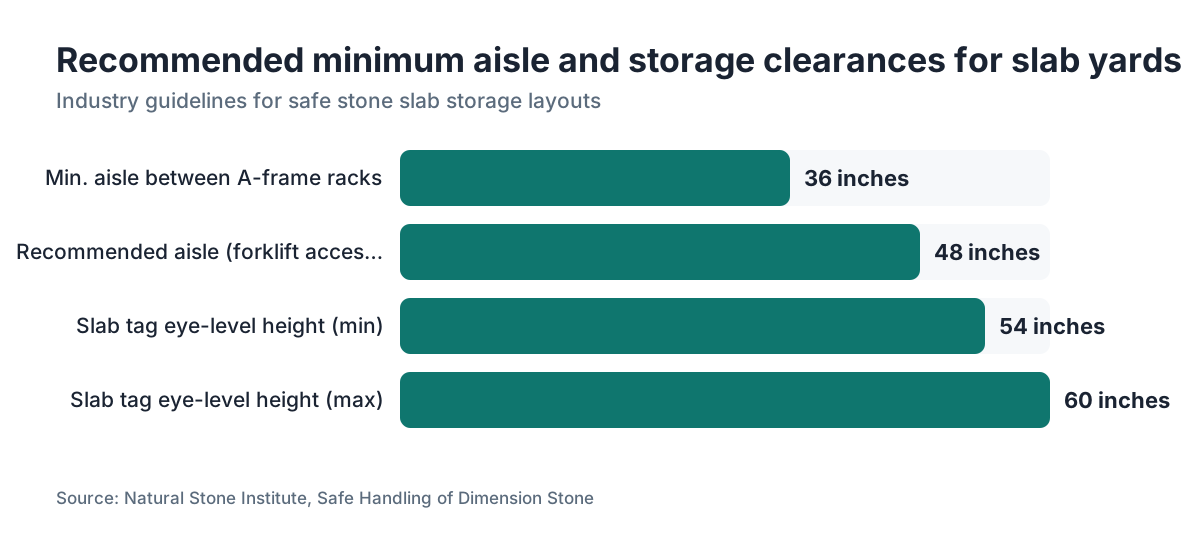
Inside each zone, run racks parallel with clear walking aisles between them. Natural Stone Institute handling guidance calls for a minimum 36-inch clear aisle between slab racks so a worker can pull a slab without tipping risk [4]. Many fabricators go to 48 inches to let a forklift or vacuum lifter in.
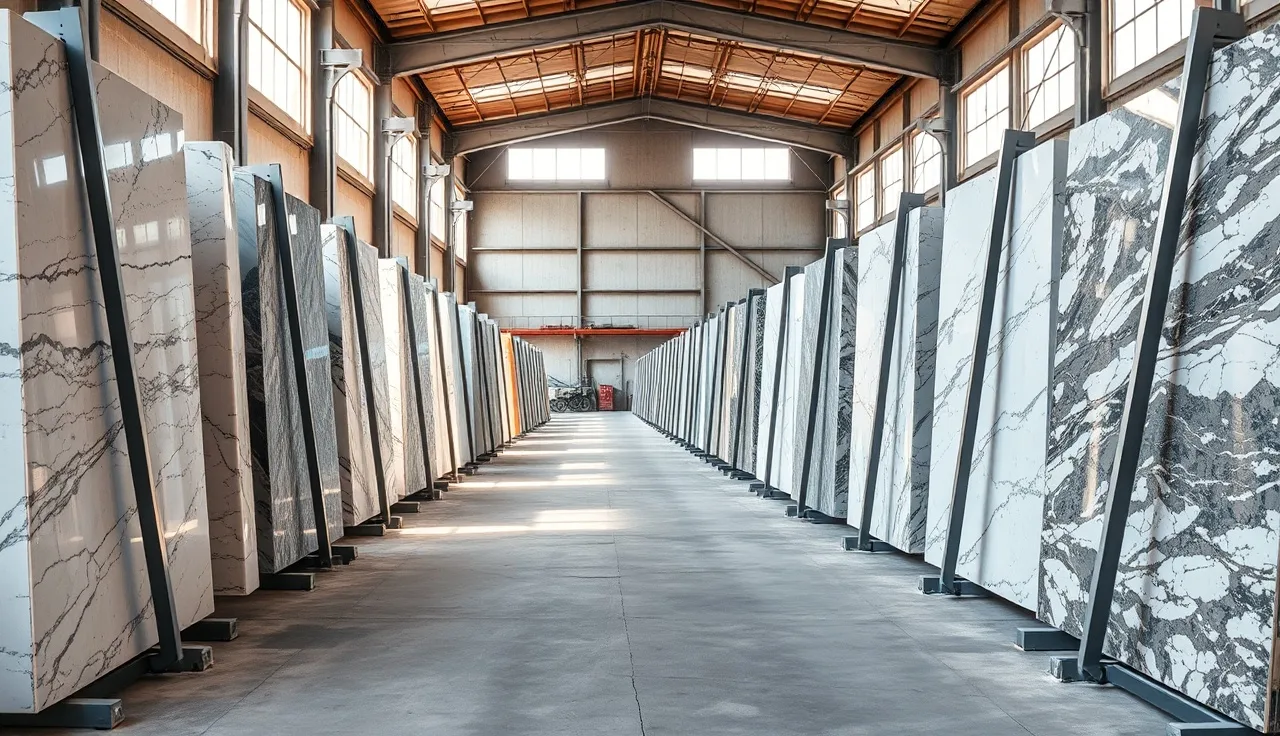
A-frame racks are the standard for natural stone. They hold slabs vertically at a slight lean, which is the correct way to store stone. Flat-stacking cracks thin or large-format slabs. Each A-frame gets numbered slots, and that slot number becomes part of every label. "Zone B, Rack 3, Slot 7" is an address anyone in the shop can find without a map after the first week.
For granite countertops or marble countertops that customers pick by eye, add a secondary hold section: a dedicated rack or set of slots where reserved material sits until job day. Nothing leaves the hold section without a work order.
How do barcodes and QR codes improve slab tracking?
Barcodes and QR codes don't change what you track. They change how fast and how accurately you update it. A worker who scans a slab tag with a phone or a handheld reader creates a timestamped record on the spot, with no transcription errors and no walk back to the computer.
For barcodes, 1D Code 128 or Code 39 handle slab IDs fine. Any basic scanner reads them ($50 to $150 for a USB model). The barcode carries a unique ID that links to a record in your spreadsheet or software.
QR codes hold more data (up to about 4,000 characters) and scan with any phone camera. A QR code can open a slab's digital record straight in a web-based system, pulling up current dimensions, photos, status, and job assignment right on the screen. That's handy when a salesperson is out in the yard with a customer.
One practical warning: QR labels only hold up when printed on polyester stock. Standard paper QR codes fall apart after two or three months in a stone yard. Print a test batch, leave one outside for a month, and confirm it still scans before you commit.
Shops running quoting and production software that ties into inventory get the most out of barcodes, because a single scan can push status changes across the whole job (slab reserved, slab pulled, slab installed). Software like SlabWise links inventory records to quotes and nesting layouts, so a scan at the saw updates the slab's remaining dimensions automatically.
Not ready for full software? A hybrid works: QR codes link to a Google Sheet row, and whoever moves the slab scans the code and updates the status field. Cheap, immediate, and it scales.
What's the right system for tracking remnants?
Remnants are where most inventory systems quietly collapse. The full slab gets labeled carefully. The job gets cut. Then the remnant, a piece that might be worth $80 to $400 or more depending on material and size, lands on a random pile with no tag and gets forgotten.
A remnant is a known quantity only as long as it stays labeled. The moment it loses its tag, it becomes an anonymous chunk of stone nobody can quote with confidence.
The simplest remnant system reuses your full-slab label format, adds the word "REMNANT" in big letters, and records the date of cut. Measure the piece right after cutting and write the real dimensions on the tag. If it's an odd shape (common after a sink cutout), measure the bounding rectangle and note the irregular section.
Keep remnants in their own section, not mixed with full slabs. A flat rack or a short A-frame does the job. Some shops stand remnants vertically in a customer-browsable area, which turns leftovers into sold jobs instead of clutter.
On pricing remnants to customers: many fabricators charge a per-square-foot rate roughly 10% to 30% above their full-slab rate, since remnants carry no waste allowance and save the customer on total square footage. Pricing swings widely by shop and material, so treat that as a starting point.
If a remnant hasn't sold or been used in 90 days, ask whether it earns its floor space. Thin or oddly shaped pieces usually don't. A 6-square-foot piece of Carrara marble is a different bet than a 6-square-foot piece of plain white engineered quartz.
How do you do a slab inventory count and reconcile records?
Even a clean yard drifts out of sync over time. Slabs get moved without a scan. A remnant gets used on a rush job and nobody updates the count. A slab cracks and quietly disappears.
A physical count, what warehousing calls a cycle count, is the fix. Most shops do well with a monthly count of high-value or active material and a quarterly full count of everything. Sounds tedious. It goes fast when the physical organization is clean. Two people can count and reconcile a 150-slab yard in 3 to 4 hours if every slab has a clear tag and every rack has a clear location label.
The process runs like this:
- Print a current inventory list from your system (spreadsheet or software).
- Walk each rack, scanning or manually checking each slab.
- Flag any slab that doesn't match the record (wrong location, dimensions off, status mismatch).
- Update every discrepancy after the walk.
- Write off any slab that's genuinely missing or unusable.
Accurate counts matter beyond operations. The IRS treats slab inventory under standard inventory accounting rules, and a bad count throws off your cost-of-goods-sold on the tax return [5]. If you carry property insurance on your stone (and you should), the insurer may demand documented records before it pays a claim. Dated count records are the cheapest insurance you can buy for your insurance.
What software options exist for stone slab inventory?
The range runs from free to serious money, and the right pick depends almost entirely on your volume.
Spreadsheets (free). A well-built Google Sheet or Excel file handles 20 to 60 slabs comfortably. Make one column per label field (material, lot, dimensions, location, status, job assignment). Color-code status with conditional formatting. This breaks down when several people update it at once and when you need to tie inventory to quotes or cut sheets.
Inventory-specific software ($50 to $200/month). General small-business tools like Sortly or Fishbowl Inventory can be configured for stone, but they aren't built for it. You'll burn time creating fields a purpose-built tool ships with by default.
Fabrication-specific software ($100 to $400+/month). Tools built for stone shops, SlabWise among them, treat the slab as the main object rather than a generic SKU. They connect slab records to quotes, nesting layouts, and remnant tracking in one place. For a shop cutting 30 or more jobs a month, the time saved on reconciliation and quoting alone usually clears the subscription cost.
ERP systems (enterprise pricing). Large multi-location operations sometimes run Moraware, Stone Profit Systems, or similar industry ERPs where inventory is one module among many. These are real commitments. Setup alone can run $5,000 to $20,000.
Nobody has clean industry-wide data on adoption by shop size. Going by fabricator forums and trade-show floor talk at events like StonExpo, most independent shops under 10 employees still lean on spreadsheets or whiteboards. That's fine. A clean spreadsheet beats a messy enterprise system every day of the week.
How do you handle slab photos in your inventory system?
For natural stone, a photo says more than any description. Two slabs can share a material name, a lot number, and near-identical dimensions and still look nothing alike in person. A customer who chose one from a photo needs that exact slab.
Photograph every slab at receiving. Shoot the full face in even, diffuse light and skip direct sun, which throws harsh shadows that hide the veining. A second shot of the back face flags quality issues. For veined materials like marble or quartzite, add a close-up of the most distinctive section.
Name each photo to match the slab's unique ID exactly. "B3-7" in your rack system becomes "B3-7.jpg" or "B3-7_front.jpg" in the photo folder. Link the photo to the slab's record in your spreadsheet or software.
For marble countertops in particular, customer-selected slabs deserve photos before and after reservation, with the customer's name on a card visible in the after shot. That builds a paper trail if anyone ever disputes which slab was picked.
Cloud storage (Google Drive, Dropbox, iCloud) is cheap and keeps photos on a phone out in the yard. A 1,000-photo library at typical slab resolution (2 to 5 MB each) runs 2 to 5 GB, well inside free or low-cost tiers.
How do you set up inventory procedures for new staff?
The best inventory system is the one people actually follow. Make labeling a 15-step ordeal, or bury it behind slow software, and it won't happen consistently. Simple wins.
Write a one-page procedure. Literally one page, not a manual. Cover four moments: receiving, reserving, pulling for production, and after cutting. At each moment, spell out what gets tagged or scanned, what field gets updated, and where the physical slab goes. Post it at the receiving dock and near the saw.
Train new hires by walking the yard together. Show the rack numbering. Pull a slab tag and read it out loud. Scan a QR code and show the record it opens. Twenty minutes of that beats any written guide.
Build the inventory check into work people already do. The saw operator pulling a slab is already handling it, so scanning it or flipping its status adds 10 seconds. The receiving crew unloading a delivery is already dealing with packing slips, so attaching a slab tag at the same time adds almost nothing.
Name one person the inventory owner. Not the only one who touches inventory, but the one responsible for the system's health: running the monthly count, catching labels that are peeling off, fixing the procedure when part of it stops working. No owner, and every system rots.
What are the safety considerations for slab storage and labeling?
Stored stone is a genuine hazard when it's done wrong. A 3cm granite slab at 60" x 110" weighs roughly 300 to 400 pounds [6]. A-frame racks that are badly loaded or sitting on uneven floors can tip. Slabs leaning at the wrong angle, or laid flat without support, crack or fall.
OSHA's general industry rule on materials handling (29 CFR 1910.176) requires that stored materials "shall not create a hazard" and that storage areas be "kept free from accumulation of materials that constitute hazards" [7]. That covers stone shops. OSHA does inspect the stoneworking sector, especially after an injury.
Labeling has a safety angle too. Tags stuck at the top of tall slabs force a worker to reach or climb to read them, which is dangerous in a yard full of moving equipment. Keep labels at eye level (roughly 54" to 60" off the floor) or, better, on the rack bar next to the slab instead of on the slab face.
Cut-stone dust deserves attention. If your labeling work involves grinding or cutting near stored inventory, OSHA's silica standard (29 CFR 1926.1153) sets a permissible exposure limit of 50 micrograms per cubic meter of air as an 8-hour TWA [8]. That's mainly a production issue, but yard layout matters here: parking finished-inventory storage right next to the wet saw raises dust exposure.
For countertop installation crews who also load slabs, proper lifting gear (vacuum lifters, slab dollies) cuts back injuries and breakage. NIOSH puts a two-person manual lift at roughly 51 lbs per person under most conditions without mechanical help [9].
How should you handle digital records when slabs move between locations?
Multi-location shops, operations that farm cutting out to another facility, and shops buying from a warehouse distribution center all hit the same wall: the physical slab and the digital record end up in different places and nobody notices.
The fix is a status field that always reflects physical location, updated at the moment of transfer, not later. A set of statuses that covers most movement:
- In yard (specific location code)
- Reserved (job number, customer name, reservation date)
- Pulled for cutting (date, work order number)
- In production (being cut or edge-processed)
- At installer (delivered to the crew ahead of the job)
- Installed (close the record)
- Remnant (new record with remnant dimensions)
- Damaged/Written off (with notes)
When a slab moves from one status to the next, the person moving it updates the record. That's the one rule that matters. Barcodes, photos, and software all support this rule. None of them replace it.
For transfers between facilities, make a transfer document. Even a plain email or text with the slab ID, origin, destination, date, and driver name works, filed with the slab's record. That matters for insurance, for tax cost tracking, and for the plain reality that slabs sometimes get unloaded in the wrong yard.
Frequently asked questions
What is the simplest slab inventory system for a small one- or two-person shop?
A laminated card tag on every slab plus one Google Sheet with a row per slab is genuinely enough for a shop cutting fewer than 15 to 20 jobs a month. The Sheet needs six columns: material name with finish, lot number, dimensions (LxW in inches), thickness, location code (like "A2-4" for Zone A, Rack 2, Slot 4), and status. Update the status whenever a slab moves. Figure 5 minutes per slab at receiving, paid back in hours you don't spend hunting material.
How do you number slab racks so the location codes make sense?
Zone letter first (A, B, C), then rack number within the zone, then slot number within the rack. So "C3-9" means Zone C (engineered quartz), third rack, ninth slot from the left. Number racks left to right as you face the entry side of the zone. Number slots bottom to top or left to right, consistently. Post the zone map on the shop wall and inside any yard vehicle. New hires learn it in one walk-through.
What material should slab tags be made from to survive the stone yard?
Laminated card stock or synthetic paper (Rite in the Rain or similar) works for most shops. Industrial polyester label stock printed on a thermal transfer printer (Zebra or Brady) lasts longest and handles water, dust, and UV well. Standard paper with a permanent marker fails within weeks in a wet or dusty yard. Whatever you choose, leave one tag outside for a month before you print a full batch.
Should slab tags attach to the slab itself or to the rack?
Both, ideally. A tag on the slab travels with the material even after it's moved. A tag on the rack bar marks what's supposed to be there. When the two disagree, someone moved a slab without updating the records, which is a useful audit signal. If you can only do one, tag the slab, not the rack. The slab is the asset. The rack location is just its address.
How do you track which slabs have been sold to specific customers?
Add a "Reserved For" field to every slab record and label. Write the customer name and job number the moment the slab is picked. Flip the physical status tag from A (available) to R (reserved). Move reserved slabs to a dedicated hold rack if you have room. Never leave a reserved slab in general stock, because someone will quote it to another customer. This one step kills most double-booking disputes.
How often should you do a full physical slab inventory count?
Quarterly for a full count, at minimum. Monthly cycle counts of your top 20% by value (usually natural stone exotics and high-end engineered quartz) catch drift early. If your records and physical inventory rarely match at the quarterly count, you have a process problem, not a counting problem. Fix the moment-of-move update habit before you spend money on better software.
Do I need to record the cost of each slab in my inventory system?
For business purposes, yes. Recording wholesale cost per slab lets you calculate real job margin, support an insurance claim if inventory is lost or damaged, and back accurate cost-of-goods-sold on the tax return. You don't show cost to customers, but having it in the system (visible only to owners or managers in multi-user software) is worth the 30 seconds at receiving. The IRS requires accrual-basis businesses to account for inventory under a consistent method [5].
How do you inventory irregular remnants that don't have square dimensions?
Measure the bounding rectangle (the smallest rectangle that fully contains the piece) and log it as the maximum dimension. Then describe the cutout or shape in a notes field: for example, "114x28 bounding, 18x18 sink cutout removed from left center." For quoting, use actual usable area, not the bounding rectangle. Sketch the shape on the tag or photograph it and link the photo to the remnant record. This keeps you from over-quoting a piece and disappointing a customer.
What's the best way to display remnants so customers can actually see and buy them?
Stand remnants vertically on a short A-frame or display rack in a customer-accessible area, tagged with material name, dimensions, and a price. Group by material category. Lighting matters: a remnant of backlit onyx or a heavily figured quartzite has to be seen in good light to sell itself. Some shops keep a remnant gallery on a wall-mounted tablet or a printout for pieces too small or awkward to stand up. Turnover jumps when customers can browse without waiting on staff.
Can QR codes survive in an outdoor or wet stone yard?
Printed on polyester label stock with a UV-resistant laminate, yes. Inkjet-printed paper QR codes fail in a few weeks outdoors. Thermal transfer printing on polyester (a Zebra or similar industrial printer) produces codes that last well over a year outdoors. Test-scan every QR in your yard monthly for the first quarter after installation to confirm none have faded or been damaged. A code that won't scan is worse than no code.
How do quartzite and marble slab inventories differ from engineered quartz in terms of tracking needs?
Natural stone (quartzite, marble, granite) needs lot tracking, because two slabs from different quarry pulls can look visually different under the same material name. Engineered quartz runs more consistent batch to batch, though lot numbers still matter on large projects. Natural stone also needs photo documentation more urgently, since customers often pick specific slabs by appearance. More on caring for these materials in our how to clean quartzite countertops guide.
Is there an industry standard format for stone slab labeling?
No universal standard exists for fabrication shop inventory labels. The Natural Stone Institute (formerly MIA+BSI) publishes guidance on slab handling and storage safety, but not on label format [4]. The institute's business practices resources address quality classification and bundle documentation from the quarry and distributor side. Individual fabricators build their own formats, which is why consistency inside your own shop matters more than matching any external standard.
How do you handle inventory for slabs purchased from multiple suppliers with different naming conventions?
Standardize on your own internal names the moment material arrives, no matter what the supplier calls it. Build a translation table (supplier name against your internal name) and use it at receiving. One supplier might call the same quartzite "White Macauba," "Macaubus Classic," or "White Fantasy" depending on sourcing. Pick one name for your system and hold to it. This stops you from searching for the same material under three names when quoting.
Sources
- Rite in the Rain, All-Weather Writing Products: Rite in the Rain synthetic paper handles water and abrasion without lamination; field notebooks cost approximately $10 to $15
- Zebra Technologies, Label and Tag Printers Product Line: Industrial label printers suitable for polyester/polypropylene slab tags cost $300 to $600 new; label rolls add $20 to $50 per 1,000 labels
- Natural Stone Institute, Safe Handling of Dimension Stone guidance: Industry guidelines recommend minimum 36-inch clear aisles between slab racks to allow safe slab extraction
- IRS Publication 538, Accounting Periods and Methods: IRS requires accrual-basis businesses to account for inventory under a consistent accounting method for cost-of-goods-sold purposes
- Natural Stone Institute, Technical Bulletin: Weight of Dimensional Stone: A 3cm granite slab measuring 60" x 110" weighs approximately 300 to 400 pounds depending on specific gravity of the stone
- OSHA, 29 CFR 1910.176, Materials Handling and Storage: OSHA 1910.176 requires stored materials not create a hazard and storage areas to be kept free from accumulation of hazardous materials
- OSHA, 29 CFR 1926.1153, Respirable Crystalline Silica in Construction: OSHA silica standard sets a permissible exposure limit of 50 micrograms per cubic meter of air as an 8-hour TWA for construction workers
- NIOSH, Ergonomic Guidelines for Manual Material Handling (DHHS Publication No. 2007-131): NIOSH recommends a two-person manual lift limit of approximately 51 lbs per person under most conditions without mechanical assist
- Brady Corporation, Industrial Label Materials Guide: Thermal transfer printing on polyester label stock produces QR codes and barcodes that survive outdoor and wet environments for over a year
Last updated 2026-07-11