
TL;DR
- Digital templating replaces foam strips and wood sticks with laser or photogrammetric measurements captured on-site, then imported directly into CAD/CAM software for CNC cutting.
- Setup costs range from roughly $8,000 to $35,000 depending on the system.
- Most shops recover that cost within 6 to 18 months through faster turnaround and fewer remakes.
What is digital templating and how does it differ from traditional methods?
Traditional templating means sending a crew to a job site with a roll of hot glue and luan strips, building a physical template of every countertop surface, hauling it back to the shop, tracing it onto stone, and cutting. It works. But it is slow, it depends heavily on who built the template, and one bad glue joint can turn a $2,000 slab into scrap.
Digital templating captures the same geometry without any physical template at all. A technician brings a device to the job site, measures reference points around each surface, and the system builds a precise digital file, usually a DXF or proprietary CAD file, that goes straight into the shop's drawing software or CNC machine. No luan to carry. No tracing errors. The file is the template.
Two technologies dominate the stone industry right now. Laser arm systems, like the Laser Products Industries LT-55 [1], use a pivoting laser arm that you physically trace along edges and around sinks. Photogrammetric systems, like the Prodim Proliner [2], shoot multiple laser or structured-light points across a surface and stitch them into a shape. Both produce DXF output. The practical difference is simple: arm systems are faster in plain kitchens, while photogrammetric systems handle curved and complex shapes more naturally.
A third category, photo-based systems like Meteon or iPad-based apps, is growing fast. They use multiple overlapping photos plus known reference targets to reconstruct geometry. Accuracy is improving, but most fabricators running CNC bridges still rely on arm or Proliner systems for their primary template data.
What equipment do you actually need to get started?
At minimum you need the measuring device itself, a ruggedized laptop or tablet to receive the data in the field, the software that runs the device, and a way to get the file into your shop's CAD or CAM program. That is the irreducible kit.
Here is how the major systems compare on the things shops actually care about:
| System | Technology | Typical Street Price (2024) | Accuracy | Output Format |
|---|---|---|---|---|
| LPI LT-55 [1] | Laser arm | $8,000, $12,000 | ±1/32 in | DXF, native LPI |
| Prodim Proliner [2] | Laser/photogrammetric | $18,000, $28,000 | ±1/64 in | DXF, PDF, Prodim native |
| Laser Products LT-2D3D [1] | Laser arm + 3D | $14,000, $20,000 | ±1/32 in | DXF, 3D point cloud |
| iPad/phone apps (e.g., Canvas, Measure) | Photogrammetry | $0, $200/mo | ±1/8 in or worse | Varies |
Prices above are estimates based on published MSRP and dealer conversations as of early 2024. Actual quotes vary by region and bundled training packages.
Beyond the measuring device, you need a laptop that can run the vendor's software without lag. Most vendors recommend at least an Intel i7 (or equivalent) with 16 GB RAM and a dedicated SSD. Some field technicians run on ruggedized Panasonic Toughbook units, which survive job site conditions better than consumer laptops.
You also need a stable way to move files from the field to the shop. Most shops use a shared cloud folder, either Google Drive, Dropbox, or a private FTP server. Email works but creates version-control chaos fast. Set up a folder structure by job number before you ever go to a first job site.
If you already have a CNC bridge (a Baca, Park Industries, or similar waterjet or saw), check which DXF format version it accepts. Some older CNCs accept only DXF R12. Your templating system almost certainly outputs a more modern DXF, and you may need a conversion step or a setting in the export dialog.
How much does a digital templating system cost, including hidden expenses?
The device price is the number most shops fixate on, and it is the least complete picture of the real cost. Budget for these categories:
Device and base software: $8,000 to $28,000 depending on system (see table above).
Training: Most vendors include one to three days of on-site or remote training in the purchase price. Beyond that, real proficiency takes two to four weeks of supervised field use. Factor in the cost of a senior employee's time during that ramp-up period.
CAD software licenses: If your shop does not already run AutoCAD, SolidWorks, or a stone-specific CAD package, you will need one. AutoCAD LT runs around $500 per year as of 2024 [3]. Stone-specific packages like Slabsmith or AlphaCAM Stone add another $3,000 to $8,000 upfront or equivalent SaaS costs.
Annual maintenance contracts: Most templating system vendors charge 10% to 15% of the device price per year for firmware updates and support. On a $20,000 Proliner, that is $2,000 to $3,000 per year.
Replacement tips and consumables: Laser arm tips wear and must be replaced periodically. Budget $200 to $500 per year.
A realistic all-in first-year cost for a mid-range system is $25,000 to $40,000 when you include training time, CAD software, and the maintenance contract. That sounds like a lot until you price a single countertop remake. A typical granite kitchen job costs $1,500 to $4,000 in materials alone [4]. Kill even four to six remakes a year and the system has paid for itself.
How do you calibrate the device and verify accuracy before going to a real job?
Calibration is not optional, and it is not a one-time event. Every reputable templating system has a built-in calibration routine, and you should run it at the start of every work day and any time the device has ridden in a truck bed or taken a hard bump.
For laser arm systems, calibration usually means placing the arm on a flat calibration plate and running a sequence of measurement points that the software checks against known distances. The software tells you whether you are within spec. If you are not, you adjust a physical set screw or a software offset value per the manual. Do not skip this because the plate is a hassle to carry.
Before trusting any system on a paying job, run a full verification test. Measure a known rectangle, at least 24 by 48 inches, with the device and compare the output DXF against a measurement made with a high-quality steel tape and square. NIST guidance on dimensional measurement best practices [5] treats repeated independent measurements with independent tools as the foundation of any trustworthy measurement process. That is more than a stone shop needs on every job, but measuring your calibration plate twice and comparing to tape once is the floor.
Temperature matters more than most shops realize. Laser arm systems drift in extreme heat or cold. If your truck sits in a Texas parking lot for two hours in August and you pull the arm out and start measuring, you may get readings that are off by 1/16 inch or more from thermal expansion of the arm components. Let the device acclimate for 10 minutes before calibrating on-site.
Log every calibration check with the date, technician name, and pass/fail result. That record protects you if a client claims a measurement error later.
What does a real digital templating workflow look like, step by step?
Here is how a well-run shop handles the process from the moment the truck arrives at a job site to the moment the CNC starts cutting.
Step 1: Job site prep. The technician confirms that all cabinets are level and fully installed. Appliances that affect cutouts (range, cooktop, undermount sink) must be on-site and confirmed by model number. You cannot accurately place a sink cutout without the sink in hand or its exact template dimension from the manufacturer. Many shops have the homeowner sign a job-readiness checklist before scheduling the template appointment.
Step 2: Reference point placement. For arm systems, the technician sets the arm base in a stable position and measures reference points around the perimeter of each surface. For Proliner-style systems, retro-reflective targets (small adhesive dots or clips) go around the surface. Those targets are how the software stitches multiple scans together.
Step 3: Edge and feature capture. The technician traces all edges, sink cutout perimeters, cooktop cutouts, and faucet hole locations. Good technicians also capture wall irregularities, out-of-square corners, and scribe situations. Scribes are where digital templating earns its money: capturing a 2-inch wall scribe in a DXF is far more reliable than guessing with luan.
Step 4: Field verification. Before leaving the job site, the technician opens the file on the laptop and runs a quick sanity check. Do the overall dimensions match a tape measure rough-check? Are all the cutouts present? This takes five minutes and catches the errors that would otherwise only show up when stone is on the saw.
Step 5: File transfer to shop. The DXF goes to the shared folder, named by job number and date. The shop's CAD operator or the fabricator pulls it into the drawing program, adds edge profiles, seam placements, and drawing notes, and sends it to the CNC queue.
Step 6: Nesting. If the shop uses nesting software (which it should), the finished piece drawings drop onto a virtual slab layout to minimize waste. This is where software like SlabWise ties the template geometry to quoting and material tracking, turning the DXF files into a complete job packet instead of just a cut file.
Step 7: CNC cut. The finalized file goes to the machine. No re-measuring at the saw. No interpreting a hand-traced template. The geometry is exactly what got captured in the field.
How long does it take to template a typical kitchen digitally?
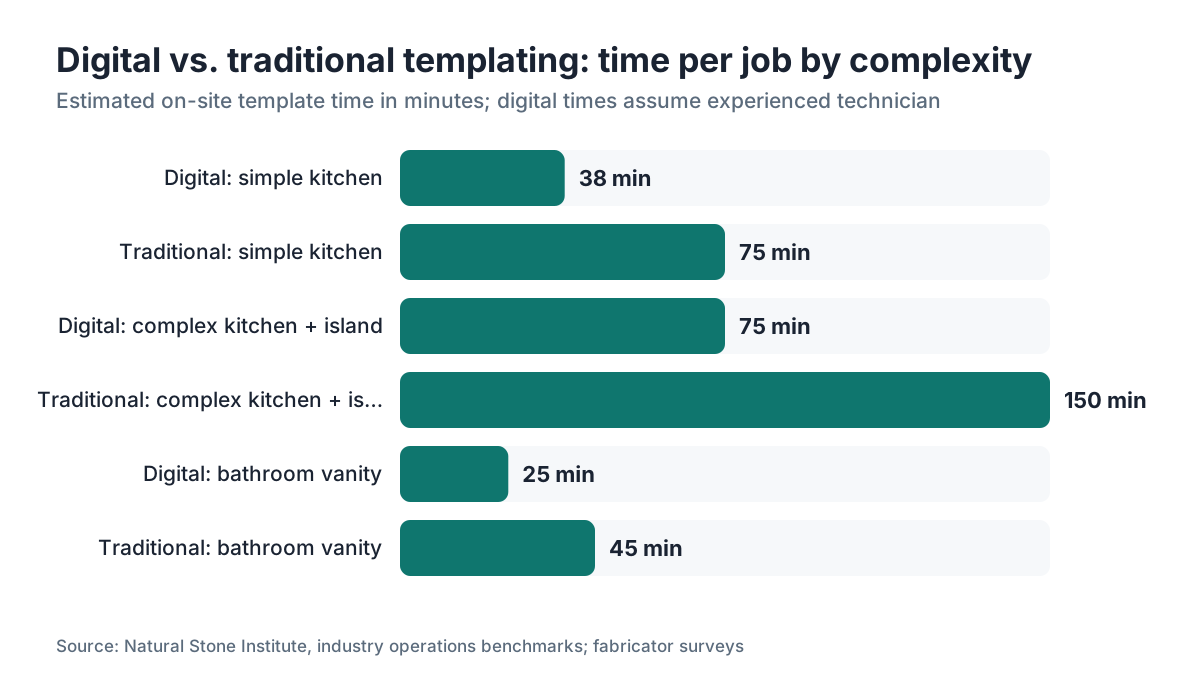
An experienced technician can template a standard kitchen, meaning three runs of countertop, one undermount sink, and no unusual scribes, in 30 to 45 minutes on-site. A complex kitchen with an island, a curved bar top, and multiple appliance cutouts might take 60 to 90 minutes.
Compare that to traditional luan templating, which typically takes 60 to 90 minutes for a simple kitchen and 2 to 3 hours for a complex one, plus the time to carry the physical template back to the shop and trace and transfer it.
The time savings compound over a full week. A digital templating technician can realistically complete four to five jobs a day. A luan templater running complex jobs is closer to two or three. Over a 250-day work year, that gap in throughput adds up to dozens of extra jobs.
The learning curve is real, though. A technician new to digital templating will be slower than the luan crew for the first two to four weeks. Budget for that ramp-up when you schedule the transition.
What are the most common mistakes shops make when switching to digital templating?
The biggest mistake is treating it as a drop-in replacement for luan with no process changes. Digital templating does more than swap a tool. It changes who does the job, when in the timeline you do it, and how that data flows through the shop. Shops that just hand a new device to their existing templater and walk away get mediocre results.
Second most common: not confirming job-site readiness before the appointment. The device can measure anything in the room. It cannot tell you that the cabinets were installed 3/8 of an inch out of level, or that the plumber ran a pipe where the farmhouse sink was supposed to sit. A job-readiness checklist, signed by the GC or homeowner, is not bureaucracy. It is the thing that keeps you from doing a second template visit for free.
Third: poor file naming and folder discipline. Within three months of going digital, a shop that does not enforce job-number-based file naming ends up with a folder full of files called "kitchen_final_v3_REAL.dxf" and no one knows which is current. Set the naming convention before day one and enforce it.
Fourth: skipping the field verification step. It adds five minutes to every template visit. It catches maybe one in twenty templates with a missing feature or an obvious geometry error. Five minutes to avoid a two-hour remake conversation.
Fifth: buying a system that does not match your shop's CAD/CNC ecosystem. A beautiful Proliner file does no good if your saw controller cannot read the DXF version it outputs. Verify the file compatibility chain, from device to CAD to CNC, before signing a purchase order.
Do you need CNC equipment, or can you use digital templates with manual cutting?
You do not need a CNC to benefit from digital templating, but the return on investment is much smaller without one.
With a CNC, the DXF file goes directly to the machine. The geometry captured in the field becomes the cut path with no human re-interpretation in between. That is where the accuracy benefit is fully realized.
Without a CNC, a digital template still gives you a precise, printable drawing a skilled saw operator can use as a guide. You can print the DXF at 1:1 scale on a large-format plotter and use it like a paper pattern on the slab. Many smaller shops do this during the transition between going digital and buying CNC equipment. It is a legitimate workflow, just not the endpoint.
If you are cutting entirely by hand or with a manual angle grinder and circular saw, digital templating is probably not your first investment priority. A good measuring system and disciplined luan templating will carry a hand-cut shop reasonably well. Save the $15,000 for a used CNC bridge first.
How do you handle training so your team actually uses the system correctly?
Vendor-supplied training covers device operation. It does not cover how to fit digital templating into your specific shop's workflow, how to handle the edge cases that show up on your jobs, or how to build the file-management discipline that keeps the system sustainable.
Plan for three distinct training phases. First, device training, which is what the vendor provides: one to three days, usually. Second, supervised field use: have the new digital templater run five to ten jobs alongside an experienced person who can catch errors before they become cut files. Third, shop integration: a separate session where the CAD operator or shop foreman learns exactly what format the files arrive in, how they are named, and what steps they take before sending to the CNC.
Write the full procedure into a one-page SOP. Step by step, laminated, hanging near the device charging station. New hires should be able to follow it without asking questions.
The Fabricators and Manufacturers Association (FMA) offers workforce development resources for manufacturing operations [6], and some state workforce development boards offer training grants that offset the cost of bringing in specialized instructors. Check your state's workforce agency, since eligibility varies widely.
Turnover is real in this industry. If your only trained digital templater quits, you need a second person who can step in. Cross-train at least two people from day one.
How does digital templating affect quoting accuracy and job profitability?
This is where the business case gets concrete. A traditional quote, built off a homeowner's rough measurements or a site visit with a tape measure, typically carries a fudge factor of 5% to 10% on material estimates to cover measurement uncertainty. On a 45-square-foot kitchen at $80 per square foot fabricated, that fudge factor is $180 to $360 of margin you are either leaving in the price (which hurts your competitiveness) or absorbing as risk.
Digital templating, done right, pushes that uncertainty to near zero. The square footage in the quote matches the square footage that goes to the saw. You can quote tighter and win more jobs, or quote at the same price and carry less risk.
Shops that track their numbers report remakes, meaning pieces cut a second time because of measurement error, drop sharply after going digital. Industry estimates put remakes between 1% and 3% of jobs in traditional shops [7]. Even at 1%, that is real money on a shop doing 20 kitchens a month.
When your template data lives in a digital format, it feeds downstream tools more accurately. Nesting software can place pieces on a virtual slab and calculate yield to three decimal places. Quoting software can pull exact square footage from the DXF instead of relying on a salesperson's hand calculation. If you run software like SlabWise for quoting and nesting, accurate DXF geometry is the foundation that makes everything else in the system trustworthy.
For homeowners reading this: a fabricator who uses digital templating is a meaningful quality signal. It means your countertops get measured with the precision a machine shop uses, not eyeballed with a tape measure and a prayer.
What do installers and GCs need to know about digital templating on the job site?
If you are a general contractor or a homeowner coordinating a countertop project, you can make the digital template visit go smoothly or you can accidentally wreck it. Here is what actually matters.
Cabinets must be fully installed, shimmed, and leveled before the template visit. Not mostly done. Done. A digital template captures exactly what exists at the moment of measurement. If a cabinet base shifts by 1/4 inch after the template but before installation, the countertop will not fit. The fabricator will argue it is a cabinet problem. The GC will argue it is a fabrication problem. The homeowner will be the one without a functioning kitchen. Confirm cabinet installation is complete before scheduling.
All sink cutout decisions must be final. The digital template places sink cutouts in exact positions. If the homeowner switches from an undermount to a farmhouse sink after the template, that is a new template visit and possibly a new slab. Sink model, faucet count, and cooktop model need to be locked before the template crew arrives.
Provide access and parking. A digital templating technician carries a device that costs more than most people's cars. They need a clean, dry path to every surface being measured. On renovation jobs, that means the work area needs to be clear of construction debris. On occupied homes, it means pets and small children are out of the measurement zone.
For countertop installation itself, see our guide on countertop installation for what to expect on the day the stone goes in.
Is digital templating worth it for small shops doing fewer than 10 jobs a month?
Honest answer: it depends on your CNC situation and your remake rate.
If you are a small shop cutting by hand or with a bridge saw and no CNC, doing 5 to 8 jobs per month, the payback period on a $15,000 to $25,000 digital templating system is probably 3 to 5 years. That is a long time to wait, and you might get more value from a used CNC first.
If you have a CNC and you are doing 8 to 10 jobs per month, with remakes at even a 2% rate, the math starts to work. Two remakes a year on average, at $1,500 to $2,500 in material and labor each, is $3,000 to $5,000 in losses. A $15,000 system with a 5-year life costs $3,000 per year in amortization. Add the throughput gains and you are break-even or slightly ahead.
For shops doing fewer than 5 jobs per month, digital templating is a prestige tool more than a financial necessity. A skilled templater with good luan discipline matches the accuracy of many digital systems on straightforward jobs. The digital system earns its keep on complex work: curves, tight scribes, multiple cutouts.
The honest threshold most experienced fabricators cite is around 10 to 15 jobs per month before digital templating becomes a clear financial win on its own.
Frequently asked questions
Can I use an iPad or smartphone app for digital templating instead of a dedicated device?
Current smartphone and iPad apps can get you within 1/8 inch on simple shapes, which is often good enough for rough quoting but not reliable enough for CNC cutting. Purpose-built laser arm systems like the LT-55 or the Proliner hit 1/32 to 1/64 inch accuracy. If your shop cuts by hand and you just need a better measuring tool than a tape, an app may be adequate. For CNC production, use a proper laser system.
How much training time does a new digital templating technician need before going solo?
Plan for two to four weeks of supervised field work after the vendor's initial one-to-three-day device training. The device operation is learnable in a day. Judgment calls, knowing when a cabinet is too unlevel to template without flagging it, or how to handle a curved wall, take repetition. Cross-train at least two people so you have backup coverage when someone is out sick.
What file format do I need for my CNC machine?
Most stone CNC bridges accept DXF files. The version matters: older Baca and some Park Industries controllers need DXF R12. Most modern systems accept DXF 2000 or later. Check your CNC controller's documentation or call the manufacturer's tech support before buying a templating system. Verify the full chain: templating software export format, any CAD conversion step, and the CNC's import requirements.
Do digital templates work for bathroom vanities and small surfaces?
Yes, and they are often more valuable on small, complex vanity jobs than on simple kitchen runs. A 24-inch vanity top with an undermount bowl and a wall scribe is harder to template accurately with luan than a straight kitchen run. The digital system captures the geometry the same way regardless of size. The per-job time savings are smaller on a vanity, but the accuracy benefit is proportionally higher.
What happens if the templating device breaks or loses calibration mid-job?
Have a backup plan. Most shops keep a luan kit in the truck even after going digital. If the device fails on-site, you fall back to traditional templating rather than rescheduling the homeowner. Contact the vendor's support line immediately. Most major vendors (LPI, Prodim) offer loaner programs or fast depot repair on maintenance contract customers. Calibration drift mid-job is rare but should get caught by the end-of-site verification check.
How do digital templates handle curved edges and radius corners?
Arm-based systems capture curves by taking a series of closely spaced points along the curve, which the software connects into a polyline arc. Accuracy depends on point density; more points mean a smoother representation. Photogrammetric systems like the Proliner capture curves more naturally because they do not require physical tracing. For true tight radius work under 6 inches, verify your specific system's accuracy with a test piece before committing to a production job.
Can digital templates be used to check if existing countertops were installed correctly?
Yes. Measuring installed countertops with a digital system and comparing to the original template file reveals installation shifts, cabinet settling, or fabrication deviations. This is useful for warranty disputes and for matching existing countertops during a partial replacement or renovation. The original DXF file becomes the documented record of what was fabricated.
What is the difference between the LT-55 and the Prodim Proliner, and which should I buy?
The LT-55 is a laser arm system: faster on simple rectangular layouts, lower entry cost (around $8,000 to $12,000), and easier to learn. The Proliner uses laser or structured-light measurement and handles complex shapes and curved walls more gracefully, but costs $18,000 to $28,000 and has a steeper learning curve. Shops doing mostly standard kitchen and bath work often start with an LT-55. Shops heavy on custom or curved work tend to justify the Proliner.
Do digital templating systems work in outdoor kitchen settings?
They work but require extra care. Bright sunlight can interfere with some laser-based systems, so shade the measurement area if possible. Wind is not a problem for arm systems but can disturb lightweight retro-reflective targets used by some photogrammetric systems. Temperature swings matter for calibration stability. Run a calibration check on-site rather than relying on the morning calibration done in the truck, and do the field verification step before leaving.
How does digital templating affect the homeowner experience during a countertop project?
Most homeowners notice that the template visit is shorter and less disruptive than a traditional luan visit. No hot glue smell, no cardboard and sticks to maneuver through the house, and the technician is in and out faster. The bigger impact is fewer remakes and better fit on installation day. A countertop that fits precisely the first time, with no gaps to fill or edges to grind on-site, makes for a much smoother installation day.
What software integrates best with digital template files for stone fabrication shops?
The most common workflow is: digital template device exports DXF, CAD software (AutoCAD, AlphaCAM Stone, or Slabsmith) adds edge profiles and seam lines, nesting software places pieces on a slab layout, and then the CNC receives the final cut file. Quoting and shop management software that can import DXF geometry directly, rather than requiring manual square footage entry, reduces errors significantly at the quoting stage.
Are there any regulatory or licensing requirements for operating digital templating equipment?
No federal license is required to operate stone templating equipment in the US. Laser classification matters: most templating systems use Class 2 or Class 3R lasers, which the FDA Center for Devices and Radiological Health regulates under 21 CFR Part 1040. Class 2 and 3R lasers are considered low risk when used as intended but should not be aimed at eyes. Follow the manufacturer's safety guidelines and any applicable state OSHA requirements for laser use in the workplace.
How do I convince my business partner or shop manager that digital templating is worth the investment?
Track your current remake rate and cost per remake for three months before making the case. Include material cost, labor to re-cut, scheduling delay, and any client relationship damage. Then run a simple payback calculation: device cost divided by annual remake savings plus throughput gains. Most shops doing 10 or more jobs per month find a payback period of one to three years. Concrete numbers from your own shop beat any vendor claim.
Sources
- Laser Products Industries (LPI) - LT-55 Digital Templating System product page: LT-55 laser arm system price range ($8,000-$12,000) and accuracy specification of ±1/32 inch
- Autodesk - AutoCAD LT subscription pricing: AutoCAD LT annual subscription cost approximately $500 per year as of 2024
- National Kitchen and Bath Association (NKBA) - Cost vs. Value and industry data: Typical granite kitchen countertop material cost range of $1,500-$4,000 per job used as remake cost proxy
- NIST - Dimensional Measurement Best Practices guidance (NIST.gov): Repeated independent measurements with independent tools as the foundation of a trustworthy measurement process
- Fabricators and Manufacturers Association (FMA) - Workforce Development: FMA offers workforce development resources for manufacturing operations that can apply to stone fabrication training
- Marble Institute of America (now Natural Stone Institute) - Stone industry operations benchmarks: Industry estimate of 1%-3% remake rate in traditional (non-digital) stone fabrication shops
- FDA Center for Devices and Radiological Health - Laser Products and Instruments, 21 CFR Part 1040: Class 2 and Class 3R lasers regulated under 21 CFR Part 1040; considered low risk when used as intended
- OSHA - Laser Hazards in the Workplace guidance: OSHA requirements for laser use in the workplace apply to stone fabrication operations using templating equipment
- Remodeling Magazine - Cost vs. Value Report (kitchen remodel data): Kitchen countertop square footage and per-square-foot fabrication cost ranges used in ROI calculation context
Last updated 2026-07-09