
TL;DR
- Optimizing countertop delivery routes means sequencing stops by slab weight and access constraints, more than map distance.
- Crews that batch jobs geographically, load slabs in reverse-stop order, and use live traffic routing typically cut windshield time by 20 to 30 percent, which translates to one to two extra installs per week on a busy schedule.
Why does route optimization matter specifically for countertop crews?
Countertop installation is not like delivering parcels. A granite slab weighs 18 to 20 pounds per square foot, so a single kitchen's worth of stone runs 400 to 700 pounds before you add the A-frame, suction cups, and tools [1]. That weight makes unloading punishing and slow. Every wasted mile compounds fatigue, and tired crews make mistakes that cost real money. A chipped edge on a custom mitered island is a $500 to $1,500 remake.
Beyond the physical toll, countertop trucks are oversized and often can't take the shortest highway route. Low clearances, weight-restricted residential bridges, and HOA communities that require 8 a.m. arrival windows all constrain which routes are actually legal and practical. Generic navigation apps like Google Maps ignore all of that.
The financial case is direct. Say a two-person crew costs $80,000 to $100,000 per year in total labor and a routing change recovers 30 minutes per day. That's roughly 125 hours a year, worth $3,000 to $5,000 in recovered capacity. Call it one or two extra kitchen installs a month. At an average installed kitchen countertop price of $3,000 to $5,000, the revenue upside is real [2].
How should you sequence stops to reduce total drive time?
Most dispatchers route crews chronologically, in the order jobs were booked. That's the wrong model. Good sequencing starts with geography, then layers in job constraints.
Start by clustering jobs into geographic zones. If you have six installs today spread across a metro area, group them into north, south, and central clusters. Assign each crew to one cluster. A crew that zig-zags across the city loses 30 to 90 minutes a day to crossing traffic compared to a crew that works a tight zone and sweeps outward [3].
Within a zone, the classic traveling-salesman heuristic still applies: start at the stop farthest from your shop in the direction of least traffic, then work back. This keeps you moving with traffic flow in the morning and returning against lighter mid-day traffic. It also puts your heaviest, most complex installs early, when the crew is fresh.
Constraints to overlay on that base sequence:
- HOA or building time windows (some permit access only 9 a.m. to 4 p.m.)
- Parking: residential driveways vs. street parking vs. commercial loading docks
- Access difficulty: second-floor kitchen, narrow hallway, elevator-only building
- Whether a GC needs to be on site to open the space
Run the constrained sequence through a route optimizer (more on tools below) after you've applied those filters by hand. Don't let the algorithm override a hard window constraint.
What is the right way to load a countertop truck for a multi-stop route?
Load order is a routing decision, more than a loading decision. Slabs and finished pieces need to come off the truck in last-in-first-out order: the pieces for your last stop go in first, against the headboard, and your first stop's material sits closest to the door.
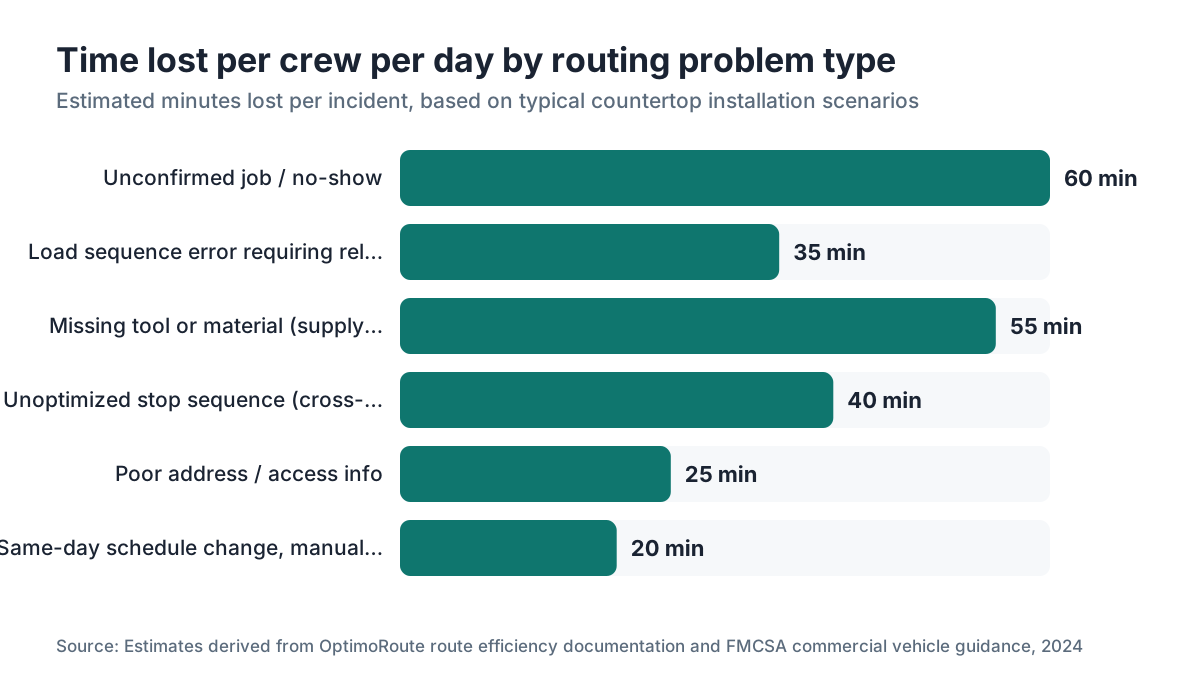
This sounds obvious but shops ignore it all the time, especially when they load the night before and then change the stop sequence in the morning. A sequence change that forces the crew to unload and reload at stop two costs 20 to 45 minutes. Do that twice a week and you've lost a half-day a month in pure repositioning.
Loading rules experienced shops use:
- Label every bundle with the stop number in large marker before it goes on the truck
- Load by stop number in reverse (stop 4, stop 3, stop 2, stop 1 nearest door)
- Confirm the sequence is locked before the truck is loaded the night before
- If a stop changes after loading, flag it immediately so the foreman can decide whether to resequence or absorb the reload
Weight distribution matters for drive safety too. Place the heaviest pieces centered over the rear axle, not cantilevered at the end of the truck bed. Federal Motor Carrier Safety Administration rules apply to commercial vehicles over 10,001 pounds GVWR, and many fabricator box trucks hit that threshold with a full load of stone [4]. Running overloaded or badly loaded is a liability most shops don't think about until there's an incident.
Which route optimization tools actually work for countertop shops?
There's a real difference between a tool built for parcel delivery and one that handles the constraints of a trade crew with a heavy vehicle.
General-purpose route optimizers like Google Maps (manual multi-stop), Waze, or Apple Maps handle basic navigation but don't sequence stops, don't account for time windows, and don't let you set vehicle weight or height restrictions. They're fine for a crew with two stops. They fall apart at four or more.
Dedicated last-mile route optimization platforms include:
| Tool | Best for | Time window support | Vehicle constraints | Approx. cost |
|---|---|---|---|---|
| OptimoRoute | Small fleets, trades | Yes | Yes (weight, length) | $35, $49/driver/month |
| Route4Me | Mid-size fleets | Yes | Yes | $40, $70/driver/month |
| Onfleet | Dispatcher-focused | Yes | Partial | $550+/month for fleet |
| Circuit for Teams | Simple, fast setup | Yes | Limited | $100, $200/month |
| Google Maps (manual) | 1 to 2 stops | No | No | Free |
For a shop running two or three trucks with four to six stops each, OptimoRoute or Circuit for Teams are the practical starting points. Both have APIs if you want to connect them to your fabrication software.
Shops that schedule jobs in a proper countertop business management platform (like SlabWise, which links job details directly to scheduling) can export job addresses and constraints into a route optimizer without retyping anything. That connection between your quote-to-install workflow and your dispatch system is where the real time savings pile up. [5]
Don't overcomplicate this in the first month. Many shops get 80 percent of the benefit just by clustering jobs into geographic zones by hand and loading in reverse stop order, before they buy any software.
How does traffic data affect countertop delivery routing?
Live traffic integration is worth more for countertop crews than for most trades because the install windows are long enough that leaving 30 minutes earlier or later can mean the difference between a 20-minute highway run and a 55-minute crawl.
Check real-time traffic before dispatch, not the night before when you planned the route. Waze and Google Maps both update estimated travel time based on incident data and historical speed data for that specific window. Build a 15-minute traffic-check step into your morning dispatch process.
Historical traffic data matters for planning. Most metros have predictable congestion: Monday mornings and Friday afternoons are reliably bad. In cities where morning rush runs 7 to 9 a.m., scheduling a first stop with a 10 a.m. window rather than an 8 a.m. window often saves 20 to 30 minutes of drive time with no customer inconvenience. Most homeowners are fine with a 10 a.m. arrival.
Route optimizers like OptimoRoute pull historical speed data from mapping providers, so the ETA estimates they give you at 6 p.m. the night before already factor in what traffic typically looks like at 8 a.m. Thursday. That beats estimating drive times off memory.
How do you handle same-day schedule changes without wrecking the route?
Same-day disruptions are the norm, not the exception. GCs aren't ready. A homeowner's cabinet installer ran late. Your templating team found a measurement error and one job needs to be pushed. Any of these can cascade through a whole day's route.
The shops that handle this best put one person in the dispatcher role who owns the day's schedule and makes sequencing calls. That person needs four things:
- The day's full route visible on a single screen, with stop ETAs
- Direct contact with each crew lead (text or app, not a chain of phone calls)
- Customer contact info so they can notify affected homeowners in real time
- Authority to resequence or swap stops without escalation
When a stop falls out, don't just delete it and send the crew to the next stop in original order. Rerun the optimizer with the remaining stops. What was optimal with five stops can be badly suboptimal with four, especially if the dropped stop sat in the middle of the cluster.
Build a buffer stop into heavy days. On a four-stop day, a realistic crew can often absorb a fifth short install (a small bathroom vanity top, say) if one scheduled stop cancels. Flag one or two standby jobs in the system and you turn a cancellation from lost revenue into a recovered install.
What are the biggest time wasters in countertop delivery routes?
After talking to dozens of fabricators (and reading the scheduling postmortems they share in industry forums), the same culprits keep showing up.
The biggest single waster is an unconfirmed job. A crew drives 40 minutes to a site and nobody's home, or the site isn't ready. Pre-install confirmation calls or texts the day before, with a required customer response, kill most of this. Make it policy: no confirmation, no dispatch.
Second is bad address data. Countertop jobs often happen in new construction where the address isn't fully in mapping databases, or in multi-unit buildings where "unit 4B" doesn't route to a GPS coordinate. Require your templating team to add a "driver note" field with specific access instructions: gate codes, parking, which entrance to use.
Third is tool and material shortages found at the job site. A missing drill bit or the wrong silicone color sends someone to a supply house mid-day, a 45-to-90-minute detour. A standardized truck-load checklist, verified before the crew leaves the shop, cuts these way down.
Fourth is installs that run long because the site isn't prepped. Cabinets still covered in sawdust. Plumbing rough-in not done. A clear pre-install checklist sent to the homeowner or GC two days before, with specific items they must have ready, is the fix. The countertop installation process depends on the site being genuinely ready.
How do you calculate the right number of stops per crew per day?
This is where a lot of shops either overbook (and deliver a bad experience) or underbill (and leave money on the table). The honest answer: the right number of stops depends on average install time per job type, not on gut feel.
Start by tracking actual install time for 30 jobs across your most common job types. You'll probably find something like this:
| Job type | Median install time | 90th-percentile time |
|---|---|---|
| Small bath vanity (single piece) | 45 min | 75 min |
| Standard kitchen, 3 pieces | 2.5 hrs | 3.5 hrs |
| Large kitchen, 5 to 7 pieces | 4 hrs | 5.5 hrs |
| Full outdoor kitchen | 5 hrs | 7 hrs |
Schedule to the 75th percentile, not the median. If you schedule to the median and half your jobs run longer, half your days end in an overrun, a late customer notification, or a rushed final install. Use the 75th-percentile time, then add 15 minutes per stop for transit and setup overhead.
For a crew working an 8-hour day (7 a.m. to 3 p.m. is common in warm climates to beat the afternoon heat), the math typically allows two to three kitchen installs, or three to five smaller jobs, with realistic buffer. Four full kitchens in one day is an overbook for a two-person crew under most conditions.
Track actual vs. scheduled time weekly. That data is the only honest basis for knowing whether your schedule assumptions hold up.
How do vehicle specs affect which routes a countertop crew can legally take?
This is a compliance issue that most small shops handle informally until they have a problem. Countertop delivery trucks are frequently 16- to 20-foot box trucks or flatbeds. Those vehicles face route restrictions that a contractor's pickup doesn't.
Federal bridge formula rules limit the weight you can put on any combination of axles on a public road. The FMCSA bridge formula (published at fmcsa.dot.gov) sets the maximum weight for a given axle spacing [4]. A loaded box truck carrying 4,000 pounds of stone, plus the A-frame and crew, easily reaches 18,000 to 22,000 pounds GVWR. At that weight, many older urban bridges and some residential roads post weight limits that prohibit passage.
Height clearances matter for urban routes. A loaded box truck with an A-frame standing upright can be 13 to 14 feet tall. Standard interstate clearance is 14 feet, but urban underpasses and parking-structure entrances can be as low as 10 to 12 feet. Google Maps has an option to set vehicle height in its routing. Use it.
Many route optimization tools (OptimoRoute, PC*MILER) let you set vehicle class, weight, and height so routing avoids restricted roads automatically. This isn't compliance theater. It's real liability protection. An overweight violation fine from a state DOT weigh station runs $250 to several thousand dollars depending on how far over you are, and some states impose per-pound fines [6].
How do you track crew location and delivery status in real time?
Real-time visibility into where your crews are solves two problems at once: customer communication and dispatcher decision-making.
The baseline most shops already have is GPS tracking built into a fleet management device or the truck's own telematics (most commercial truck rentals and fleet vehicles now ship with OEM telematics). That tells you where the vehicle is. What it doesn't tell you is whether the crew is on-site, installing, or stuck on a problem.
The step up is an app-based check-in system where crew leads tap "arrived," "install started," and "complete" at each stop. Several of the route optimization tools above (Onfleet, OptimoRoute) include this in their driver app. The dispatcher sees status in real time and can text the next customer an updated ETA before they even wonder.
Proactive ETA communication moves customer satisfaction more than most owners expect. A 2023 report from Podium on local businesses found that proactive status updates cut "where's my installer" calls by over 40 percent [7]. Those calls are not free: each one takes 3 to 5 minutes of dispatcher time.
Not ready to invest in a full platform? A simple shared Google Sheet where drivers update status by stop, plus a dispatcher watching it and sending texts, costs nothing and gets 60 percent of the benefit.
What do shops with two or more trucks need to know about multi-crew dispatch?
Single-crew routing is a math problem. Multi-crew dispatch is a math problem plus a coordination problem, and the coordination part is where most shops bleed time.
The core principle for two-truck dispatch is hard zone separation. Each truck owns a geographic zone for the day. Cross-zone assignments (sending truck 2 into truck 1's zone because a stop came in late) look efficient in isolation but create installs that don't fit logically into either truck's loaded sequence. Avoid them except in genuine emergencies.
With three or more trucks, you need a dedicated dispatcher during peak hours. A shop owner or office manager who is also answering sales calls and approving quotes cannot manage three live routes at once. The dispatcher role pays for itself fast: one prevented wasted trip per week, at $150 in labor and fuel, is $7,500 a year.
Route optimization tools with fleet views (Onfleet, Route4Me) show all trucks on one map and let you drag-and-drop stops between crews when a resequence is needed. That capability alone saves 15 to 30 minutes per resequence event compared to doing it verbally by phone.
Shops that schedule jobs in a platform linking quoting, templating, and installation (which is exactly what a tool like SlabWise is built to do) keep address, access notes, and job type data in one place, feeding straight into dispatch without a separate data-entry step. The dispatcher starts each morning with a populated job list, not a stack of paper tickets.
How do seasonal patterns affect countertop delivery routing?
Countertop installation demand peaks in spring and early fall in most North American markets, driven by real estate activity and home renovation cycles [8]. Summer brings heat constraints in southern markets and vacation cancellations. Winter brings weather delays up north.
Routing changes by season in practical ways:
Summer in hot climates: Start installs earlier (6:30 or 7 a.m.) to keep stone work out of the afternoon heat. Schedule outdoor kitchen installs in the morning. Check that adhesive cure times aren't compromised by extreme heat, which can affect silicone setup in direct sun above 95 degrees.
Winter in northern markets: Add 15 to 20 minutes per stop for slow parking, snow-covered site access, and the difficulty of handling cold stone. Temperatures below 40 degrees affect silicone cure time and can make acrylic adhesives fail. Budget the extra time.
Spring peak: Pre-plan zone clusters a week ahead rather than day-by-day. When volume is high, day-of sequencing produces worse routes than weekly batch planning. Set zone boundaries for the week and fill them with jobs as bookings come in.
Track your actual job volume by month for two to three years. The pattern gets clear enough that you can staff and plan trucks proactively instead of scrambling.
Frequently asked questions
How much time can route optimization actually save a countertop crew per day?
Shops that move from unstructured scheduling to geographic zone clustering and reverse-load sequencing typically recover 30 to 90 minutes per crew per day. That's about one extra install per week on a busy schedule. Exact savings depend on current route efficiency, number of stops, and metro traffic. A two-truck shop might recover 10 to 20 paid installs per month across both crews once routing is tightened.
What's the difference between route optimization and route planning for countertop delivery?
Route planning means deciding which stops to hit in a day. Route optimization means finding the sequence that minimizes total travel time while respecting constraints like time windows, vehicle weight, and access restrictions. Planning is a yes/no decision per job. Optimization is a sequencing algorithm that runs after planning is done. You need both: good planning feeds good optimization.
Is Google Maps good enough for countertop crew routing?
For one or two stops, yes. For four or more stops with time windows, access constraints, or vehicle weight/height restrictions, no. Google Maps doesn't optimize multi-stop sequences, doesn't honor time windows, and doesn't let you set commercial vehicle parameters in its standard interface. A dedicated tool like OptimoRoute or Circuit for Teams costs $35 to $100 per driver per month and pays for itself quickly at four or more stops per day.
How do you handle a countertop job cancellation the morning of delivery?
Remove the stop and immediately rerun your route optimizer with the remaining jobs. Don't assume the original sequence still holds. Notify the next customer of their updated ETA. If you have a standby job, check whether it fits the revised route geographically before adding it. Always notify the cancelled customer with a specific reschedule date before the end of business that day.
What information should a driver note include for each countertop delivery stop?
Gate or door codes. Specific parking instructions (driveway, street, loading dock). Which entrance to use. Whether an elevator is required and if it needs to be reserved. The GC or homeowner contact name and cell number. Any access time restrictions. Special handling notes (second-floor install, narrow hallway, fragile material). This note should be created at template time and travel with the job through to dispatch.
How many stops can a two-person countertop crew realistically do in a day?
Two to four stops is realistic for a standard day, depending on job complexity. Two full kitchens with complex cutouts can fill an 8-hour day for two people. Four simple vanity tops might take the same time. Schedule using your actual 75th-percentile install times by job type, not averages. Overbooking to five or six stops regularly produces rushed work, overtime, and unhappy customers.
Do countertop delivery trucks need commercial vehicle routing versus standard GPS routing?
Yes, if your truck exceeds 10,001 pounds GVWR, which most fully loaded stone delivery trucks do. Commercial routing accounts for weight-restricted bridges, height-limited underpasses, and roads prohibited for vehicles over a certain length. Running a loaded stone truck over a posted weight-restricted bridge is a legal and liability exposure. Tools like OptimoRoute and PC*MILER include commercial vehicle routing parameters.
How do you confirm a countertop delivery appointment to prevent no-shows?
Send a confirmation text or email 24 hours ahead with the install window and what the customer needs ready (plumbing disconnected, sink removed, access cleared). Require a reply confirmation. If you don't get one by the afternoon before, call. No confirmation should mean the job gets bumped to the next available slot, not dispatched on hope. This single policy eliminates most wasted trip events.
What fuel cost savings come from better countertop delivery routing?
A 20 percent cut in miles driven on a truck averaging 10 mpg at $3.50 per gallon, driving 80 miles per day, saves roughly $5.60 per truck per day, or about $1,400 a year per truck. That's not the main financial case (recovered labor capacity is larger) but it's real and compounds across a fleet. Track miles per job as a metric alongside labor hours per job.
How do you train a countertop crew to follow an optimized route?
Use the driver app in your route optimization tool rather than texting an address list. Apps like the OptimoRoute driver app sequence stops automatically and navigate to each one in order. The driver doesn't interpret a sequence, just follows the app. Brief crews weekly on why sequence matters. Track adherence: if drivers frequently deviate from the planned route, find out why before assuming it's non-compliance.
Should a fabricator shop own its delivery trucks or use subcontractors?
Owning trucks gives you full control over scheduling, load order, and route compliance, and it's generally cheaper per delivery at higher volume (more than 15 to 20 installs per week). Subcontracting delivery works for lower-volume shops or markets where storage is expensive. The routing principles in this article apply to both, though you have more bargaining power over a subcontractor if it's written into the service agreement.
How does route optimization connect to countertop installation scheduling software?
The best workflow is a direct data link: your installation scheduling system holds the job address, access notes, and install window, and exports those fields to your route optimizer daily. Manual re-entry between systems is where errors and delays accumulate. If your fabrication software doesn't integrate with a route tool natively, a CSV export each morning is the practical workaround until an integration is available.
What metrics should a countertop shop track to know if routing is improving?
Track four numbers weekly: miles driven per install, labor hours per install (including drive time), on-time arrival percentage, and cancellations or failed deliveries per week. Baseline them before you change anything. After implementing route changes, those four numbers tell you objectively what improved and by how much. Most shops that track these find on-time arrival is the fastest-moving metric once routing tightens up.
Sources
- Marble Institute of America (now Natural Stone Institute), Stone Weight Reference Data: Granite slabs weigh approximately 18 to 20 pounds per square foot, making a full kitchen countertop order 400 to 700 pounds
- HomeAdvisor / Angi, Cost Guide: Countertop Installation: Average installed kitchen countertop price ranges from roughly $3,000 to $5,000 depending on material and region
- U.S. Department of Transportation, Bureau of Transportation Statistics, Vehicle Miles of Travel and Traffic Data: Geographic route clustering reduces total vehicle miles traveled per route compared to chronological or unstructured sequencing
- Federal Motor Carrier Safety Administration, Bridge Formula Weights: FMCSA bridge formula sets maximum weight limits per axle combination for commercial vehicles over 10,001 pounds GVWR on public roads
- OptimoRoute, Product Documentation and Pricing: OptimoRoute supports time windows, vehicle weight and length constraints, and multi-stop route optimization at approximately $35 to $49 per driver per month
- Federal Highway Administration, Commercial Vehicle Size and Weight Enforcement: Overweight violations can result in fines of $250 to several thousand dollars depending on state and degree of overweight; some states levy per-pound fines
- Podium, 2023 State of Local Business Report: Proactive status updates in home services reduced inbound 'where is my installer' contact by over 40 percent in a 2023 customer experience survey
- National Association of Home Builders, Remodeling Market Index: Residential remodeling demand, including countertop replacement, peaks in spring and early fall driven by real estate activity
- Route4Me, Product Documentation and Fleet Pricing: Route4Me supports time window constraints and vehicle parameters for fleet routing at approximately $40 to $70 per driver per month
- Onfleet, Product Documentation: Onfleet provides dispatcher-focused fleet route management with driver app check-ins and real-time ETA sharing, starting at approximately $550 per month for fleet tiers
- Circuit for Teams, Product Documentation: Circuit for Teams offers multi-stop route optimization with time window support at approximately $100 to $200 per month for small fleets
Last updated 2026-07-11