TL;DR
- The best countertop business management software depends on shop size and workflow.
- Stone Profit Systems, Moraware, and Slabsmith each lead a different category.
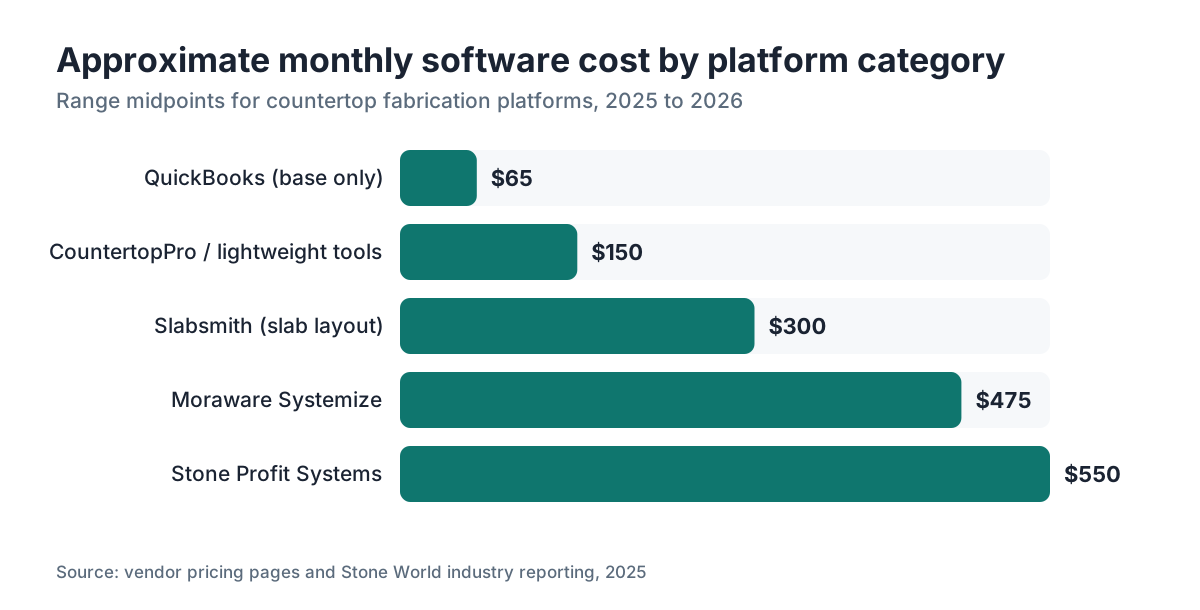
- Most shops pay $200 to $700 per month.
- Small shops often start with QuickBooks plus a quoting add-on.
- No single platform wins everything, so match the software to your actual bottleneck.
What does countertop business management software actually do?
Countertop shop software ties together the work that would otherwise live in four spreadsheets, a whiteboard, and someone's memory. At its core it handles quoting (pricing slabs by square footage, edge profiles, cutouts, and material), job scheduling, remnant tracking, and invoicing. Better platforms add digital templating integration, purchase order management, and installer routing.
Generic software falls short because fabrication has a few genuinely odd requirements. You're pricing irregular shapes. You're tracking inventory by slab, not by unit. A single job can pull from several slabs, and the remnants from those slabs have real resale value. QuickBooks doesn't know what a remnant is. That gap is where purpose-built fabrication software earns its price.
Most platforms fall into two rough camps. Shop management systems run quoting through invoicing. Nesting or layout tools squeeze more yield out of a slab. Some products do both. Others pair best with a separate nesting tool. Figuring out which problem costs you the most money tells you which camp to prioritize.
Who are the main countertop software platforms and what do they cost?
Here are the platforms that come up most in fabricator forums, trade groups, and the Natural Stone Institute's vendor directories. Pricing is based on public information and ranges shops report in industry communities as of 2025 to 2026. Vendors change pricing often, so treat these as ballparks and verify directly.
| Platform | Best fit | Approx. monthly cost | Nesting included? |
|---|---|---|---|
| Moraware Systemize | Mid to large shops | $350, $600+ | No (integrates with Slabsmith) |
| Stone Profit Systems | Full-service large shops | $400, $700+ | Limited |
| Slabsmith | Slab layout and inventory | $200, $400 | Yes (core function) |
| Cyncly (former 2020) | Cabinet/countertop combo | Varies, often $300, $600 | Partial |
| QuickBooks + add-ons | Very small shops | $30, $100 (QB) + add-ons | No |
| CountertopPro | Small fabricators | ~$100, $200 | Basic |
| SlabWise | Quoting and nesting | Contact for pricing | Yes |
Moraware is probably the most-cited name in fabricator communities for job tracking and scheduling [1]. Stone Profit Systems positions itself as an end-to-end ERP for larger operations [5]. Slabsmith's strength is slab photography and layout, which helps shops cut waste and show customers the exact veining they'll get [3]. These are different tools solving different problems, and plenty of shops run two of them side by side.
Nobody has clean public market-share data for this niche. The closest signal is participation in vendor customer lists and the frequency of mentions in the Stone World and Slippery Rock Gazette trade publications [2][8].
What features matter most for a countertop fabrication shop?
Talk to shop owners who've switched platforms and the same pain points surface. Quoting speed is usually first. A salesperson who takes two days to send a quote loses jobs to someone who sends one in two hours. Software that prices a job from a template or a rough square footage estimate, with your real material and labor rates baked in, is worth actual money.
Job status visibility is second. Where is this job? Has it been templated? Is the slab ordered? Is it on the cut schedule? Shops that can answer without calling three people run tighter installs and get fewer callbacks.
Remnant tracking comes up more than people expect. A busy granite shop can stack up thousands of square feet of remnants. [/articles/granite-countertops] Cataloged and sold, those remnants cover a real chunk of material waste. Software that logs remnants by slab, size, and location lets you sell them instead of piling them in a corner until they crack.
Installer scheduling and routing is the fourth big feature. Some platforms let you assign crews, attach job packets, and flag when a delivery window collides with another job. Others leave scheduling in a separate tool.
A few features sound good but matter less in practice. Elaborate CRM pipelines are overkill for most fab shops, since few have the lead volume to need Salesforce-style nurturing. Complex commission tracking helps sales-heavy operations and does nothing for owner-operators.
How does Moraware compare to Stone Profit Systems?
Moraware Systemize wins praise for its job board and scheduling interface. It's built for countertop and stone shops, not adapted from generic manufacturing software. The workflow runs lead to quote to job to invoice the way fab shops actually operate. Its integrations with Slabsmith and with digital templating tools like Prodim and Laser Products let you build a connected workflow without replacing everything at once [1].
Stone Profit Systems covers more ground, closer to a full ERP [5]. It includes the accounting functions Moraware hands off to QuickBooks. For a shop big enough to want one system running purchasing, payroll linkage, and financials, that consolidation has real appeal. The tradeoff is steeper onboarding and more configuration time, which is true of nearly every ERP-style system.
Neither is clearly better in the abstract. Moraware fits shops that want best-in-class job management and are fine stitching accounting together elsewhere. Stone Profit fits shops that want fewer vendors and have the office staff to configure something bigger. Most shops under about 20 employees find Moraware's scope right. Larger operations with dedicated office staff often find Stone Profit worth the complexity.
Pricing for both is quote-based at larger configurations, so the table above is a starting range, not a ceiling.
What is Slabsmith and when does a shop need it?
Slabsmith is a slab management and layout tool from Northwood Design [3]. The workflow: photograph each slab with a calibrated camera setup, let the software build a to-scale digital image, then lay out the actual cut pieces on that actual slab. You can show a customer exactly which part of a Calacatta marble slab their island comes from, which is a genuine sales tool for high-end material.
The yield side matters just as much. A fabricator cutting a $2,000 slab wants to waste as little as possible. Slabsmith lets you check whether a layout is efficient before the saw runs. Shops report real material savings, though hard industry-wide data on average yield improvement is thin. Individual shops cite figures from 5% to 15% waste reduction, but those are self-reported and swing by material type and job mix.
You don't need Slabsmith if you run a high-volume laminate or solid-surface shop. [/articles/laminate-countertops] The economics of slab photography and digital layout don't hold up for materials priced at $10 to $30 per square foot. It pays off for natural stone and premium quartz shops, where slab cost is high and customers care about vein matching.
Slabsmith doesn't replace a shop management system. Most shops using it pair it with Moraware or Stone Profit for job tracking.
Can small fabricators just use QuickBooks or spreadsheets?
Yes, and plenty do, especially shops under about $500,000 in annual revenue. QuickBooks handles invoicing, expense tracking, and basic job costing well [9]. If your quoting is simple (standard edge, no odd cutouts, predictable material costs), a solid spreadsheet quote template plus QuickBooks for billing can absolutely work.
The trouble shows up when you scale. Spreadsheets don't track job status. They don't flag when a slab hasn't been ordered. They don't tell you which installer is double-booked next Thursday. Every one of those gaps gets papered over with phone calls, sticky notes, and memory, and every one of them costs money in errors.
A threshold that comes up repeatedly in fabricator discussions: once you're running more than 15 to 20 active jobs at a time, the coordination overhead of generic tools starts costing more than purpose-built software would. That's not a studied number. It's a practitioner heuristic, but it's consistent enough to trust.
If you're a one-person shop doing mostly [/articles/countertop-installation] work for a local builder, a $30-per-month QuickBooks subscription and a good quote template might genuinely be the right answer. Buying Moraware at $400 per month when you have two employees and eight jobs a month is over-buying.
How does countertop software handle digital templating integration?
Digital templating (using a laser or structured-light device to capture a kitchen's exact dimensions) is standard at most mid-to-large shops now. The leading hardware includes the Prodim Proliner and Laser Products Industries systems [4][7]. The output is a digital file with precise measurements that feeds straight into CNC programming.
Good shop management software should receive that template file and attach it to the job record without you re-typing dimensions. Moraware integrates with Prodim and LPI exports. Stone Profit has similar connections. Shops with tight integration report fewer measurement errors, because the dimension set gets captured once and flows through instead of being re-keyed at each handoff.
The CNC side is a related but separate question. Software like Alphacam, Terminator, or Turrini Claudio writes the actual machine programs. Most shop management platforms don't try to be CNC programmers. They hand off to those tools. What you want is the job file traveling cleanly from templating through the management system to the CNC operator with no paper in between.
For shops cutting [/articles/marble-countertops] or other premium stone, where a mis-measurement ruins a very expensive slab, this integration chain is where connected software actually earns its keep.
What should fabricators look for in a quoting tool specifically?
Quoting is where most fabricators feel the most pain, and where good software pays back fastest. Here's what actually matters in a quoting tool.
Material pricing flexibility. Your cost per square foot for Cambria quartz [/articles/cambria-countertops] is not your cost for builder-grade granite. The software has to let you set material-specific pricing with markup, not a flat rate.
Edge profile pricing. A mitered waterfall edge costs more to fabricate than an eased edge. Your quoting tool needs a library of edge types with labor rates attached, and it needs to apply that price to the right linear footage automatically.
Cutout and sink pricing. Each cutout type (undermount sink, cooktop, faucet holes) carries a labor cost. A good tool prices these per cutout without forcing you to hand-enter a line item every time.
Customer-facing quote output. The quote your customer sees should look professional without you rebuilding it in Word. PDF output with your logo, job dimensions, material description, and a clear total helps close jobs.
Revision tracking. Customers change their minds. When a quote gets revised three times before signing, you want to know which version was approved and what changed. Shops without revision tracking fabricate to the wrong spec more often than they'll admit.
SlabWise is one platform built around the quoting and nesting workflow, with edge pricing, cutout libraries, and slab layout in the same tool. Worth a look if those are your bottlenecks. Matching the tool to the problem you're solving is the whole game.
How long does it take to implement countertop shop software?
This is where a lot of shops get burned. Vendors tend to understate implementation time. A realistic timeline for a mid-size shop (5 to 15 employees, 20 to 50 jobs per month) looks like this.
Simpler platforms (Moraware basic setup): 2 to 6 weeks to configure your material library, pricing, and job workflow, then train your team. Running parallel with your old process for the first month is smart.
More complex platforms (Stone Profit full ERP): 2 to 4 months is realistic, sometimes longer if you're migrating accounting data or connecting an existing CRM.
Data migration is usually the biggest surprise. If you have years of customer records, material pricing, and job history in spreadsheets or an old system, cleaning and importing that data takes time nobody budgets for.
The shops that implement most successfully almost always name one internal person as the software owner. That person learns the system deeply, makes the configuration calls, and trains everyone else. Implementing by committee means slow decisions and inconsistent setup.
Plan for productivity to dip during the first four to eight weeks. That's normal. Shops that push through the dip usually report the software paying for itself within six to twelve months through time saved and errors avoided. Again, that's practitioner-reported, not a controlled study.
Are there software options built specifically for quartz or engineered stone shops?
Most major platforms are material-agnostic. They handle granite, quartz, quartzite, marble, soapstone, and solid surface in one workflow with different pricing parameters. You set up your material library, assign costs, and the quoting engine applies them no matter the material.
That said, some workflow differences matter. Quartz shops buying from distributors rather than slab yards often have more standardized pricing, which makes quoting simpler. Natural stone shops dealing with slab-level variation in color and veining, the kind that matters for [/articles/how-to-clean-stone-countertops] expensive bookmatched installs, get more from Slabsmith-style photography tools.
Solid surface and [/articles/corian-countertops] Corian shops run different fabrication workflows (thermoforming, seaming techniques) that most countertop software doesn't explicitly model, but the job management and invoicing functions work fine regardless.
For butcher block [/articles/butcher-block-countertops] or laminate shops, the slab-centric inventory and remnant tracking in premium platforms are mostly irrelevant. Those shops are usually better served by simpler job management tools or a well-configured general trade contractor platform.
What questions should you ask before buying countertop business software?
Before you sign up for a demo or a trial, get clear on a few things.
What is your actual bottleneck right now? Quoting speed, job scheduling visibility, material waste, or billing? Buy for the problem you have today, not the one you might have in three years.
How does the vendor handle onboarding? Self-serve video tutorials, or a dedicated onboarding person? For a shop where the owner is also the estimator and the job manager, self-serve setup is brutal. Ask exactly what implementation looks like.
What integrations do you actually need? If you use QuickBooks for accounting and plan to keep it, make sure the software pushes invoices to QB cleanly. If you use a specific templating device, confirm the integration before buying.
What happens if the company folds or changes pricing? Real risk with smaller vendors. Your job data, material library, and customer history all need to be exportable. Ask specifically about data portability and export formats.
Can you talk to two or three current customers? Any vendor should connect you with references. If they can't, that's information.
Most vendors offer a free trial or demo. Take it seriously. Run two or three real jobs through the system before committing. The interface that looks clean in a sales demo feels different when you're entering your third countertop job at 7pm.
How is AI changing countertop shop software?
Carefully and slowly, which is the right pace for fabrication software. As of 2025 to 2026, AI is showing up in three places: automated quote generation from photos or floor plans, smarter nesting algorithms that optimize slab layout past what a human does by hand, and predictive scheduling that flags likely delays from historical job data [8].
Nesting is probably furthest along. Optimizing cut layouts across irregular shapes is a combinatorial problem that computers genuinely solve better than people. Platforms investing in better nesting can show measurable material savings, though the improvement depends heavily on job mix and slab size.
AI-generated quoting from a customer photo is more demo than production feature right now. The geometry detection isn't reliable enough to stake a $3,000 job on without human review. It's useful for rough estimates, not final quotes.
For fabricators evaluating software, treat AI features as a nice-to-have, not a buying criterion. The fundamentals (reliable job tracking, clean quoting, good CNC integration) matter more than whether the platform has a chatbot. Ask what specific AI features are live in production versus on the roadmap, and discount roadmap promises heavily.
SlabWise is one platform where the computational layout side is a core function rather than an add-on. Worth exploring if waste reduction and quote accuracy are your priorities.
Frequently asked questions
How much does countertop shop management software cost per month?
Most purpose-built countertop fabrication platforms cost between $200 and $700 per month depending on shop size, user count, and which modules you need. Simpler quoting tools can run under $200. Full ERP-style systems for larger operations can exceed $700. QuickBooks alone starts around $30 per month but lacks fabrication-specific features like remnant tracking and slab inventory.
Is Moraware the best software for countertop fabricators?
Moraware Systemize is one of the most widely used countertop shop management platforms and is strong on job scheduling, workflow tracking, and integration with digital templating tools. It's not the best fit for everyone. Very small shops may find it more than they need, and larger operations wanting integrated accounting may prefer Stone Profit Systems. Trial it alongside at least one competitor before deciding.
Can I use QuickBooks to run a countertop fabrication shop?
QuickBooks handles invoicing, expense tracking, and basic job costing well, and many small shops use it. The gaps show up as you scale: it doesn't track job status, doesn't manage slab inventory or remnants, and doesn't handle installer scheduling. Most shops find a dedicated fabrication platform worth the switch once they run more than 15 to 20 concurrent jobs regularly.
What is Stone Profit Systems and who is it for?
Stone Profit Systems is a countertop industry ERP covering quoting, job management, purchasing, and some accounting in one system. It's built for mid-to-large fabrication operations that want fewer software vendors. The tradeoff is a steeper setup curve and more configuration time. Shops under about 15 employees often find it more complex than their operation warrants.
Does countertop software integrate with digital templating devices like Prodim?
Yes, leading platforms including Moraware and Stone Profit integrate with Prodim Proliner and Laser Products Industries templating systems. The integration lets digital template files attach directly to job records, cutting re-entry errors. Confirm specific device compatibility with the vendor before purchasing, since integration depth varies and some connections need extra configuration or middleware.
What is Slabsmith used for in a stone fabrication shop?
Slabsmith is a slab photography and layout tool made by Northwood Design. It lets fabricators create to-scale digital images of each slab, then lay out cut pieces on that actual slab before any cutting starts. This helps with yield optimization, reduces material waste, and lets customers see the exact veining their countertop will have. It pairs with a separate shop management system rather than replacing one.
How long does it take to set up and implement countertop shop software?
Simpler platforms like Moraware typically take two to six weeks for a mid-size shop to configure and train staff. More complex ERP systems like Stone Profit can take two to four months, especially with historical data migration. Plan for a productivity dip during the first month and name one internal person to own the rollout. Data migration from old spreadsheets is usually the biggest time sink.
What countertop software is best for small fabrication shops?
Small shops (under 10 employees, fewer than 15 concurrent jobs) often do well with lighter options: CountertopPro, a well-configured QuickBooks setup, or a focused quoting platform before committing to a full ERP. The key questions are quoting speed and job visibility. Don't overbuy. A $500-per-month platform has to deliver real time savings to justify the cost at low volume.
Does countertop software track remnants and leftover slab inventory?
Purpose-built fabrication platforms like Moraware and Stone Profit include remnant tracking, letting shops log remnant dimensions, material type, and location. Selling remnants instead of scrapping them has real revenue impact for stone shops. Generic tools like QuickBooks have no concept of a remnant. If your shop stacks up significant leftover stone, remnant management is worth evaluating during any software demo.
What features should a countertop quoting tool have?
A good countertop quoting tool needs material-specific pricing with markup, an edge profile library priced by linear foot, per-cutout pricing for sinks and cooktops, professional PDF output for customers, and revision tracking so you always know which version was approved. Quoting speed matters enormously for closing jobs, so the interface has to be fast enough that your estimator doesn't work around it.
Is there countertop software that includes both quoting and nesting?
Yes. Some platforms combine quoting (pricing the job) and nesting (optimizing slab layout for minimum waste) in one tool. Slabsmith is the most established dedicated nesting and layout platform. Some newer quoting tools are building nesting into the same workflow. Having both in one system cuts the number of files transferred between steps and keeps slab usage tied to the original quote.
How do I choose between countertop software options?
Start by naming your biggest operational pain: slow quoting, poor job visibility, material waste, or billing delays. Match the software to that problem first. Then check integrations with tools you already use (QuickBooks, your templating device). Run two or three real jobs through any trial before committing. Talk to at least two current customers of the vendor. Don't buy on demo impressions alone.
Can countertop business software help with scheduling installers?
Yes, most purpose-built fabrication platforms include installer scheduling. Moraware, for example, lets you assign jobs to installation crews, attach job packets, and view the calendar to catch conflicts. Better scheduling cuts double-bookings and late starts, a major source of customer complaints in the countertop business. This feature alone often justifies the software cost for shops running five or more installs per week.
What data should I be able to export from countertop shop software?
At minimum, you should be able to export your customer list, job history, and material pricing in a standard format (CSV, Excel, or PDF). Ask every vendor specifically about data portability before signing. If a company folds or raises prices beyond what you'll pay, you don't want your business history locked in a proprietary format with no clean way out.
Sources
- Moraware, Systemize product page: Moraware Systemize is a job tracking and scheduling platform built specifically for countertop fabricators, with integrations for Slabsmith and digital templating devices.
- Slippery Rock Gazette, stone industry trade publication: Moraware and Stone Profit Systems are among the most frequently discussed shop management platforms in stone fabrication industry trade coverage.
- Northwood Design, Slabsmith product page: Slabsmith is a slab photography and digital layout tool made by Northwood Design, used for yield optimization and customer slab selection in natural stone shops.
- Stone Profit Systems, product overview: Stone Profit Systems is an ERP-style platform for countertop fabrication covering quoting, job management, purchasing, and accounting functions.
- Natural Stone Institute, industry resources: The Natural Stone Institute maintains vendor and supplier directories used by fabricators to identify software and equipment providers in the stone industry.
- Stone World, countertop fabrication industry trade magazine: Stone World covers technology and software adoption trends in the stone fabrication industry, including quoting, templating, and shop management platforms.
- U.S. Small Business Administration, business accounting guidance: Small fabrication shops commonly rely on general accounting software for invoicing and basic job costing before adopting industry-specific platforms.
- U.S. Bureau of Labor Statistics, Occupational Outlook for stonemasons and fabrication trades: Stone and countertop fabrication is a distinct skilled trade with workflows (templating, cutting, installation) that generic business software does not model.
Last updated 2026-07-11