
TL;DR
- Moraware is countertop-specific job management software with two products: JobTracker for scheduling and workflow, and Systemize (formerly CounterGo) for quoting.
- Shops use it to build a visual calendar, assign templating and install crews, fire automated customer reminders, and track every job from lead to final payment.
- Initial setup takes two to three days.
- Full crew adoption usually runs two to four weeks.
What is Moraware and what does it actually do for a countertop shop?
Moraware is software built for countertop fabricators and nobody else. It is not a generic construction scheduler or a repurposed CRM. The company has focused on this trade since 2003, and that matters, because the vocabulary, the job stages, and the reports inside the tool match how a stone or solid-surface shop actually runs.[1]
The platform has two products. JobTracker is the scheduling and workflow engine: a calendar, a job board, a customer communication layer, and a reporting dashboard rolled into one. Systemize (the product Moraware got when it bought CounterGo) is the quoting side, handling measurements, material pricing, and customer-facing estimates. Many shops run both. Some run only JobTracker and quote somewhere else.
For scheduling, JobTracker is the piece you want. You create a job record the moment a lead comes in, attach every note, measurement, and file to that record, then drag the job through a defined set of stages on a visual calendar. Your whole team sees the same calendar. Your customers get automated text and email reminders without anyone lifting a finger. One place for everything, visible to everyone who needs it. That is the whole pitch, and it holds up.
How do you set up Moraware JobTracker for the first time?
Plan on two to three full days of configuration before you let a real job touch the system. Moraware offers onboarding calls and a big library of help articles, but you can work through setup yourself if you are patient.
Start with your job stages. JobTracker calls these workflow steps, and they map directly to your shop's process: Lead, Measure (template), Fabrication, Installation, Balance Due, Complete are the common ones. Name them whatever your crew already calls them. Get this right first, because every other piece of the schedule hangs off it.
Next, configure your activity types. An activity is anything that lands on the calendar: a template appointment, a delivery, a CNC run, an installation. Each activity type gets its own color, default duration, and crew assignment rules. Spend real time here. Color-coding by crew or activity type is what makes the calendar readable at a glance.
Then set up your users and assign roles carefully. An installer does not need to edit job financials. A salesperson should not be rescheduling fabrication. Moraware's permissions are granular enough to draw those lines.
Last, build your customer notification templates. JobTracker sends automated reminders by email or text at intervals you set before an appointment. A 48-hour text and a 24-hour email will cut your no-show rate on template appointments noticeably. Write the messages in plain language, include the appointment time, and give a real phone number to call for rescheduling.
How does the Moraware scheduling calendar work day to day?
The calendar in JobTracker is the operational center of the shop. View it by day, week, or a rolling multi-week span. Each crew or resource gets its own calendar lane, so the templater's schedule, the CNC operator's schedule, and each install crew's schedule sit side by side without colliding.
When a job is ready to schedule, you open the job record and create an activity. Pick the type (template, install, whatever), choose the date and time, assign a crew or a person, and save. The block appears on the calendar instantly. Try to double-book a crew and the system flags it.
Drag-and-drop rescheduling is where you win back time. A customer calls to move their install date. You grab the block and drag it two days out. The job record updates itself, and if notifications are on, the customer gets a fresh confirmation without you writing a separate email.
New shops sleep on the status filters. You can filter the calendar to show only jobs in one stage, only jobs assigned to one crew, or only jobs with a balance due. Run a filter at morning standup and you know exactly what is in fabrication today, what is on the truck, and what is stuck waiting on material. That five-minute review kills a lot of phone tag.
How do you manage multiple crews and installers in Moraware?
Shops with more than two crews are where Moraware's resource management earns its keep. Each installer or crew is a resource with its own calendar lane. When you schedule an install, you assign it to a specific crew, and the software will not let you put that same crew on two jobs at the same time on the same day.
You can set capacity limits per day. If a crew realistically handles two kitchens or three smaller jobs, cap the calendar so schedulers cannot overload them. Sounds obvious. Almost nobody running whiteboards or spreadsheets actually enforces it, which is exactly why installers roll up at 4 PM to a job that has no chance of finishing.
Use subs for templating or installation? Set them up as resources too. They show on the calendar like any employee. Some shops give subs a limited login so they see their own schedule and nothing else about the business.
Moraware does not do GPS tracking or route optimization out of the box. If you need turn-by-turn crew routing, that is a separate tool. What it does give you is a clear daily schedule every crew member can pull up on a phone. That beats a printed sheet that goes stale the second someone reschedules.
What customer communication tools does Moraware include?
Automated customer communication is the feature shops notice most after switching. Before Moraware, someone on staff was manually calling or texting to confirm template and install appointments. That eats time, gets forgotten, and leaves no paper trail.
JobTracker's notification system lets you build email and SMS templates that fire on rules you set: X hours before an appointment, when a job moves to a stage, when a balance posts. You write the message once and the system delivers it.
The effect on template no-shows is real. A reminder the day before means customers either confirm or call to reschedule instead of just forgetting. Fewer wasted templating trips means lower cost per job. Moraware's published materials point to shops cutting no-shows sharply after turning reminders on, though the exact drop varies by market.[1]
Two-way SMS is built in. A customer replies to a reminder text and the reply lands in the job record, not on somebody's personal cell. That matters for accountability. If a dispute comes up about whether a customer confirmed, you have the log.
One honest caveat: the notification builder takes a while to get right. The merge fields (customer name, appointment time, crew name) work fine, but the interface for building the rules is not the friendliest part of the software. Budget a few hours to test your templates against fake jobs before anything goes live.
How does Moraware handle job tracking from lead to final payment?
Every job in JobTracker lives as a record that moves through your workflow stages. The record holds the customer's contact info, the job address, all attached files (template drawings, signed contracts, photos), every activity ever scheduled, every note anyone wrote, and the financial summary pulled from Systemize if you run both.
Stage progression is manual by default. Someone moves the job from Templated to In Fabrication when the template is done and the slab is cut. Some shops automate parts of this by triggering a stage change when an activity is marked complete. Both work. Manual gives you more control. Automation gives you less chance of a job stalling in the wrong stage because someone forgot to click.
Financial tracking in JobTracker is not a full accounting system and does not replace QuickBooks. It lets you record the contract amount, deposits received, and balance due, and flag jobs where payment is open. Running a report of every job with a balance due is a standard end-of-week task for most managers on the platform.
Moraware integrates with QuickBooks Online and QuickBooks Desktop, pushing invoice data across so you are not keying the same numbers twice. The sync is not flawless and needs setup to match your chart of accounts, but for most shops it works well enough to be worth the configuration time. The SBA makes the general case here: small businesses that connect their scheduling and accounting tools cut manual re-entry and financial errors.[4]
If you also want your quoting workflow to feed scheduling, tools like SlabWise handle the quoting and nesting side, so an approved quote can move into a scheduling system like Moraware without anyone re-entering the data.
What reports does Moraware JobTracker produce and which ones actually matter?
Moraware has a reports section that most shops barely touch in year one. The ones that earn their keep:
Jobs by stage: A count and list of every job in each workflow stage. Run it Monday morning. Forty jobs in fabrication and only 20 installs scheduled in the next two weeks means you have a pacing problem.
Activities by date range: Pulls every appointment in a period. Good for calculating crew utilization, or for figuring out why one week turned into chaos.
Accounts receivable (balance due): Lists every open balance. This one gets ignored until a job is 60 days past installation, which is far too late. Check it weekly.
Lead source: Tracks where jobs come from, if you log it on intake. Most shops log this inconsistently, which guts the report. Commit to logging lead source on every job for six months and it will tell you which marketing spend is actually generating revenue.
Moraware also has a custom report builder for shops that want odd field combinations. It works, but it wants SQL-adjacent thinking. Most managers never need it. The built-in reports cover roughly 90 percent of what it takes to run the schedule.
How much does Moraware cost and is it worth it for smaller shops?
Moraware publishes its pricing at moraware.com. As of 2024, JobTracker starts around $150 per month for a small shop and scales with users and job volume.[3] Systemize (quoting) is priced separately. A shop running both at a mid-tier plan usually spends $300 to $500 a month total, depending on volume and plan.
For a shop doing 15 or more jobs a month, the math is easy. One avoided template no-show saves a templater's time and vehicle cost. One avoided double-booking saves a crew showing up to a job that is not ready. One payment caught early saves a collections call. Those stack up fast against a $300 monthly bill.
For a two-person operation doing fewer than 10 jobs a month, the return is fuzzier. A well-built spreadsheet and a shared Google Calendar can carry that volume without the cost of learning a new system. Census data backs up why this debate even exists: most specialty trade contractor establishments employ fewer than 20 people, right at the scale where software ROI gets argued.[9] Moraware pays off once your scheduling complexity outgrows a spreadsheet: multiple crews, 20-plus jobs a month, or heavy customer communication volume.
There is a free trial. Use it with real jobs from your current backlog, not made-up test data. That is the only honest way to see if the workflow fits your shop.
What are the most common mistakes shops make when implementing Moraware?
The biggest mistake is skipping the workflow design phase. Shops fire up JobTracker, use the default stages, and six weeks in realize the stages do not match how work moves through their building. Changing stages after jobs are already in the system is messy. Map your real process on a whiteboard before you touch the software.
Second mistake: not training installers. If installers do not use the mobile view to check their schedule and mark activities complete, the data goes stale. A scheduler who cannot trust the system will drop it and go back to phone calls. Moraware's mobile view is functional in a smartphone browser even without an app. Five minutes showing each installer how to check their day pays for itself.
Third mistake: over-automating notifications too early. Set up a dozen triggers before you understand how jobs actually flow and customers get confusing messages at the wrong stage. Start with one or two (pre-template reminder, pre-install reminder), confirm they fire correctly for a month, then add more.
Fourth: no system owner. Someone at your shop has to own Moraware, keeping stages accurate, adding users, cleaning up old jobs. Without a named owner, the configuration drifts and the whole thing gets unreliable. At a small shop that is usually the owner or office manager. At a bigger shop it might be an operations coordinator. SCORE makes the same point about trade businesses generally: scheduling software cuts missed appointments and improves crew utilization only when someone stays on top of it.[6]
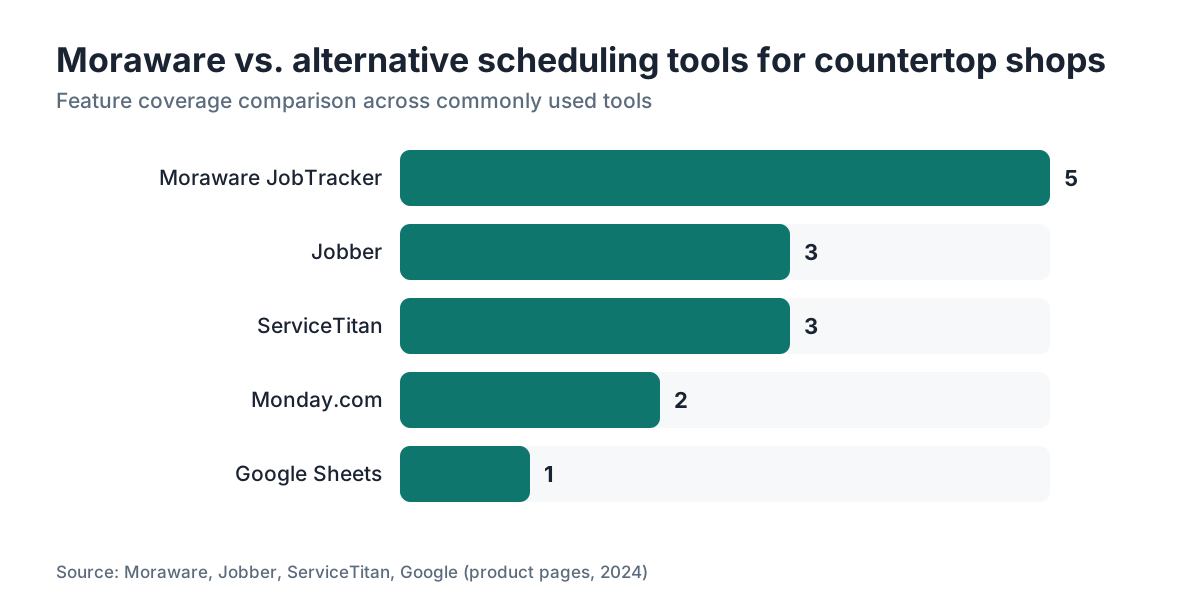
How does Moraware compare to using spreadsheets or other scheduling tools?
Spreadsheets break down at scale. A shared Google Sheet with 50 active jobs, four crews, and constant rescheduling needs either one very disciplined person owning every edit or it turns into chaos from people editing at once. A color-coded spreadsheet also carries no customer communication, no file attachments, and no record of who changed what.
Generic tools like Microsoft Project or Monday.com can technically do some of what Moraware does, but only after heavy customization to match countertop workflows, and that work never really ends. You end up maintaining the tool instead of the tool serving you.
Field service software like ServiceTitan or Jobber are closer competitors. They handle multi-crew scheduling and customer notifications well. The gap is that they were built for plumbing, HVAC, and electrical, so their templates and reports do not map cleanly onto stone fabrication stages, material tracking, or the template-then-fabricate-then-install sequence a countertop shop lives by.
Moraware's countertop focus is the real difference. You are not building from scratch. You are configuring a system that already knows your trade.
| Tool | Countertop-specific workflow | Customer notifications | Quoting integration | Typical monthly cost |
|---|---|---|---|---|
| Moraware JobTracker | Yes | Yes (SMS + email) | Yes (Systemize) | $150-$400+ |
| Google Sheets | No | No | No | Free |
| Jobber | Partial | Yes | Basic | $49-$249 |
| ServiceTitan | No | Yes | Yes | $300+ |
| Monday.com | No | Limited | No | $50-$200+ |
Can Moraware handle template scheduling and slab inventory tracking together?
Template scheduling is where Moraware is strongest. Create a template activity, assign your templater, set the time, send the customer a confirmation, and the system logs it all. When the template is done, the templater or office staff marks the activity complete and moves the job to the next stage. Clean and simple.
Slab inventory is a different animal. JobTracker is not a slab yard inventory system. You can note which slab was allocated on a job, and Systemize has some material tracking, but if you need live inventory with remnant tracking and bundle management, Moraware does not replace a dedicated inventory tool. Plenty of shops run a separate spreadsheet or a purpose-built remnant tracker and just log the slab identifier on the Moraware job record.
For high-volume granite or quartz shops, this gap has teeth. A standard kitchen countertop job might eat two-thirds of a slab, and tracking what remnant is left and whether it fits another job is real money. That workflow lives outside Moraware for most shops.
The integration between Moraware and slab inventory tools is thin as of 2024. Ask about it on the onboarding call so you get a current answer, since the product roadmap keeps moving.
How do you use Moraware to reduce scheduling conflicts and double-bookings?
Double-bookings in a countertop shop are expensive. An installer who shows up to a conflicting job either burns drive time or leaves a customer with no countertops on the day they cleared their kitchen. Both cost you money and reputation.
Moraware blocks double-bookings at the resource level. Once a crew is assigned to an activity at a set time, the system refuses a second overlapping activity for that same crew. Try it and you get a conflict warning. That alone justifies the subscription for shops that were juggling multiple installers on a shared whiteboard.
Color-coding by activity type or crew makes trouble visible before it happens. Look at next Thursday's column and you can see a crew stacked with a long commercial install right next to a residential job that will obviously run over. You fix it before the day arrives.
Conflicts also hide in material readiness. Fabrication scheduled Tuesday with the template appointment on Monday afternoon leaves zero margin if templating goes sideways. Some shops set a rule: no fabrication activity scheduled less than 48 hours after the template on the same job. You enforce that through scheduling discipline, not an automated lock, but a visible calendar makes those tight sequences obvious in a way a mental model or spreadsheet never does.
For shops running countertop installation crews across a wide service area, geography is the blind spot. You might have three Thursday installs that sit an hour apart by drive time, an impossible day the calendar shows as conflict-free. That routing check still needs human judgment or a separate mapping tool. BLS tracks wage benchmarks for stone and tile setters, which is worth knowing when you price out how much a wasted crew day actually costs you.[5]
Frequently asked questions
Is Moraware only for stone fabricators, or can solid surface and laminate shops use it too?
Moraware works for any countertop fabricator regardless of material. Shops doing solid surface, laminate, quartz, and mixed-material work all use it. The workflow stages and activity types are fully customizable, so you name them to match your process. The software does not care whether the slab is granite or Formica.
How long does it take to fully set up Moraware for a shop with three installation crews?
Plan on two to three days of configuration for initial setup: workflow stages, activity types, user accounts, and notification templates. After that, running real jobs through the system for two to four weeks gets the crew comfortable. Full adoption, where everyone trusts and uses the calendar consistently, usually takes a full month, sometimes six weeks if crew turnover hits during onboarding.
Does Moraware have a mobile app for installers in the field?
As of 2024, Moraware does not have a dedicated native mobile app. JobTracker is accessible through a mobile browser, and the interface is functional on a smartphone for checking schedules, marking activities complete, and viewing job details. Moraware has acknowledged this gap. Check their current release notes for any updates on a native app.
Can Moraware send automated text reminders to customers before a template appointment?
Yes. JobTracker's notification system supports SMS and email reminders triggered by rules you configure: a text 48 hours before any template activity, another 24 hours before. You write the message template once with merge fields for the customer's name and appointment time. The system sends them automatically without staff involvement.
Does Moraware integrate with QuickBooks for invoicing?
Yes, Moraware integrates with both QuickBooks Online and QuickBooks Desktop. The integration pushes job financial data to QuickBooks to avoid double entry. The sync requires initial setup to map your Moraware job financials to your QuickBooks chart of accounts, plus occasional maintenance, but it works for most standard accounting setups.
What is the difference between Moraware JobTracker and Moraware Systemize?
JobTracker is the scheduling and workflow product. It handles the calendar, crew assignments, customer notifications, and job tracking from lead to payment. Systemize is the quoting product, formerly called CounterGo, that handles measurements, material pricing, and customer-facing estimates. They are sold separately but integrate together. Many shops use both. Some use only one.
Can subcontractors or outside installers see their schedule in Moraware without seeing the whole shop's data?
Yes. You can set up a subcontractor as a user with a limited-permission login that shows only their assigned activities. They see their own schedule and the job details they need, but cannot see other crews' schedules, financials, or sensitive business data. This works for shops that use subs for overflow installation or templating.
How does Moraware handle jobs that span multiple days, like a large commercial project?
You can create multiple activities for a single job record, each scheduled on different days. A commercial project might have a template activity on Monday, a fabrication activity spanning Tuesday through Thursday, and installation activities on Friday and the following Monday. All activities link back to the same job record, so the full project history and status live in one place.
Is there a way to track which jobs are waiting on material before scheduling fabrication?
Moraware lets you create custom workflow stages, so many shops add a stage called something like 'Waiting on Material' or 'Slab Ordered' between templating and fabrication. Jobs sit in that stage until the slab arrives, then staff manually advance them to fabrication and schedule the CNC or saw time. It is a manual step, but it gives clear visibility into the material pipeline.
What happens to the schedule in Moraware if a customer cancels last minute?
You open the job record, mark the scheduled activity as canceled or rescheduled, and drag the new appointment to the correct date. If automated notifications are enabled, you can trigger a fresh confirmation to the customer from the job record. The original activity stays in the job history, so you keep a record of the cancellation and when it was rescheduled. No data is lost.
How many jobs can Moraware handle before it gets slow or unwieldy?
Moraware is cloud-based and handles high job volumes without performance issues at typical fabrication shop scale. Shops doing 100 or more jobs a month use it without reported slowdowns. The practical limit is organizational, not technical: keeping workflow stages clean and archiving completed jobs regularly keeps the active job board readable regardless of total volume.
Can Moraware track which salesperson or location brought in a job?
Yes. You can add custom fields to a job record to capture lead source, salesperson name, or showroom location. Log this consistently on every job and the reporting section can filter and group jobs by those fields. It is only as useful as your data entry discipline. Shops that log lead source on every intake form get actionable data within a few months.
Sources
- Moraware, JobTracker product page: Moraware has been building countertop-specific job management software since 2003 and markets automated customer reminders as a core feature of JobTracker.
- Moraware, pricing page: Moraware JobTracker pricing starts around $150 per month for small shops and scales with users and job volume.
- U.S. Small Business Administration, Manage your finances: SBA guidance recommends small businesses integrate scheduling and accounting tools to reduce manual data re-entry and financial errors.
- U.S. Bureau of Labor Statistics, Occupational Outlook Handbook, Construction and Extraction Occupations: Construction and specialty trade occupations including stone and tile setters are tracked by BLS for employment and wage benchmarks relevant to fabrication crew costs.
- SCORE, small business mentoring and operations resources: SCORE advises small trade businesses that scheduling software reduces missed appointments and improves crew utilization, common pain points in service scheduling.
- National Kitchen and Bath Association (NKBA), industry research: NKBA tracks countertop market trends including material preferences and installation volumes relevant to fabrication shop job volumes.
- Moraware, Systemize (formerly CounterGo) product page: Moraware acquired CounterGo and rebranded it as Systemize, its quoting and estimating product that integrates with JobTracker.
- U.S. Census Bureau, Statistics of U.S. Businesses: Census data shows the majority of specialty trade contractor establishments including stone fabricators employ fewer than 20 people, the scale where scheduling software ROI is most debated.
Last updated 2026-07-10