
TL;DR
- A good countertop job folder holds the signed contract, template drawings, slab purchase receipts, cut sheets, installation photos, and any warranty or lien documents, all in a consistent order so anyone on your team finds the right file in under a minute.
- Digital folders beat paper for most shops.
- A simple naming convention matters more than the software you pick.
Why does a job folder matter for a countertop project?
One countertop job passes through four or five hands: a sales conversation, a template visit, slab selection at the yard, fabrication on the shop floor, and installation at the site. Each handoff carries its own paperwork and its own person doing the work. Skip a single place where all of it lives, and something slips.
A quote gets revised but the old version goes to the installer. A customer swears the edge was supposed to be ogee and nobody can find the original email. A supplier invoice vanishes and the job reads as unpaid in your books.
The folder is insurance. It protects you legally when a customer disputes something, and it protects your margin by making an unbilled sub-cost obvious. For a homeowner running their own renovation, it does the same work: it records what you paid, who did it, and what warranty applies, which matters the day you sell the house or file an insurance claim.
Small shops skip formal folder structures because every job is "in someone's head." That holds up until the person with the knowledge quits, or until three jobs run at once. Building the habit while you're small costs almost nothing. Reconstructing project records after something goes wrong costs a lot.
What documents belong in a countertop job folder?
Every countertop project needs the same core set of documents, no matter the material. Here's the breakdown by category.
| Category | Documents to include |
|---|---|
| Sales & Scope | Signed quote/contract, change orders, customer communications summary |
| Template | Template drawing (DXF or PDF), field measurement notes, sink/appliance cutout specs |
| Material | Slab purchase receipt or PO, slab tag photos, remnant notes |
| Fabrication | Cut sheet, edge profile confirmation, CNC file reference |
| Installation | Signed delivery/installation confirmation, before-and-after photos |
| Financial | Final invoice, payment records, subcontractor invoices |
| Legal / Warranty | Preliminary notice (where required), warranty card, care instructions |
The signed contract is the anchor. Everything else flows from it or responds to it. No signed contract, no job folder. You have a pile of hope.
Photos are underrated. Most experienced fabricators shoot at template, at slab selection, and after installation. Those three sets have settled more disputes than any other document type, and they cost nothing to take.
Change orders earn their own slot, not a buried email chain. Any time scope shifts after the original contract (adding a backsplash section, switching from eased to bullnose, moving an island outlet cutout), that change gets written, priced, and signed before the work happens. A change order is a mini contract for the amendment. NARI guidance treats a signed change order for every scope modification as standard professional practice. [10]
What is the best folder structure for a fabrication shop?
The structure that works for most shops runs three levels: a top-level Jobs folder, one subfolder per job with a consistent name, then category subfolders inside each job.
A practical name for the job folder itself:
YYYY-MM-DD_LastName_JobType_Status
For example: 2025-03-14_Kowalski_Kitchen_Active or 2025-01-07_Reyes_Bathroom_Complete
Date-first names sort chronologically by default in any file browser, so recent jobs surface fast. Status tags (Active, Pending, Complete, On-Hold) let you archive old jobs without deleting them. The job type lets you pull every bathroom job or every commercial job for a review.
Inside each job folder, a fixed set of subfolders kills decision fatigue:
- /01_Contract
- /02_Template
- /03_Slab
- /04_Fabrication
- /05_Installation
- /06_Financial
- /07_Legal
Numbering the subfolders holds them in workflow order regardless of alphabetical sorting. Your templater drops files into /02_Template. Your installer drops photos into /05_Installation. Nobody stops to think about where things go.
Homeowners can go simpler: one folder per contractor or material type, with subfolders for Quotes, Signed Contract, Receipts, and Photos. You don't need seven levels. You need consistent habits.
Should you use digital folders, paper folders, or a dedicated platform?
Paper still runs in shops that have been around 20 or 30 years, and it works until it doesn't. Paper can't reach the installer standing in the customer's kitchen. It doesn't survive a flood or a fire. You can't search it.
Cloud-based folders (Google Drive, Dropbox, OneDrive, SharePoint) fix the access and backup problems and cost almost nothing. A shared Google Drive for a five-person shop runs on the free tier, or a few dollars per user per month on Workspace. [1] The only discipline it demands is consistent naming and a rule that files go into the folder the same day they're created.
Dedicated job management or quoting platforms go further by tying the folder structure to your quotes, schedules, and invoices. Some countertop-specific tools, like SlabWise, build the project record around the quote itself, so the cut sheet and the financial data sit in the same place instead of scattered across email and a folder. The tradeoff is cost and migration effort. A platform earns its keep once you're running more jobs than you can hold in your head, usually somewhere around 8 to 15 active projects depending on complexity.
Honest version: the tool matters less than the habit. A disciplined team on Google Drive beats a messy team on expensive software every time.
How should you name files inside a countertop job folder?
File naming is where most systems fall apart. Someone saves a quote as "Quote Final.pdf," and three weeks later the folder holds "Quote Final.pdf," "Quote Final v2.pdf," "Quote FINAL USE THIS ONE.pdf," and "Quote Final_JRev.pdf," and nobody knows which one is live.
One rule fixes it: every file gets a date prefix and a version suffix.
Format: YYYYMMDD_JobID_DocumentType_v01.ext
Example: 20250314_Kowalski_Contract_v01.pdf
When a document is revised: 20250319_Kowalski_Contract_v02.pdf
The current version is always the highest number. Never delete old versions. Let them sit below the current one. If a customer claims you changed the scope without telling them, you show the full version history.
Photos get a location or stage tag: 20250314_Kowalski_Template_IslandNorth.jpg. You'll thank yourself six months later, hunting for the north side of the island in a folder holding 200 photos.
Some shops add the slab lot number to fabrication and slab files: 20250318_Kowalski_SlabTag_Lot4427A.jpg. Worth doing for natural stone. If a customer reports a defect two years out, you can trace the slab back to the supplier.
What legal documents does a countertop job folder need?
This varies by state and by job size, and the legal layer is the one most shops underbuild.
The signed contract is baseline. It should carry the scope of work, the material specified (including grade and color), the price, the payment schedule, what happens if the slab shows a defect after fabrication, and your dispute process. Many states allow a mechanic's lien for unpaid work on real property, which requires a preliminary notice filed inside a set window, often 20 days from first furnishing labor or materials. [2] Miss that window and you can lose lien rights outright. The Cornell Legal Information Institute puts it plainly: a mechanic's lien is "a security interest in the title to property for the benefit of those who have supplied labor or materials that improve the property."
California shows how tight the deadlines get. A direct contractor must record a mechanics lien within 90 days after completion if no notice of completion has been recorded, or within 60 days if one has. [3] The California Contractors State License Board publishes the statutory framework. Other states set their own deadlines. If you work across state lines, track the rules for every state where you operate.
A preliminary or pre-lien notice (the "20-day notice" in many states) should go out on every job above a threshold you set. Most experienced fabricators send it on anything over $2,000. Customers find it annoying. It preserves your rights anyway.
Warranty paperwork belongs here too. If you offer a fabrication warranty (workmanship for 1 year is common), put it in writing and drop a copy in /07_Legal. Same for manufacturer warranty cards on engineered stone like Cambria, which carries a limited lifetime warranty on its quartz surfaces. [4]
Homeowners: keep any permit documents (some jurisdictions require a permit for countertop work that involves plumbing reconnection), the contractor's license number, and their insurance certificate. The license number lets you verify coverage with your state licensing board if a dispute comes up.
How do you handle photos and measurements in a job folder?
Template drawings are the most important technical documents in the folder. Whether your templater runs a digital system (Proliner, Laser Products LT-55, and the like) or hand-measures with a story stick, the output lands in /02_Template as a PDF or DXF the same day as the visit.
Include a written measurement sheet next to the drawing. Capture overall dimensions, sink make and model, stovetop cutout dimensions, overhang specs, edge profile, and notes on anything odd: out-of-square walls, walls that bow, corbel locations, an appliance garage. The drawing shows the geometry. The notes sheet catches the context the drawing can't.
Template photos should cover the full run of cabinets from each end, each corner with a reference ruler if you can manage it, the sink and appliances in place, and every problem area like pipes, outlets, or structural features that touch the stone. Fifty photos sounds like a lot. It takes four minutes and saves a remade slab.
Installation photos capture before (bare cabinet tops), during (stone set but seams not yet cleaned), and after (finished, cleaned, ready for sign-off). The after shots double as portfolio content once the homeowner gives permission, which is worth asking for.
How should a fabrication shop manage job folders across multiple projects?
Past five or six active jobs, a folder system alone stops being enough. You need a status layer on top of it.
Simplest approach: a master job log. One spreadsheet or board listing every active job with a job ID, customer name, material, stage (Template Scheduled, Template Complete, Fabrication, Install Scheduled, Complete, On-Hold), and a link or path to the job folder. Update it daily. It's your dispatch board and your status check in one.
Color-code by stage when you print or display it. Red means past the expected date at the current stage. Yellow means due in the next two days. Green is on track.
Some shops run the status layer in a project tool (Trello, Asana, Monday.com) and keep files in Google Drive or a similar service. The two coexist fine, as long as the job folder path lives on the project card so the link between status and documents never breaks. The Associated General Contractors of America recommends keeping project records including contracts, change orders, and correspondence for the full applicable statute of limitations. [9]
Homeowners running a renovation with multiple surfaces or multiple contractors can get by with a spreadsheet: contractor name, quote amount, signed/unsigned, install date, folder path. No sophisticated tooling needed for a single kitchen.
What information should go in the job folder at each project stage?
Treat the folder as something that fills in over time, not something you finish upfront. Here's what should exist at each stage.
At lead creation: customer contact info, source of the lead, preliminary scope notes, any photos the customer sent. Nothing else exists yet.
At quote: signed quote or contract, material selection (slab name, color, supplier), edge profile, sink specs, any customer-supplied drawings.
At template: template drawing, measurement sheet, template photos. A preliminary lien notice issued at this stage goes in /07_Legal.
At slab purchase: supplier invoice or PO, slab tag photo, lot number, defect notes.
At fabrication: cut sheet, CNC file reference or waterjet program number, edge profile confirmation, any approved deviation from the original scope.
At installation: delivery confirmation, installation photos, sign-off document, punch list items.
At close-out: final invoice, payment confirmation, warranty paperwork, care instructions. Move the folder to an archive location and mark the master log Complete.
The discipline is adding documents in real time, not rebuilding them at close-out. A template photo sitting in someone's phone for two weeks is a liability. It should be in the folder by end of day.
How long should you keep countertop job folders after a project is complete?
Retention depends on document type and state law. A practical baseline for a fabrication business follows.
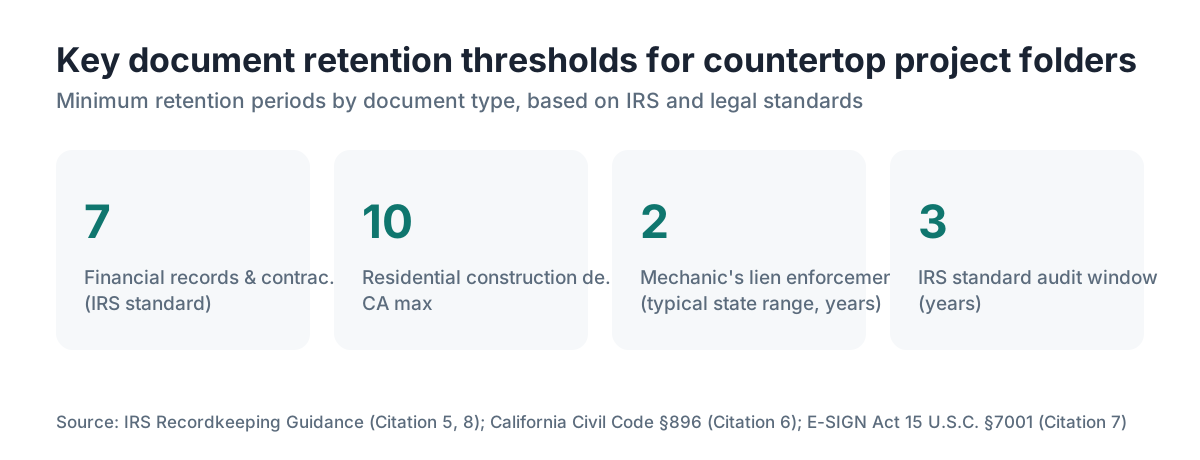
Contracts and financial records: keep at least 7 years. [8] The IRS generally has 3 years to audit a return but up to 6 years if it suspects a substantial understatement of income. [5] State tax authorities set their own periods.
Mechanic's lien documents: keep until the statute of limitations for lien enforcement passes in your state. In most states that runs 1 to 2 years from the lien filing, but check your code. [2]
Construction defect claims: some states let homeowners bring a defect claim years after completion. In California, the right to bring a residential construction defect claim can run up to 10 years under Civil Code Section 896. [6] Holding template drawings and cut sheets for 10 years on residential jobs is not unreasonable.
Photos: storage is cheap. Keep them indefinitely, or at minimum the same 7 years as the financial records.
Homeowners: keep the countertop folder as long as you own the home, and hand the key documents (warranty, contractor license info, product data sheets) to the buyer at closing.
How do digital tools or countertop software change job folder management?
Dedicated countertop quoting and shop software changes how documents relate to job data. Instead of a folder full of PDFs you track by hand, the job record holds the quote, the line items, the customer contact, and often the cut layout in one place. Documents attach directly to the record, so the contract sits next to the invoice instead of in a separate file system.
SlabWise, for one, links the quoting step to the project record, so material costs, slab dimensions, and edge selections start as structured data rather than text buried in a PDF. That structured data drives cut sheets and cuts transcription errors between the quote and the shop floor.
The risk with any platform is lock-in. Before you adopt a SaaS tool for job records, ask what export options exist, then test the export. A CSV of your financial data and a zip of attached documents should download at any time.
For shops not ready for a full platform, a Google Drive folder system with a shared Google Sheet as the master log is a legitimate long-term answer. Plenty of solid mid-size shops run exactly this way. The folder structure in this article works just as well in Drive as anywhere else.
What are the most common mistakes fabricators make with job folders?
The biggest mistake is having no system and treating email search as the filing cabinet. Email search holds up until the account changes, the thread grows too long to parse, or the attachment was never actually sent.
Second: inconsistent naming. When two people name files differently, the system rots within a month. A one-page naming convention, posted somewhere visible, is worth the ten minutes it takes to write.
Third: cutting stone before documents are signed. A quote that got a verbal yes, then a dispute over the edge profile, is a fight you can't win without a signature. The federal E-SIGN Act gives an electronic signature "the same legal effect" as a paper one for most business contracts. [7] Docusign and similar tools made remote signing fast. There's no good reason to cut stone without a signed contract.
Fourth: forgetting change orders. The original contract is clean. The change order records are where the gaps show. Every scope change, even adding a 6-inch filler piece, should produce a written, signed change order. [10]
Fifth: letting the folder go stale. A folder that's 90% done but missing the final invoice or the install sign-off is a half-closed loop. Build a close-out checklist into your workflow so the folder hits a true complete state before you move on.
Frequently asked questions
What is the simplest job folder setup for a one-person countertop shop?
One top-level folder per job, named with date and customer last name, with five subfolders: Contract, Template, Slab, Photos, and Financial. Keep a single Google Sheet as your job log with a link to each folder. This takes under an hour to set up and covers 90% of what you need. Add Legal as a sixth subfolder once you start sending preliminary lien notices.
Should a homeowner keep a countertop job folder?
Yes. Keep the signed contract, the final invoice with the contractor's license number, warranty documents, product data sheets for the stone or surface, and before-and-after photos. Store them as long as you own the home. At closing, pass the key documents to the buyer. A folder in Google Drive or iCloud works fine and takes about 10 minutes to set up after the project is done.
What is a preliminary lien notice and does every countertop job need one?
A preliminary lien notice (sometimes called a 20-day notice) goes to the property owner, general contractor, and lender to preserve your right to file a mechanic's lien if you don't get paid. Rules vary by state. Many fabricators send one on any job above a threshold they set, often $1,500 to $2,000. Missing the filing window can wipe out your lien rights entirely, so check your state's statute.
How do I handle job folder documents when I use a subcontractor for installation?
The sub's signed agreement, certificate of insurance, and license number live in your /07_Legal subfolder. Any reports or photos the sub takes during installation go in /05_Installation. You remain the primary contractor in the customer's eyes, so your folder captures everything the sub does on your job. Get the sub's insurance cert before they ever set foot on site.
Can I use Google Drive for countertop job folders?
Yes, and many shops do. Google Workspace Business Starter runs about $6 per user per month and gives you 30 GB per user with shared drives. Shared drives beat My Drive for teams because files belong to the organization, not the individual. If someone leaves, the files stay. Set up a folder template, copy it for each new job, and rename it on day one.
What file format should template drawings be saved in?
Save both DXF (for CNC or waterjet programming) and PDF (for human review and archiving). If your templating system spits out a proprietary format, export to both the day of the template visit. A PDF alone is fine for archiving, but the shop floor runs on the DXF. Store both in /02_Template so neither gets lost.
How should I handle a job folder when a project is put on hold by the customer?
Change the status in your master log to On-Hold and add a date-stamped note in the folder (a text file or a line in the log works) explaining why and what has to happen before the job resumes. Don't mark it Complete or it disappears into the finished pile. Review On-Hold jobs weekly and follow up after a set window. 30 days is reasonable.
Do I need to keep physical paper copies of countertop contracts?
Usually no. Electronic records are legally valid for most business purposes under the federal E-SIGN Act (15 U.S.C. § 7001), which gives electronic signatures and records the same legal effect as paper. Some court or government filings still want paper originals, so if you ever enforce a contract in small claims, keep a way to print a clean copy. A PDF signed via Docusign or similar is generally sufficient.
How many photos should I take at the template stage?
Aim for 15 to 20 per kitchen, more for complex layouts. Cover each run of cabinets end to end, every inside and outside corner, all cutout locations (sink, cooktop, outlets), unusual features like corbels or partial walls, and any pre-existing damage to adjacent surfaces. More photos are almost never a problem. Missing the one that later becomes a dispute is always a problem.
What should a countertop change order document include?
Reference the original contract by date and job number, describe exactly what changes (material, dimension, edge profile, cutout, added piece), the added cost, and the new total. Both parties sign before any work tied to the change starts. Keep the change order in the same /01_Contract subfolder as the original, with a version suffix that separates it from the base contract.
How do I organize job folders for a remodel with multiple countertop surfaces?
Treat it as one job folder if it's one contract and one installation. Inside, use location tags in file and subfolder names: Template_Kitchen, Template_MasterBath, Slab_KitchenIsland. If each surface has its own contract (different materials, different timelines), give each its own job folder and link them in your master log with a note that they belong to the same renovation.
What is the best way to share a job folder with a customer?
Share a read-only link to a specific subfolder, not the whole job folder. Customers don't need your cost sheets or internal notes. A shared link to /05_Installation with their photos, or a shared PDF of the signed contract, is usually all they need. Google Drive and Dropbox both support view-only links that don't require the customer to have an account.
How do I set up a job folder template so every new project starts the same way?
Create one master template folder with all seven subfolders and a blank job log entry. When a new job comes in, copy the whole template, rename it with the job's date and name, and update the master log. In Google Drive, right-click and Duplicate a folder. In Windows or Mac, copy and rename it in File Explorer or Finder. Under two minutes per job.
Sources
- Google Workspace Pricing: Google Workspace Business Starter pricing per user per month for cloud storage and shared drives
- Cornell Law School Legal Information Institute, Mechanic's Lien Overview: Mechanic's lien rights and preliminary notice requirements vary by state; missing the filing window can eliminate lien rights
- California Contractors State License Board, Mechanics Lien Law: In California, a direct contractor must record a mechanics lien within 90 days after completion if no notice of completion has been recorded, or within 60 days if one has
- Cambria Quartz Surfaces, Warranty Information: Cambria offers a limited lifetime warranty on its quartz surfaces, documentation of which should be retained in job records
- IRS, How long should I keep records?: The IRS generally has 3 years to audit a return but up to 6 years if it suspects a substantial understatement of income; records should be kept at least that long
- California Legislative Information, Civil Code Section 896: California Civil Code Section 896 establishes a right of action for construction defects on residential projects that can run up to 10 years under certain theories
- U.S. Congress, Electronic Signatures in Global and National Commerce Act (E-SIGN), 15 U.S.C. § 7001: The E-SIGN Act gives electronic signatures and electronic records the same legal effect as paper ones for most business contracts
- IRS, Recordkeeping for Businesses: Business financial records including invoices and contracts should generally be retained for at least 7 years to cover IRS audit windows and state tax authority requirements
- Associated General Contractors of America, Best Practices for Construction Documentation: Industry guidance recommends retaining construction project records including contracts, change orders, and correspondence for the full applicable statute of limitations period
- National Association of the Remodeling Industry (NARI), Contractor Documentation Standards: NARI guidance recommends written change orders for every scope modification, signed before work proceeds, as a standard professional practice
- U.S. Small Business Administration, Record Keeping for Small Businesses: The SBA recommends small businesses maintain organized financial and contractual records to support tax compliance and dispute resolution
Last updated 2026-07-10