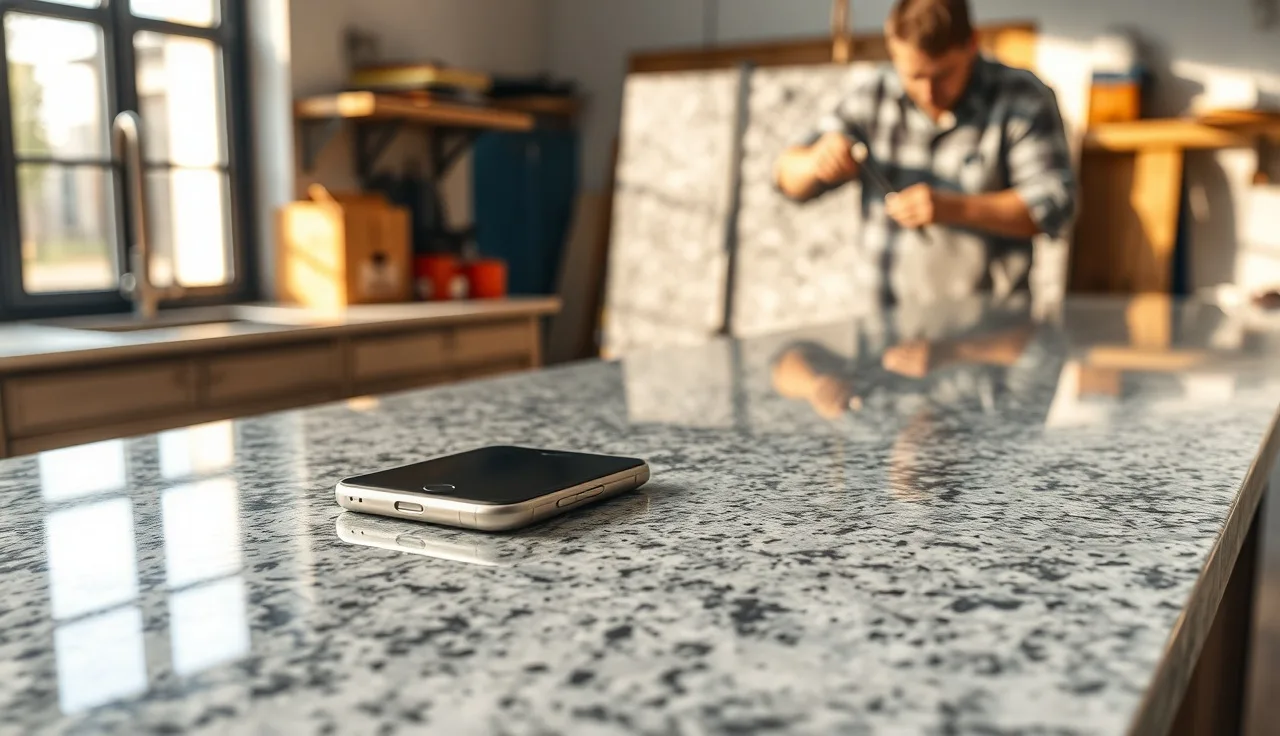
TL;DR
- Quoting a stone countertop with integrated wireless charging means pricing the stone itself, a precision pocket routed to 3-8mm depth, a Qi-standard charging module ($40-$300 depending on wattage), and electrical rough-in coordination.
- Total premium over a standard countertop runs $300-$900 installed, with most projects landing around $500 extra.
- Thinner stone and harder materials cost more to mill accurately.
What exactly is a wireless charging countertop, and how does it work?
A wireless charging countertop hides a Qi-standard inductive charging pad beneath the stone surface so a phone or earbud case charges just by sitting on the counter. No visible hardware, no cutout, no cord. The pad sits in a shallow pocket milled into the underside of the stone, connected to a low-voltage power supply that wires back to an outlet inside the cabinet below.
The Qi standard, maintained by the Wireless Power Consortium, specifies operating frequencies between 87 and 205 kHz and defines power classes from 5W up to 15W for standard profiles [1]. At those frequencies, the electromagnetic field passes through stone reasonably well, but stone thickness matters a lot. Most Qi chargers are rated to work through materials up to about 8mm total, and that 8mm includes the stone above the coil plus any adhesive layer holding the module in place.
Granite, quartzite, and engineered quartz are the most common substrates. Marble works too. The one material that kills wireless charging entirely is metal: stainless countertops, copper, or any slab with significant metalite veining can block or severely attenuate the field. Always confirm with the module manufacturer before quoting exotic or heavily veined slabs.
What stone thicknesses actually allow wireless charging to work?
Standard countertop slabs come in 2cm (roughly 20mm) and 3cm (roughly 30mm) nominal thickness. Neither is thin enough to charge through the full slab. That's the fabrication problem in a sentence: you mill a pocket from the underside to bring the stone above the coil down to 6mm or less, while leaving enough material that the surface doesn't crack under normal use.
Most fabricators and module suppliers recommend a finished stone thickness above the coil of 4-6mm [2]. Go thinner than 4mm and you risk hairline fractures under point loads, especially in materials like marble or quartzite that have natural fissure planes. Go thicker than 8mm and charging reliability drops off sharply. At 10mm or more, most modules simply won't charge at all.
For a 2cm slab, milling from the underside to leave 5mm above the coil means removing about 14-15mm of material in a pocket roughly 100mm x 100mm (or whatever the module footprint requires). For a 3cm slab you're removing 24-25mm. Both are doable with a CNC router or a skilled hand router operator. Both take time, and both produce a structurally thin section that has to be handled carefully during templating, transport, and installation.
Harder materials cost more to mill. Quartzite and some granites with high quartz content wear router bits faster than softer marbles or limestones. Budget for bit wear when you price the machining step.
What are the main cost components when quoting a wireless charging countertop?
Every quote has five distinct cost buckets. Lump them together and you'll underprice the job.
1. The stone itself. This doesn't change much. You're pricing the slab normally based on material grade and square footage, the same way you would any kitchen countertop. The wireless charging feature doesn't require extra stone unless the pocket milling scraps a large piece.
2. The charging module. Consumer-grade Qi modules (5W) run $40-$80 each. Mid-range 10W units designed for countertop embedding cost $80-$180. Premium 15W fast-charge modules with integrated LED indicators and higher build quality run $150-$300 [3]. For most kitchen island applications, a 10W module is the right balance of price and performance. Clients who specifically want to charge newer Android or MagSafe-adjacent devices faster should step up to 15W.
3. CNC pocket milling. This is the part most fabricators underquote. The pocket has to be flat, at a consistent depth, and sized precisely to the module footprint with a tolerance of about 1mm so the module seats flush and the adhesive layer is uniform. On a CNC router, program and cut time for one pocket runs 30-60 minutes of machine time plus fixturing. At a shop rate of $95-$150/hour for CNC time (a reasonable range for a well-equipped US shop), that's $50-$150 per pocket, not counting the router bit wear discussed above.
If you're doing this by hand with a plunge router and a shop-made jig, labor time is similar but the risk of inconsistency is higher. Hand routing is fine for experienced operators. The margin for error on a thin remaining wall is unforgiving.
4. Module installation and wiring. The charging module typically bonds into the pocket with a thin layer of two-part epoxy or a dedicated thermal adhesive. Wiring runs from the module through a small channel or grommet into the cabinet below, connecting to a 12V or 5V DC power supply (depends on the module). This is low-voltage work. The DC power supply plugs into a standard outlet in the cabinet. Plan for 30-60 minutes of installation labor per charging point.
5. Electrical coordination. The fabricator's scope stops at the low-voltage connection. An outlet inside the cabinet is the homeowner's responsibility, typically requiring a licensed electrician if one isn't already present. The electrical portion sits outside the fabricator's scope, but note it clearly so the homeowner isn't surprised. An in-cabinet outlet typically costs $150-$300 if the electrician is already on site for other work, more if it's a standalone trip.
What does the total installed price premium typically look like?
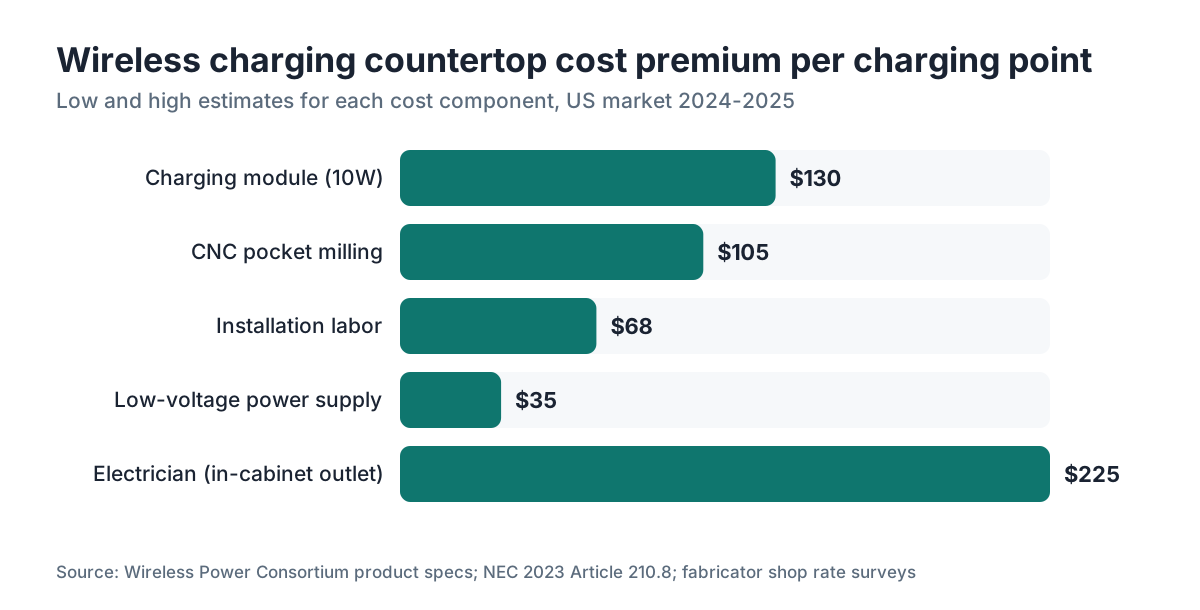
Based on the cost components above, the premium over a standard countertop for a single wireless charging point breaks down like this:
| Cost component | Low estimate | High estimate |
|---|---|---|
| Charging module (10W) | $80 | $180 |
| CNC pocket milling (machine time + bits) | $60 | $150 |
| Installation labor (bonding + wiring) | $45 | $90 |
| Low-voltage power supply | $20 | $50 |
| Electrician (in-cabinet outlet, if needed) | $150 | $300 |
| Total premium per charging point | $355 | $770 |
The midpoint lands right around $550-$600 per charging point, all in. If the homeowner already has a powered cabinet (common in newer kitchens with under-cabinet lighting), you can drop the electrician line and the premium falls to $250-$450.
Multiple charging points at the same island or peninsula share some milling setup time, so the second and third points usually cost 10-20% less than the first. Quote them individually but apply a small volume discount and note it in writing, so the client sees the value of doing all the charging points at once instead of coming back later.
How do you template and measure for a wireless charging pocket?
The charging point location has to be decided before fabrication, and ideally before templating. Most homeowners have a vague idea ("somewhere near the end of the island") but need help thinking it through. The right spot is where someone naturally sets their phone down, away from the sink splash zone, not directly over a seam, and not where heavy objects like stand mixers usually live.
At templating, mark the desired charging point center on the digital template or the physical template board. Note the exact XY coordinates. Back in the shop, the CNC programmer places the pocket at those coordinates, centered on the module footprint. For a 100mm x 100mm module, allow 2mm of clearance on each side, so the pocket is 104mm x 104mm. Confirm the module footprint with your supplier before finalizing the CNC file, because module sizes vary by manufacturer and wattage.
One practical templating note: if the countertop has a mitered waterfall edge or any edge detail near the charging location, check that the pocket won't break through or structurally compromise the edge profile. Keep at least 50mm between the pocket wall and any edge or undermount sink cutout.
Fabrication software that ties template data to shop drawings makes this coordinate handoff simple. SlabWise, for example, lets you flag custom machining operations like charging pockets directly in the quote and pass those notes to the cut file, which cuts the chance of a pocket being milled in the wrong location.
For countertop installation, the installer needs the pocket location before the slab goes in, because the low-voltage wire has to exit through a small hole or channel into the cabinet. Drill that passage before installation, not after.
Which stone materials work best for wireless charging, and which don't?
Material selection has real consequences for both charging performance and milling cost.
Engineered quartz (brands like Cambria, Silestone, Caesarstone) mills cleanly, holds tight tolerances, and has consistent thickness throughout the slab. The polymer binder is radio-transparent. This is probably the easiest material to work with for wireless charging pockets. See Cambria countertops for an overview of that product family.
Granite works well in most cases. The main variable is hardness. Softer granites (lower quartz content) machine quickly. Very hard granites or those with significant mica or metalite content may require slower feeds, sharper bits, and more time. Check with your CNC operator on specific materials you haven't machined before.
Marble machines beautifully, but its natural fissure structure means a thin remaining wall at 4-5mm is at elevated risk of fracture, especially in Carrara or Calacatta varieties with strong directional veining. If the client has their heart set on marble, quote an extra structural reinforcement step: a small fiberglass mesh patch bonded to the underside of the pocket with epoxy, bridging the thin section. Add $30-$60 per pocket for that.
Quartzite is hard and abrasive. CNC bit wear runs higher than on granite. Budget for 1.5x the normal bit cost on quartzite jobs.
Soapstone is soft enough to machine quickly, but the remaining thin wall is mechanically weak. The same mesh reinforcement recommended for marble applies here.
Porcelain slabs at 12mm thickness may not leave enough material for a viable pocket. Some 20mm porcelain slabs work, but porcelain chips aggressively at thin sections. Most module manufacturers don't certify porcelain installations. Proceed cautiously and get written confirmation from the module supplier.
Granite and quartzite you already fabricate routinely are your lowest-risk starting points for wireless charging projects. Metal-based countertops (stainless, copper) and slabs with metal inlays are incompatible with wireless charging and should not be quoted for this application.
What electrical and code requirements apply to in-counter wireless charging?
The charging module itself runs on low voltage (typically 5-12VDC) and draws power from a small adapter plugged into a standard 120V outlet inside the cabinet. The low-voltage side of this system isn't regulated by electrical code the way line voltage is, but the outlet serving it absolutely is.
The National Electrical Code (NEC) Article 210.8 requires GFCI protection for receptacles serving kitchen countertop areas [4]. Any outlet inside a kitchen island cabinet that powers the charging adapter needs to be GFCI-protected. Most electricians handle this automatically, but note it in your quote documentation so the homeowner knows they can't just use any old outlet.
The NEC is adopted by most states and jurisdictions, though adoption cycles vary [9]. Local amendments may apply. California, for instance, has historically adopted modified versions of the NEC with additional requirements. The Authority Having Jurisdiction (AHJ) in your local area has final say. Send homeowners and their electricians to the local building department for permit and inspection requirements.
From the fabricator's side, your scope ends at the low-voltage wire exiting the underside of the slab. You're not doing electrical work. State it that way in the contract. Something like: "Fabrication includes installation of wireless charging module and low-voltage wiring to cabinet interior. Electrical outlet and GFCI protection by licensed electrician, at homeowner's arrangement and expense."
The Federal Communications Commission (FCC) Part 15 rules govern intentional radiators like wireless charging devices sold in the US [5]. Modules sold through legitimate retail and trade channels carry FCC authorization. Buy modules from suppliers who can provide FCC ID documentation. Don't source modules from unknown overseas suppliers without verified FCC authorization, because using an unauthorized device could expose the homeowner to interference complaints and you to liability.
How do you write the quote document for a wireless charging countertop?
A clear quote for this type of job protects you from scope creep and sets the homeowner's expectations correctly. Here's how to structure it.
Start with the standard countertop line items: material, edge profile, sink cutout, and so on, exactly as you would for any other job. Then add a separate section for the wireless charging work, broken out by component. Don't bury it in a single "special features" line.
The line items in the wireless charging section should be:
- Charging module (specify brand, model, wattage, and quantity)
- CNC pocket machining (specify number of pockets and location reference, e.g. "per template mark at island north end")
- Module installation and adhesive bonding
- Low-voltage wiring to cabinet interior
- (If applicable) Structural reinforcement patch
Then add a clearly labeled exclusion: "Electrical outlet supply and GFCI installation: not included. To be coordinated by homeowner with licensed electrician prior to countertop installation."
Note the stone thickness at the charging point and the remaining wall thickness so there's no confusion later. Something like: "Pocket milled from underside, leaving approximately 5mm stone above module. Client acknowledges this section is structurally thinner than surrounding slab and should not support concentrated point loads."
Include a one-paragraph charging performance disclosure. Real-world charging through stone depends on module wattage, phone case thickness, and the exact phone model. Qi charging runs at 5-15W depending on the configuration. Quote the module spec, not a performance guarantee. Say something like: "Charging performance depends on device compatibility and is subject to Qi standard specifications. Fabricator does not warrant specific charging speeds for specific devices."
Shops that run their quoting in dedicated software find it easier to build a wireless charging package as a named add-on with preset line items. The estimator doesn't miss components, and the quote reads the same across estimators. SlabWise supports custom add-on packages in its quoting module, which helps shops standardize this kind of multi-component pricing without building every quote from scratch.
Pricing transparency builds trust. Homeowners who get an itemized quote for wireless charging understand exactly what they're paying for and are less likely to push back on the total.
What are the risks and failure modes fabricators should know about?
The pocket-milling step is where most problems start. If the router path deviates, the pocket bottom isn't flat, or the depth varies by more than 0.5mm across the pocket, the module won't seat properly and the adhesive layer will be uneven. An uneven adhesive layer creates a variable distance from the coil to the stone surface, which causes charging dead spots. Mill slowly, check depth with a dial indicator, and confirm flatness before you bond the module in.
Adhesive selection matters. Standard epoxy works but gets stiff and can debond as temperature cycles. Products designed for tile or stone bonding with a Shore hardness suited to constrained joints hold up better over time. The module supplier sometimes recommends a specific adhesive. Follow that recommendation. If they don't specify, a structural methacrylate adhesive rated for stone bonding is a reasonable choice.
Cracked stone around the pocket is rare but not unheard of. It happens when the remaining wall is less than 4mm, when a natural fissure in the slab runs through the pocket area, or when the stone is mishandled during transport after milling. Once you've milled a pocket, that area of the slab is more fragile than the rest until the module is installed and the assembly is supported. Handle accordingly, and transport the slab on full-length support, not cantilevered off the truck.
Heat deserves a mention. Wireless charging converts some energy to heat [8]. A 10W charger running at high load dissipates a few watts as heat into the stone above it. Stone is a decent thermal mass, so surface temperature rise stays small, but if a phone charges for hours on a warm countertop on a hot day, the charging zone can feel mildly warm to the touch. This isn't a safety issue at typical wattages. Tell the homeowner anyway, so they're not alarmed.
How does wireless charging affect countertop warranty?
This is where fabricators and homeowners both need to pay attention. Engineered quartz manufacturers have warranty language that covers defects in the material but excludes damage caused by modification or improper installation. Milling a pocket in the underside of a Cambria or Silestone slab is a modification. Whether that voids the warranty on the rest of the slab depends on the manufacturer's specific warranty terms.
Cambria's warranty, for instance, covers manufacturing defects but excludes damage resulting from improper fabrication or installation [6]. Pocket milling generally falls under the fabricator's fabrication scope, so if the pocket causes a crack, the fabricator bears that liability, not Cambria. The balance of the countertop's warranty typically stays intact as long as the fabrication met manufacturer specs for thickness and edge handling.
Natural stone (granite, marble, quartzite) has no manufacturer warranty in the same sense, since it's a natural material. The warranty in those cases comes from the fabricator's workmanship warranty, which you control. If you offer a workmanship warranty on your standard jobs, extend it explicitly to cover the charging pocket area with clear language about the thinner section and normal use expectations.
The charging module itself should carry the manufacturer's warranty separately. Pass that documentation to the homeowner at installation. Module warranties from reputable suppliers run 1-2 years.
Can you retrofit wireless charging into an existing countertop?
Yes, but it's harder and more expensive than doing it during initial fabrication. The countertop is already installed, so you're milling from underneath in a confined space with the slab supported by the cabinet. A plunge router with a shop-made guide is usually the practical tool here, because getting a CNC to the job site isn't realistic.
Retrofit milling costs more, typically 1.5x to 2x the shop-milling rate, because of the awkward working position, the need to protect the cabinet interior during milling, and the slower pace of hand routing to hold accuracy. The structural risk is higher too. If a crack develops during milling, the countertop is in place and a replacement is a full reinstall.
Before quoting a retrofit, check the stone thickness. Slip a digital caliper from the underside to the top surface at the target location. Confirm you have enough material to mill to a 5mm remaining wall. Look for existing cracks or fissures in that area. If anything looks questionable, recommend against the retrofit and offer a full replacement with the charging built in instead.
Retrofit pricing should reflect the higher labor, the access difficulty, and the risk premium. A retrofit that costs $550 to do in the shop might reasonably cost $900-$1,200 in the field.
What questions should fabricators ask the client before quoting?
Clear answers upfront save a painful post-quote conversation. Here are the questions that actually change the price or the scope:
- How many charging points do you want, and approximately where? (Affects module count and milling setup.)
- What devices will you primarily be charging? (Affects recommended module wattage.)
- Is there already an electrical outlet inside the cabinet, or does that need to be added? (Affects whether electrician coordination is needed.)
- What stone material are you choosing? (Affects milling time, bit wear, and structural risk.)
- What's the nominal thickness of the slab you've selected? (2cm vs 3cm changes milling depth.)
- Are there any seams, sink cutouts, or edge details near the desired charging location? (Affects pocket placement.)
- Do you have a specific charging module brand in mind, or should we source it? (Affects who supplies the module and how it's marked up.)
- Is the countertop already installed (retrofit) or is this new fabrication? (Changes the whole pricing structure.)
These eight questions give you everything you need to produce an accurate quote without a site visit for most new-fabrication jobs. For retrofits, always do a site visit before quoting.
Frequently asked questions
How thick does stone need to be for wireless charging to work?
The stone layer directly above the charging coil should be 4-6mm for reliable Qi charging. Standard 2cm and 3cm slabs are too thick to charge through without milling a pocket from the underside. Most module manufacturers specify a maximum material thickness of 8mm between the coil and the device being charged, and that limit includes any adhesive layer used to bond the module.
Does wireless charging work through granite and quartz equally well?
Both work well. Engineered quartz and granite are radio-transparent at Qi frequencies, so field strength through either material at 5-6mm is similar. The practical difference is milling: quartz has consistent thickness and machines predictably, while some granites have variable hardness that affects router bit wear and milling time. Neither material significantly attenuates the charging field at the depths used in countertop applications.
Will wireless charging void my quartz countertop warranty?
Pocket milling from the underside is a fabrication modification. Most engineered quartz manufacturer warranties, including Cambria's, cover material defects but exclude damage from improper fabrication or installation. If milling causes a crack, that's typically the fabricator's liability. The rest of the countertop's material warranty generally stays intact. Confirm with the specific manufacturer before proceeding and note the modification in your fabrication documentation.
Does the electrician need to be involved for a wireless charging countertop?
The charging module runs on low voltage (5-12VDC) from a small adapter inside the cabinet, so the fabricator's work is low-voltage only. But the outlet supplying that adapter in a kitchen must be GFCI-protected per NEC Article 210.8. If no outlet exists inside the cabinet, a licensed electrician needs to install one before countertop installation. This is the homeowner's responsibility to coordinate, not the fabricator's.
How much extra does wireless charging add to a countertop quote?
Expect a premium of $300-$900 per charging point over a standard countertop, with most jobs landing around $500-$600. The range depends on module wattage ($40-$300 for the module alone), CNC milling time ($50-$150 per pocket), installation labor, and whether a new electrical outlet is needed ($150-$300 if so). Second and third charging points at the same island are usually 10-20% cheaper than the first.
Can you add wireless charging to an existing countertop after installation?
Yes, but it costs more. Retrofit milling happens from underneath with the slab in place, usually using a hand router, which is slower and riskier than CNC work in the shop. Expect to pay 1.5x to 2x the in-shop milling price, and factor in a higher risk premium if the stone has any existing fissures. Always measure the actual stone thickness from underneath before quoting a retrofit.
Which stone materials are not compatible with wireless charging?
Any metal-based countertop material blocks wireless charging entirely, including stainless steel and copper. Slabs with significant metalite or pyrite veining can also attenuate the charging field enough to cause unreliable charging. Thin porcelain slabs (12mm) often lack enough material for a safe pocket. For marble and soapstone, wireless charging is possible but requires structural reinforcement (a fiberglass mesh patch) at the thinned section of the pocket.
Do wireless charging modules need FCC approval to be used in a countertop?
Yes. Wireless charging devices sold or used in the US must comply with FCC Part 15 rules for intentional radiators. Legitimate modules from established suppliers carry FCC authorization and an FCC ID number. Ask your supplier for that documentation. Modules sourced from unverified overseas suppliers without FCC authorization can cause interference with other devices and create liability if used commercially.
How do you locate the wireless charging pocket during templating?
Mark the desired charging point center on the template during the site visit, with the homeowner present to confirm placement. Record XY coordinates in the template file or on the physical template board. Back in the shop, the CNC programmer places the pocket at those coordinates. Keep the pocket at least 50mm from any edge, seam, or sink cutout, and confirm the module footprint dimensions with the supplier before finalizing the CNC file.
What wattage wireless charging module should I specify for a kitchen countertop?
For most kitchen islands, a 10W module is the right choice. It charges modern smartphones at a useful rate (faster than 5W, not as fast as the device's theoretical maximum but fine for kitchen use), and it's priced reasonably at $80-$180. Spec 15W only if the client specifically wants fast charging for newer Android devices. The 5W modules are fine for earbuds and older phones but will frustrate clients who expect faster performance.
Is there a code that requires disclosure of the thin stone section over the charging pocket?
No specific statute requires it, but clear written disclosure is basic best practice. Language in your quote and contract that identifies the thinned section and notes it should not support concentrated point loads protects you from liability if the client later cracks it by, say, setting a heavy appliance on that spot. Treat it the same way you'd disclose seam locations or sink clip placement.
How do you price multiple wireless charging points on the same island?
The first charging point carries full setup cost for CNC programming and fixturing. Additional pockets on the same slab share that setup time. A reasonable approach is to price the first pocket at full rate and apply a 10-20% discount on subsequent pockets at the same job. List each pocket as a separate line item with its own module cost (no discount there, it's a physical part), and apply the discount only to the machining and installation labor lines.
What adhesive should be used to bond the wireless charging module into the stone pocket?
The module manufacturer's recommendation takes priority if they specify one. In the absence of a specification, a structural methacrylate adhesive rated for stone bonding is a sound choice. It bonds well to both stone and the module housing, has good shear strength, and handles thermal cycling better than standard epoxy. Apply it at a consistent thin layer to keep even coil-to-surface distance across the entire module footprint.
Can wireless charging be integrated into outdoor kitchen stone countertops?
Technically possible but not straightforward. The charging module needs to be rated for outdoor use or fully protected from moisture by the enclosure. Most standard Qi modules are not waterproof. Outdoor temperature swings also stress the adhesive bond more than indoor installations. If a client asks about outdoor wireless charging, specify a module with an IP65 or higher rating, use a waterproof sealant around the module perimeter, and note that outdoor installations carry higher long-term failure risk.
Sources
- Wireless Power Consortium, Qi System Description Wireless Power Transfer: Qi standard specifies operating frequencies between 87 and 205 kHz and defines power classes from 5W to 15W for standard profiles
- Wireless Power Consortium, Qi Compliance Program documentation: Maximum recommended material thickness above the coil for reliable Qi charging is approximately 8mm total including adhesive layers, with 4-6mm of stone recommended for countertop applications
- Consumer Technology Association, CES 2024 Wireless Charging Product Category Data: Embedded countertop Qi charging modules range from approximately $40 for 5W consumer units to $300 for 15W premium trade-spec units
- NFPA, National Electrical Code (NEC) 2023, Article 210.8: NEC Article 210.8 requires GFCI protection for receptacles serving kitchen countertop areas
- Cambria, Cambria Warranty Statement: Cambria's warranty covers manufacturing defects but excludes damage resulting from improper fabrication or installation
- Natural Stone Institute, Dimensional Stone Design Manual: Recommended minimum finished stone thickness for structural integrity in countertop applications with machined features is 4mm at the thinned section with reinforcement for fragile materials
- US Department of Energy: Wireless inductive chargers convert some energy to heat and dissipate losses through the surrounding material; at 10W, surface temperature rise in stone substrates is small under normal use
- NFPA, National Electrical Code adoption information: NEC is adopted by most US states and jurisdictions, with local amendments possible; California and other states may have additional requirements beyond the base NEC text
- Natural Stone Institute, fabrication standards for CNC routing of natural stone: CNC pocket milling in natural stone for inlay features requires consistent depth tolerance of approximately 1mm and flat pocket bottoms to ensure proper inlay seating
- International Code Council, International Residential Code (electrical provisions): International Residential Code electrical provisions reference NEC GFCI requirements for kitchen receptacle locations
Last updated 2026-07-11